Thursday, 2 February 2017

5 Trends That Will Define Agency New Business in 2017 [New Data]

Will 2017 be the year agencies fall dangerously out of touch with client expectations?

How will the shift towards project-based work impact your agency's ability to retain long-term clients?

Do clients intend to move more marketing services in-house in 2017? 

A new report from RSW/US examines these and other troubling trends, offering valuable insights into both agency and marketer perspectives on key topics such as spending, project work versus AORs, and the explosive rise of marketing technology.

Now in its 11th year of publication, the annual RSW/US New Year Outlook Report gathers and analyzes data from over 10,000 agencies and over 100,000 marketing decision makers across the US and Canada. As you begin to set your marketing and sales priorities for 2017, consider how the RSW/US data will impact your goals.

5 Trends Defining Agency New Business

1) There's a growing disconnect between marketer plans and agency expectations for spending in 2017.

Since RSW/US first conducted the survey in 2011, marketer plans for marketing and advertising spending has seen a steady increase.

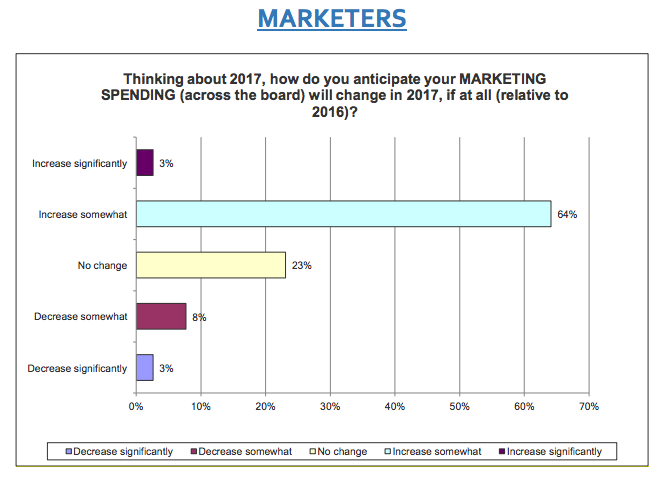
According to the 2017 survey, marketers will continue to get more aggressive with their spending, with 67% of marketers saying their budgets will increase somewhat or significantly this year.

Data from RSW/US 2017 Outlook Report

While broadening client budgets might seem like great news for agencies, there appears to be a growing expectations gap between what marketers plan on spending and what agencies predict they will spend this year.

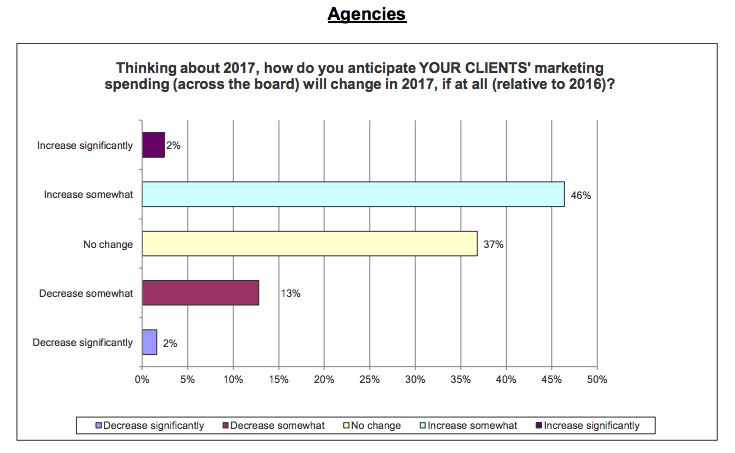
Of the agencies surveyed, only 48% expected marketer spending to increase somewhat or significantly in 2017. That's a nearly 20% disconnect -- one of the largest gaps in spending expectations between agencies and clients since 2011.

Mark Sneider, the president and owner of RSW/US, chalks this lack of alignment up to cautious optimism on the part of agencies, rather than an indication of a greater underlying disconnect between agencies and their clients. He urges agencies to take advantage of marketers' willingness to spend more in 2017 by regularly pursuing new prospects, and keeping current clients consistently engaged with new project opportunities. 

Data from RSW/US 2017 Outlook Report

2) Agencies are investing slightly less in business operations (people, marketing, and sales).

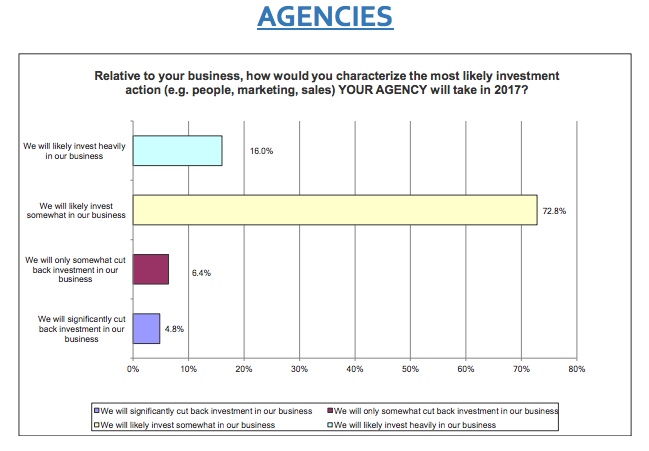
Even though a solid majority of agencies (89%) say they plan to invest somewhat or heavily in their business operations for 2017, this percentage has seen a slight decline since 2014, when a whopping 96% of agencies reported plans to invest more internally in their people, marketing, and sales resources.

So why are agencies more reluctant than previous years to invest in their own business functions? It could be due to a perceived shift in client marketing/ad spends going towards project-based and in-house work, which agencies might take as a sign to invest less aggressively in building up their resources. 

Data from RSW/US 2017 Outlook Report

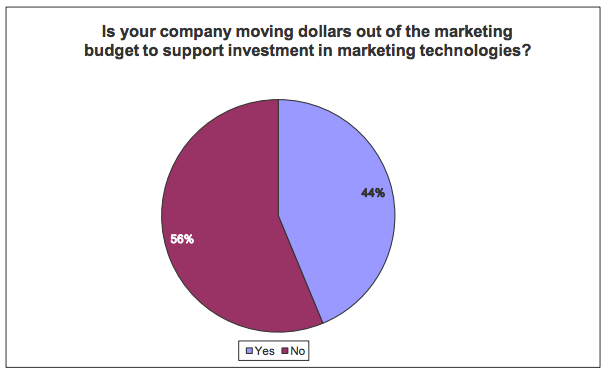
3) Nearly half (44%) of marketers plan to move money away from marketing and into marketing technology.

If there's one area agencies should be growing their expertise and beefing up their services offerings, it's marketing technology. Marketers are actively seeking opportunities to leverage automation and analytics to make more data-driven decisions -- and agencies need to keep pace.

Marketers are so committed to investing in marketing technologies, many are dipping into their traditional marketing and advertising budgets to reallocate money towards new tools. 44% of marketers told RSW/US they plan on moving funds away from marketing and towards marketing technology in 2017, and 74% said they plan on investing in more in marketing technology over the next three years.

Agencies planning on spending less on resources and talent in 2017 might want to reconsider. Meeting marketer expectations over the next few years is going to require an advanced understanding of data and automation, and agencies shouldn't wait to fortify their teams against the impending shift.

Data from RSW/US 2017 Outlook Report

4) Marketers are parsing out the majority of their work as projects (versus discipline-specific AORs)

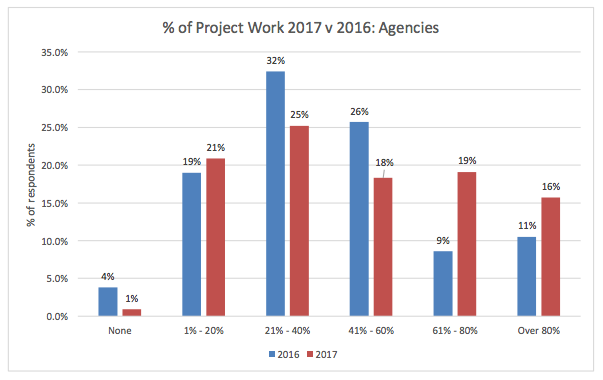
The shift away from AORs and towards project-based work continues to intensify, with 35% of agencies reporting that over 60% of their current work is project-based. This is a 15 point jump from last year, when only 20% of agencies reported over 60% of their work as project-based.

So what does this shift mean for agencies looking to build long-term client relationships? Project work can no longer be approached as a quick payout option -- it's just the starting point of a relationship that needs to be nurtured over time. Agencies need to look beyond a single project and evaluate whether or not it sets them up for future opportunities with the client.

Data from RSW/US 2017 Outlook Report

5) Agencies are seeing more marketers move agency services in-house.

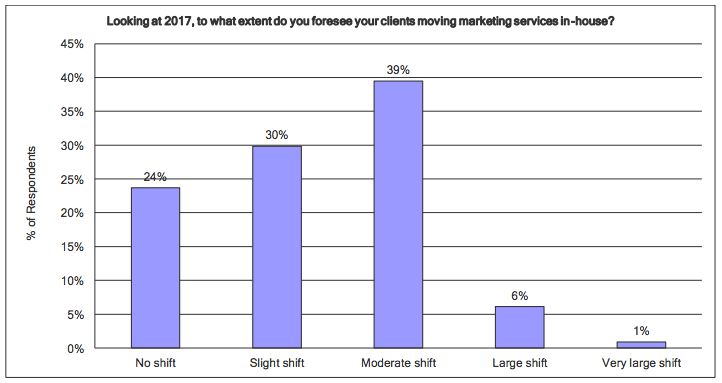
Nearly 80% of agencies predict their clients will move some marketing services in-house in 2017 -- that's a 23% increase over 2016's prediction.

Even though this number seems intimidating, agencies shouldn't start to panic yet. Marketers themselves reported a much smaller shift, with a solid majority (84%) saying they'll be moving 20% or less of their marketing services in-house in 2017.

According to the RSW/US report, most of what marketers are moving in-house is "smaller stuff," and as long as agencies continue to offer large value propositions, they shouldn't get overly worried.

Data from RSW/US 2017 Outlook Report

What are your predictions for agencies in 2017? Let us know in the comments.

client-agency-checklist


from HubSpot Marketing Blog https://blog.hubspot.com/marketing/2017-agency-new-business-trends

Wednesday, 1 February 2017

10 Disciplined Approaches to Google Analytics

We live in a world of digital data. We create it. We consume it. It’s everywhere. And it’s accumulating at an unprecedented pace. In fact, experts predict that we’ll be adding 50,000 gigabytes every single second by 2018.

That’s a whole lot of tweets, snaps, and posts.

But data goes beyond just social media, email, and YouTube videos. The successful businesses of tomorrow – and today for that matter – don’t just create and consume data. They use it to improve. For insight. To guide their decisions and goals.

Take Google Analytics, for example. It’s a fantastic product that provides a buffet of data about your website, your visitors, and your marketing. It’s the most widely used analytics solution on the internet (tens of millions and counting).

It’s so easy to collect data these days that everyone is doing it…from multinational corporations to the mom n’ pop store on the corner. But here’s the rub: having that data and using it efficiently are two very different things.

Analytics are only as good as your reaction to them. It’s what you do with that data deluge that separates the rock stars from the folks that plays bass in a garage band on Tuesday afternoon.

Setting up Google Analytics (with or without the enhanced ecommerce plugin) and then passively looking over the various overview reports while nodding and saying “Hmm, yes, I see” is worthless. Know that your bounce rate is 43%? Big whoop. What are you going to do about it?

You need to use it to get better, stronger, faster, and more able to deliver the experience your customers want. When you see X in the data, you need to respond with Y. You need to react to the data.

Or better yet, use the platform to answer your questions (i.e. be proactive rather than reactive). Orbit Media co-founder Andy Crestodina says Google Analytics is best used as a decision-support tool. He suggests a simple five-step process:

  1. Develop an idea or belief about your content and website
  2. Define a question that could define this belief
  3. Create a Google Analytics report to answer that question
  4. Take action based on the data
  5. Measure and manage the result

To help with both of those, here are ten suggested approaches to Google Analytics to get you started.

The Proactive Approach

Asking questions to either support or refute your ideas and beliefs is a surefire path to site success. Ask a question, then seek out the answer in the mountains of available data.

Approach #1 – What content/pages are resonating most with my audience?

All pages are not created equal, and despite your best efforts, sometimes your stuff will fall flat with your target. It’s in your best interest to know exactly which pages and what content is exceeding expectations, and which is lagging far behind.

Find out quickly under Behavior > Site Content > All Pages. Focus on those pages that visitors choose to view rather than those that they must view (like your homepage or search results page). Results are organized by most to fewest page views by default. Click on the comparison view to see individual pages compared against the site average for time on page, exit and bounce rate, entrances, and unique page views.

Click on “advanced” to filter your results and limit them to only blog posts, for example. When it comes to your data, specificity rules the day. Zero in on the metrics and pages that matter most to your questions, ideas, and concerns.

all-pages-google-analytics

Once you identify the high performers, you’ve got insight into what your visitors want, enjoy, and like. Create more of that.

Once you identify the low performers, you can endeavor to improve or remove them. Excise the junk. Get rid of the filler. Beef up the stuff that you know can be of value. A high bounce rate – something in excess of 50% – typically indicates a lack of engagement.

So engage.

Approach #2 – Is any platform underperforming when compared to the others?

We live in a mobile world, but that doesn’t mean no one is using a desktop anymore (51.3% and 48.7% respectively as of November 2016). And while Chrome may be the browser du jour (56.43% market share), the segment using Internet Explorer (20.84%) or Firefox (12.22%) is still sizeable.

Use Google Analytics to determine if you’re meeting the needs of everyone equally.

Head over to Audience > Technology > Browser & OS to see what browsers and operating systems your visitors are using. Check out the bounce rate and conversion rate (CVR) for each one compared to the site average (it’s listed at the top of the column). If there’s one with a noticeably lower CVR or higher bounce rate, then it may indicate incompatibility or CSS rendering issues that need to be addressed.

If half of your visitors are using IE but your site doesn’t load properly in that browser, you’re going to see a lot of bouncing traffic and missed conversions.
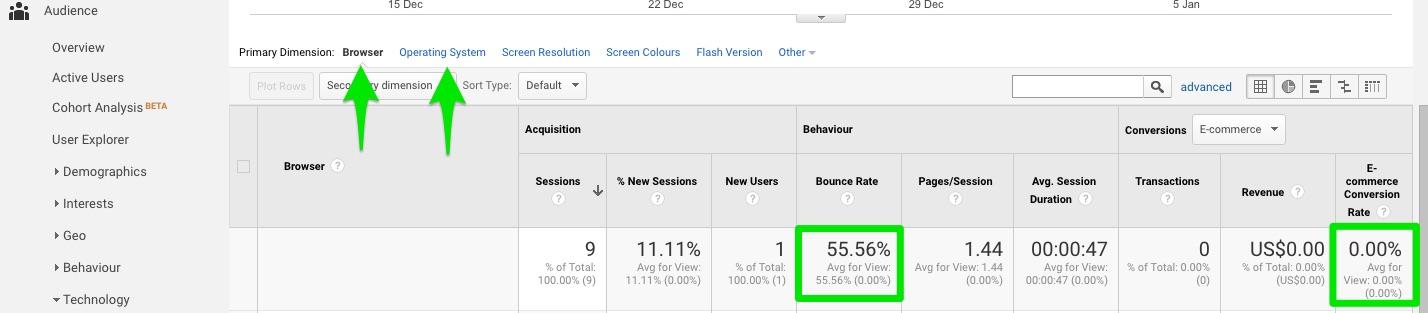
bounced-traffic-low-conversions-analytics

Ditto for devices. Look at Audience > Mobile > Overview. Check both bounce and CVR for desktop vs mobile vs tablet. Any anomalies? In 2017, if your site is not mobile-friendly, then you’re not friendly full-stop. People have no patience for a poor mobile experience. Problems? Fix them.

Use the comparison feature in either report to get a nifty side-by-side comparison for several key metrics like sessions, bounce, and conversions against the site average. Better? Worse?
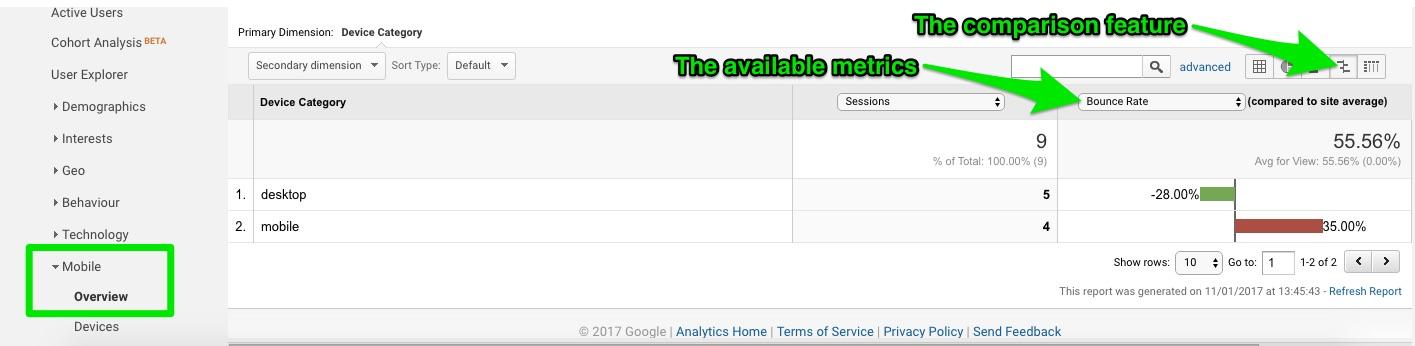
mobile-overview-comparison-google-analytics

You want to create a powerful and engaging experience for all visitors, regardless of browser, operating system, or device. But let the data guide you. Prioritise your efforts based on your audience.

Approach #3 – What terms are bringing in traffic, and what do they search for once on site?

It’s all about the keywords, right? Even in 2017, you need to be aware of the words and phrases that bring in the crowds.

Search rules the roost. Search engines. Search fields on your website. Search, search, search. It’s how people find you and find whatever it is they’re looking for once they come into your virtual lair.

To find the terms people are using to end up on your site, you need to enable data sharing between your Google Analytics and Search Console accounts. Go to Admin > Property > Property Settings and scroll down to Search Console Settings. If you see your website URL listed, you’re already up and running. If not, add your website to Search Console.

Once the connection is in place, you can use Acquisition > Search Console > Queries to see what search queries resulted in your website appearing in the SERPs. What words and phrases are bringing you impressions and clicks? Those are the ones you should be using in your targeting, paid ads, and SEO efforts.

But those aren’t the only words that matter, of course. Consider what people are searching for after they arrive at your little corner of cyberspace. To do that, you need to enable search tracking under Admin > View > View Settings > Site Search Tracking. Turn it on.
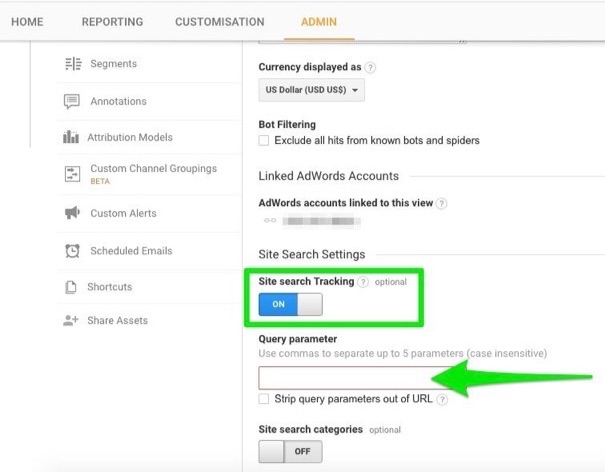
site-search-tracking-on

To find and enter the query parameter, conduct a quick search on your site and look at the resulting URL. Your query parameter is usually (although not always) the word or letter immediately after the “?”. Enter it in the field, and hit “Save”.

Once the data starts rolling in, you’ll be able to see what words, items, products, and more that visitors are looking for on your site under Behavior > Site Search. The Overview report gives a wonderful snapshot: terms, categories, number of sessions with a search, number of exits after a search (people aren’t finding what they’re looking for!), and time spent on site after conducting a search.

Use the Pages report to identify those spots with unusually high searches. It could indicate insufficient information, poor navigation, or that it’s falling short in some other way. Shore it up.

Use the terms and categories to see what’s most popular, what products/services that people are looking for but you don’t yet offer, and the words and phrases you should be targeting in your copy and descriptions.

Approach #4 – Which landing page is delivering the goods?

Your various landing pages have a tough job. They’re the first impression. The entry point. They have to seal the deal and convert visitors to leads and/or customers. Do you know how well they’re doing that?

If you identify your top landing pages, you can optimize and improve them over time. Hypothesize. A/B test. Prioritize.

To find them, look no further than Behavior > Site Content > Landing Pages. Easy. Organized from highest to lowest sessions, you can instantly compare conversions, bounce rate, time on page, and so on against the average. Find your best – and worst – performing pages. Lean on the alphas, and tweak the runts with better headlines (try a few templates or analyzers for ideas), design, copy, visuals, and calls-to-action. Find any common mistakes being made, and work to improve them till they reach a respectable conversion rate (which is about 5-10%).

A poor performing page has no place on your website. Remove or revamp it.

Approach #5 – How are visitors engaging with individual pages?

Wouldn’t it be nice if you could see precisely how visitors were interacting with your individual pages?

You can.

A paid heat map like Crazy Egg can do it. But you can also get plenty of data from plain old Google Analytics.

You just need the Page Analytics browser extension.
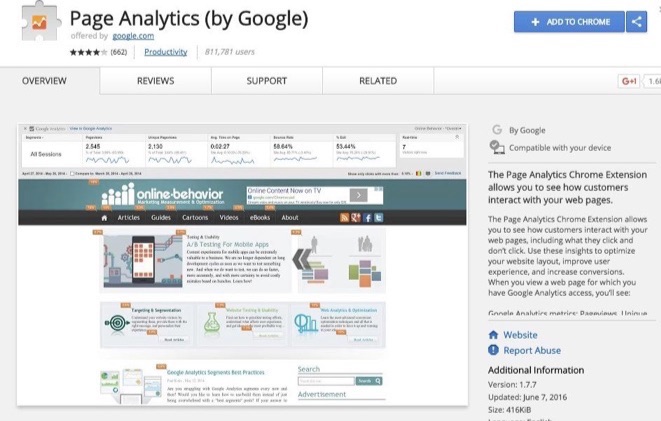
page-analytics-chrome-extension

With it, you can get insights galore about each page on your site, including bounce and exit rate, pageviews, time on page, number of visitors in real-time, and most importantly, in-page click analysis (a basic heat map showing what links users did and did not click).

Data like that is invaluable for improving the UX and increasing conversions. And that’s what it’s all about.

The Reactive Approach

Asking questions and seeking answers is good, but don’t ignore what the data is suggesting about things you haven’t even begun to examine or consider. Once set up, Google Analytics is going to deliver a steady stream of data to your digital doorstep. It’s your job to react to what it’s telling you.

Approach #6 – The Behavior Flow

Everyone loves a good flow chart. And the Behavior Flow report in Google Analytics provides a great visual of the path that visitors are taking through your website.

Why is that important? Because it provides answers to questions you may not have asked yet. Because it highlights the leaks, bottlenecks, and areas that need immediate attention. Because it identifies problem areas, popular areas, and pages to invest more design and improvement efforts, helping you eliminate weak spots and assess the effectiveness of any changes you’ve made to pages and content.

That’s why.

Located at Behavior > Behavior Flow, the report shows how visitors move from page to page (including their entry or referral point of origin), the different paths taken to the same ultimate end, where they leave you, and more.

Follow the paths:

  • Unexpected pages? Misleading copy, confusion, visitors not sure what to do, how to do it or what they want. Simplify your navigation. Improve your copy. Strengthen the selling points and benefits.
  • Frequent u-turns? Confusion in the navigation or unsure of their own intentions. Make it crystal clear and easy for them. Sell the benefits.
  • Mass exodus? Something on the page is turning them off. They’re not getting what they need. Amp it up.

Look at their behavior from arrival to exit. Follow its lead. What is it telling you? How can you make their journey (i.e. the conversion) easier, faster, and safer? Do that.

Approach #7 – Event Tracking

It may be a little tricky to set up, but event tracking allows you to gather intel about behavior on your site that would otherwise remain off the radar because it doesn’t take visitors to a new page. Actions such as watching a video, giving a rating, clicking a button, leaving a comment, or downloading a file – in short, nearly everything people do while exploring your website – won’t appear in your data without it.

Use an event tracking code generator to make it that much easier, or you can get someone more comfortable with code to do it for you. Regardless, just get it done.

Once you do, your options are increased tenfold. Track which posts are garnering the most comments, how often visitors are leaving ratings and on which pages, how often people are submitting your contact form, which of your painstakingly created videos are receiving the most attention (including how many watch the whole thing, whether watching the video increases conversions, and more), and how many times your new infographic (or new whatever) is downloaded each week.

That kind of data can guide your marketing strategy, your business decisions, your content plan, and essentially everything else to do with your website and goals.

React to what it reveals:

  • Popular video that nearly everyone watches to completion? Promote it. Share it.
  • Blog post on Subject X got 3x as many comments as any other one? Write more about that.
  • Newsletter sign-up on Page A getting twice as many subscriptions as Page B? Send all your traffic there. Use it as the landing page for a PPC ad.

Approach #8 – Channels

You already know this one, but it bears repeating: you need to pay attention to the channels that are bringing in traffic.

Online, it’s all about the numbers. Conversions ultimately matter more, but without sufficient traffic, there’s no one to convert in the first place.

Turn to Acquisition > All Traffic > Channels. You’ll see everything broken down by direct, organic search, social, email, affiliates, referral, display, and paid search.

Check bounce and conversion rates for each one. Is any one channel underperforming? Why do you think that is? Any overachieving? Perhaps lean on that more going forward, giving it a greater allocation of your time and budget.

Any channels missing that should be there? Double-check links and your other accounts.

Under referrals, click on each one to discover the exact page used to enter your site. Reach out to the sites linking to you. Build that relationship. Craft more of what they seem to like and share with their readers.

It’s so easy to just “check” channels and move on. But don’t. Dig deep. Interpret.

And yes, react.

Approach #9 – Exit Pages

Just as important as knowing where your visitors are coming from and entering to is to track and react to the exit pages on your site. From where are they leaving you?

Google Analytics has you covered there, too. Behavior > Site Content > Exit Pages.

Any unexpected ones? Any unusually high? Consider improving CTAs and/or using an exit intent pop-up with a great incentive to stick around.

Examine the content on your pages with higher than average exit rates. Is there something frightening people away? Up your trust indicators like social counts, testimonials, reviews, security seals, guarantees, and more.

Identify where they’re getting out, and politely close (and lock) the door.

Approach #10 – The Funnel Visualization

The funnel Visualization found at Conversions > Goals > Funnel Visualisation shows you quickly and conveniently how many visitors completed each page in your funnel, which pages are bleeding out (anything higher than a 40% dropoff needs to be improved with trust indicators, simplified processes, reduced distractions, greater persuasion, and so on), and how effective your funnel is as a whole.

It only works once you’ve properly set up goals under Admin > View > Goals and turned on the Funnel feature (and entered in the corresponding funnel pages). So do that. Right now.
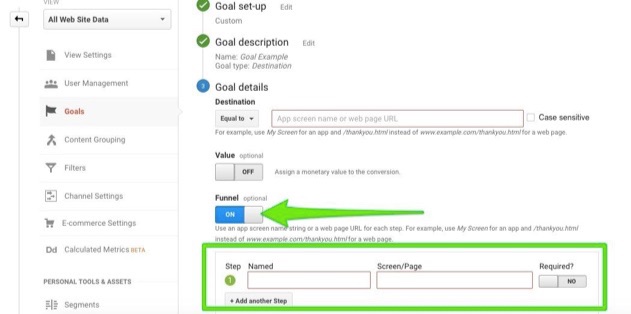
funnel-on-google-analytics

Reacting – and reacting quickly – to the data collected here is crucial to your business success. If your funnel is leaking, or bottlenecking, or failing in any way, you need to fix it yesterday. This is one report you should be turning to on a regular basis.

Create a shortcut or add it to a custom dashboard. Make it dead-simple to remember and access the information. Track, measure, and manage.

That’s the beauty of Google Analytics: it can be something completely different to everyone. Build your own. Mix and match the four main categories of analytics data:

  1. Audience – who is your audience, and what are their interests?
  2. Acquisition – what channels, sources, and terms are bringing in the traffic?
  3. Behavior – what exactly is your audience doing on your site? How are they engaging, interacting, and using it?
  4. Conversions – are you meeting, exceeding, or falling short of the goals you’ve set for your business?

Those are the main ingredients. Start experimenting and crafting your own recipe.

What matters most to you might not matter at all to someone else. But with the powerful personalization options, the Google Analytics Solution Gallery for custom reports and more (check out these 12 awesome custom reports available for importing), and the ability to refine your workflow as you go, it can be exactly what you need it to be.

There’s a lot of data to sift through. Some is more important than others, so it’s up to you to determine the reports and metrics that matter to you and your business. And you could, of course, beef up your abilities with the Analyze (enhanced analytics functionality) and Engage (conversions made easier) products from Kissmetrics. It makes a good thing great.

Then, react to that data. Or seek it out with proactive questions that need answers. It doesn’t matter…so long as you do something. Aim for a generous mix of both and you’re golden.

How do you use Google Analytics? Are you more proactive or reactive in your approach to it? Leave your thoughts in the comments below.

About the Author: Aaron Agius, CEO of worldwide digital agency Louder Online is, according to Forbes, among the world’s leading digital marketers. Working with clients such as Salesforce, Coca-Cola, IBM, Intel, and scores of stellar brands, Aaron is a Growth Marketer – a fusion between search, content, social, and PR. Find him on Twitter, LinkedIn, or on the Louder Online blog.


from The Kissmetrics Marketing Blog https://blog.kissmetrics.com/approaches-to-google-analytics/

4 Ways Demand Generation Marketing Is Like Football

marketing is like football

Author: Randy Frisch

They say the toughest position on a football field is the quarterback. You’ve got hundreds of plays to learn and optimize. You need to learn how to play in the scorching sun (think Miami) and adjust to the bitter cold a week later (think Green Bay). You get hit with a blow when you least expect it and need to dash to an opening that presents itself. Your team counts on your strategies to win the game and you take the blame for losses. Whether your name is Montana, Favre, or Brady, you are in control. And there’s nothing better than holding the ball and knowing what’s possible when you have control.

Before I lose those of you who are not football fans, I want you to reread the entire opening paragraph with a revised first sentence: “They say the toughest position in a high growth company is the demand generation quarterback.”

Okay, I guess we don’t have to truly adapt to the weather as marketers, but geography plays a factor! With Super Bowl 51 just around the corner, I decided to have some fun and draw some parallels between football and demand generation marketing. Feel free to drop yourself into the quarterback slot here and see if you can relate.

1. It’s a Game of Inches

Has a bad football movie ever been made? My wife, who’s the last person to suggest watching a real-life game, is always up for a football flick. And perhaps the best line ever is the reminder from Al Pacino in Any Given Sunday that “it’s a game of inches.”

After hearing that line, can’t you relate as a marketer? From the subject line tweak on your email campaign to the right CTA beside your latest blog post–the details are what make the difference. Don’t count on the Hail Mary.

2. Control and Optimize

Just as a football team can always prepare a bit more by analyzing videos, you’ll never hear a modern marketer tell you they have nothing to optimize. The field is always changing. One of the tools our team uses to ensure we can optimize and maintain control is Unbounce. Many of our campaigns require landing pages either to gate content or create an event sign up page. With Unbounce, our team is able to control and optimize the little details as the campaign progresses by making changes on the fly.

When we launched our first user conference Uberflip Experience last year, we were constantly adjusting messaging, pricing, and CTAs to entice customers and prospects to take a chance and come check out our first big event. With Unbounce, we were able to adjust these variables within minutes, as often as needed, to drive registrations to the conference.

3. It Takes More Than One Play to Score

In 2016, the Patriots scored 3.6 touchdowns per game but needed 66.3 plays per game to get there. Sometimes in football, we see exciting plays where a kickoff is returned for a touchdown, a first pass of the game is thrown downfield for 6, or an interception is converted without the offense coming on the field. But the reality is that most points in a game are the result of several downs to take a team into the end zone.

Don’t get me wrong. There’s nothing better than having a prospect Google your company and phone in to say, “I just want the best price and need to be up and running today.” Love those days! But let’s be honest. Most businesses create a sequence of experiences and events that they offer in the right place, and at the right time to get a prospect over the line.

Back to our quarterback, our VP of Marketing, Shannon uses a combination of tools, such as Marketo and Bizible, to track the various “plays” needed to get a prospect over the line. Just as the quarterback would like to execute a set number of plays when there’s a minute to go and they’re down by 5, the goal in content marketing, naturally, is to minimize the number of touches needed to get someone through the buyer’s journey. We can’t rush it or skip some steps. We must learn which plays are the most important and impactful.

I’ll give you a quick example. Last year, I was standing with our CEO at an event we sponsored, Sirius Decisions Summit. We were talking about going bigger on that event for the next year and debating whether we could pull out of another industry conference to create the budget. Just as we landed on cutting the event, a prospect walked over and said, “Hey Randy, we met at last year’s conference and this time I’ve got my boss here. Could you give him that demo you gave me last time?” As he walked away more or less ready to buy, I couldn’t help but laugh since that was the same event we were about to cut. I learned last week that this prospect recently became a customer.

Although we wanted to throw our investment all into one play, we realized that winning this prospect’s business happened throughout multiple plays. In fact, this event was probably just getting him into the end zone, with a steady drip of relevant emails and sales touches to add the final nudges.  

4. The Quarterback Can’t Win Alone

I started by giving all the glory to the quarterback. Don’t get me wrong. Shannon has some mad demand gen and marketing skills, but there are only so many quarterback sneaks or runs that can happen in a game. The marketing quarterback needs a strong offensive line and receivers to make each play happen. On our team, Shannon relies on our offensive lineswomen: Kelly (product marketing), Tara (demand generation), Maya (events and community), and Katie (social). She also needs help from the sidelines from people like Quentin, our graphic designer. And of course, no play would start without a solid snapper–luckily we have Jermaine Reyes, our content manager. Bottom line is that every member of her team ensures she gets time to release the ball.

football play in marketing

So if you’re into the analogy, you’re probably trying to figure out who the receivers and running backs are. Well, sales of course! Assuming the ball is the prospect (and unless you’re running an online sale), most of us rely on salespeople to get the deal over the line. On our team, we have a sales team of just over 30 members, all ready to take an MQL and work through the plays to get the deal done. Our salespeople actually need to wear a marketing hat too, because some prospects require a bit of guidance to progress.

One way our sales team coordinates with the marketing quarterback is by choosing which content to share with their audience. This is easier said than done. In many companies, salespeople search a dated wiki article, bulky excel file of links, or actually search Google for their company’s own content. Fortunately, our team has full access to our marketing content hub so they can quickly send off successful content passes to their prospects.

This ensures that the entire sequence from first-touch to last follows our brand guidelines and overall core messaging. The last thing you want is a wide receiver celebrating too quickly while heading downfield.

At the end of the day, as marketers, we need to always be dialed in to keep the leads and customers coming. Just look back to about a year ago from this time today, where neither of the 2016 Super Bowl teams even made the 2017 playoffs! What worked last year may not work tomorrow. There is no such thing as auto-pilot for marketers. Those who purchase an engagement platform and assume it’s cruise control are destined to early elimination. So whether you’re cheering for the Pats or Falcons, let’s hope the coach and quarterback have rallied their team with a few trick plays to win the customer (I mean game).

What other similarities have you seen between football teams and demand generation teams? Share your observations in the comments below!

Marketing Nation Summit Promotion


4 Ways Demand Generation Marketing Is Like Football was posted at Marketo Marketing Blog - Best Practices and Thought Leadership. | http://blog.marketo.com

The post 4 Ways Demand Generation Marketing Is Like Football appeared first on Marketo Marketing Blog - Best Practices and Thought Leadership.


from Marketo Marketing Blog http://blog.marketo.com/2017/02/4-ways-demand-generation-marketing-is-like-football.html

How to Write a Case Study: The Ultimate Guide & Template

writing-case-studies-compressor.jpg

Earning the trust of prospective customers can be a struggle. Before you can even begin to expect to earn their business, you need to demonstrate your ability to deliver on what your product or service promises. Sure, you could say that you're great at X, or that you're way ahead of the competition when it comes to Y. But at the end of the day, what you really need to win new business is cold, hard proof.

One of the best ways to prove your worth is through compelling case studies. When done correctly, these examples of your work can chronicle the positive impact your business has on existing or previous customers. Download our free case study templates here to help you display your company's success.

To help you arm your prospects with information they can trust, we've put together a step-by-step guide on how to create effective case studies for your business -- as well as free case study templates for creating your own.

How to Write a Business Case Study: The Ultimate Guide

1) Find the Right Case Study Candidate

Writing about your previous projects requires more than picking a client and telling a story. You need permission, quotes, and a plan. To start, here are a few things to look for in potential candidates.

Product Knowledge

It helps to select a customer who's well-versed in the logistics of your product or service. That way, he or she can better speak to the value of what you offer in a way that makes sense for future customers.

Remarkable Results

Clients that have seen the best results are going to make the strongest case studies. If their own businesses have seen an exemplary ROI from your product or service, they're more likely to convey the enthusiasm that you want prospects to feel, too.

One part of this step is to choose clients who have experienced unexpected success from your product or service. When you've provided non-traditional customers -- in industries that you don't usually work with, for example -- with positive results, it can help to remove doubts from prospects.

Recognizable Names

While small companies can have powerful stories, bigger or more notable brands tend to lend credibility to your own -- in some cases, having brand recognition can lead to 24.4X as much growth as companies without it.

Switchers

Customers that came to you after working with a competitor help highlight your competitive advantage, and might even sway decisions in your favor.

2) Reach Out to Case Study Participants

To get the right case study participants on board, you have to set the stage for clear and open communication. That means outlining expectations and a timeline right away -- not having those is one of the biggest culprits in delayed case study creation.

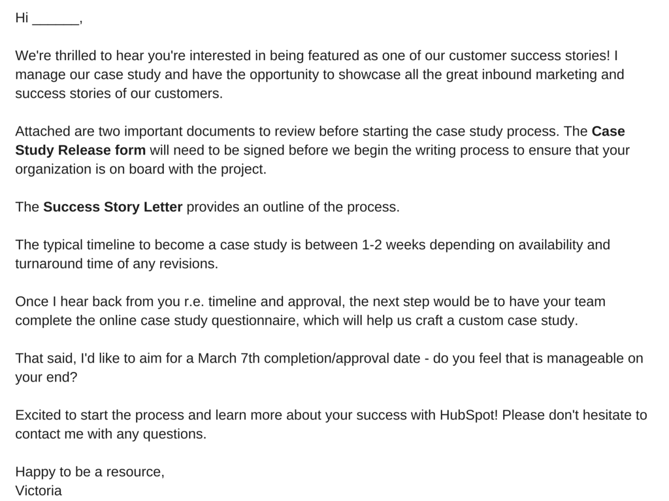
It's helpful to know what you'll need from the participants, like permission to use any brand names and share the project information publicly. Kick off the process with an email that runs through exactly what they can expect from you, as well as what is expected of them. To give you an idea of what that might look like, check out this sample email:

Case_Study_Email_Template.png

You might be wondering, "What's a Case Study Release Form?" or, "What's a Success Story Letter?" Let's break those down.

Case Study Release Form

This document can vary, depending on factors like the size of your business, the nature of your work, and what you intend to do with the case studies once they are completed. That said, you should typically aim to include the following in the Case Study Release Form:

  • A clear explanation of why you are creating this case study and how it will be used.
  • A statement defining the information and potentially trademarked information you expect to include about the company -- things like names, logos, job titles, and pictures.
  • An explanation of what you expect from the participant, beyond the completion of the case study. For example, is this customer willing to act as a reference or share feedback, and do you have permission to pass contact information along for these purposes?
  • A note about compensation.

Success Story Letter

As noted in the sample email, this document serves as an outline for the entire case study process. Other than a brief explanation of how the customer will benefit from case study participation, you'll want to be sure to define the following steps in the Success Story Letter.

The Acceptance

First, you'll need to receive internal approval from the company's marketing team. Once approved, the Release Form should be signed and returned to you. It's also a good time to determine a timeline that meets the needs and capabilities of both teams.

The Questionnaire

To ensure that you have a productive interview -- which is one of the best ways to collect information for the case study -- you'll want to ask the participant to complete a questionnaire prior to this conversation. That will provide your team with the necessary foundation to organize the interview, and get the most out of it.

The Interview

Once the questionnaire is completed, someone on your team should reach out to the participant to schedule a 30-60 minute interview, which should include a series of custom questions related to the customer's experience with your product or service.

The Draft Review

After the case study is composed, you'll want to send a draft to the customer, allowing an opportunity to give you feedback and edits.

The Final Approval

Once any necessary edits are completed, send a revised copy of the case study to the customer for final approval.

Once the case study goes live -- on your website or elsewhere -- it's best to contact the customer with a link to the page where the case study lives. Don't be afraid to ask your participants to share these links with their own networks, as it not only demonstrates your ability to deliver positive results, but their impressive growth, as well.

3) Ensure You're Asking the Right Questions

Before you execute the questionnaire and actual interview, make sure you're setting yourself up for success. A strong case study results from being prepared to ask the right questions. What do those look like? Here are a few examples to get you started:

  • What are your goals?
  • What challenges were you experiencing prior to purchasing our product or service?
  • What made our product or service stand out against our competitors?
  • What did your decision-making process look like?
  • How have you benefited from using our product or service? (Where applicable, always ask for data.)

Keep in mind that the questionnaire is designed to help you gain insights into what sort of strong, success-focused questions to ask during the actual interview. And once you get to that stage, we recommend that you follow the "Golden Rule of Interviewing." Sounds fancy, right? It's actually quite simple -- ask open-ended questions.

If you're looking to craft a compelling story, "yes" or "no" answers won't provide the details you need. Focus on questions that invite elaboration, such as, "Can you describe ...?" or, "Tell me about ..."

In terms of the interview structure, we recommend categorizing the questions and flow into six specific sections. Combined, they'll allow you to gather enough information to put together a rich, comprehensive study.

The Customer's Business

The goal of this section is to generate a better understanding of the company's current challenges and goals, and how they fit into the landscape of their industry. Sample questions might include:

  • How long have you been in business?
  • How many employees do you have?
  • What are some of the objectives of your department at this time?

The Need for a Solution

In order to tell a compelling story, you need context. That helps match the customer's need with your solution. Sample questions might include:

  • What challenges and objectives led you to look for a solution?
  • What might have happened if you did not identify a solution?
  • Did you explore other solutions prior to this that did not work out? If so, what happened?

The Decision Process

Exploring how the customer arrived at the decision to work with you helps to guide potential customers through their own decision-making processes. Sample questions might include:

  • How did you hear about our product or service?
  • Who was involved in the selection process?
  • What was most important to you when evaluating your options?

The Implementation

The focus here should be placed on the customer's experience during the onboarding process. Sample questions might include:

  • How long did it take to get up and running?
  • Did that meet your expectations?
  • Who was involved in the process?

The Solution in Action

The goal of this section is to better understand how the customer is using your product or service. Sample questions might include:

  • Is there a particular aspect of the product or service that you rely on most?
  • Who is using the product or service?

The Results

In this section, you want to uncover impressive measurable outcomes -- the more numbers, the better. Sample questions might include:

  • How is the product or service helping you save time and increase productivity?
  • In what ways does that enhance your competitive advantage?
  • How much have you increased metrics X, Y, and Z?

4) Lay Out Your Case Study

When it comes time to take all of the information you've collected and actually turn it into something, it's easy to feel overwhelmed. Where should you start? What should you include? What's the best way to structure it?

To help you get a handle on this step, it's important to first understand that there is no one-size-fits-all when it comes to ways to present a case study. They can be very visual, which you'll see in some of the examples we've included below, and can sometimes be communicated mostly through video or photos, with a bit of accompanying text.

When it comes to recommending written case studies, we recommend focusing on seven sections, which we've outlined here. Note -- even if you do elect to use a visual case study, it should still include all of this information, but presented in a different format.

  1. Title: Keep it short. Focus on highlighting the most compelling accomplishment.
  2. Executive Summary: A 2-4 sentence summary of the entire story. You'll want to follow it with 2-3 bullet points that display metrics showcasing success.
  3. About: An introduction to the person or company, which can be pulled from a LinkedIn profile or website.
  4. Challenges: A 2-3 paragraph description of the customer's challenges, prior to using your product or service. This section should also include the goals that the customer set out to achieve.
  5. How You Helped: A 2-3 paragraph section that describes how your product or service provided a solution to their problem.
  6. Results: A 2-3 paragraph testimonial that proves how your product or service specifically impacted the person or company, and helped achieve goals. Include numbers to quantify your contributions.
  7. Supporting Visuals or Quotes: Pick one or two powerful quotes that you would feature at the bottom of the sections above, as well as a visual that supports the story you are telling.

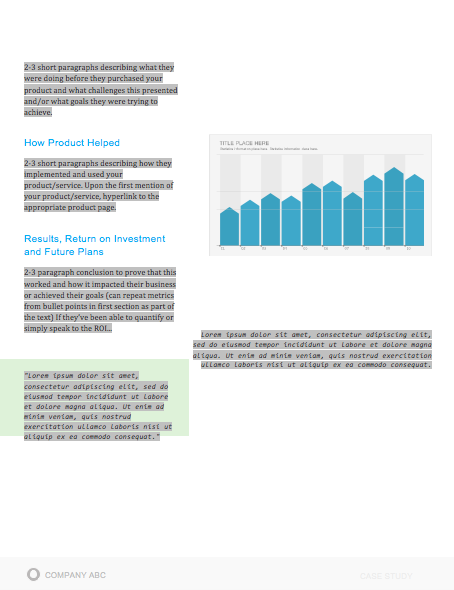
To help you visualize this case study format, check out this case study template, which can also be downloaded here.

Case_Study_Template_1.png

Case_Study_Template_2.png

When laying out your case study, focus on conveying the information you've gathered in the most clear and concise way possible. Make it easy to scan and comprehend, and be sure to provide an attractive call-to-action at the bottom -- that should provide readers an opportunity to learn more about your product or service.

Business Case Study Examples

You drove the results, made the connect, set the expectations, used the questionnaire to conduct a successful interview, and boiled down your findings into a compelling story. And after all of that, you're left with a little piece of sales enabling gold -- a case study.

To show you what a well-executed final product looks like, have a look at some of these marketing case study examples.

1) "New England Journal of Medicine," by Corey McPherson Nash

J9fzrMF4GV.gif

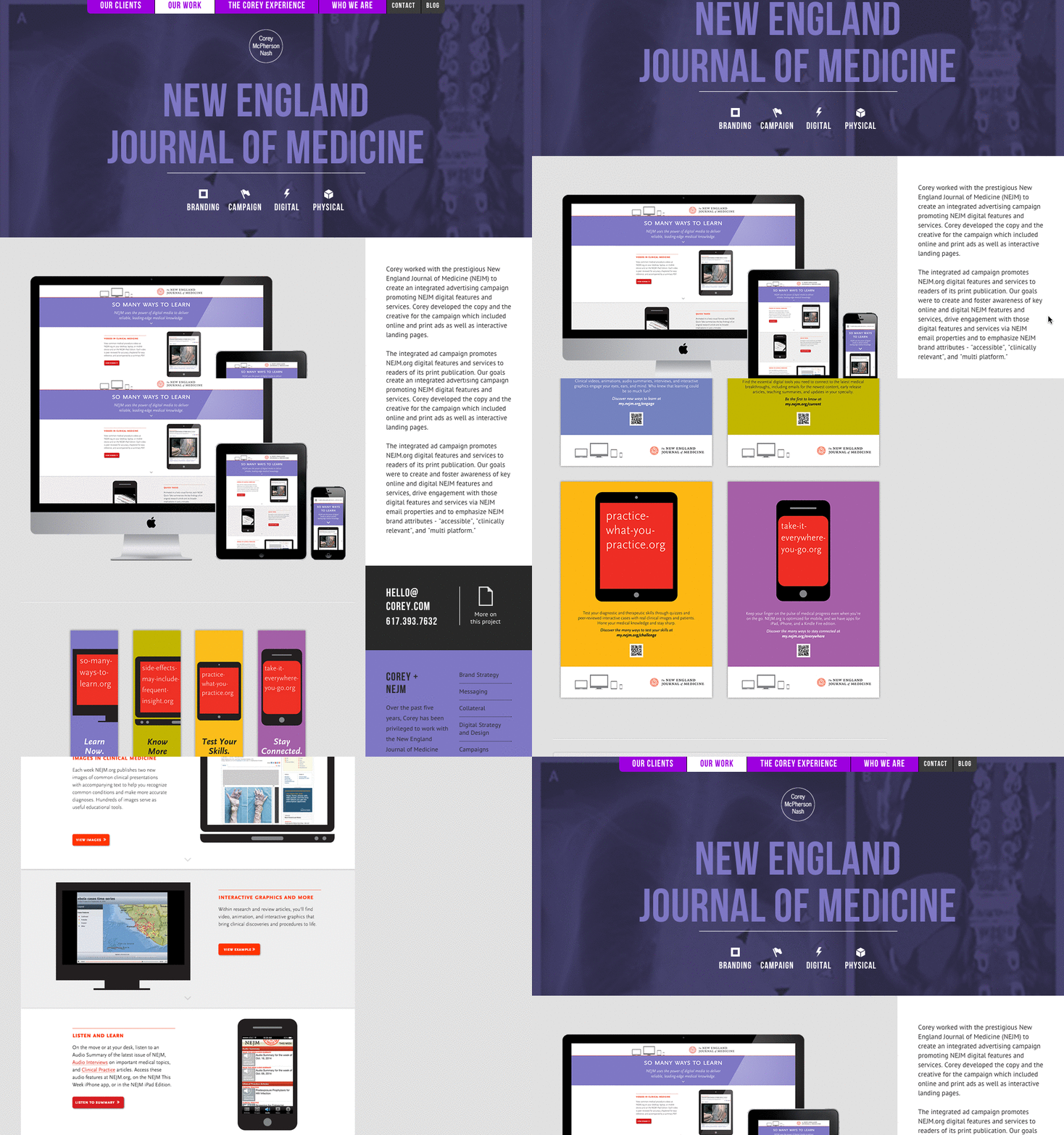
When branding and design studio Corey McPherson Nash showcases its work, it makes sense for it to be visual -- after all, that's what they do. So in building the case study for the studio's work on the New England Journal of Medicine's integrated advertising campaign -- a project that included the goal of promoting the client's digital presence -- Corey McPherson Nash showed its audience what it did, rather than purely telling it.

Notice that the case study does include some light written copy -- which includes the major points we've suggested -- but really lets the visuals do the talking, allowing users to really absorb the studio's services.

2) "Shopify Uses HubSpot CRM to Transform High Volume Sales Organization," by HubSpot

34CB35pU6w.gif

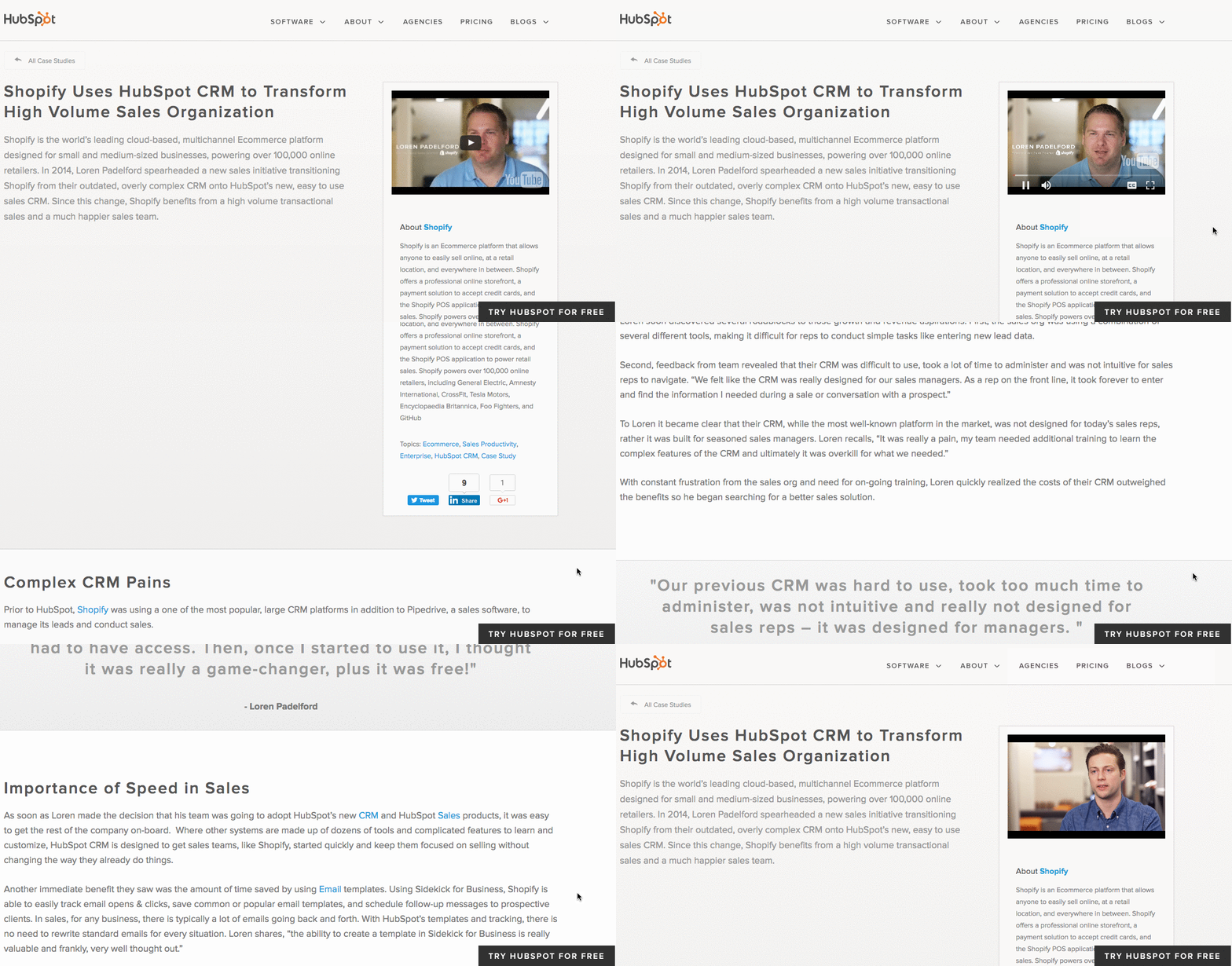
What's interesting about this case study is the way it leads with the customer. That reflects a major HubSpot credo, which is to always solve for the customer first. The copy leads with a brief description of why Shopify uses HubSpot, and is accompanied by a short video and some basic statistics on the company.

Notice that this case study uses mixed-media. Yes, there is a short video, but it's elaborated upon in the additional text on the page. So while your case studies can use one or the other, don't be afraid to combine written copy with visuals to emphasize the project's success.

3) "Designing the Future of Urban Farming," by IDEO

sb5t259Tr6.gif

Here's a design company that knows how to lead with simplicity in its case studies. As soon as the visitor arrives at the page, he or she is greeted with a big, bold photo, and two very simple columns of text -- "The Challenge" and "The Outcome."

Immediately, IDEO has communicated two of the case study's major pillars. And while that's great -- the company created a solution for vertical farming startup INFARM's challenge -- it doesn't stop there. As the user scrolls down, those pillars are elaborated upon with comprehensive (but not overwhelming) copy that outlines what that process looked like, replete with quotes and additional visuals.

4) "Secure Wi-Fi Wins Big for Tournament," by WatchGuard

Then, there are the cases when visuals can tell almost the entire story -- when executed correctly. Network security provider WatchGuard is able to do that through this video, which tells the story of how its services enhanced the attendee and vendor experience at the Windmill Ultimate Frisbee tournament.

Showcase Your Work

You work hard at what you do. Now, it's time to show it to the world -- and, perhaps more important, to potential customers.

But before you show off the projects that make you the proudest, make sure you follow the important steps that will help ensure that work is effectively communicated, and leaves all parties feeling good about it.

How does your company approach the case study creation process? Let us know in the comments.

Editor's Note: This post was originally published in June 2012 and has been updated for freshness, accuracy, and comprehensiveness.

case study creation kit - guide + template

free case study template and guide


from HubSpot Marketing Blog https://blog.hubspot.com/blog/tabid/6307/bid/33282/the-ultimate-guide-to-creating-compelling-case-studies.aspx

Blast From the Past: 7 Websites That Were One Thing, But Now They're Another

Sites-that-were-this-compressor.jpg

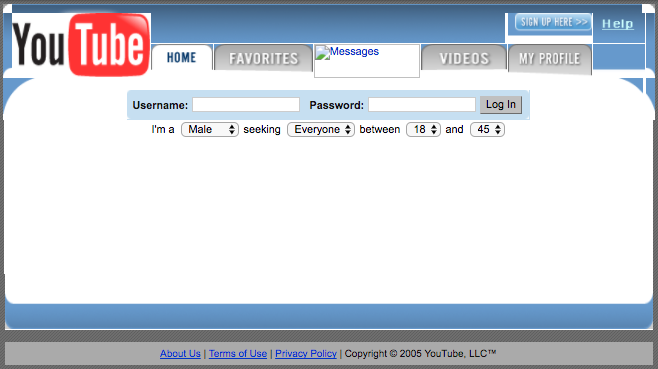
Once upon a time, back in 2005, there lived on the internet a website called YouTube. It's a name that, today, many people recognize as a video-sharing website -- and much more -- that's owned by Google. But over a decade ago, YouTube wasn't what it is today. In 2005, YouTube was a dating site.

Yes, you read that correctly. YouTube began as a dating site.

It's something that the co-founders have discussed in interviews, but the rest of us rarely do. Since the late 90s, how many websites have transformed into something completely different from what they originally set out to be?  Download our free collection of brilliant website design examples here. 

As it turns out, many of our most beloved destination sites -- some of which we frequently write about and are essential to marketers -- were borderline unrecognizable when they first launched. What were they then? And what can marketers stand to learn from it?

Spoiler alert: It's been a long time since people recorded things in stone. It's the internet, and it allows for progressive changes to design, product, and the way they're marketed. But remember -- be strategic. If you're looking to make some big changes, check out our quick guide to branding.

7 Websites That Used to Be Something Completely Different

1) Amazon

Before:

2014_09_05_HOW-INTERACTIVE-CONFERENCE_the-permanent-transition.067.jpg Source: Newfangled

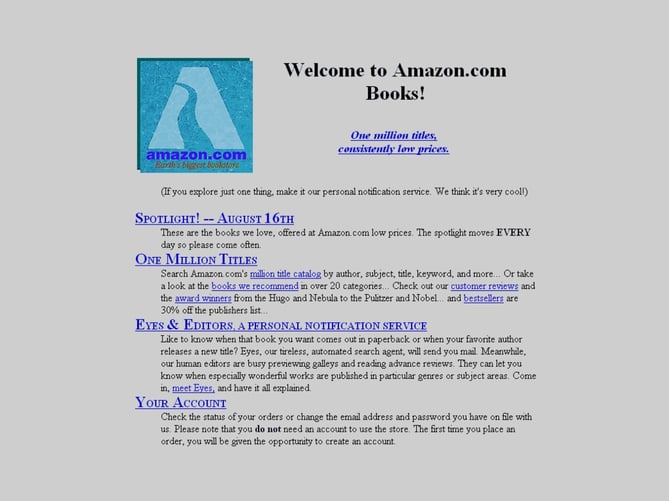
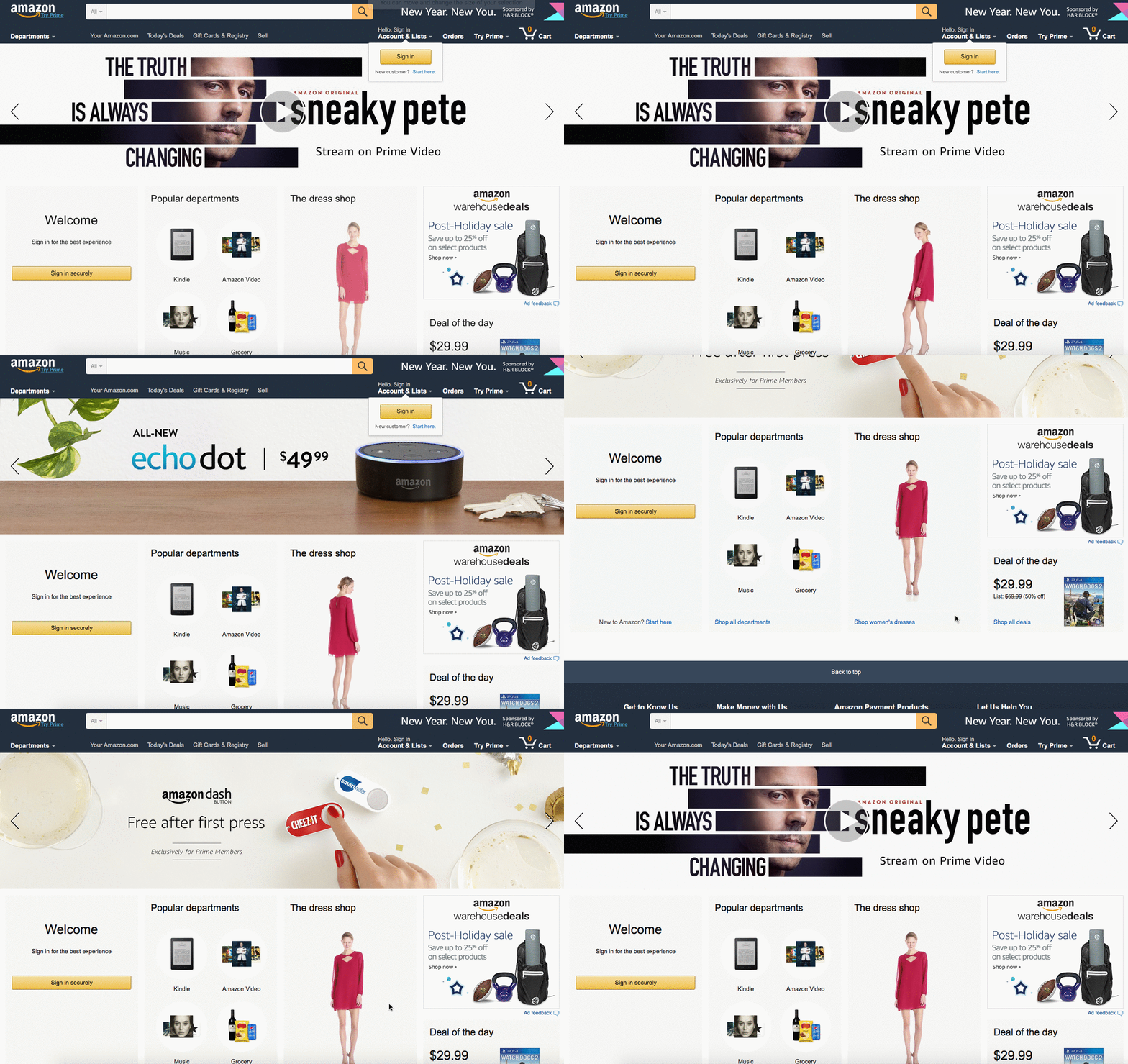
Founder Jeff Bezos is said to have chosen books from his list of 20 products he thought would sell online, because they were the lowest-cost and most universally-demanded. And sure, Amazon still sells books -- and a lot more. The amount of growth it has witnessed in the two decades since its incorporation is beyond impressive.

Today:

Today.gif

2) Netflix

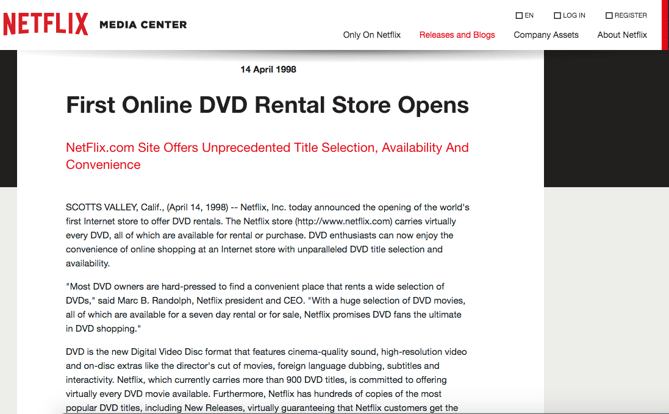
Before:

041498.png Source: Netflix

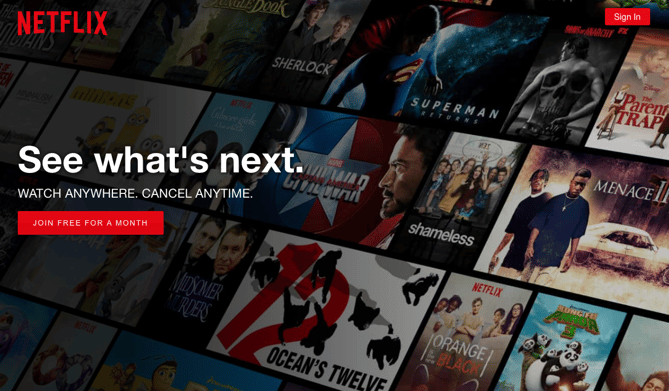
When Reed Hastings and Marc Randolph co-founded Netflix, the intention was clear -- they wanted to create an easy way for people to rent and return movies, without having to drive to the now-extinct video store. Now, things look a little different.

Today:

Today.png

3) Facebook

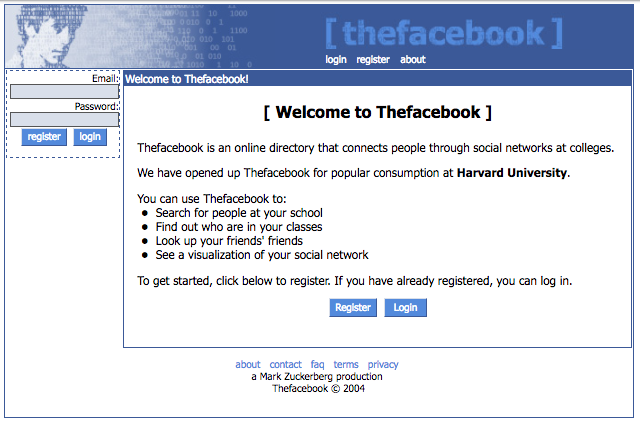
Before:

021204.png Source: Wayback Machine

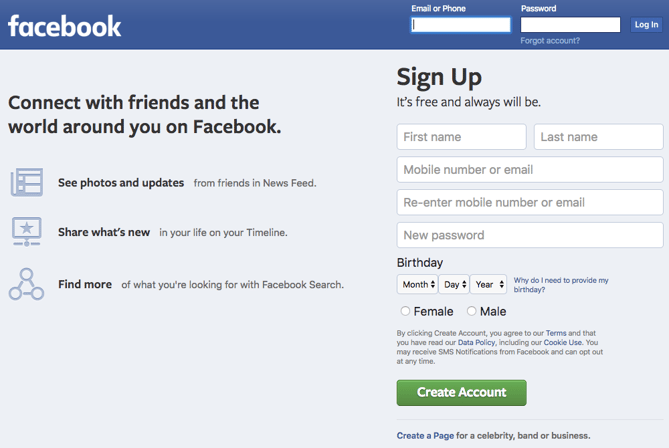
There have been many pop cultural references to Facebook since its 2004 launch. But on the surface, founder Mark Zuckerberg's intentions were fairly clear -- to allow students at Harvard to connect online. Eventually, the network expanded to most U.S. colleges and universities, until it was announced in 2006 that anyone would be able to join.

Today:

Today-2.png

4) YouTube

Before:

042805.png Source: Wayback Machine

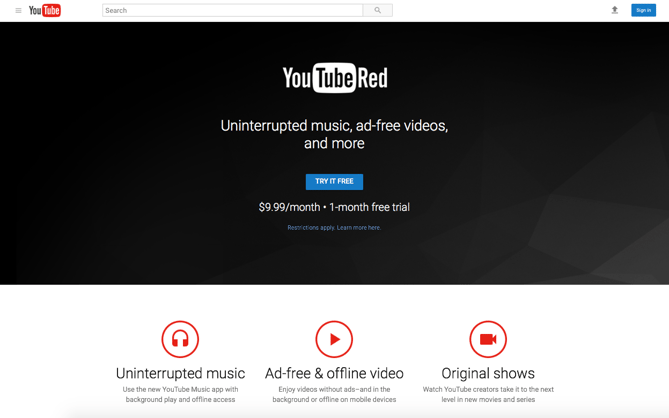
It's true -- as we mentioned earlier, YouTube had very brief beginnings as a dating website. Its founders have spoken to the press about it on more than one occasion. CEO Chad Hurley once told Time that the intention was for YouTube to serve as "a video version of HOTorNOT.com," a site in which users would rate the attractiveness of complete strangers on a scale of one to 10. To the delight of its many current users, that's no longer the case.

Today:

Today-3.png

5) Inbound.org

Before:

Screen Shot 2017-01-13 at 12.46.57 PM.png Source: Wayback Machine

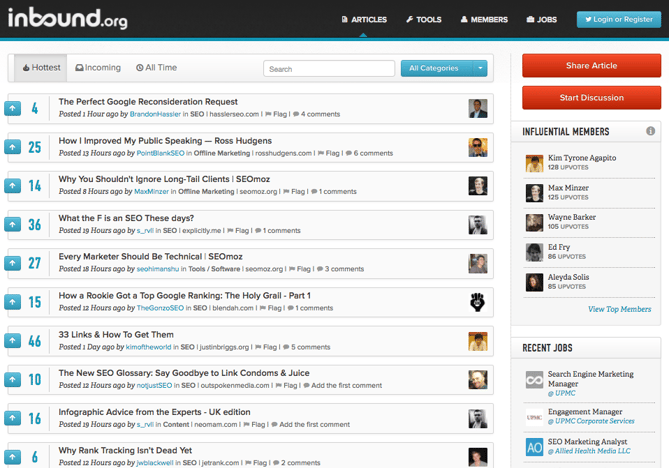
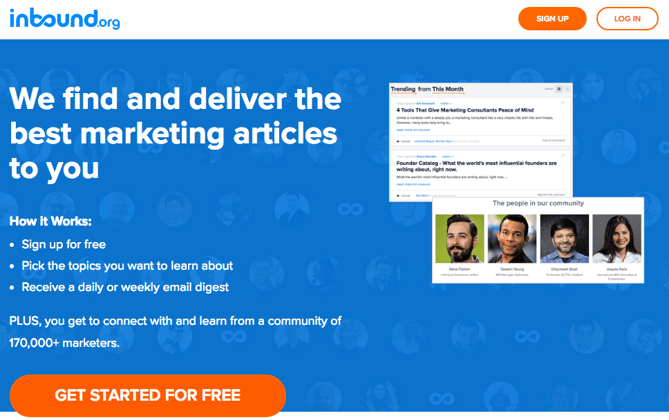
As the story goes, a pair of friends -- Moz co-founder Rand Fishkind and HubSpot co-founder Dharmesh Shah -- started Inbound.org "for fun," and to provide a platform for the content creators who were following the somewhat-new principles of inbound marketing. There were member-powered discussion boards, Q&As, and job listings. And while the foundation of that community is still, at its core, very much the same, the site provides even more to do and see.

Today:

Today-1.png
  • Current model:
    • "An online hub where good Marketers come to get better."
    • Members can do more than ask questions and start conversations -- they can post original content on Inbound.org. That comes with the opportunity for other members to "upvote" it.
    • Offers discussion boards, original content, and ways for members to earn badges, among other marketing-related resources. As Casey Henry -- who oversees growth for Inbound.org -- says, it's "a community where marketers access, share, and leverage marketing resources all in one place."
  • Members: 204,929

6) BuzzFeed

Before:

112606_2.png Source: Wayback Machine

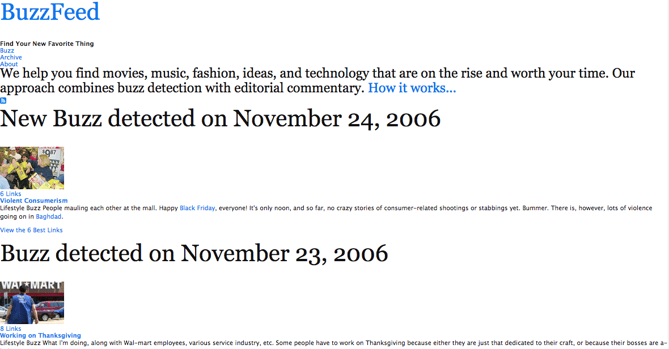
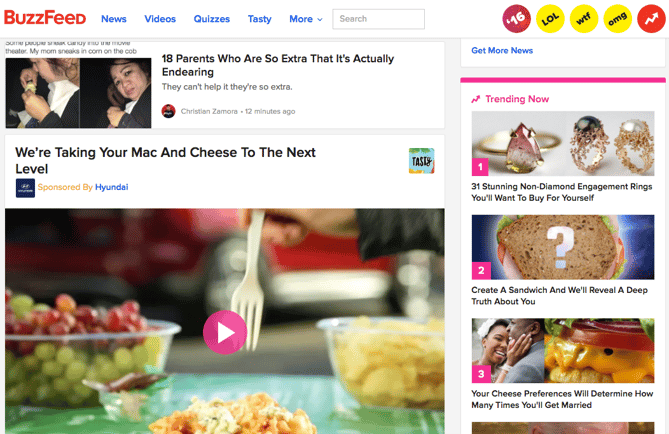
It seems like BuzzFeed has really earned a name for itself in the realm of listicles, like "6 Items That Totally Overreact To Being Microwaved," and other light -- but fun -- content, like quizzes to determine how many marriages you'll have, based on your favorite cheese. (Even we can't make this stuff up.) But it wasn't always like that. BuzzFeed was actually founded on the principle to detect only the most important news items that were "on the rise and worth your time."

Today:

Today-4.png

7) Airbnb

Before:

030509.png Source: Wayback Machine

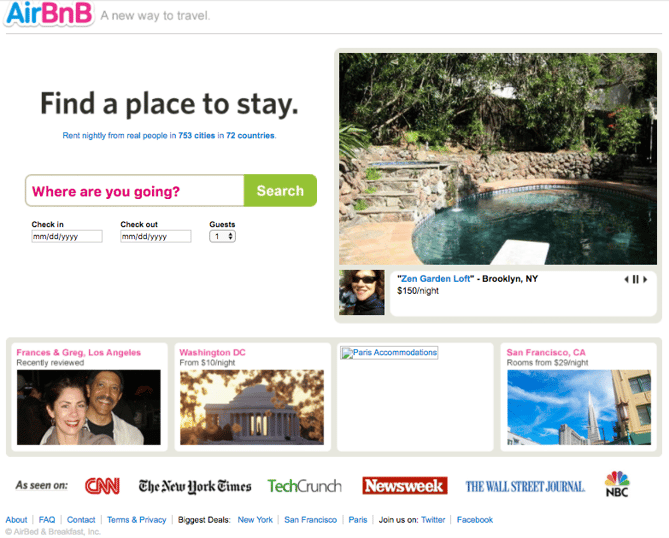
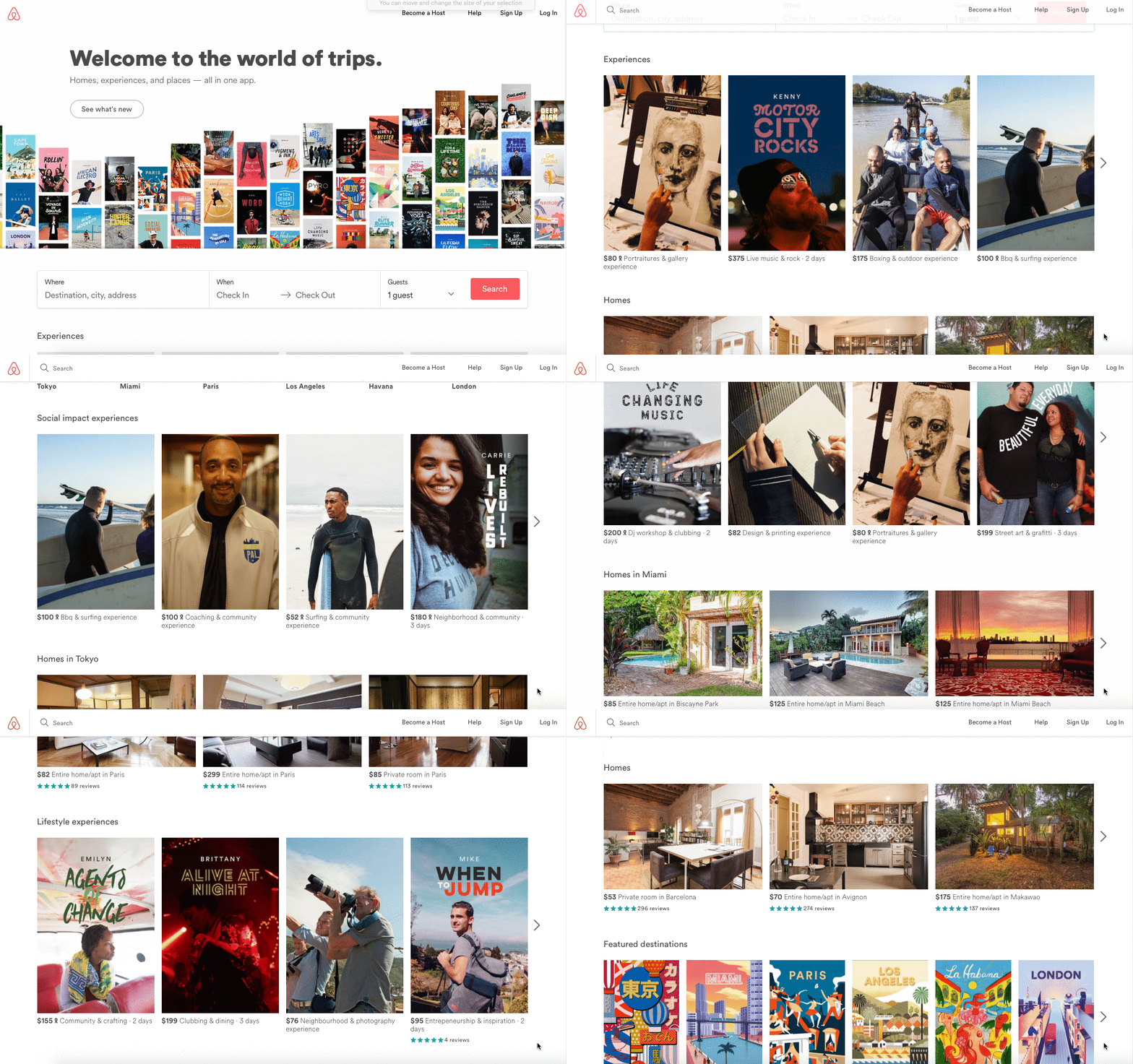
When Airbnb -- first known as AirBed & Breakfast -- started out, the mission was to help people make money. Much of the focus was on homeowners, and the efforts to help them earn supplemental income by renting extra space, empty apartments, and even fold-out couches to kind people. And yes, renters also benefitted by finding affordable places to stay when traveling. But since its inception, Airbnb has gotten a major makeover -- one that's safer, more expensive, and offers more than just lodging.

Today:

Today-1.gif

What's Your Before-And-After?

Things change. Businesses, brands, entrepreneurs, and websites do, too. Maybe your original idea isn't going in the direction you had hoped. Or maybe, you know you can make it bigger.

These examples show that it's more than acceptable -- and often beneficial -- to ask questions like, "What's next?" or, "What needs to change?" Of course, positive evolution takes time, and these brands had an average period of 12 years between their "Before" and "Today." So be patient, but be creative. With that combination, there's no limit to where your brand and its online presence can go.

What are your favorite before-and-after websites? Let us know in the comments.

25 website must-haves


from HubSpot Marketing Blog https://blog.hubspot.com/marketing/before-and-after-websites