Tuesday, 4 September 2018

We Analyzed 5,860,631,392 Articles From 64 Countries. Here’s What Facebook Loves!

data marketing facebook

Facebook reach has continually declined over time.

Nowadays everyone tells me there is no point in even sharing content on Facebook.

But you know what? You can still generate traffic from Facebook.

Yes, traffic has declined. Even so, in the last 31 days, I’ve generated 20,420 visits from Facebook.
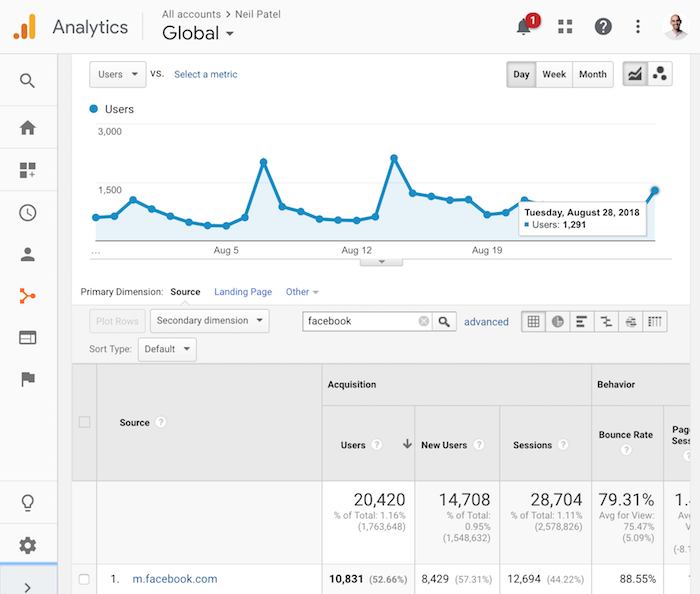
facebook traffic

That’s not too shabby considering I’m only publishing 4 articles a month. That’s an average of 5,105 visitors per article from Facebook.

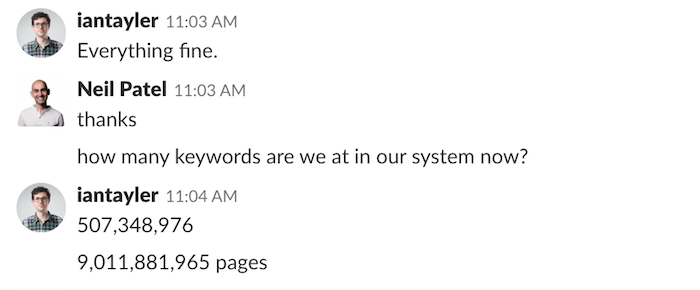
And because I’ve been building the ultimate SEO tool, I’ve been gathering social sharing data on over 9 billion URLs.
database size

But a large portion of the URLs in our database aren’t articles. So, for this analysis, we looked at 5,860,631,392 articles.

Before I dive into what we have learned, there are few things you ought to know about the data:

  1. Technically we have gathered social sharing data on 11,721,262,784 articles. For each URL we gather data on the HTTP and the HTTPS version to get an accurate count as more sites have transitioned to HTTPS over time.
  2. We only looked at articles. A lot of URLs such as nike.com have over a million Facebook shares, but they aren’t articles.
  3. We looked at articles in multiple languages as English isn’t the main language everyone speaks in the world.
  4. When I say “social shares”, that includes reactions, comments, and shares from Facebook.
  5. We excluded scraper sites. A lot of the articles shared on Facebook are scraper sites. They barely have any shares and it skews the data.
  6. In total, the 5,860,631,392 articles came from 163,968,722 domains.
  7. Our list of articles started with Google search results. Because we have data on 507,348,976 search engine results from 64 different countries, we were then able to find the sites that you read on a regular basis, which then helped us crawl and find more articles that you may read.

Let’s dive into the learnings.

What type of content generates the most Facebook likes overtime?

There’s been countless articles published showing that list posts and infographics generate the most social shares.

And that makes sense because who doesn’t love a visual piece of content such as an infographic?

But what if you want social shares over time?

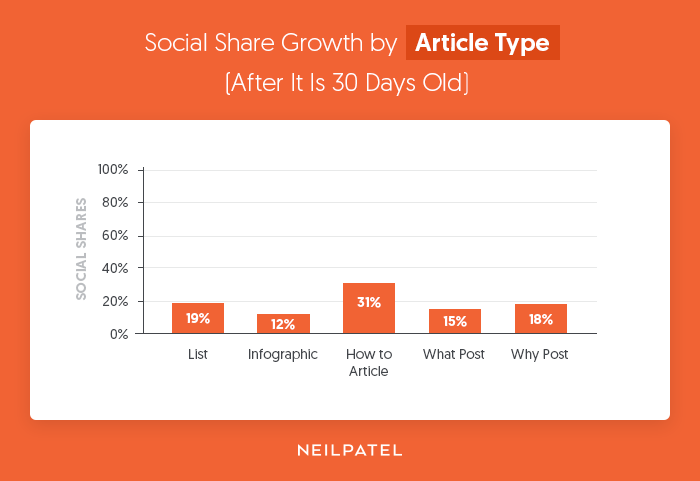
By looking at how many social shares each article generates on a monthly basis, we were able to see the growth rate and the types of article that generate the most social shares over time.

Here’s the share growth rate over time per article type:
how to

If you want a quick boost in Facebook traffic, consider creating infographics.

But if you want more consistent Facebook traffic each and every month, focus on “how to” articles. They don’t do as well right off the bat, but over time they produce more consistent Facebook traffic.
how to trends

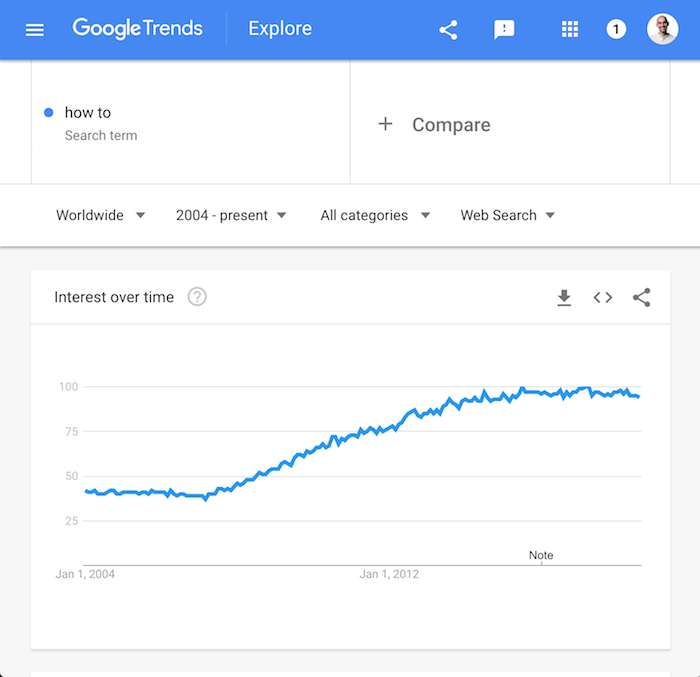
The reason for this is that infographics are harder to rank on Google because they don’t contain a lot of text.

By creating content like “how to” articles that tend to get searched frequently, you can get consistent traffic to your articles which will cause more social shares.

How long (or short) should your headlines be?

Do Facebook users prefer short or long headlines? If you had to take a guess, what would you think?

Most people think the shorter the better…

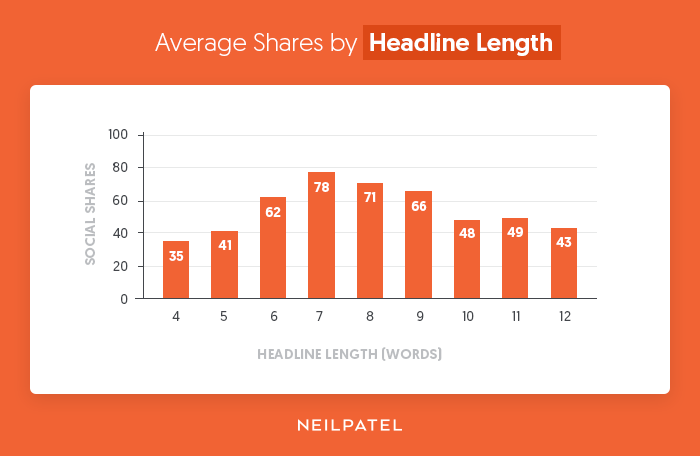
Let’s look at the data:
headline length

Users prefer headlines that are roughly 7, 8 or 9 words.

You can’t really explain what an article is about in 4 words. By having your headline long enough, it will allow you to be more descriptive.

Don’t focus on making your headlines as short as possible, focus on making them descriptive.

How do images impact shares?

You already know people love images. If they didn’t, Facebook wouldn’t be as popular.

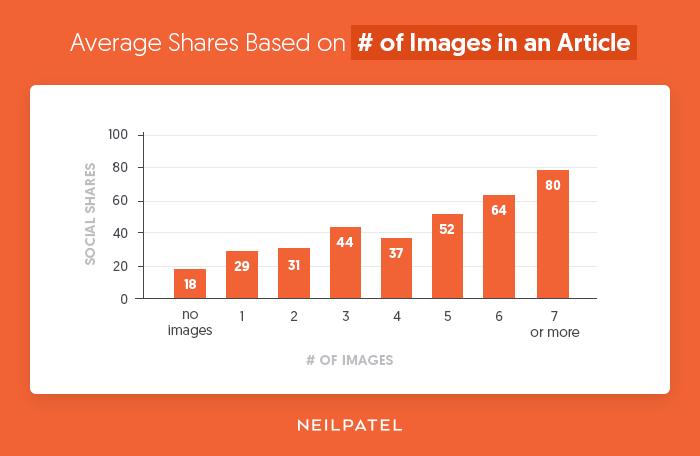
But the question is, how many images do you really need per article to get the maximum number of social shares?
images shares

In general, the more images the better.

The one thing to note is that a lot of the articles that had over 7 images weren’t really articles per say.

A lot of them were articles that have a clear objective of getting you to browse through an image gallery, such as someone showing off stunning images of the Milky Way or image galleries of silly cats.

When writing content, consider including images to describe your message. The more the better.

How long should your lists be?

Based on our data, most people prefer writing list-based articles with the number 10. In other words, their lists only have 10 items.

When we looked at the average share count based on list size, it was clear that lists that were 10 items long won.

But there is a problem: the data is skewed because everyone focuses on smaller lists.

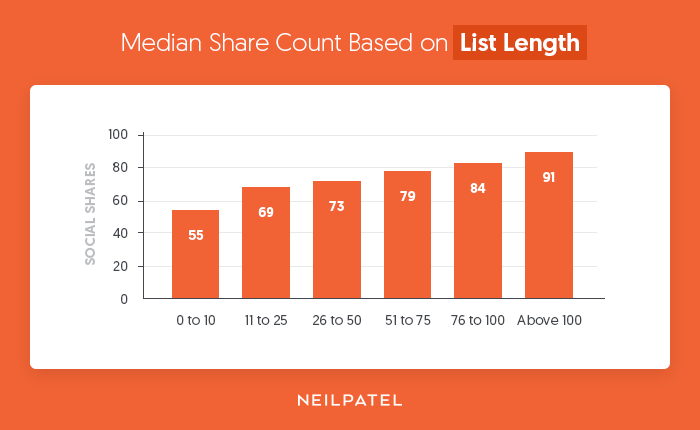
When we started to look at the median share count per list size, the data got interesting.
list length

The more detailed the list, the better.

If you ever decide to write a list-based post that is over 100 items, there is a good chance people will share it assuming it is super detailed.

Shortlists have been beaten to death for years. That’s why longer ones that leverage the skyscraper technique perform better these days.

How long should your articles be?

Should you write short articles or long ones? And how sort or long should they be?

This question has been asked and discussed in marketing circles for years.
content length

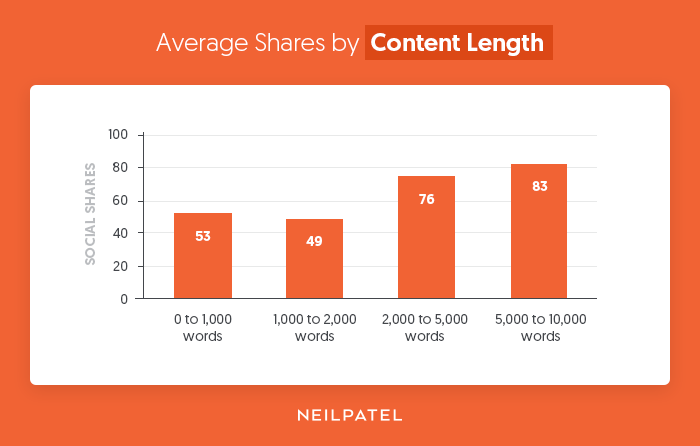
The data shows, the longer the better.

If you were to write 10,000-word blog posts that are super actionable, you would generate more social shares than if you wrote 2,000-word blog posts.

I know I’ve mentioned in the past that writing super long content is like throwing money out the window. And it is especially true when it comes to Google traffic.

So for a nice balance, I would still stick with the advice I gave in that article, which is to write roughly 2,000-word blog posts. Then expand upon it over time. And every time you expand upon the article, you can share it again on Facebook.

If you don’t care about Google and you only want to focus on Facebook, then just go for that 10,000-word article.

You’ll also notice that 1,000-word articles generate more shares than 2,000-word articles.

We were curious why this was so we dug into the data a bit more and found that articles that contained less than 1,000 words in many cases contained more images than 2,000-word articles.

In addition to that, many of the shorter articles were also news based.

And speaking of news…

Is it better to write news-based content or evergreen content?

Over time, evergreen content gets more traffic. It’s not just because of Facebook, it’s that they rank better in Google and get more consistent traffic over the years.

No one is Googling about what happened in the news a year ago.

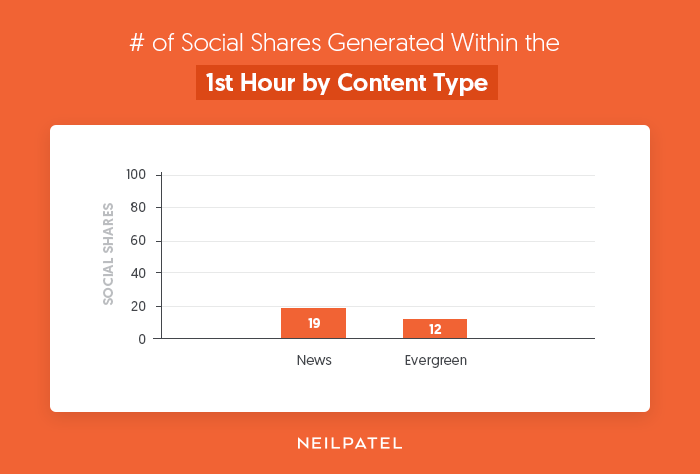
None-the-less, let’s look at the first hour of when an article is published.
news shares

News based articles win in the short run. I already discussed above how “how to” articles will get you the most consistent search traffic over time, but if you want a quick hit, consider covering news related topics.

Do emotions affect social sharing?

I used to love writing articles that pushed fear because they generated a lot of traffic for me. But the issue with doing this is that I used to get emails from people asking me if I was depressed or needed help.

I’ve always been fine, but many of you told me how you don’t like when I push fear in my articles. So, I naturally stopped.

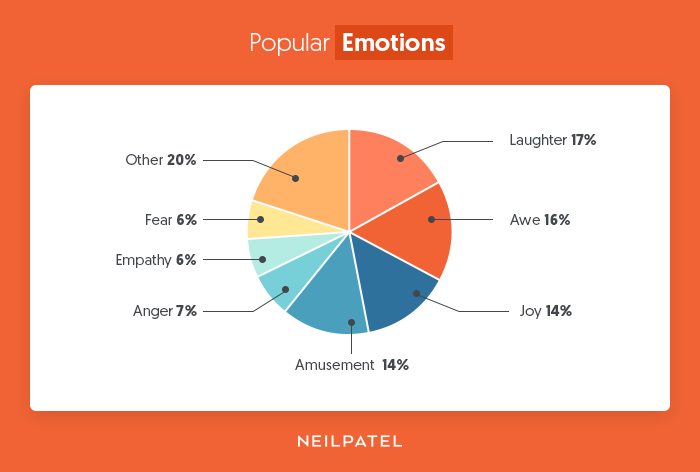
And although fear is an effective way to generate more social shares, it isn’t the most powerful emotion (at least when it comes to Facebook).
emotions

People love content with laughter, awe, and joy. Or at least, that’s what people prefer sharing, as opposed to fear.

You can clearly see by the image above that people prefer laughter roughly 3 times more than they prefer fear.

When should you post your content?

Writing an amazing article isn’t enough. If you write content on a bad day and release it during a time when no one is online, then you won’t go viral on Facebook.
day of week

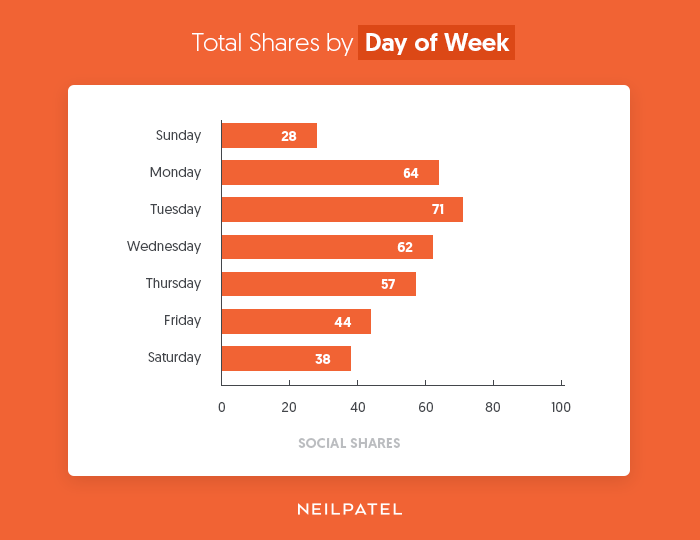
People prefer sharing content on Tuesday over any other day.

If you are going to write only one article a week, release it on Tuesday. If you are writing multiple articles a week, focus on Monday, Tuesday, and Wednesday as they are the most popular days.

And as for the time of day…
time of day

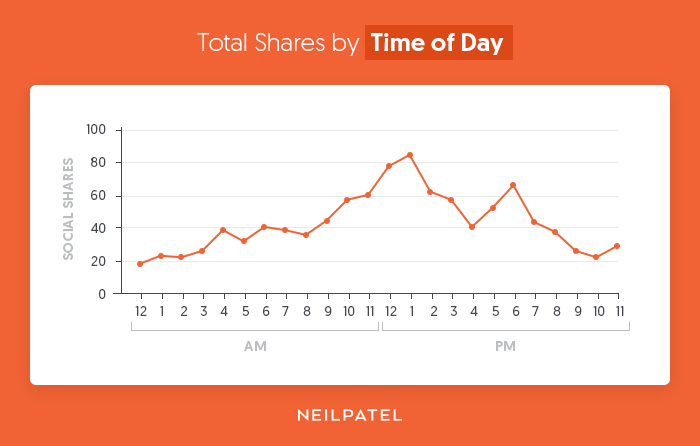
You tend to share content between 11 am and 1 pm.

That’s right before you are about to leave for your lunch break and it’s right when you come back. A lot of people get tired during the middle of the day and they need a break.

That’s why you will see many people within your office on Facebook during the afternoon.

If you miss the 1 pm publishing window, you can always shoot for the 6 pm slot. The share count goes back up around the time people are finishing up with work.

Conclusion

Yes, it is hard to get traffic from Facebook. They do limit your reach compared to 4 or 5 years ago because they don’t want you driving people from Facebook off to your website. That and they want you to boost posts to increase your reach (and their revenue).

The longer people stay on Facebook the more money they make. That’s why they love video content.

But that doesn’t mean you still can’t do well. If you follow the data above it will give you the best shot of getting the most traffic from Facebook.

What do you think about the data and stats? Are you going to follow it?

The post We Analyzed 5,860,631,392 Articles From 64 Countries. Here’s What Facebook Loves! appeared first on Neil Patel.


from Blog – Neil Patel https://neilpatel.com/blog/facebook-shares/

Content Marketing vs. Marketing Content: Where You’re Getting It Wrong

In the marketing world, content is at the core of everything we do. And for demand generation activities, in particular, it’s content that fuels nurture campaigns, content syndication, and retargeting ads. It also can help arm your sales team with the collateral they need to seal the deal. It’s hard to think of an area of the customer journey that content marketing doesn’t touch. But there’s a core piece of this content puzzle that marketers have been getting wrong—or perhaps missing altogether.

I’m talking about marketing content.

Not long ago, I wrote a LinkedIn article about this idea that my team didn’t love at first. I called it F#*k Content Marketing. My point was that it’s time to abandon the “old way” of marketing and embrace change. It’s time for our entire marketing teams (and eventually, our entire organizations) to start maximizing the use of the content that our content marketing teams work so hard to create. Click To Tweet

The Problem With Content

Looking at how much content is out there, unused, makes me think about a conversation my Uberflip co-founder and I had nearly six years ago. Content marketing was on the rise, and we wanted to start a company that empowered marketers. But it felt as if everything by way of an authoring tool had already been done. This got us thinking about what happens after. What do marketing teams do once they’ve created all this new content?

I apologize in advance to any content marketers reading this, but according to SiriusDecisions, 60 to 70% of all content churned out by B2B marketing departments sits unused. When we think of that from a demand generation perspective, there’s so much missed opportunity in that content that’s just sitting.

Your content team may take a step back once the “publish” button is clicked, aside from a few social posts. But for the rest of the marketing team, there’s so much more that needs to be done.

Rethink What You Already Have

Instead of having your content team create more and more content to meet your demand generation goals (I’m talking webinar follow-ups, content syndication, and display ad campaigns), what if you spent your time rethinking the way your existing content is consumed?

First, look at your existing content to see if it can be repurposed by your content team. Why have your team spend time creating something from scratch if you can leverage what you already have? (And, bonus: If a piece of content already exists, chances are your team will be able to turn your request around faster.)

While you’re at it, look at your company website and blog to see if the content is organized in a way that is optimized for lead generation. Is your best performing top-of-the-funnel content easy to find? Is your middle-of-the-funnel content directing your prospects to customer stories and case studies and your bottom-of-the-funnel content to the demo page? The way you organize your content can guide your prospects down the funnel.

Order Matters

I’m going to throw out another stat that might make you want to take on this job: Organizations are 57% of the way through the purchase decision process before they engage with a sales rep. In other words, you should make sure that the content your team is offering does the talking for you.

One of the things we often see is marketers organizing content by publication date. The articles on your blog from 2016 may still be valuable, but I’m not scrolling through years’ worth of posts to find them.

And if not by date, some marketers organize by resource type—infographics, blogs, ebooks, videos, podcasts. But it’s unlikely that someone coming to your site with a question about SEO or social media will care what format they find their answer in. Take this into account when evaluating your website and encourage your content marketing team to start organizing using topics instead. They’ll get more views on their content, and you’re likely to get more leads from it.

The way the content is structured on your website is where content meets user experience. Optimizing the way your content is organized will it easier to discover your assets and help your team to meet your marketing goals. It will also guide your prospects through the buyer journey.

Create Personalized Content Experiences 

Much like how marketers must strategically organize their content, they must also think through the experiences they create with that content. Rather than looking at each blog article or video as an engagement resource on its own, we need to take a step further and think of how that asset fits into the larger content puzzle. When we send someone to a blog post through an ad or email, where will they go next? What elements on the page compel them to engage further?

These are a few ways you can create highly personalized experiences that will make your audience want to consume more:

  • Contextual calls-to-action: Place a targeted, and relevant CTA below or beside an asset someone is already consuming; the user is more likely to consume more because it directly applies to the content they just interacted with.
  • Overlay calls-to-action: Rather than sending users away from your content to a dead-end landing page, why not gate your assets with an overlay CTA instead? This creates a more integrated approach to lead generation because you’re creating the feeling that the answer they need is “just out of reach.” And it doesn’t disrupt their experience.
  • Content recommendations: Using automated suggestions and recommendations, you can make sure your audience’s interactions with your content are meaningful, and guide your prospects along the path to purchase.

To truly engage your audience, you’ll want to create experiences that make them feel as if your content is exclusively for them.

Involving the Rest of Your Team

Just as content and demand partner to create and distribute content experiences, you’ll want to include the rest of your team. After all, the best way to market your content is to get your entire organization to start marketing with your content.

Content no longer lives exclusively in the content marketer’s domain. Your sales team should leverage content when prospecting customers, and your customer success team when engaging customers. To have the most impact, use it at every stage, with everyone on your team.

So, while I wouldn’t suggest telling your boss that they should “F#*k Content Marketing,” I’d recommend reevaluating how your content is used across your website and organization. And while you’re at it, start focusing on the content experience.

The post Content Marketing vs. Marketing Content: Where You’re Getting It Wrong appeared first on Marketo Marketing Blog - Best Practices and Thought Leadership.


from Marketo Marketing Blog https://blog.marketo.com/2018/09/content-marketing-vs-marketing-content-where-youre-getting-it-wrong.html

8 Things You Should Never Say on Slack (Or Any Other Work Chat)

Many companies these days use Slack or another work chat application to communicate more efficiently and spend less time writing emails. Whether you currently work for a company that uses Slack in place of email, or are about to start a new job and are not sure what the company’s communication tools are, it’s always a good rule of thumb to be cautious about how you behave in front of co-workers both in person and in a digital chat room.

Though most people are used to the fast ways we communicate through texting and chats, learning what’s appropriate and inappropriate behavior in a digital workspace can be tricky to navigate.

Before you become known as the co-worker who drives everyone crazy on Slack, consider avoiding these 8 words or sayings.

8 Things You Should Never Say on Slack

1. “Bro” or “Dude”

Chatting with you co-workers on a work chat can seem harmless, but you are a professional now and, regardless of how laid-back your work office is, you should always address your co-workers by their first names. Referring to someone as “bro” or “dude” gives off major college vibes, and even if you are fresh out of college, you don’t want your co-workers to continually think of you as the unpolished graduate.

2. “That’s not my job.”

If a boss, manager, or co-worker asks you to do something on your work chat and it’s not something you typically do for them, you should either politely decline, or if you have the time to spare, help them out. It’s never a good idea to respond by saying it’s “not your job” to do something, especially on a work chat where tone can be hard to interpret.

3. “Like” and “Literally”

Most people struggle to avoid using these words when speaking and what’s worse than hearing someone say these words at the beginning and end of all their sentences? Reading it on a work chat or in an email. Avoid these filler words.

4. “I’m bored.”

The history of your chat can always come back to haunt you and the last thing you’d want to have your manager see is your chats about how boring your job is, or how not busy you are at work. Beware of leaving a digital trail of your disinterest in your job.

5. “I’m feeling …”

Using Slack to have a significant conversation is not the best course of action. Work chats should be used for action items and professional discussions, any emotional conversations you need to have with a manager or co-worker should happen in person.

6. “Maybe we can …”

Using tentative language has no place in a work chat. Lean in. The point of using Slack is to get answers quickly, so don’t leave the door open for a lot of back and forth. Instead, be assertive in what you’re asking or answering. Give a firm yes if you can do it, or a no if you can’t. Don’t waste time; Slack and other communication apps are supposed to make collaborating easier!

7. “No worries.”

Again, tone can often be hard to read in an e-mail and saying, “no worries” can be read as passive aggressive, or too short and laid-back. Instead of writing something of as “no worries,” be more direct and only apologize if you truly are sorry for something.

8. Cursing

In general, you should avoid cursing at the office. The last thing you want is to be known as the co-worker who is always dropping the f-bomb. Even if you don’t curse out loud in the office, it might be viewed as disrespectful by some co-workers, especially anyone who works above you. Moreover, cursing sets the tone for the chat and if you’re always cursing, you’re creating the volatile tone in the chat.


from Marketing https://blog.hubspot.com/marketing/things-to-never-say-on-slack

8 Voice-to-Text Software That'll Help You Work Faster

In marketing, efficiency is crucial for success. The faster you produce results, the longer you can focus on refining your overarching strategy and capturing more of your audience’s attention than your competitors can.

But the physical act of typing out personal notes, your own ideas, and other documents is much slower than your brain’s actual processing speed. The fact that you type slower than you can think means you’re probably wasting a good chunk of time on something that could be automated.

Fortunately, though, there’s technology that lets you type without your hands. It’s called voice-to-text software, and it lets you use your voice to create documents faster than typing, expedite your workflow, and improve your efficiency. But before we delve into the best voice-to-text or dictation software for content creation and productivity, let’s go over what it exactly is.

Now that you know what exactly voice-to-text or dictation software is, here are some of the best available today.

The 8 Best Dictation Software to Help You Work Faster

1. Google Docs Voice Typing


Most writers rely on Google Docs everyday, so if you need a free yet powerful dictation tool, consider using Google’s Voice Typing tool. Not only does it let you type with your voice on Google Docs, but you can also leverage over 100 voice commands to edit and format your document in almost every way possible, like making bullet points, italicizing or bolding text, and moving your cursor to different parts of your document.

To use Voice Typing on Google Docs, all you have to do is click on “Tools”, “Voice Typing”, and let Google access your laptop’s microphone.

Available On: The Internet

Price: Free

2. Dragon Professional Individual

As the most popular dictation software in its space, Dragon Professional Individual allows you to do the majority of your job without even touching a keyboard.

By leveraging its Deep Learning technology that adapts to your specific voice, jargon, and work environment, you can create and edit documents with 99% accuracy, quickly and accurately transcribe recordings into text, and use voice commands to control your computer's actions on programs and web browsers, like sending an email or creating a report.

Dragon also integrates with Microsoft Office, iWork, and other popular business applications, so you can do hands-free work without leaving your favorite programs.

Available On: Mac and Windows

Price: $300

3. Braina Pro

Braina Pro is more than speech recognition software -- it’s a personal virtual assistant powered by artificial intelligence. Other than its ability to dictate over 100 languages, Braina Pro can automate various computer tasks, set alarms and reminders, give you updates on current events, serve as dictionary and thesaurus, play songs and videos, read eBooks out loud, search files on folders on your computer, and more.

Braina Pro also supports most laptops’ built in microphones and has a mobile app, so you can work headset free and away from your computer.

Available On: Windows

Price: $239

4. Speechnotes

Built on Google’s speech-recognition engines, Speechnotes is a simple, clean, online dictation tool that helps users transcribe their speech into text with over 90% accuracy. And since you don’t have to download, install, or register for Speechnotes, it’s one of the most accessible dictation tools out there.

Speechnotes is incredibly user-friendly too -- it automatically capitalizes the beginning of your sentences, autosave your documents, and allows you to dictate and type at the same time. When you’re finished dictating on Speechnotes, you can email or print your documents, export them to Google Drive, or download them onto your computer.

Available On: Google Chrome

Price: Free

5. e-Speaking

e-Speaking Dictation Software

Picture Credit: e-Speaking

Using Microsoft’s Speech Application Program Interface and .Net Framework, e-Speaking lets you use your voice to control your computer's actions, dictate documents and emails, and make your computer read text out loud. The software has over 100 built-in commands, like “open internet” or “open excel”. You can also train words and add more commands on e-Speaking to take even more control of your computer.

Available On: Windows

Price: $14

6. Voice Finger

Picture Credit: Business.com

Engineered for people with disabilities or injuries and competitive video game players, Voice Finger is one of the fastest ways to control your mouse and keyboard without your hands. Using just your voice, you can click the left, middle, or right buttons on your mouse, drag and drop items on your computer, and repeatedly click items. You can also use commands to type, hold, and hit keys on your keyboard.

Available On: Windows

Price: $9.99

7. Apple Dictation

Apple Dictation Software

Picture Credit: Apple

All Apple devices have a built-in dictation software that uses Siri’s servers to dictate up to 30 seconds of speech at a time, if you’re connected to the internet. Dictate is ideal for quickly getting your thoughts down on paper, but if you want to create longer form content with just your voice and you’ve updated your Mac’s operating system to OS X 10.9 or later, Enhanced Dictation is the better option.

This voice-to-text tool can help you dictate without any internet connection or time constraints on Apple Pages. And with over 70 voice commands, you can control your Mac’s actions, allowing you to type, edit, and format almost any type of document.

To enable Enhanced Dictation on your Mac, click on the Apple Menu > System Preferences > Keyboard > Dictation. Then, turn Dictation on and choose the Enhanced Dictation option.

Available On: Mac

Price: Free

8. Windows Speech Recognition

Windows Speech Recognition Software

Picture Credit: Windows

Just like Apple, Windows also has a built-in dictation software. But the main advantage Windows Speech Recognition has over Apple Dictation is that it lets you dictate and control text on any browser, program, or web application.

You can also activate Microsoft’s personal assistant, Cortana, if you have a Windows 10, to streamline your day by setting reminders, managing your calendar and email, playing music, and finding quick answers to any pressing or random questions you might have.

To set up Speech Recognition on your Windows computer, click on Programs > Accessories > Ease of Access > Windows Speech Recognition. Then, click on the Speech Recognition option.

Available On: Windows

Price: Free


from Marketing https://blog.hubspot.com/marketing/voice-to-text

Monday, 3 September 2018

How to Develop a Content Strategy: A Start-to-Finish Guide

Whether you're just starting out with content marketing or you've been using the same approach for a while, it never hurts to revisit your content strategy plan -- to make sure it's up-to-date, innovative, and strong.

After all, you've got more competition than ever. According to the Content Marketing Institute, the most successful B2B marketers report spending 40% of their budget on content marketing as of 2018 -- up 1% from 2017.

The first step to getting a leg up on the competition is to have a solid, smart content marketing plan in place. If you're having trouble planning for the upcoming year or need some fresh ideas to include in your plan, read on.

Click here to try our free Blog Ideas Generator tool.

In this post, we'll dive into:

  • What content strategy is.
  • Why your business needs a content marketing plan.
  • The exact steps you will need to take to create your strategy, including:
    • How your content can generate leads.
    • How (and what) to publish on social media.

What Is Content Strategy?

Content strategy refers to the management of pretty much any tangible media that you create and own: written, visual, downloadable ... you name it. It is the piece of your marketing plan that continuously demonstrates who you are and the expertise you bring to your industry.

You might've heard how important content creation is to the growth of your business, but as you'll see throughout this post, it needs to have a well-planned purpose. When you develop a content strategy, there are some key things to consider:

Whom You're Creating Content For

Who's the target audience for this content? For how many audiences are you creating content? Just as your business might have more than one type of customer, your content strategy can cater to more than one type of reader or viewer. Using different content types and channels will help you deliver value to everyone your company does business with.

The Problem it's Going to Solve for that Audience

Ideally, your product or service solves a problem you know your audience has. By the same token, your content coaches and educates your audience through this problem as they begin to identify and address it.

A sound content strategy supports people on both sides of your product: those who are still figuring out what their main challenges are, and those who are already using your product to overcome these challenges. Your content reinforces the solution(s) you're offering and makes your customers more qualified users of your product.

What Makes You Unique

Your competitors likely have a similar product as yours, which means your potential customers need to know what makes yours better -- or, at least, different. This is where content comes in. In order to prove why you're worth buying from, you need to prove why you're worth listening to.

The Content Formats You'll Focus On

What forms will your content take? Infographics? Videos? Blog posts? Having identified the topics you want to take a position on, you'll need to determine which formats are best for expressing that position.

The Channels Where It'll Be Published

Just as you can create content in different formats, you'll also have different channels you can publish to. Channels can include owned properties, such as your website and blog; and social media properties, such as Facebook and Twitter. We'll talk more about social media content strategy in the step-by-step guide later in this article.

How You'll Manage Creation and Publication

Figuring out how you'll create and publish all your content can be a daunting task. It's important for a content strategy to know who's creating what, where it's being published, and when it's going live.

Today's content strategies prevent clutter by managing content from a topic standpoint. When planning a content calendar around topics, you can easily visualize your company's message and assert yourself as an authority in your market over time. Learn more about topics in content strategy in the video below.

Why Do Marketers Need to Create a Content Marketing Strategy?

Content marketing helps businesses prepare and plan for reliable and cost-effective sources of website traffic and new leads. Think about it -- if you can create just one blog post that gets a steady amount of organic traffic, an embedded link to an ebook or free tool will continue generating leads for you as time goes on.

HubSpot's Sales Blog Team found this to be key to their strategy to increasing traffic to the blog over time. Read about their blog strategy here.

The reliable source of traffic and leads from your evergreen content will give you the flexibility to experiment with other marketing tactics to generate revenue, such as sponsored content, social media advertising, and distributed content. Plus, your content will not only help attract leads -- it will also help educate your target prospects and generate awareness for your brand.

Now, let's dive in to learn the specifics of how to create a content marketing plan.

How to Create a Content Marketing Strategy

1. Define your goal.

What's your aim for developing a content marketing plan? Why do you want to produce content and create a content marketing plan? Know your goals before you begin planning, and you'll have an easier time determining what's best for your strategy. (Want help figuring out the right goals? Download this goal planning template.)

2. Conduct persona research.

To develop a successful plan, you need to clearly define your content's target audience -- also known as your buyer persona.

This is especially important for those who are starting out or are new to marketing. By knowing your target audience, you can produce more relevant and valuable content that they'll want to read and convert on.

If you're an experienced marketer, your target may have changed. Do you want to target a new group of people or expand your current target market? Do you want to keep the same target audience? Revisiting your audience parameters by conducting market research each year is crucial to growing your audience.

3. Run a content audit.

Most people start out with blog posts, but if you want to venture out and try producing other content pieces, consider which ones you want to make. For instance, if you've been doing weekly blog posts for the past year, creating an ebook that distills all your blog posts into one ultimate guide would be a one way to offer information in a different format. We'll go over several different types of content you can use further down on the list.

If you've been in business for a while, review your content marketing efforts and the results from it in the last year. Figure out what you can do differently in the upcoming year and set new goals to reach. (Pro tip: Now is a great time to align your team's goals with the rest of your organization's goals.)

4. Choose a content management system.

Have a system in place where you can manage your content. A few vital parts of content management include content creation, content publication, and content analytics.

If you're a HubSpot customer, you can plan, produce, publish, and measure your results all in one place using HubSpot software. Other content management system options include CoSchedule and WordPress (although we can't speak to the full range of capabilities of these sites).

5. Brainstorm content ideas.

Now, it's time to start coming up with ideas for your next content project. Here are some tools to get the wheels turning:

HubSpot's Website Grader

HubSpot's Website Grader is a great tool to use when you want to see where you're at with your marketing. From your blogging efforts to your social media marketing, Website Grader grades vital areas of your marketing and sends you a detailed report to help you optimize and improve each area.

With this tool, you can figure out how to make your website more SEO-friendly and discover new content ideas.

BlogAbout

Get your mind gears going with IMPACT's unique content idea generator, BlogAbout. This tool works a bit like Mad Libs, but instead of joke sentences, it shows you common headline formats with blanks where you can fill in the subject you have in mind.

This brainstorming technique helps you put general ideas in contexts that would be appealing to your target audience. Once you have a headline you like, BlogAbout lets you add it to your "Notebook" so you can save your best ideas.

HubSpot's Blog Ideas Generator

Get blog post ideas for an entire year with HubSpot's Blog Ideas Generator. All you need to do is enter general topics or terms you'd like to write about, and this content idea generator does all the work for you.

Feedly

This popular RSS feed is a wonderful way to keep track of trendy topics in your industry and find content ideas at the same time.

BuzzSumo

Discover popular content and content ideas at BuzzSumo. This company offers a number of market research tools, one of which uses social media shares to determine if a piece of content is popular and well-liked. In turn, this information helps you see which content ideas would do well if you were to create content about them.

Blog Post Headline Analyzer

CoSchedule's tool analyzes headlines and titles and provides feedback on length, word choice, grammar, and keyword search volume. If you have an idea in mind, run a few title options through the Headline Analyzer to see how you could make it stronger, and to move your idea further along in the brainstorming process.

6. Determine which types of content you want to create.

There are a variety of options out there for content you can create. Here are some of the most popular content formats marketers are creating, and tools and templates to get you started.

Blog posts

If you haven't already noticed, you're currently perusing a blog post. Blog posts live on a website and should be published regularly in order to attract new visitors. Posts should provide valuable content for your audience that makes them inclined to share posts on social media and across other websites. We recommend that blog posts be between 1,000 and 2,000 words in length, but experiment to see if your audience prefers longer or shorter reads.

Check out our free blog post templates for writing great how-to, listicle, curation, SlideShare presentation, and newsjacking posts on your own blog.

Ebooks

Ebooks are lead-generation tools that potential customers can download after submitting a lead form with their contact information. They're typically longer, more in-depth, and published less frequently than blog posts, which are written to attract visitors to a website.

Ebooks are the next step in the inbound marketing process: After reading a blog post (such as this one), visitors might want more information. This is where calls-to-action (CTAs) come into play, directing people to a landing page where they can submit their contact information and download an ebook to learn more valuable information for their business. In turn, the business producing the ebook has a new lead for the sales team to contact.

Case Studies

Case studies, also known as testimonials, are your opportunity to tell the story of a customer who succeeded in solving a problem by working with you. A case study is perhaps your most versatile type of content marketing because it can take many different forms -- some of which are on this list. That's right, case studies can take the form of a blog post, ebook, podcast ... even an infographic.

Your goal in a case study is to show the people who are considering your product that the proof is in the pudding. Before choosing a customer for a case study, you should determine which form the testimonial will take and the area of your business to which you're trying to drive value.

Templates

Templates are a handy content format to try because they generate leads for you while providing tremendous value to your audience. When you provide your audience with template tools to save them time and help them succeed, they're more likely to keep engaging with your content in the future.

Infographics

Infographics can organize and visualize data in a more compelling way than words alone. These are great content formats to use if you're trying to share a lot of data in a way that is clear and easy to understand.

If you're ready to get started, get our templates for creating beautiful infographics in less than an hour.

Videos

Videos are a highly engaging content medium that are shareable across social media platforms and websites alike. Videos require a bigger investment of time and resources than written content, but as visual marketing increases in popularity -- after all, it's 40X more likely to get shared on social media than other types of content -- it's a medium worth experimenting with.

HubSpot Research recently found that video is the most preferred form of content. Video also captures people's attention more than any other content format.

Podcasts

Starting a podcast will help audiences find your brand if they don't have time or interest in reading content every day. The number of podcast listeners is growing -- in 2018, nearly one-third of the U.S. population has listened to a podcast in the last month. If you have interesting people to interview or conversations to host, consider podcasting as another content format to experiment with.

Here's our comprehensive guide to starting a podcast.

Social Media

Once you've been regularly publishing content on your own site for a while, it might be time to start thinking about distributing your content on other sites. This could mean repurposing content into new formats and publishing them on your blog, creating original content specifically for external sites -- such as Medium -- or publishing website content on various social networks.

Considering Medium? Check out our insights from our first year of publishing original content on ThinkGrowth.org.

Posting on social media, however, is pivotal to amplifying your brand's reach and delivering your content to your customers where you know they spend their time. Social networks on which businesses often post include:

  • Facebook
  • Instagram
  • Twitter
  • LinkedIn
  • Pinterest
  • Snapchat
  • YouTube (yep, this is technically a social network)

When launching a business account on any of the social networks above, it's important to post the type of content your followers expect to see. On Instagram, for example, users want photos, videos, and graphics that reflect current events, show off user-generated content, or even go behind the scenes of your organization.

On Facebook, your options for what to post open up a bit: Not only can you share your blog posts and website content, but you can also post native Facebook videos, product promotions, and original memes that resonate with your customers. You can also interact with other businesses that have a similar audience as your own.

While the goal on social media sites like Instagram or Snapchat is to connect more intimately with your audience, your goal on platforms like Facebook and Twitter is to expand that audience, drive traffic toward your website, and start conversations in your industry. Do some basic market research to discover which platforms your buyers are on, and mold your content to their expectations.

When you're ready for more ideas, there are a plethora of different content types to diversify your website. Check them out below:

List of content formats for creating a content strategy

7. Publish and manage your content.

Your marketing plan should go beyond the types of content you'll create -- it should also cover you'll organize your content. With the help of an editorial calendar, you'll be on the right track for publishing a well-balanced and diverse content library on your website. Then, create a social media content calendar so you can promote and manage your content on other sites.

Many of the ideas you think of will be evergreen -- they're just as relevant months from now as they are today. That being said, you shouldn't ignore timely topics either. While they may not be the bulk of your editorial calendar, they can help you generate spikes of traffic.

Most people count on incorporating popular holidays such as New Year's and Thanksgiving in their marketing efforts, but you don't have to limit yourself to these important marketing dates. If there are niche holidays that might appeal to your audience, it could be worth publishing content on your blog or on social media. HubSpot's Service Blog Editor Sophia Bernazzani compiled this ultimate list of social media holidays -- keep an eye on it when you're planning your calendar.

We know this is a lot of information, but the work has just begun. It takes time, organization, and creativity to grow a successful content marketing strategy. From building the foundation of your content marketing plan to adding tools to better manage your content, setting up your strategy for the new year won't be a hassle if you follow the steps and explore the resources here.

For additional guidance, use HubSpot's Marketing Plan Generator to create a 12-month strategy in just a few minutes.

Happy creating.

Free Content Marketing Workbook

Free Content Marketing Workbook


from Marketing https://blog.hubspot.com/marketing/content-marketing-plan

The Ultimate Guide to Writing a Cover Letter

Have you been asked to attach a cover letter to your job application? Perhaps you’re struggling to write one that lands an interview, or have no clue what one is at all.

Whichever situation you’re in, we’ve crafted this ultimate guide to cover letters. You’ll find out how to write one that gets read, what to include, and browse tons of templates to gain inspiration.

Are you ready to land the job of your dreams through a perfectly crafted cover letter?

Awesome!

You can dive straight in, or jump to the section you’d like to read.


How Long Should a Cover Letter Be?

Okay, so you’re all fired up and ready to craft the cover letter of the hiring manager’s dream. That’s great! But how do you manage the fine balance between in-depth and overwhelming?

A good cover letter is long enough to communicate why the recruiter should pick you … but not long enough to bore them to the point where they’ll need a strong coffee.

One page is usually enough to cover everything you’ll need to include, without losing the recruiter’s attention and having your cover letter tossed into the trash.

Are Cover Letters Necessary?

Cover letters are often a required field for online job applications. But do you really need to include one if you’re sending your resume through email or applying in-person?

The answer isn’t as clear-cut as you might think.

Just 26% of recruiters consider cover letters important in their decision to hire an applicant. That means they are influential in hiring decisions, but not essential.

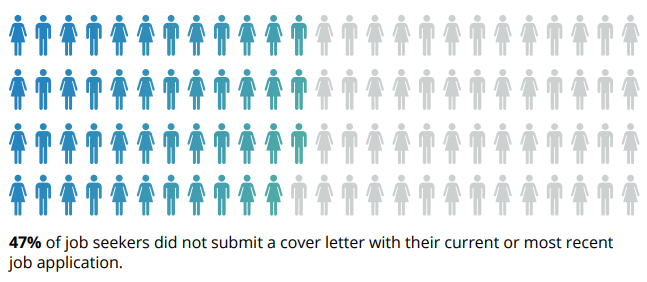
Having said that, cover letters give you an advantage over other potential candidates. Only 53% of job seekers submitted a cover letter in their most recent application ... which means you could stand out by including a cover letter in your application.

submit-cover-letter

Source

Plus, cover letters allow you the chance to communicate with the hiring manager. You’re given more space to tell them why you’re the perfect fit for their job, meaning you don’t have to rely on bullet-pointed lists in your resume.

Cover letters also help to build your personal brand. By going the extra mile (even when it’s not required), you’re proving key skills like being a hard worker, having good communication, and taking initiative.

In short: Cover letters aren’t absolutely necessary, but they do have stark advantages. If there’s an option to upload one when applying for any job, do it — even if it’s not required!

How to Write a Cover Letter

Writing a cover letter can be tricky. Even the best writers can struggle with communicating their skills in the right manner, but these tips will help you create a job-winning document.

The structure of your cover letter is arguably the most important thing about writing one.

Not only does a good structure help you to organize your points effectively, but it can help a hiring manager to quickly review the details you’re sharing.


How Long Should a Cover Letter Be?

Okay, so you’re all fired up and ready to craft the cover letter of the hiring manager’s dream. That’s great! But how do you manage the fine balance between in-depth and overwhelming?

A good cover letter is long enough to communicate why the recruiter should pick you … but not long enough to bore them to the point where they’ll need a strong coffee.

One page is usually enough to cover everything you’ll need to include, without losing the recruiter’s attention and having your cover letter tossed into the trash. 

Let's go into those items in more detail:

Your Name and Address

Kick off your cover letter by adding your name and address to the document.

This step is pretty self-explanatory, but it allows the recruiter to easily connect your cover letter to your resume (especially if they’re being printed).

Your name and address also makes it easier for the recruiter to get in touch with a job offer. And that’s the aim of our letter, right?

Their Name and Address

Similarly, you should add the name and address of the company or person you’re writing to.

This shows you’ve done your research and allows the hiring manager to receive your letter if it’s sent to a generic company email address.

The Date of Writing

Make it easier for the hiring manager to file your application by including the date on your cover letter.

Even if you’re not successful this time around, the company might store your letter and refer back to it when they’re hiring for another position!

Why You’re Writing the Letter

We know that the aim of a cover letter is to persuade the hiring manager you’re the best fit for their job. But, be sure to open your letter strongly, with 1-2 sentences that’ll grab their attention and quickly make them realize they’re reading a cover letter.

Something like this will usually do the trick:

“I’m writing to discuss the content strategist role at HubSpot.”

Why You’re a Perfect Fit for the Job

The next section of a cover letter structure is the fun part; it’s where you’ll convince the hiring manager they should hire you — and not the person who’s resume is behind yours.

In this section, answer these questions:

  • Why should this company hire you?
  • What skills do you have that will help complete the job better than anyone else?
  • What makes you a good employee?
  • What extra qualifications do you have that are relevant to the role?

Once you’ve answered these, the recruiter will have a solid understanding of who you are, and (hopefully) be convinced to hire you!

What You Can Offer the Company

Have you ever heard the advice to “always sell yourself in a job application”? That concept can be applied to cover letters, but remember that recruitment isn’t all about you.

Businesses measure success in terms of results. The company looking for a new employee will want to know what they bring to the table and how they’ll shape their business’ future. New candidates are rarely brought on-board solely for the soft skills listed in their resume.

That’s why this part of your cover letter structure is arguably the most important.

In less than two paragraphs, show the business what you can do — and prove you’ve done it before (preferably with examples).

Not only does this give them the opportunity to show off your skills, but the company can picture the success you’ll bring to their business by hiring you.

Your Availability

In the marketing world, we’re always told the importance a call-to-action can make. But, don’t leave them to your blog posts: Explain your availability to the person reading your cover letter for the best chances of a follow-up call.

Great cover letters end with a brief section on the candidate’s earliest start date. You could also include your availability for an interview and tell them you’re happy to answer any questions they may have.

How to Address a Cover Letter

Earlier, we mentioned the importance of addressing the hiring manager by their name and address. This proves you’ve done your research and ensures the cover letter lands in the right place.

Personalized content does 42% better than non-personalized, so including the first name of the recruiter can go a long way.

But in a world where privacy is held close to our chest, you might need to do a bit of digging before revealing the name your letter should be addressed to.

Luckily, you can use the power of the internet to do this. To find their:

Name

Head over to LinkedIn and find the company’s profile page. You can do this by entering their name into the search bar or searching for a link to their LinkedIn page on the company’s website.

Then, click “See all employees on LinkedIn”:

hubspot-linkedin-1

You’ll then be greeted with a list of all people (with a LinkedIn profile) that work for your target company. Simply work your way through this list to find the most relevant contact, or search

  • Hiring manager
  • HR manager
  • Recruitment manager

… to find the most-suitable name to address in your cover letter.

Address

You can find the address of the company you’re looking to submit a job application to by finding the About or Contact page on their website.

This should be in their navigation bar, but can also be found by Googling their URL and “contact”.

On this page, you should find an address for the company. If not, don’t worry. Simply call one of the numbers listed or send an email to their support team. Ask for the company’s general careers email address, and use this on your cover letter.

Opening a Cover Letter

Great job! You’ve done all of the digging you’ll need to write a cover letter. It’s easy from here.

After you’ve addressed the cover letter to the most relevant person, we’ll need to open the letter with something relevant.

“Dear Ms. H.Spot” (using your own initials, of course) will keep it professional.

But, if you’ve struggled to unveil the hiring manager’s name, stick with “Dear Sir/Madam” or “Dear Hiring Manager”.

How to Close a Cover Letter

Once you’ve followed the above cover letter structure and explained your availability, it’s time to wrap it up.

If you’ve addressed the letter personally, end with “Thanks”.

If you haven’t, opt for “Sincerely”.

Then, sign the cover letter with your full name.

Should You Include Salary Requirements?

Talking about money is a tricky subject. Some feel uncomfortable discussing wages in the first interaction with a company, so it’s best to avoid discussing salary requirements in your cover letter unless it’s stated as a requirement.

Including salary requirements in your cover letter could set a bad tone. Instead, allow your letter to show off your skills and make a convincing argument as to why they should hire you.

Save the money talk until your interview!

7 Tips for Writing Great Cover Letters

So, you’ve crafted a cover letter and you’re almost ready to hit send.

Now, wait a minute ...

Before attaching to your resume and hoping for the best, use these seven tips to make sure your cover letter is as great as can be:

1. Don’t babble.

Earlier, we mentioned how the best cover letters strike the perfect balance in their length.

Our best tip for writing cover letters is to avoid any babble. Don’t add fluff that fails to add anything of value. Not only are you wasting your time by writing it, but you’re wasting the hiring manager’s time, too.

You want to keep the recruiter’s attention, which can be easily lost through babbling. Cut the jargon and corporate speak that hiring managers have heard before. (Like “leverage” and “thinking outside the box”.)

Yes, professionalism is important, but be harsh and critical when editing your cover letter. If a sentence doesn’t add value, get rid of it!

2. Tailor it for the company and position you’re applying for.

The one-size-fits-all approach doesn’t fit well with cover letters.

You’re applying for different roles at various companies, but don’t let a change in name and address be the only amendments you make.

Remember that a cover letter should explain why you should be hired instead of anyone else. It’s highly unlikely that multiple companies will hire for exactly the same position, so take some time to personalize your cover letter for every position you’re applying for.

3. Add more value than your resume.

Although cover letters are used in partnership with resumes, be wary of falling into the trap of making them carbon copies of one another.

Cover letters that regurgitate everything already explained on a resume are useless. Instead, use the documents to compliment each other by:

  • Including new skills.
  • Elaborating on how your qualifications would help you in the role.
  • Sharing how specific experience gives you an advantage over other candidates.

If you need to include the same thing in both documents, add “as listed in my resume …” rather than copy and pasting the same content.

Put yourself in your recruiter’s shoes: Reading the same thing multiple times would be annoying, right? (Remember, we don’t want to bore them!)

4. Include data-backed examples.

When referencing experience from your resume, use your cover letter as an opportunity to explain in detail — with examples.

Examples allow the company to picture the success you could bring if they hired you, rather than the person next in their resume pile. But, data-backed examples give an extra edge.

Let’s use an example. Which of these options is more impressive?

  1. I increased leads for the company.
  2. I increased leads by 35% in one month through a single blog post, which became the company’s biggest revenue source.

It’s option B, right?

5. Tell a story.

Following on from the previous step, you could elaborate on your data-backed examples by telling a story.

Storytelling helps with relatability and gives a hint of your personality in a cover letter. It also makes the recruiter remember your cover letter amongst a sea of other one-page documents in their review pile.

However, this cover letter tip comes with a warning: Don’t over-do it, and make it relevant. Remember what we said about babbling?

Including a story about how you adopted your pet cat is unlikely to influence someone into hiring you. On the other hand, a story on how you created a company’s blogging strategy to achieve your data-backed results is.

6. Get a second pair of eyes on it.

Even the best writers make occasional mistakes, but some hiring managers can be strict with grammatical errors — even if you’re not applying for a role where writing features heavily in your daily to-do’s.

That’s why our sixth cover letter tip is to get a second pair of eyes on it.

Email it to a friend or ask a family member to glance over it before you hit “send”. Ask them to highlight any spelling mistakes or suggestions to improve how you’re communicating with the person reading it.

You never get a second chance to make a first impression. Seeing as though a cover letter is one of the first documents a recruiter sees, try to make it perfect!

7. Be unique.

Finally, make your cover letter unique.

If you’re applying for a creative role, experiment with colors, subheadings, and layouts.

If you’re apply for more of a traditional role, be wary. Not everyone is a fan of bright, bold cover letters, but you can scope your limits by getting a feel of their company culture.

Are they strict and professional, or does the company like to have fun? (You can usually get a feel of this from their website or social media profiles.)

Testing the level of uniqueness can be a case of trial and error. If you’re not getting great reactions from your cover letter, revise and try again.

Cover Letter Examples

We understand that inspiration can go a long way. That’s why we’ve created a one-stop shop for cover letter examples, which are available to view here.

You’re also free to browse our collection of cover letter samples for extra inspiration on formatting your cover letter, and learning from those who’ve helped to land dream jobs.

Conclusion

Congratulations! You’ve now got a fantastic cover letter!

Don’t forget to send it with your resume for each job you apply for.

You’ll soon be flooded with responses to your application — including compliments on the contents of your cover letter, job offers, or invites to interview! 


from Marketing https://blog.hubspot.com/marketing/cover-letter

Everything You Need to Know About Instagram Pods, the New Way Influencers Are Gaming the Algorithm

In 2016, Instagram changed its algorithm to eliminate a feed full of chronological posts. Now, your post can only appear at the top of a user's feed if it earns a certain level of engagement, signaling to Instagram that your post is popular and should be shown to more people.

Additionally, in order to rank highly, your post must receive engagement immediately. If your post receives likes and comments, but not within the first few hours after posting it, Instagram likely won't boot it to the top.

The algorithm change is helpful for Instagram users -- after all, I'd personally rather see posts most of my friends are commenting on and liking. However, it's less useful for brands trying to spread their content to a wider audience. Plus, it can seem unfair. If you are trying to grow your audience by sharing helpful content, but you don't have a ton of followers at the moment, it's twice as hard to get your posts seen by new people.

So how can you get around it? Sure, there are a few shady tactics out there, like buying followers or using bots, but none of those methods will earn you a long-term, loyal audience. Instead, you might want to consider Instagram pods.

In a way, Instagram pods are a more strategic version of texting your friends and saying, "I posted a new Instagram picture but it only has six likes, can you go like it so I don't look lame?"

The concept is the same, but pods take it to the extreme -- instead of texting your friends once in a while, you're in a constant messaging thread, where you're expected to engage with upwards of twenty or thirty posts a day. Plus, you've got to do it in a timely manner, or it won't work.

But if you're committed to growing your following, the effort might be worth the reward. To learn which pods to consider joining, and whether it's even a good idea, read on.

Instagram Engagement Groups

To join an Instagram pod, you can start by checking out a few Facebook groups, such as Instagram Marketing Mastermind Pods. However, since Facebook owns Instagram, there's a chance your group could get deleted (more on that below).

Additionally, you might try Telegram, a messaging app that hosts pods inside the app. Take a look at Telegram's engagement group directory (the link will only work once you have a username), and choose one best suited for your business.

Don't be fooled -- it takes a lot of time and effort to find a pod. Since companies don't typically want to get caught using a pod, pods are often kept secret from the public. Getting caught using a pod could harm your brand's integrity, since it implies your engagement isn't authentic.

Which leads us to our next point -- are pods even a good idea?

Have Instagram Pods Been Banned?

As reported by Buzzfeed, Facebook recently removed 10 groups on their platform that were employing tactics like trading likes for likes, or encouraging users to join pods on Telegram. Ultimately, all these tactics are meant to "trick" Instagram's algorithm, which violates their terms of use.

While Instagram pods themselves haven't been officially banned, it's clear Facebook and Instagram don't condone them, which makes them tricky to find and join.

Additionally, it's doubtful whether pods are a useful long-term strategy. Yes, they get you a boost in engagement on posts you send to your group, but that doesn't necessarily translate to the kind of engagement you want -- namely, comments and likes by people who could buy from you down the road, or become your best brand advocates.

Your engagement metrics will also be skewed, and you'll no longer be able to tell if your content is resonating with your potential customers. Is your audience liking your content because they feel it's relatable, or are they liking it because you asked them to?

For instance, I used to ask friends through text to like my Instagram pictures after I'd posted them -- my own version of a pod. After a few weeks, I stopped asking. I realized if I didn't allow my posts to gain natural traction, I'd never know what was working and what wasn't. If one of my posts doesn't get a ton of attention, I take it as a sign I should alter my strategy, rather than trying to trick the system.

Ultimately, pods might be worth it for the initial boost, but they can't substitute authentic engagement, especially if you're testing to see what type of content works best with your audience. For long-term, sustainable growth, you'll want to focus on creating content that earns likes and comments on its own. 


from Marketing https://blog.hubspot.com/marketing/instagram-pods