Thursday, 6 September 2018

How to Use Snapchat: A Detailed Look Into HubSpot’s Snapchat Strategy

Back in 2011, Snapchat was synonymous with risqué teen behavior. News coverage repeatedly warned parents of the damaging effects the platform might have, and as a result, Snapchat's success wasn't looking good.

Since then, Snapchat has evolved into something so much more. And while it's certainly not the cornerstone of every marketing strategy just yet, the channel has earned a reputation for fast growth and innovation.

Snapchat is now known as a platform for individuals and brands -- one that allows users to create quick, lighthearted, and even educational video content without using valuable production resources. For brands, this means a new opportunity to show off their company culture, share their industry knowledge, and connect with their audience in a new and exciting way.

Get our guide to using Snapchat for business here.

After reporting more than 100 million daily active users and 8 billion video views a day, we decided to give it a go: The official HubSpot Snapchat account launched in March 2016. Since then, we've learned a lot about executing and iterating a successful Snapchat business strategy.

To help you get started, we've detailed everything we've learned below. In this guide, we'll go over:

  • How to set up your Snapchat account.
  • How to make, send, and view Snapchats.
  • How to use Snapchat Lenses and Geofilters.
  • How to add and acquire friends or followers.
  • How to perfect your use of Snapchat for Business.

How to Set Up Your Snapchat Account

The first thing you’ll need to do is download the Snapchat mobile app -- available for iOS and Android -- and create an account by entering your email, a username, and a password. This will be your personal account, and you can ultimately use it to create a Snapchat Business Account.

1. Sign up on Snapchat's home screen.

Once you've downloaded the Snapchat mobile app, open it and you'll see the screen below.

Yellow Snapchat home screen to log in or sign up

Tap "Sign Up" and the app will take you to the sign-up page, starting with your first and last name.
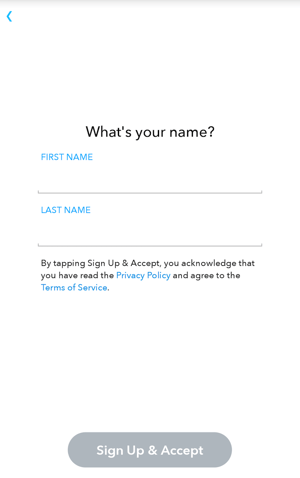
snapchat-signup

Then, you'll enter your:

  • Birthday.
  • Username and password.
  • Email address.
  • Phone number.
  • Friends to add.

Adding friends from the signup screen will help you find friends on Snapchat who are also in your phone's contact list. You can skip this for now if you wish -- we'll talk more about adding friends in Step 4.

When creating a username, however, keep in mind that you've only got one shot: Snapchat does not allow you to change your username once you set it.

2. Create a profile picture using Bitmoji.

Once your account is created, you'll want to take care of a few housekeeping things. The first is your profile picture -- this picture will be how people identify you when sending and receiving snaps to and from you.

To create your profile picture, tap the snapchat-profile-photo-icon icon to the top-left of the camera screen. Then, tap "Create Bitmoji," as shown below:
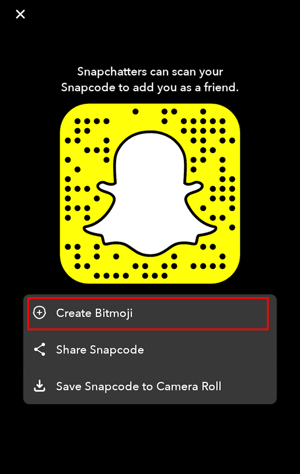
Snapchat Snapcode with option to Create Bitmoji

Bitmoji is a free, separate app that integrates with Snapchat and allows you to create a fun, illustrated avatar of yourself. Once you select this option through Snapchat, you'll be able to download the Bitmoji app and personalize your profile picture. Here's what that personalization process looks like:
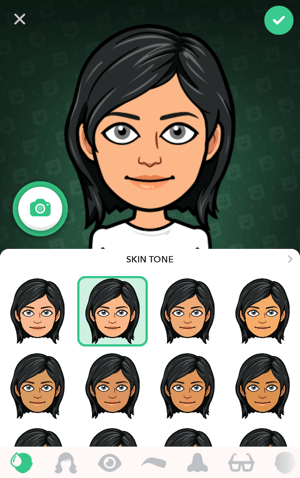
Bitmoji app screen with black-haired female avatar and skin tone options

Once you've designed a Bitmoji that resembles you, follow the prompts to connect your Bitmoji to Snapchat. The screen below will indicate that your Snapchat profile picture has officially been set:

bitmoji-successfully-linked-snapchat

3. Adjust your privacy settings.

In Snapchat, tap your new Bitmoji icon at the top of the camera screen to visit your profile page. Then, tap the gear icon to access your settings in the top-righthand corner.
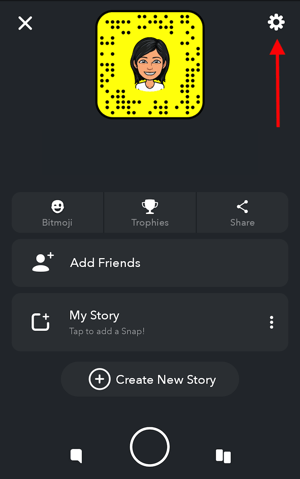
Snapchat profile screen with gear icon for accessing user settings

Under the "Who Can..." section, adjust your preferences accordingly. You'll be able to modify which people can contact you, view your Story, and even see your location. In most of these sections, your options for who can do these three things are:

  • Everyone, whether or not your friends with them on Snapchat.
  • My Friends, indicating that only those you've added as a friend can see your snaps.
  • Custom, where you can select specific users to include and exclude as viewers of your content.

4. Add your friends.

Adding friends in Snapchat allows you to see these users' Stories (a feature we'll talk about in just a minute), and alerts these users that you've connected with them so that they might add you as a friend in return.
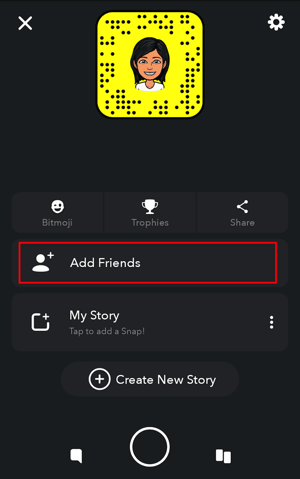
Snapchat home screen with option to Add Friends

To add friends, tap your Bitmoji at the top of the camera screen to visit your profile page. Then, tap the "Add Friends" option, as shown above. From here, you'll have the option to add friends by:

  • Username. To add a friend by their username, simply type in their username using the search bar at the top of your screen.
  • Contacts. To add friends based on your phone's address book, tap the "Contacts" tab at the top of your screen and select "Continue" at the bottom. Allow Snapchat to search your contacts in Snapchat by the phone number you have saved on each person, and the app will begin pulling contacts into Snapchat for you to send friend requests to.
  • Snapcode. Your Snapcode is contained in the yellow background surrounding your Bitmoji, as you can see in the screenshot above (believe it or not, those black dots embedded in the yellow frame are in a pattern that's unique to your account). To add someone as a friend by their Snapcode, you'll need to have a picture of this Snapcode saved in your phone's camera roll. Once you've captured this photo, turn it into a Snapchat friend by selecting "Snapcode" at the top of your screen and selecting the photo.

How to Make, Send, and View Snapchats

A snap is a direct message from one account to one (or several) other accounts. These messages disappear immediately after viewing, and can contain photos, videos, or images uploaded from your phone.

To send a photo Snap, open up the camera screen and tap Camera_circle_icon_small-595773352.jpg or the anywhere on the screen to capture the photo. To send a video Snap, hold Camera_circle_icon_small-595773352.jpg. By holding down the Camera_circle_icon_small-595773352.jpg and quickly swiping left, you can run the recording without holding down the button.

How to Make and Send a Snap

Once you've got a photo or video, you have 10 options before you hit send. See an explanation of each numbered icon below the following screenshot.

Snapchat picture from INBOUND 2018 with 10 options numbered in yellow

1. Discard your snap.

Tapping icon #1, as shown above, simply returns you to the camera screen, where you can take a new snap.

2. Save the snap to your memories.

All Snapchat content is ephemeral, meaning the snap either disappears after 24 hours -- if it's added to your Story -- or it's deleted after the friends you sent it to view it. Saving a snap to your Memories, however, allows you to keep the snap permanently and view it in your own private photo gallery.
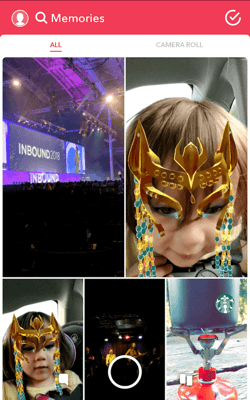
snapchat-memories-1

3. Add the snap only to your Story.

A Snapchat Story is a photo or video that is viewable to all of your friends for 24 hours. You can create multiple photos/videos shown in succession to create a longer story. Most brands use this feature, as it allows you to reach a larger audience.

To create a Story on Snapchat, follow the process for creating a Snap in the steps above. When you're ready to send it, tap icon #3, as shown just above Step 1. This will present you with the option to save your snap to "My Story," which makes it visible to just those who have added you as a friend; or "Our Story," which adds it to a collection of Stories from other Snapchatters who are in the same location or at the same event.

snapchat-add-to-my-story

4. Add text to your snap.

Tapping the "T" icon lets you add text to your snap, pulling up your phone's keyboard where you can create a caption for your photo in any font, color, or size. Check out an example from our event, INBOUND:

Snapchat text caption that says #INBOUND18

5. Draw on your snap.

Tapping the pen icon provides you with a digital pen, which you can use by dragging your finger across your screen. Change the color of this pen by sliding your finger across the color meter on the top-right of your snap, as shown below:
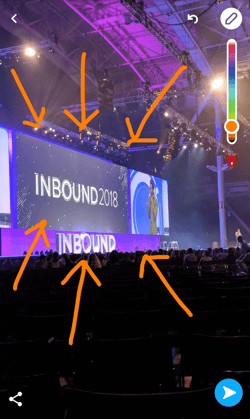
Snapchat from INBOUND 2018 with orange arrows drawn from the draw icon

6. Add stickers to your snap.

Tapping the notepad icon pulls up a gallery of fun, illustrated images. You can use these "stickers" to annotate your snap, as shown below:

Snapchat with added stickers of yellow love hand and purple heart balloon

7. Create a sticker from your snap.

Tapping the scissors icon allows you to cut out a section of your snap and paste it to this or other snaps you might take in the future. See what creating a sticker looks like below:
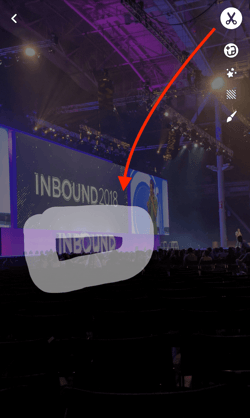
Snapchat icon to create a sticker from your snap

8. Attach a hyperlink to your snap.

Tapping the paperclip icon gives you a URL search bar. Type in any website's URL, and attach this URL as a hyperlink to your snap for your friends and viewers to click on. This is a great function for businesses to use when promoting content that originates on their blog or website.
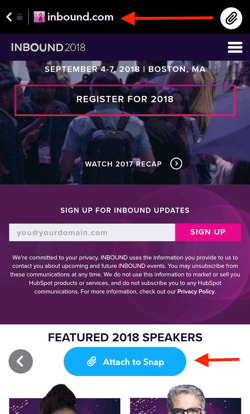
snapchat-attach-link

9. Change the duration of your snap.

Tap the stopwatch icon to adjust how long your snap stays on your friend's screen (or plays if it's a video). Your timing options range from one to 10 seconds -- or infinity, which keeps the snap on your friends' screen until they swipe away from the snap. For videos, the stopwatch icon lets you set how many times the video will loop on your friends' screen before the snap closes.
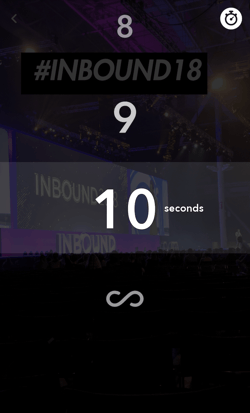
Snapchat icon to change the duration of your snap

10. Send your snap to your friends.

Once you're happy with your snap, tap the send-snap-1 icon on the bottom-right of your snap. This icon will show you a list of all your friends, where you can select to whom you want to directly send your snap. Then, tap the white arrow on the bottom-right of your friends list to officially deliver your photo or video. This will notify each friend you send it to that they've received a snap from you.
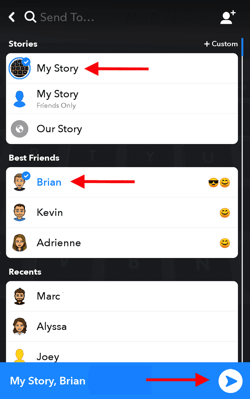
List of friends on Snapchat to send your snap to your friends

How to Add Snapchat Filters to Your Snap

Want to add filters, the time, the weather, or your current speed to a Snap? Swipe left or right on the preview screen to browse your options.

Add Lenses

Want to experiment with Snapchat Lenses? These are animations that can be overlaid on top of your selfie. To use them, simply press and hold your face with the camera directed toward you until the Lens option appears below. You can then swipe left to browse through the options, like this one:

Snapchat Lens making a rainbow come out of user's mouth

Image Credit: Snapchat

(Note: Snapchat also offers Sponsored Lenses -- like the Gatorade one featured in #4 on this list -- but it'll cost you. According to Financial Times, a Sponsored Lens could cost up to $750K in certain situations.)

Add Geofilters

You'll also notice something called Geofilters appear as you swipe through. On-Demand Geofilters are available to businesses and individuals for purchase.

These special filters can be use for an event, business, or specific location -- brand logos and trade-marks are permitted. Here's one made for the city of Boston, which we used on a snap from our event, INBOUND 2018:

Snapchat geofilter from Boston

How to View a Snap a Friend Sent to You

To view a Snap that has been sent to you, swipe right on your camera screen to see your Friends list. Snaps you've received directly from a friend will have a red (still photo), purple (video), or blue (text message) square to the right of their name. Tap this square once to see or play the Snap. If you have several Snaps from the same friend, they'll play like a flipbook.
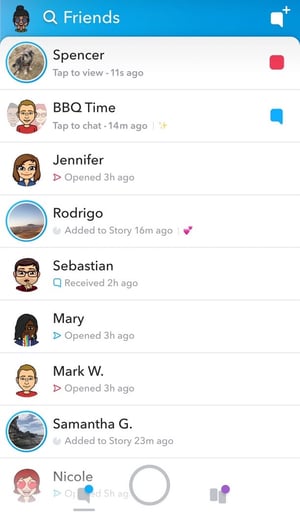
snapchat-friends-list

Image Credit: Elite Daily

Here are some helpful tips for viewing other users' snaps:

  • To skip a Snap, tap the screen once.
  • To exit, swipe down.

How to View a Snapchat Story

There are two ways to view Snapchat Stories: from your Friends list or from your Discover page.

From Your Friends List

To view a user's story, swipe left on your camera screen to see a list of your friends. Friends whom you recently interacted with will appear near the top. If they've posted a Story, you'll see it in place of their Bitmoji to the left of their name.

Tap the circular icon next to a user's name once to open their story. To view your own Story, tap your profile icon on the top-left on your Friends list.

From Your Discover Page

To see Stories from everyone you've added as a friend, regardless of your interactions with them, swipe right twice to the Discover page. Each friend who has an active story will appear at the top in a small, portrait-shaped rectangle, as shown below:
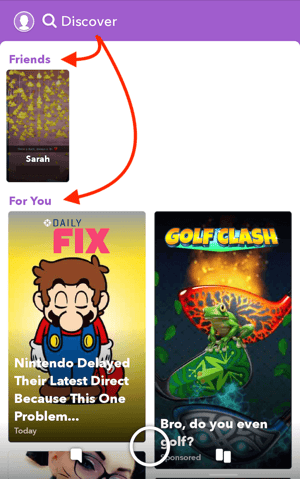
snapchat-discover

Stories are available for 24 hours (unless they are deleted). During that 24-hour period, you can watch the Story as many times as you want.

Below your friends' Stories, you'll see a section called "For You." This is where you can view branded Snapchat Stories, recommended to you from Snapchat and created by companies with Snapchat Business accounts. In the section below, we'll talk more about how businesses can use their accounts to garner the most views and appear on their customers' Discover pages.

Here are some helpful tips for viewing others' Snapchat Stories:

  • To skip to the next Snap in a Story, tap the screen once.
  • To skip to the next Story, swipe left.
  • To exit, swipe down.
  • To save a Story, follow the instructions here.

How to Use Snapchat for Business: 6 Tips From HubSpot's Snapchat Playbook

1. Create a personal Snapchat account.

Before you invest in Snapchat marketing for your brand, you'll need to create a personal account. Follow accounts your audience might follow. Add your friends and family. Just start using it. Your personal Snapchat account can help you understand the intricacies and nuances of how real people use the platform -- which will ultimately help you make better decisions and create better content.

At HubSpot, we’ve found the best performing content looks and feels like the native content being created by the average Snapchat user. So use your personal account to play around with the front facing camera, explore different filter options, and dress up your Snaps with doodles and emojis. The more Snaps you send and engage with, the better your understanding of how the platform works will be.

2. Register for your Snapchat Business account.

Once you know the ins and outs of your personal Snapchat account, it's time to create your Business account. To do this, log into Snapchat online and fill out this form.
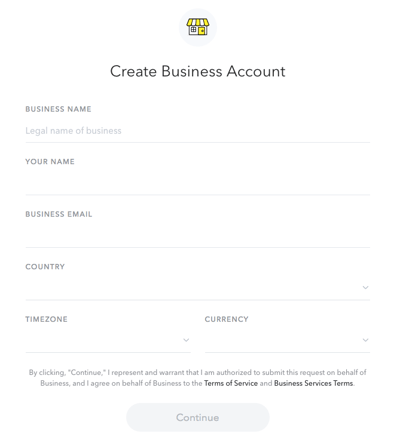
create-snapchat-business-account

As shown above, this registration form is where you can enter your business's name, your name, your business email, the company's location, and its main currency (e.g. dollars, pounds, etc). Press "Continue" at the bottom and follow the prompts to tether your Business account to your personal Snapchat account and officially launch your page.

3. Create a plan for measurement.

Here's the truth: Talk to any social media manager and they’ll tell you Snapchat analytics are a pain in the rear. At the end of the day, you’re limited to views (Screen_Shot_2016-05-09_at_12.36.07_PM.png), screenshots ( Snapchat_screenshots.png), and replies. That’s it.

You can’t even get a total follower count: Snapchat replaces what would be your follower count with a score that reflects the sum of the messages you send and receive.

All this aside, you can use context to put things into perspective. Here are a few tips we've picked up along the way to help us better understand our Snapchat performance:

  • Looking at your retention rate (what percentage of people watch each frame of your story) will allow you to compare stories to each other. Which are performing better? We’ve learned there’s a sweet spot around 90 seconds -- any longer than that, and people start to lose steam.
  • Looking at the percentage of people that dropped off after the second Snap will help you gauge general interest. If 30% of our audience dropped off after the second Snap, we probably missed the mark.
  • Reviewing qualitative feedback can help you better understand your success. If people are sending you chats telling you they love your latest post, you’re probably on the right track.

Another tricky part about Snapchat analytics? In order to accurately collect numbers, you need to log in and write them down or screenshot them exactly 24 hours after you took the first Snap. Otherwise, they disappear forever. (We learned this the hard way. A few times.) You can find your views & engagements on the “Stories” screen.
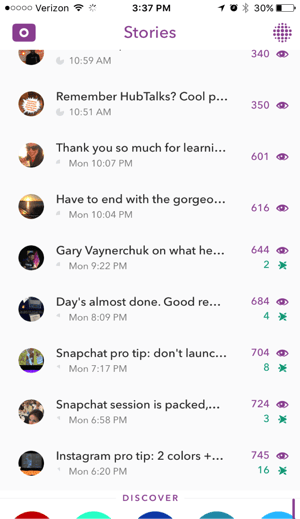
HubSpot_Snapchat_Story.png

At HubSpot, we record the following information on each Story:

  • Story Title: What are you calling this Story?
  • Number of Snaps: How many individual Snaps are in your Story?
  • Length of Story: How long is your Story from start to finish?
  • Views on first Snap
  • Views on last Snap
  • Retention rate: What percentage of people who start your Story view through the end?
  • Engagements: How many people screenshot a Snap and send a direct message in reply?

4. Source content and ideas from your team.

Finding the time to come up with creative, engaging content ideas for Snapchat can be a big challenge -- especially if you're the only person on the job.

To combat this, we turned to our collective team to gain perspective and source ideas. This is an especially interesting tip if you work at a company with global offices, as it can help you piece together interesting stories from all over the world.

Here's how we approached this outreach:

  • First, we sent out a company-wide email asking for anyone who wanted to be featured on Snapchat. This gave us a massive list of people who were interested in being on camera or creating Stories themselves.
  • We then created an internal Slack channel for all those who were interested. We used this platform to ask for volunteers for specific shoots and to source general ideas.

If you're struggling to gain internal support, you might want to consider explaining how certain teams could benefit from getting involved with the company Snapchat account. For example, our social media team is working closely with the culture team to highlight our company culture. By creating stories that showcase what life is like at HubSpot, they can get the word out about our culture, while also helping us lighten our daily content load.

5. Focus on variety.

If you want to maintain an engaged audience, it's important that you commit to consistently posting great Snapchat content. What makes a Snap or Story great? For starters: Variety. Snapchat users like to consume stories and information in different formats, and the app provides a lot of room for creative application.

For example, here are a few ideas and formats we're currently testing:

  • Video vs. stills
  • Graphics/drawing/emojis
  • Selfie cam style video vs. point and shoot
  • Sound vs. no sound

By testing different types of content, we can start setting up some best practices that we can share across the company. Here are some early findings:

  • Short videos rule. Our highest performing videos are all under 60 seconds long.
  • Pay attention to timing. Things like newsjacks or live coverage of major company events tends to perform well.
  • Cast a wider net. We’ve incorporated content from our Sydney and Dublin offices, which helps us build out a global perspective. This initiative has been really well received by our Snapchat audience.

Looking for inspiration? Check out what 10 of the best brands on Snapchat are doing to engage their audience.

6. Look for creative ways to build your audience.

On most social networks, it’s easy to browse around and find stuff that might be interesting to you. For example, on Instagram you might search for a particular hashtag or look for photos tagged with a specific location. Snapchat, however, does not make “discoverability” easy. And as a result, building an audience requires you to get a little creative.

When we launched HubSpot's Snapchat account, we leveraged other company channels -- blog posts, social media, etc. -- to attract followers. As a result, we got some momentum going. Trouble is, keeping that growth moving has proved to be a challenge.

To avoid stalling out once the initial excitement has faded, we recommend developing a long-term promotional plan to keep your audience up-to-date on what's to come.

Some more tips for increasing your reach:

  • Leverage partners or influencers. Invite others to be featured on your account, and ask them to spread the word to their network.
  • Newsjack. We’ve done a few “HubSpot Hot Takes," which is essentially our version of a quick reaction to industry news. This has gotten our account mentioned by people on other social platforms, which helps spread the word.
  • Join the conversation. Find an opportunity to get involved in a relevant event and leverage that audience. We recently did a takeover from Social Media Marketing World, highlighting some speakers, sessions, and key learnings from the conference. In 2016, we posted about the takeover using the #SMMW16 hashtag and saw a noticeable spike in followers that day.

7. Don't get too caught up with perfection.

This one is hard for many content creators to stomach: We like to edit, adjust, tweak until the last second. But if you’re doing Snapchat right, it’s not gonna be perfect.

Stories should feel quick, off the cuff, and not overly produced. In fact, one of our highest performing stories was just a quick video of me sitting in a chair reacting to a Facebook platform announcement in real time. I saw the press release, ran to an empty room, and fired off a few quick snaps explaining the change. That's it.

Keep in mind that the photos won’t be professional-grade ... and they don't have to be. Your focus should be on finding a way to create authentic, compelling moments and stories, so try not to overthink it.
free guide: how to use snapchat for business


from Marketing https://blog.hubspot.com/marketing/how-to-use-snapchat-for-business

Driving SEO Results Through Content Marketing: Results From Over 6000 Articles

Content marketers have so many questions and hesitations during their day. Did I include the target keywords in the text and title frequently enough? Did that guest blogger really write that piece? Or did they pull all of the copy from another site and try to pitch it as their own? Is this blog long enough? Too long? Is this too tough for my readers to understand? All of these questions and more are on a content marketing professional’s mind every day.

SEMrush has analyzed more than 6,000 articles using the SEO Writing Assistant tool to determine the preferences of content gurus. This research helps you to take a look at the best practices in the world of content marketing, not from the theoretical side, but in how people are actually creating and optimizing their content.

The SEO Writing Assistant Tool is a Google Docs add-on and a WordPress extension that can quickly analyze any text online. It gives you information about keywords targeted, how well the post is optimized for them, word count, readability score, and plagiarism hits by providing recommendations for content optimization based on best-performing articles in Google’s top-10 for given keywords in a given location.

Using Keywords 

The first thing you want to do before you start writing is to determine the keywords you want your content to be shown for in Google. According to our study, editors use an average of two target keywords in their articles, with at least one of them in the title. Still, a large number of content writers—more than 50% of editors using the SEO Writing Assistant tool—don’t fully understand the importance of having more than one keyword in their text.

Optimizing your article for more than just one keyword gives you an opportunity to appear in searches for more than one query. Avoid creating different texts for each search query—this is an old-school SEO practice.

The optimal number of target keywords recommended for use in articles is 15. It can really help to maximize the visibility of your content. It is worth noting that more than 95% of SEO Writing Assistant’s users followed the tool’s recommendations to increase the number of relevant keywords. This indicates that the world of content marketing has begun to trust online tools.

Targeting Devices and Locations

Another critical decision to make is on which devices and locations you want to promote your content. Depending on whether you need to promote your content on mobile or desktop, your strategy will change. Because for the same keywords on different devices, you can see different articles at the top of the Google search engine results page or SERP. The same goes for locations.

You should always tailor your text to specific devices and cities to win the battle for the top spot in the SERPs. Our study revealed that more than 65% of editors prefer to target their content in specific regions, or even cities, rather than countries. Unfortunately, only 3% of recipients chose a mobile device. This is a lost opportunity. After all, more than half of global traffic comes from mobile devices.

Measuring Text Length

A recent report by SEMRush studying ranking factors found that longer pages tended to rank higher. For reference, the average content length for the top 3 rankings was about 750 words. The average content length for position 20 rankings was about 500 words. This corresponds to the average length of the analyzed articles by the SEO Writing Assistant tool: 810 words.

“I think that while most marketers might be surprised by the average word count of 810 words, it tells me that more brands might be adding variety to their content, which is a good thing. As much as I’m a fan of super in-depth, pillar guides, I don’t think they should be the only public content a company is putting out. For example, for each huge guide you publish, you might want to publish a few shorter posts linking back to it if you’re following the content cluster model. Or, if you’re creating a podcast or video content in addition to written blog content, you’ll want to create blog posts about them that might be on the shorter side while still getting their point across thanks to multimedia,” comments Brittany Berger, content marketing expert.

Improving Text Readability

Readability is one of the most important metrics of your text. It evaluates your text’s difficulty based on the recommended Flesch-Kincaid reading-ease scale. The higher the score, the easier to read. For example, if your score is between 90 and 100 points, it means that the average 11-year-old easily understands the text. If your score is between 0 and 30 points, then your text is very difficult to read, and only university graduates will be able to understand it.

According to the study, the average readability score for articles that have not been optimized is 39. But, 95% of readability suggestions issued by the tool were successfully implemented by the authors.

Checking for Plagiarism

Duplicate content is the greatest enemy of a strong online presence. In some cases, this is a necessity, but more often it is a manipulation of organic search results. To avoid Google’s penalties, you should create unique content and always check your text for plagiarism. In our research, more than 23.8% of the analyzed articles came back as containing plagiarized text.

As our study revealed, content optimization can be a rather time-consuming task. The average time users spent optimizing their articles was 2 hours and 32 minutes. But it is worth the effort for the results.

Driving Results

When it comes to content marketing, you should always fall back on two things if you want results:

  • Give your audience exactly what they want
  • Heed the best practices for content creation and keyword optimization

These two things will help your articles to be both valuable and competitive. This will help you to improve your SERP rankings and get more traffic to your website.

SEMRush Content Marketing Infographic

Were there any surprising findings in our study for you? I’d love to hear about what surprised you in the comments below.

The post Driving SEO Results Through Content Marketing: Results From Over 6000 Articles appeared first on Marketo Marketing Blog - Best Practices and Thought Leadership.


from Marketo Marketing Blog https://blog.marketo.com/2018/09/seo-results-content-marketing-6000-articles.html

9 of the Best Bitcoin Wallets for 2018

The best bitcoin wallets are the safest bitcoin wallets. And out of the four types of wallets you can use -- hardware, software, web, and mobile -- the crypto community generally considers hardware and software wallets to be the most secure.

If you’re wondering why hardware and software wallets are more secure than mobile and web wallets, I’ll explain below.

Mobile wallets are the most convenient, but people who have a certain set of impersonation tricks up their sleeve can easily hack it. Web wallets are just as risky -- they technically own your private key. So if cybercriminals can hack your web wallet provider, they can also steal your private key and your crypto funds.

On the opposite end of the spectrum, hardware wallets are like external hard drives for your bitcoins. They’re the most secure way of storing your bitcoins because they limit your funds’ exposure to the internet and potential hackers. Software wallets are installed on your computer, but they’re more secure than mobile or web wallets because they can encrypt your private key and account recovery phrases.

With this in mind, we decided our curated list of the best Bitcoin wallets should only feature hardware or software wallets. So read on to find a wallet that can safely and securely store your cryptocurrency. 


9 of the Best Cryptocurrency Wallets for 2018

1. Ledger (Hardware Wallet)

Ledger offers two of the most secure Bitcoin wallets on the market: the Ledger Nano S and the Ledger Blue. Engineered for maximum security and simplicity, the Nano S looks like a bluetooth dongle and and only has two buttons you can press. It also protects your private key with a pin code and the same type of smart card chip passports and credit cards have. If you ever lose your Nano S, it’s backed up by a recovery phase, so you can just restore your account on a new Ledger device.

The Ledger Blue has all the same functionality as the Nano S, but it looks more like an iPad than a bluetooth dongle. So instead of controlling the hardware wallet with just two buttons, you manage your Bitcoins on a color touchscreen.

Compatible With: PC, Mac, and Linux

Price: $99.99 for Ledger Nano S, $269 for Ledger Blue


2. Trezor (Hardware Wallet)

Picture Credit: Trezor

Just like Ledger, Trezor also offers two types of hardware wallets: the Trezor One and the Trezor Model T.

The Trezor One is the more affordable option and recommended for Bitcoin beginners. But even though it’s technically for crypto novices, the wallet still has robust functionality. You can store all your coins, keys, and passwords on it, use it to encrypt your data on the cloud, and get your own personal recovery seed, in case you ever lose it. The Trezor One also has a monochrome display with two buttons for simple and secure use.

The Trezor Model T has all the same functionality as the Trezor one, but the only difference between the two hardware wallets is that the Trezor Model T boasts a color touchscreen and is more expensive.

Compatible With: PC, Mac, and Linux

Price: $104 for Trezor One, $174 for Trezor Model T


3. KeepKey (Hardware Wallet)

KeepKey is a sleek hardware wallet that works with the wallet software on your computer to help you generate your private key, securely store it, and verify your Bitcoin transactions. To provide you with the most secure private key, KeepKey generates one with its hardware-based random number generator, protects it with a pin code, and will only store it in the hardware itself. KeepKey also gives you a backup key to recover your hardware wallet without compromising its private key, if it ever gets lost or stolen. Transacting Bitcoins on your KeepKey is just as secure as generating and storing your private key -- you have to approve each of your transactions by punching in a pin code and pushing the wallet’s confirmation button.

Compatible With: PC, Mac, and Linux

Price: $129


4. BitBox (Hardware Wallet)

Picture Credit: BitBox

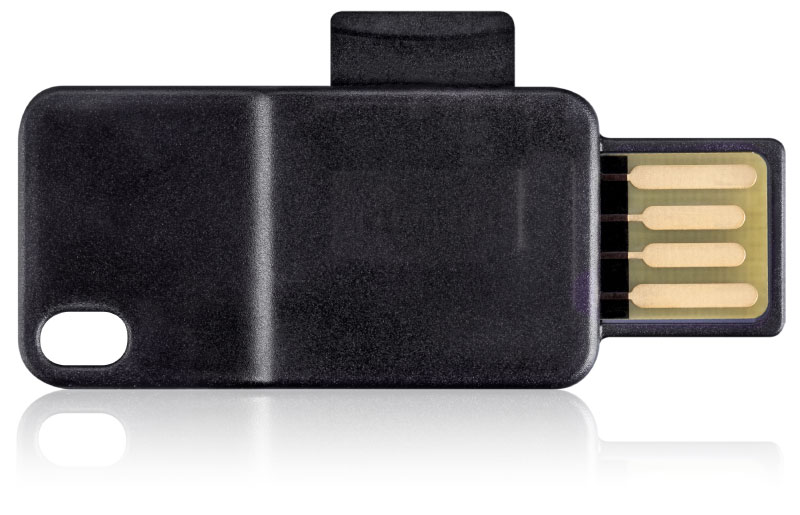
BitBox is a small plug-in hardware wallet, kind of like a bluetooth dongle, that lets you store, spend, and receive Bitcoin, Ethereum, and Litecoin. They pride themselves on their wallet’s physical and digital security. For instance, BitBox’s protective case is made from the same material used in bullet-proof glass, and to safely secure your crypto funds, they leverage a dual chip system that guards your information on a high-security memory chip.

Compatible With: PC, Mac, and Linux

Price: $69


5. CoolWallet S (Hardware Wallet)

The CoolWallet S is the world’s only hardware wallet for mobile devices. The wallet looks like a thick debit card, and it uses encrypted bluetooth technology to wirelessly connect with your mobile device. To quickly and securely send or receive cryptocurrency from your phone, all you have to do is download the app and sync your wallet to it. The CoolWallet S also leverages an EAL5+ certified Secure Element microchip to safely store your coins.

Compatible With: IOS and Android

Price: $189


6. Copay (Software Wallet)

Picture Credit: 99 Bitcoins

Copay is a multisig wallet, which means you share your crypto funds with a group of people, like your family, friends, or coworkers. A shared-funds wallet is one of the most secure ways to send cryptocurrency and prevent fraud. For instance, to send Bitcoin from your Copay wallet, your entire group has to approve the transaction, just like how nodes verify each transaction of a cryptocurrency on their blockchain. Another one of Copay’s best features is that you can store multiple bitcoin wallets on your account, like a personal wallet and a business wallet. And since Copay’s software and server is open source, enterprise companies and cryptocurrency experts can also create their own version of the Copay wallet to gain full control of their crypto assets.
Compatible With: PC, Mac, and Linux

Price: Free


7. Electrum (Software Wallet)

Picture Credit: Bitcoin Electrum

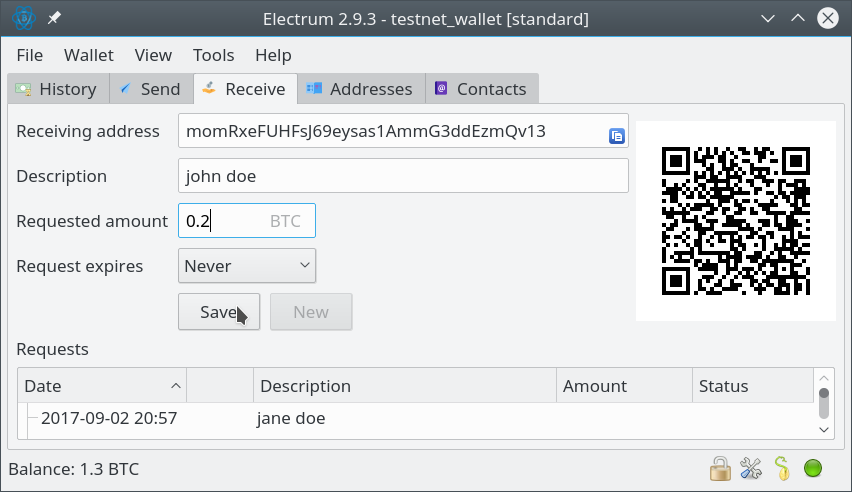
Since its inception in 2011, Electrum has been one of the most popular Bitcoin wallets in the crypto community -- it’s free, easy to use, and, most importantly, safe and reliable. To protect your Bitcoin funds, Electrum encrypts your private keys, stores them in your computer, and has two-factor authentication. Electrum’s major advantage over other software wallets is that it’s faster and hogs less space on your computer because its servers index Bitcoin’s blockchain instead of downloading it entirely. You can also recover any stolen crypto funds with your secret phrase.

Compatible With: PC, Mac, and Linux

Price: Free


8. Jaxx (Software Wallet)

Picture Credit: Coin Central

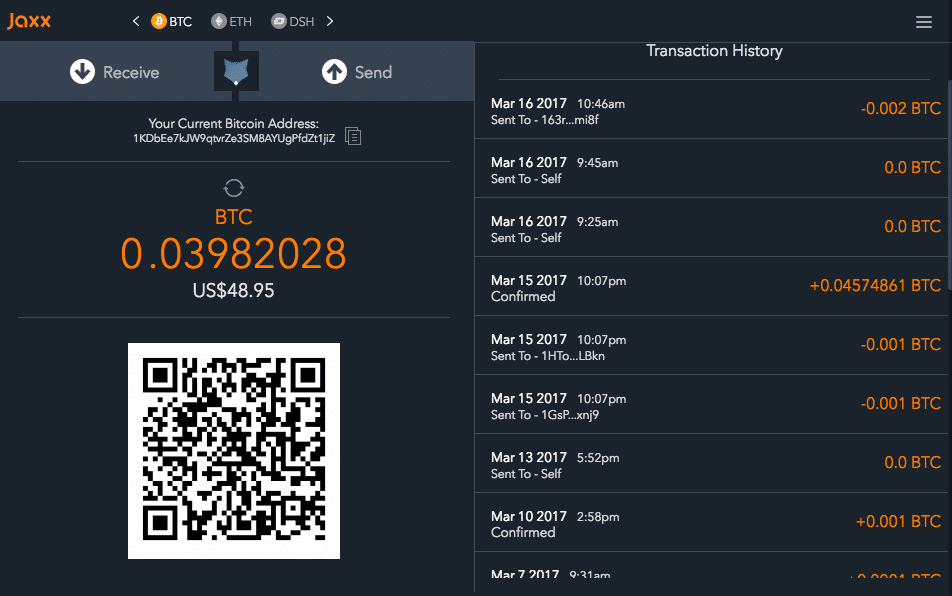
Founded by one of the co-founders of Ethereum in 2014, Jaxx doesn’t want to tie their users down to one cryptocurrency wallet or software. They give you a Masterseed that manages the private keys for all your blockchain-based assets and lets you use them on any other cryptocurrency wallet or software. Another one Jaxx’s top features is its Blockchain Interface, which lets you convert your digital assets to other cryptocurrencies.

Compatible With: PC, Mac, and Linux

Price: Free


9. Exodus (Software Wallet)

Picture Credit: Exodus

In addition to being a cryptocurrency wallet, Exodus is also a crypto portfolio and crypto exchange. You can trade, manage, and store your cryptocurrency all in one platform. To help you clearly understand the performance of your crypto assets, Exodus visually displays your portfolio in charts and graphs. Their exchange also has a clean, intuitive design to help you confirm that you’re trading the crypto assets that you mean to trade. And if you want to store your cryptocurrency safely and securely, Exodus’ wallet will encrypt your private keys and transaction data for your eyes only.

Compatible With: Windows, Mac, and Linux

Price: Free


from Marketing https://blog.hubspot.com/marketing/best-bitcoin-wallet

Why Marketers Suck at Video — and How to Fix It

Us marketers are a tight-knit tribe. We share a lot of similar beliefs. We believe that content is king, that nothing is as sweet as first-page first position, and that interruption is the enemy.

We also believe that video is the future. Right now people spend a staggering six hours a day watching video, and that number is only increasing.

But I’d like to let you in on a little secret: even though us marketers know that video is the future, that our customers love it, and that it can be the most compelling and powerful marketing channel available -- it scares the hell out of us. And in general, we’re really bad at it.

As the CMO of HubSpot, I personally love the video work we have done but also know firsthand how hard it can be. That’s why today we’re introducing HubSpot Video, a series of new features woven throughout the entire HubSpot growth platform. This isn’t a new app or a simple integration. It’s the video-ification of HubSpot.

We took this approach because we believe it’s exactly what the industry needs. We’ve been talking about video for years, but adoption of video by most businesses has been painfully slow. In our own marketing work at HubSpot, we’re still just figuring it out.

Video can transform your business -- but it’s hard to get right. Here’s why.
Why we fail at video.

A. We’re afraid of video.

Going on camera puts you and your business out there in a way that a blog post or a whitepaper doesn’t. Once you push that record button, there's nowhere to hide on camera -- and that can make you feel exposed and out of your element. You're not a professional actor, you're a marketer! What if you embarrass yourself?
As a result of these fears, video has become something that is fussed over like no other type of content. We take lots of time to produce it, hire expensive agencies to make sure it’s good, and generally end up with a few high production, but ultimately not-too-impactful videos. It's just way too infrequent, way too safe, and mostly mediocre.

B. Our video strategy is stuck in 2010.

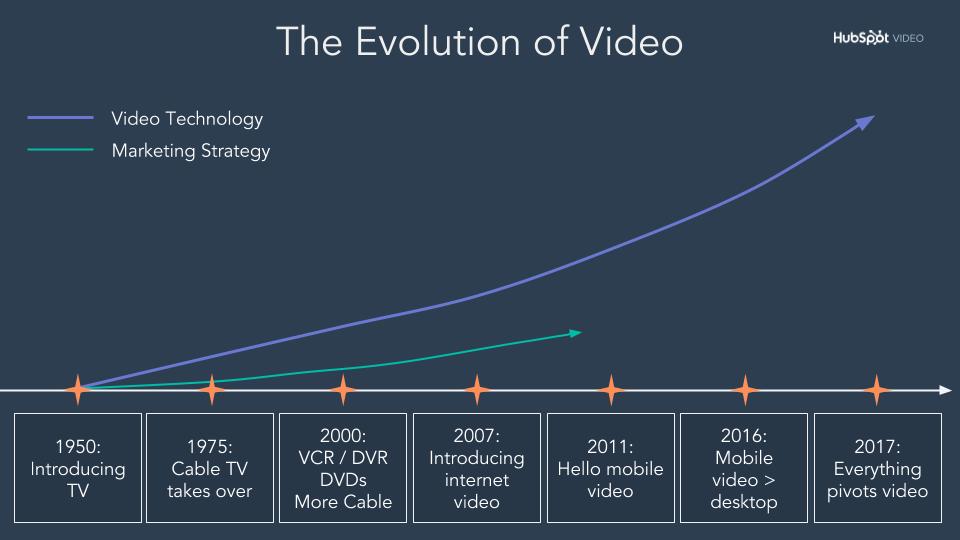
It’s hard to measure the impact of video, so our collective yardstick for success has become the viral video: an internet phenomenon that only .0001% of all videos reach (an even smaller percentage of which are branded). This way of thinking is insane. If you start out with this expectation, your video strategy is already on a poor foundation. 

The Evolution of Video-1

Video is a great top-of-funnel awareness tool, but it’s also great at the bottom of the funnel -- and everywhere in between. It’s just a great channel for communication in general. With people consuming video at all times a day and for all sorts of different reasons, views alone is an ineffective metric to pin all your hopes to. It’s time to rethink what video is for, who makes it, and how we make it.

How people watch video has changed.

The way people consume video today is very different than it was in 2010. Smartphones and high-speed wifi has made high-definition video consumption available anywhere, at any time. This increase in accessibility has led to a boom in how many people watch videos, and this steadily expanding audience demands new and different types of content on a regular basis. Publishers and individuals alike have been more than happy to fulfill that demand.

This influx of video content creators means that we’re not just all watching the same viral video anymore. Today we’re drawn towards more personal, authentic videos. We can watch anything at any time, more often than not we're opting for Snapchat and Instagram stories. These platforms host videos from our friends -- and it doesn't get much more personal or authentic than that. More than anything, we want to hear from people like us. And with the ability to create great video with nothing more than a smartphone, more people than ever before can produce and share quality content.

But we’re not just watching video from our friends on Instagram and Snapchat. Influencers and savvy brands create video content that feels like it's from a friend and blends into our feeds naturally. They get it: people want personal, authentic videos.

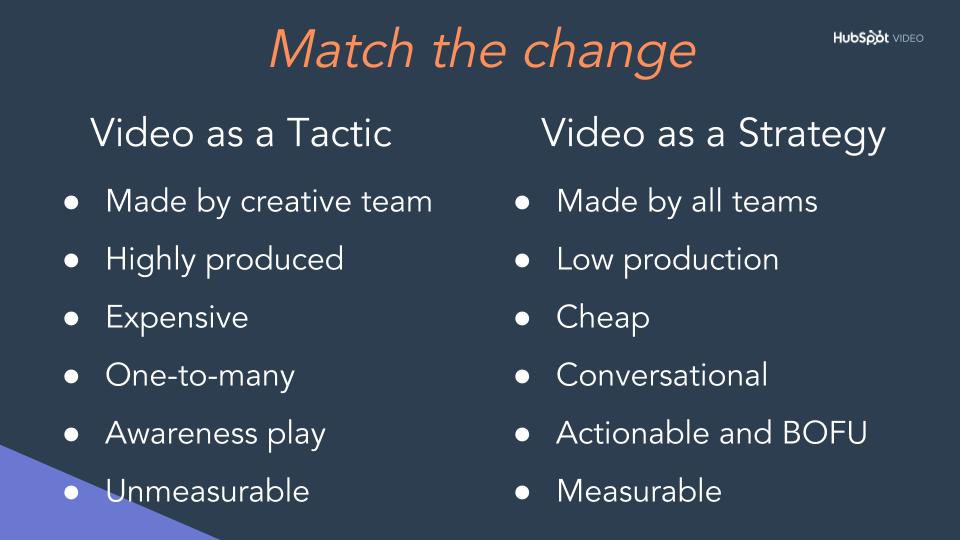
Video has changed and we need to match the change.

If you want to transform your business through video, you need to take a more personal, authentic, and conversational approach to the content.
86% of people say authenticity is important when deciding which brands they like and support. A simple way to increase authenticity is to use the people on your team to create videos. Keep your content short, simple, and honest. Speak directly to a specific audience and be yourself. Let people into your world -- don’t try and create an artificial environment. HubSpot Video product marketing overview

The more personal your videos are to a specific audience, the more likely they are to resonate with the people that matter most to your brand. Marketers need to use the data they have to build videos for specific audiences, even if those audiences seem small or niche. If you have a big update for the 25 people who buy a specific product from you, organize them into a list and send them an email with a video specifically for them. Use data to guide and optimize this approach. Think about where you can add video to landing pages even if they are way down the funnel. A personalized, authentic message at that point may have a big impact on conversion rates.

Build an experience around video. Video is no longer a passive experience: you can now comment on, message, share, or create your own video in response to a video you’ve just watched. Give your marketing video the same treatment. Include in-video CTAs and forms to make your video interactive. Build lists and workflows that increase touch points around a single video.

Finally, sometimes your videos just won’t work -- and that’s ok. It’s a good idea to create more video of lower production quality more frequently to increase your odds of reaching the right group. This approach will also keep your videos fresh and topical. Don’t create video just to create video, but do think about video in everything you do. This doesn't mean you need to abandon your big creative video efforts -- just make sure those big productions aren't the only way your company uses video content.

Video needs to be a business strategy, not a marketing tactic.
Most businesses think of video as a powerful marketing tactic -- which it is -- but all your teams can benefit from incorporating video into their workflows and strategies. At HubSpot, personalized one-on-one videos are part of the sales process (we email prospects personalized videos on how to use their trial), and part of how our services team solves tickets and onboards new customers.

Our marketing team was the first team to really dive headfirst into video, but as other teams saw the impact video had for us, they picked it up and adapted it to their own departments' goals. Now, video is a critical element of making our flywheel spin. All our front office teams use video -- and their videos often work together to move people down the funnel.

Similarly, to truly transform your business with video you need to turn video from a marketing tactic into a complete business strategy. As a marketer, you’re best suited to lead the charge. Learn more about using video in your sales process here, and services process here.
The Video-ifcation of HubSpot

There's a lot that goes into making a business-wide video strategy work. Up until now, we’ve seen customers stitch together a series of tools to personalize videos, optimize them, and make them interactive. But today, HubSpot Video makes all of this possible.

HubSpot Video -- a series of new video functionality woven throughout the HubSpot platform. Learn more about HubSpot Video here.

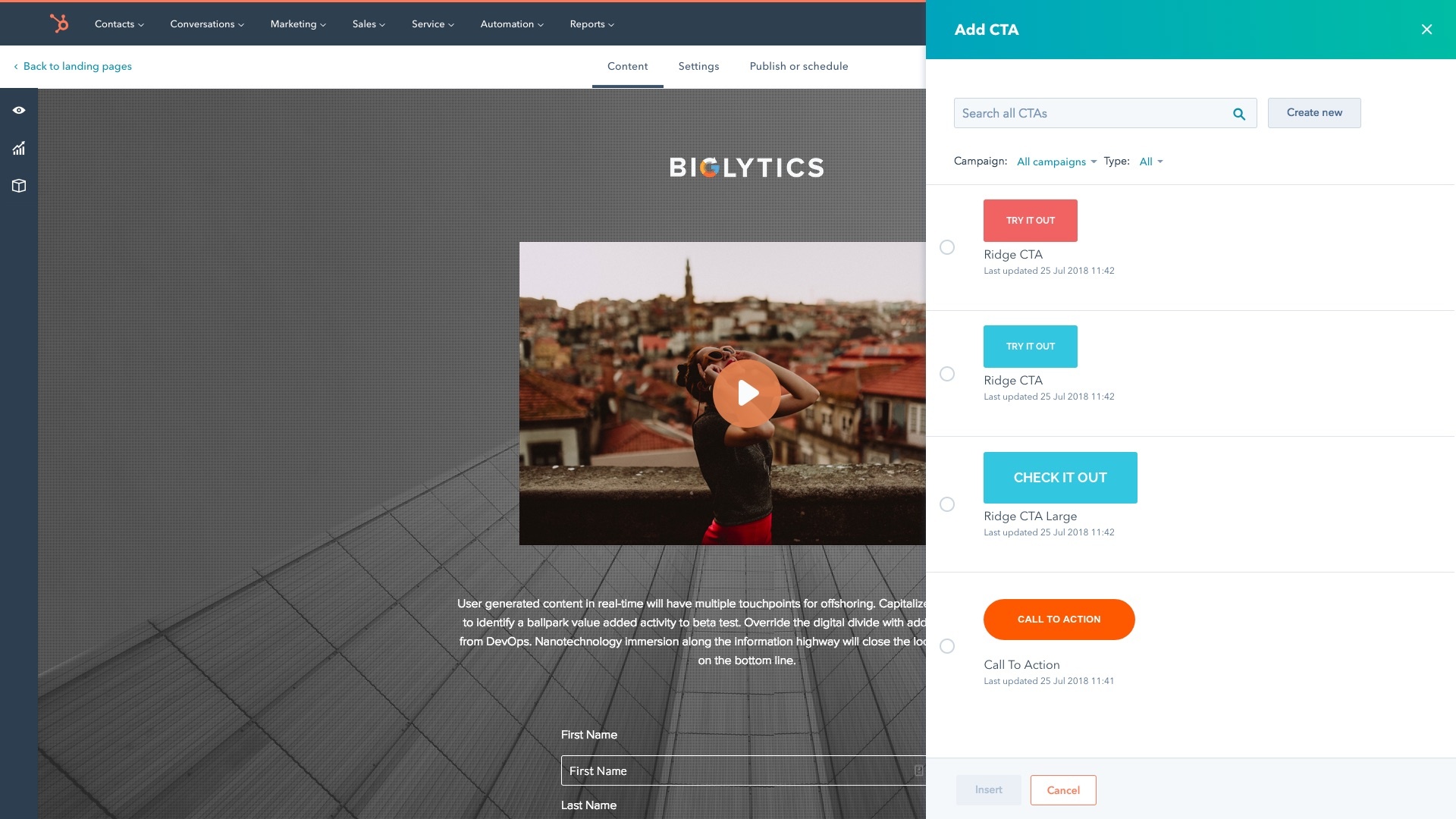
With HubSpot Video, marketers can now host and manage video files inside of HubSpot for free. You can embed those videos into website pages, blogs, and social media channels with just one click. You can also add in-video CTAs and forms to make videos interactive. New video specific landing page analytics help maximize the impact of your video marketing campaigns and make it easy to personalize your videos.

Video in editor - Add a CTA

HubSpot Video also stretches across sales and services.

Salespeople can build stronger relationships with prospects by creating, sharing, and tracking personalized videos right from the HubSpot CRM. Service teams can help customers faster and more completely with personalized help videos created and shared directly from Service Hub.

Learn more about all the features of HubSpot video here. 

Video is the future, and it’s time to do more than just believe that.

Video is one area of marketing where there's still a really big first mover advantage. It’s been around for a while, but very few are doing it well. If you can jump your strategy forward and take a more personalized, authentic, and business-wide approach to video, we’re sure it can transform your business. HubSpot will be here to help -- with new tools, certifications, and more. It’s only the beginning for HubSpot and video.


from Marketing https://blog.hubspot.com/marketing/why-marketers-suck-at-video-and-how-to-fix-it

Wednesday, 5 September 2018

How the Flywheel Killed HubSpot's Funnel

I’ll be honest. When Brian Halligan (HubSpot’s CEO) started talking about retiring the funnel and adopting the flywheel as the model to think about our business, I was not very happy.

See, I love the funnel. It’s been my trusted sidekick for years. It’s given me the hard feedback I’ve needed, celebrated my team’s successes, and gotten me out of more growth troubles than I care to admit. I love the funnel so much that my team at HubSpot was literally called the Funnel team, and the opening slide of my global team kickoff this year was a photo of about 25 funnels.

So no disrespect to Brian, but “retire the funnel”? Yeah right.

That is, until I started learning about flywheels. Turns out, they’re pretty amazing.

Funnels lose the energy you put into them once you reach the bottom, but flywheels are remarkable at storing and releasing energy.

Invented by James Watt (yes, the guy whose name is on every lightbulb) over 200 years ago, a flywheel is simple a wheel or disc on an axis, that’s incredibly energy-efficient. The amount of energy it stores depends on how fast you spin it, how much friction there is, and the composition of the wheel itself -- how big it is and how much it weighs. Flywheels are used in cars, trains and power plants.

Here’s why this model changed my mind.

Despite the funnel being my first love, I have to admit that its linear approach to measuring growth is a huge weakness. Funnels produce customers, but don’t consider how those customers can help you grow. And all the momentum you built acquiring that customer? Gone. Each day, each month, and each quarter, we have to start new.

This isn’t just inefficient, it’s a major problem. Ignoring how customers can help you grow is perilous in today’s world.

Word of mouth has always been fundamental to great marketing, but look at the world we living in today. Trust is at an all time low, it’s harder to get distribution on Google and Facebook, and prospects are doing far more independent research than they ever have. With word of mouth being so crucial, losing the momentum you generate in creating a new customer is a real drag on your growth.

Whereas funnels lose their momentum at the bottom, flywheels leverage their momentum to keep spinning. Also, because they preserve momentum so well, all of the additional energy you add to spin it faster adds to the capacity of the whole.

Learn how to go from funnel to flywheel in a free HubSpot Academy video tutorial.

Why the Flywheel Framework Matters

I know what you’re thinking: Are we just debating jargon for the sake of it?

No -- when you think of your business as a flywheel instead of a funnel, you make different decisions.

At HubSpot, shifting to the flywheel model helped us change in the following ways:

  1. Flywheels represent a circular process where customers feed growth. We’ve invested more in customer marketing, more in customer advocacy, and more in creating delightful onboarding for new customers. We’ve also invested in an integrations ecosystem that helps customers do more with HubSpot and creates real value for people who adopt our suite of software.
  2. Friction kills flywheels. We’ve made investments that systematically target our biggest points of friction: Great free software as an entry point, channels that help people connect now instead of later, a sales process that solves for prospects, and a broad range of customer education.

Using Your Flywheel as a Growth Tool

Three factors dictate how much momentum your flywheel contains:

  1. How fast you spin it
  2. How much friction there is
  3. How it’s composed -- how big it is and how much it weighs

The best teams will have strategies for all three.

Let’s start with how fast you spin it. The speed of your flywheel is increased by applying more force in the areas where it can have the biggest impact. In a funnel model, all force is applied to attract and acquire customers. In a flywheel model, you also apply force to delight those customers and make them successful.

Since you’re applying all sorts of force all around your flywheel, ensure that none of your investments oppose each other. A lack of alignment between sales and customer success, for instance, can create unhappy customers and slow your flywheel when they churn. Classic sales and marketing misalignment is another area where the flywheel can slow. Alignment is crucial.

You can reduce friction by finding the inefficiencies where your customers are losing momentum, and making them better. Improving conversion rates, delighting customers at scale, and addressing issues that cause you to churn customers increase the speed of your flywheel. The other crucial area to consider when thinking about friction is how your teams are organized. Silos, handoffs, and specialization all create friction.

As you successfully increase speed and decrease friction, you will create more delighted customers. More delighted customers means a “heavier” wheel, and one that produces more energy when spun. Said another way, your flywheel produces more growth as your customer count increases. If you can add “density” to those customers, by getting them to adopt more of your products or be more “sticky,” even more momentum and growth can be achieved.

How to Flywheel-ize Your Funnel

In his keynote at INBOUND 2018, Halligan explained the flywheel, and why it’s a powerful new growth model. In his keynote, he assigned the following “homework” to attendees:

  1. Identify the core flywheel metrics your company tracks
  2. Identify your company’s forces by flywheel stage
    • Re-draw those forces to maximize delight and word of mouth
  3. Identify points of friction between your customers and your employees, and points of handoff between internal teams, that affect customer experience
    • Re-align those points of friction to better serve the customer through automation, shared goals, or a reorganization

To help you build your flywheel and turn it into a growth tool for your business, I’ve completed his homework for HubSpot’s flywheel, and provided a guide for you to do the same.

Here are links to the homework templates:

  • Google Slides -- you won’t be able to edit this file directly, so make a copy for an editable version
  • PowerPoint

Assignment 1: Measuring the Flywheel

Our first task is understanding the status quo of your flywheel.

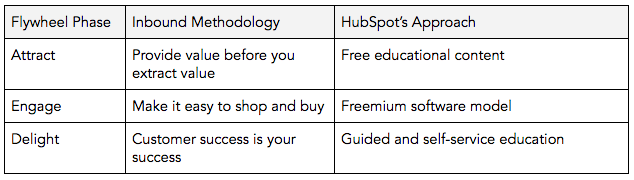
At each stage depicted below -- Attract, Engage, and Delight -- HubSpot has different priorities and commitments that we’ve made to our prospects and customers.

Here’s how we think about each stage:

Attract: This is where prospects enter your flywheel and interact with your company for the first time. Our commitment is to provide value before we extract value from those prospects.

Engage: At this stage, engage prospects that are interested in becoming customers. Our commitment is to make that decision making and purchasing process as easy as possible.

Delight: Finally, new customers have the potential to become promoters of your company. Remember that customer success is your success. Our commitment is to ensure our customers see success with HubSpot.

To determine the health of our flywheel, we asked ourselves two questions:

  1. What investments are we making at each stage of the flywheel?
  2. How are we measuring the success or failure of those investments?

Part 1: Mapping your go-to-market strategy

In this step, identify the core activity or program your company has invested in to uphold each of your Attract, Engage, and Delight commitments. Fill out each activity corresponding to its flywheel stage.

You may find that one flywheel isn’t enough to encompass all your company does. That’s perfectly okay -- there are probably multiple flywheels spinning in parallel. The purpose of this exercise is to distill the core parts of your business, so focus on the most important activity at each stage.

Attract: At HubSpot, we use inbound marketing principles to get our flywheel spinning. To provide value before we extract value, we’ve heavily invested in free content through our blogs, webinars, campaigns, social media, and HubSpot Academy lessons and certifications.

Convert: To make it easy for prospects to buy, we offer free versions of our software so users can try before they buy and seamlessly upgrade.

Delight: We help our customers succeed through a mix of guided and self-service education. Paying customers have access to a core implementation and strategy team, free users are offered light-touch free support, and both groups are given access to extensive user guides and knowledge base documentation.

Table1

Part 2: Measuring success

In this step, identify the most important metric for each activity. Make a note of conversion rates between each stage here as well -- this measures the friction in your flywheel.

Then, record (either month-over-month or year-over-year) how much you added or lost in that bucket, and your total number.

Attract: Our topline metric here is monthly website traffic. We measure how much traffic we gain month-over-month.

Engage: HubSpot’s flywheel moves visitors through the “Engage” stage in two steps.

First, we’re focused on how many free users of our product enter our flywheel each month. We also measure how many of those users churn. The more free users that we have the better the composition of our flywheel is and the more momentum it can generate.

Second, we build upgrade points in our product where free users can become qualified leads. We track how many of those qualified leads close into paying customers, and then track how many of these churn. Each churn causes us to lose momentum.

Delight: We run Net Promoter Score® surveys with our customer base quarterly, and we track the number of customers who are promoters -- that is, how many customers say they would recommend HubSpot to a friend, and how many drop from promoters to passives or detractors.

Assignment 2: Maximizing Delight

When you’re just starting to grow a business, most of your resources will be focused on the Attract and Convert parts of your flywheel. Rightly so -- it takes a lot of investment to build enough momentum to get your flywheel spinning. But once it is, consider whether your resources could be better spent focusing on delighting customers.

That’s because once your flywheel is spinning, momentum comes from retaining customers and transforming them into promoters who will advocate for your brand and even bring you new business.

In this assignment, examine the “forces” -- activities and programs -- that currently move your customers through your flywheel, and consider whether they are designed to serve your process or your customers’ needs. Then, list out what changes you’d need to make to those forces in 2019 to help maximize delight.

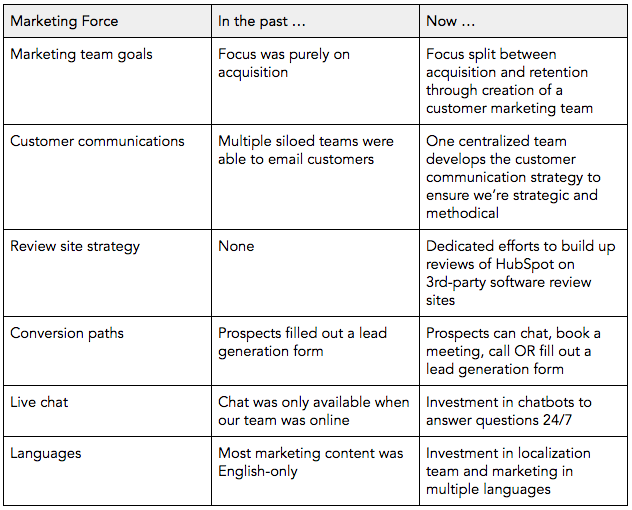
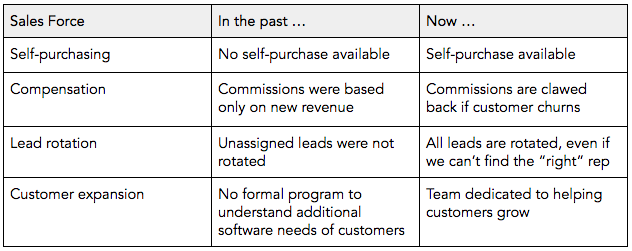
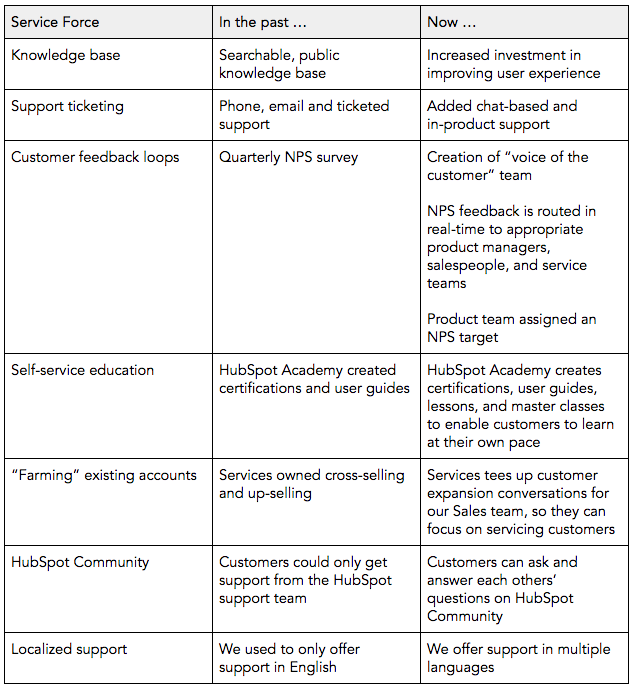
At HubSpot, we underwent this exercise at the beginning of 2018. Here’s how our forces have evolved across our marketing, sales, and services teams.

Table2

Table3

Table4

This is by no means an exhaustive list of the changes we’ve made to re-center our focus around the customer, but they’re examples of some of the biggest shifts we’ve made in our go-to-market and services organizations.

Assignment 3: Reducing Friction

There are many ways to reduce the friction in your flywheel.

One way is to smooth out common friction points, like your conversion rates between different phases, how many customers become successful, and how many churn. It’s not too difficult to identify this type of weakness, because you’re dealing with metrics that are largely isolated from one another.

It’s harder to see the forest for the trees, and examine how the overall structure of your company might be contributing to drag and friction. So for this assignment, we’re going to focus on one of the thornier sources of friction at your company: Your organizational chart. Siloed work and poor handoff between teams are some of the biggest areas of friction in most flywheels, and at HubSpot are a legacy from our funnel days.

You can break this down into four steps:

  1. Where are your points of friction?
  2. What can be automated?
  3. What can be addressed through shared goals?
  4. What can be addressed through team reorganization?

We’ll go step by step here.

Step 1: Identify friction

Where is there drag in your organization?

Externally, think about the complaints you hear from customers and prospects -- where do they have difficulty interacting with your company?

Internally, consider which metrics you struggle to move despite repeated efforts, processes that take longer than they should, and sources of common problems.

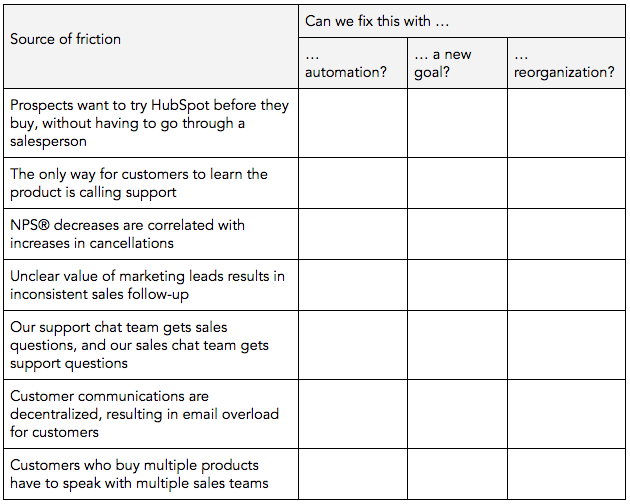
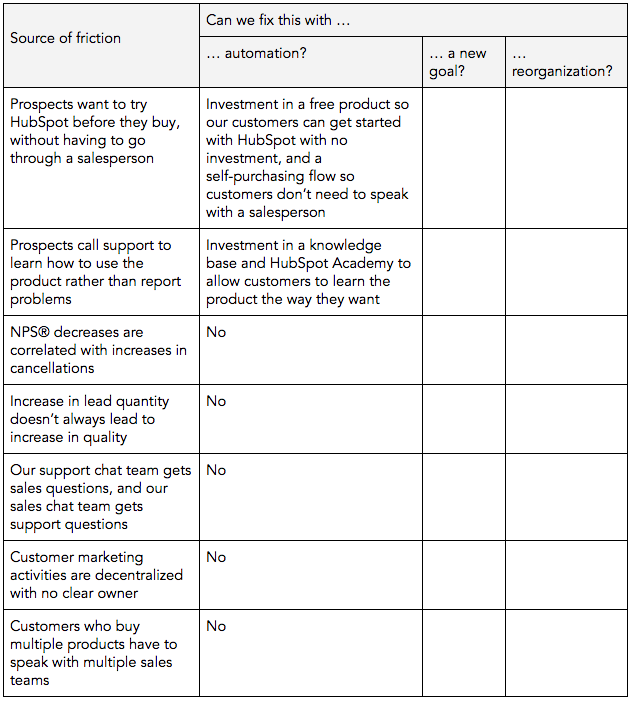
Here’s how we envision this at HubSpot (we’ll fill in each column as we walk through each step): 

Table5

Step 2: Automate repeatable tasks

Consider the activities your customers and prospects want to do, but are complex for humans to execute. In addition, look for the repetitive, mechanical tasks that fall on your team’s plates -- can you free up their time for work that’s more valuable for your customers? Also consider which parts of your go-to-market currently rely purely on your employees to function but could be supplemented by automation.

Here are the friction points that HubSpot has solved with automation:

Table6

Step 3: Reset goals to bridge teams

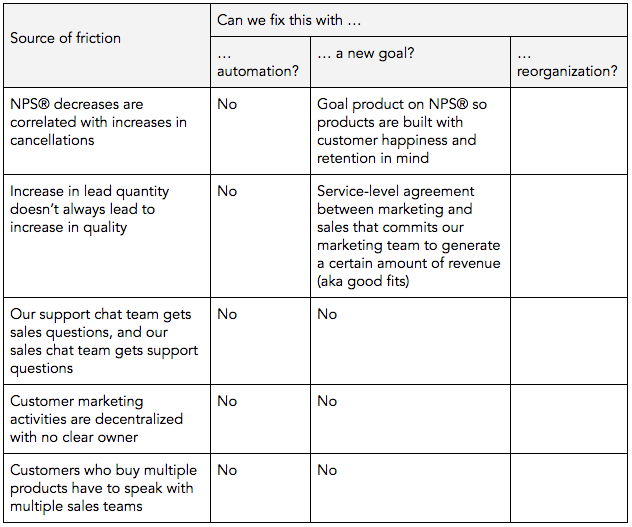
Often, friction exists because two teams are moving in opposite directions. For example, marketing is traditionally goaled on an overall lead generation number -- but optimizing for lead quantity doesn’t always lead to good-fit customers.

Some of your biggest friction points can be smoothed by re-setting goals or introducing processes that re-orient teams in the same direction. Here are our remaining points of friction:

Table7

Step 4: Restructure teams

Within every organization, there are problems that can’t be fixed by automation or goal realignment. In those cases, a reorganization may be necessary.

Some questions you can use to self-assess here are:

  • Do employees who work in the same functions sit across different departments?
  • Are teams over-specialized?
  • If your organization has a systemic blind spot, do you have a team dedicated to solving it?

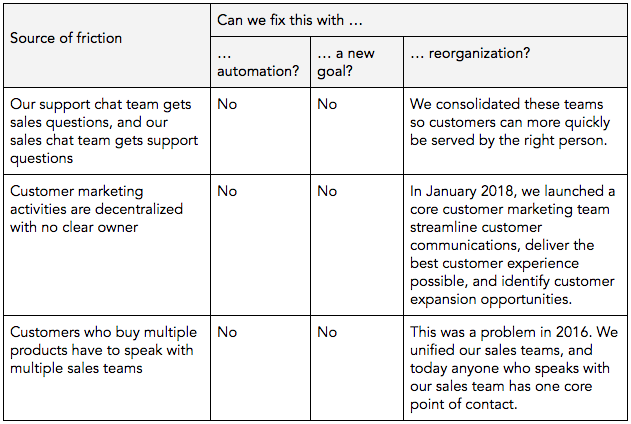
Here are final points of friction, and how we solved them:

Table8

So that’s our flywheel. I may have been hesitant at first, but after I used this framework to assess the areas we could improve … well, I’m a believer.

As you step through this exercise, screenshot your flywheel and share them on Twitter or Instagram using the hashtag #OurFlywheel.

Brian will be monitoring this hashtag until September 14 at 12 p.m. EST. If your company shares his favorite flywheel, he’ll send you two VIP passes to INBOUND 2019.

Terms and conditions apply and are included below.

New Call-to-action

OurFlywheel Homework Official Rules

ELIGIBILITY: Open only to persons who are 18 years of age or older and U.S. or Australian residents. Employees of HubSpot, Inc. are not eligible to enter or win a prize. All applicable federal, state and local laws and regulations apply. Void where prohibited or restricted by law. NO PURCHASE NECESSARY. A PURCHASE WILL NOT IMPROVE YOUR CHANCES OF WINNING.

OurFlywheel Homework GIVEAWAY PERIOD: The OurFlywheel Homework Giveaway entry period begins at 2:00pm EDT on Sept 5, 2018 and ends at 12:00pm EDT on Sept 14, 2018 (the "OurFlywheel Homework Giveaway Period"). Winners will be selected from entries properly submitted and timely received during the OurFlywheel Homework Giveaway Period.

HOW TO ENTER: During the OurFlywheel Homework Giveaway Period, enter by using #OurFlywheel on Twitter and/or Instagram, with picture of flywheel.  Include description as desired in body of message. Multiple messages permitted for descriptions (an “Initial Entry”). Limit one (1) entry per person, per company, and per household during the OurFlywheel Homework Giveaway Period via online entry, regardless of whether a person has more than one address or more than one person uses the same address.

ALTERNATIVE MEANS OF ENTRY: In lieu of an online entry, you may enter the OurFlywheel Homework Giveaway by mailing a standard-size postcard with a drawing and description of your company’s flywheel to: HubSpot OurFlywheel Homework Giveaway Entries, c/o HubSpot, Inc., 25 First Street, Cambridge, MA 02141. Postcard entries must be postmarked during the OurFlywheel Homework Giveaway Period to be included in the winner selection process, and no more than one Flywheel homework may be submitted during the OurFlywheel Homework Giveaway Period.

WINNER SELECTION: One winner will be determined by a panel of experts employed by HubSpot, based on originality and completeness on Sept 30, 2018. Winner will be selected from entries received during the OurFlywheel Homework Giveaway Period. The potential winner will be notified via email to the email address submitted with the potential winner’s entry within two (2) weeks after the selection]. The selection will be conducted by HubSpot, the judge of the OurFlywheel Homework Giveaway, whose decisions on all matters relating to the OurFlywheel Homework Giveaway shall be final. In the event that a potential winner is disqualified for any reason, HubSpot may, in its sole discretion, award the applicable prize to an alternate winner selected by the panel of judges.

PRIZES/ODDS OF WINNING PRIZE: The winner will receive two (2) VIP passes to INBOUND19. Approximate Retail Value (ARV) of each prize: $4,400 USD. Overall odds of winning depend on number of entries received during the OurFlywheel Homework Giveaway Period. No prize substitution or cash equivalent of prize. No prize transfer.

CONDITIONS: HubSpot reserves the right, at its sole discretion, to cancel, terminate, modify or suspend the OurFlywheel Homework Giveaway (or portion thereof). HubSpot also reserves the right at its sole discretion to disqualify the entry of any individual. All federal, state and local taxes on prize and any expenses not specified herein are the sole responsibility of winner. Should a dispute arise regarding the identity of the claimant, HubSpot reserves the sole right to determine the eligible party. BY ENTERING, ENTRANT WAIVES ALL RIGHTS TO BRING (AND COVENANTS NOT TO BRING) ANY CLAIM AGAINST HUBSPOT OR ANY OTHERS ASSOCIATED WITH THIS OurFlywheel Homework Giveaway. ENTRANTS FURTHER AGREE TO RELEASE AND HOLD HARMLESS HUBSPOT FROM ANY AND ALL LIABILITY ARISING FROM THEIR PARTICIPATION IN THE OURFLYWHEEL HOMEWORK GIVEAWAY, OR HUBSPOT’S USE OF ANY ENTRY INFORMATION. Any disputes that may arise hereunder shall be governed in all respects by the laws of the Commonwealth of Massachusetts without regard to the conflicts of laws principles of any jurisdiction. Venue with respect to any such disputes shall be had in the state and federal courts of the Commonwealth of Massachusetts.

THIRD PARTY WEBSITES: This OurFlywheel Homework Giveaway is in no way sponsored, endorsed or administered by, or associated with, Twitter or Instagram, or any of their affiliates. YOU RELEASE TWITTER and INSTAGRAM OF ALL LIABILITY RELATED TO THIS OURFLYWHEEL HOMEWORK GIVEAWAY TO THE FULL EXTENT PERMITTED BY LAW. Any entrant who creates multiple accounts with Twitter or INSTAGRAM for the purposes of increasing the odds of winning this OurFlywheel Homework Giveaway will be disqualified. All entries via Twitter must comply with Twitter Rules and Instagram Rules. If you have any questions or comments about the OurFlywheel Homework Giveaway, please direct them directly to us, the Sponsor.

PUBLICITY AND RELEASE: As a condition of entry into the Giveaway, except where prohibited by law, each entrant and each winner by accepting a prize grants to HubSpot all right, title and interest in, to publicize, broadcast, display and/or otherwise use, the Giveaway entrant’s name, city, state, and biographical material (collectively, “Licensed Rights”) in any media for advertising and publicity purposes, without additional review, compensation, or approval of the winner. As a further condition of entry into the Giveaway, each entrant, and each winner by accepting a prize, grants to HubSpot a worldwide, royalty-free, non-exclusive, perpetual license to display, reproduce, distribute, prepare derivative works of, and otherwise use any of the answer text submitted with an entrant’s entry, in any media and for any purpose, without additional review, compensation, or approval by the entrant. Entries must not infringe upon the legal rights, including copyrights, trademarks, contract rights, or any other intellectual property rights of any other person or entity. If Winner does not respond to notification, or is not present when prize delivery is attempted, such prize will be forfeited. By participating, entrants agree to be bound by the Official Rules and the decisions of the judges, which are final and binding in all respects.

OFFICIAL RULES/WINNERS LIST: For notification of the winners, send a self-addressed stamped envelope to: HubSpot OurFlywheel Homework Giveaway Entries, c/o HubSpot, Inc., 25 First Street, Cambridge, MA 02141. Requests for winners' lists must be received within one month after the end of the Giveaway Period.

SPONSOR: HubSpot, Inc., 25 First Street, Cambridge, MA 02141.


from Marketing https://blog.hubspot.com/marketing/our-flywheel

How Mobile Marketing Can Boost Your Campaign Results

Staying up to date is the only way to be relevant in this growing global economy. And right now, the growth of mobile devices is contributing to an incredible amount of individuals being on the world wide web. In the US, 71% of total digital minutes comes from mobile devices. The average time spent browsing on a smartphone per month is 87 hours in the US, compared to 34 hours on a desktop.

In 2015, more than 35% of web pages were served to a mobile phone. In 2018, that number has risen to 52.2% according to Statista. The category with the highest percentage of mobile search volume is food & beverage with 72%. Following food & beverage are health, sports, news, lifestyle, and retail. Businesses in these industries and many others will instantly see results when incorporating mobile into their strategy. With this information, it is clear that mobile marketing should still be a concern to all marketers when crafting a robust digital strategy.

Here are five mobile marketing trends to keep in mind while developing your campaigns, and as you begin to plan for 2019.

1. Augmented Reality

Augmented reality (AR) enhances and supports real-life environments by superimposing virtual elements onto them, thus providing a greater value-add for lower costs, all around. AR is more than just finding ATMs within 50 yards of you. Big data-driven AR can anticipate and offer what the customer wants before being explicitly asked.

Here’s an example: a man who enjoys pizza is walking down a side-street at lunchtime will be shown enticing photos and a route marker on his smartphone for pizza and Italian restaurants that he can hop over to in under two minutes. Or say you’re reorganizing the living room and want to check out coffee tables. You can download a 360-degree model to position it virtually in your real living room—as seen through the viewfinder—to see if it fits. To see how other companies are using this, check out Amazon, Ikea, Home Depot, and Target within their digital strategy.

2)  Chatbots

Most preliminary customer support uses natural-language chatbots. According to Forbes, by the end of this decade, over 85% of such customer interactions will be performed by chatbots.

Instead of waiting for the customers to chat you up, marketers can engage customers by using chatbots on messaging apps. By inviting interested customers to chat, or messaging them directly if privacy settings allow it, you can directly engage potential and repeat buyers. Chatbots can work 24/7 and eliminate a lot of repetitive workloads related to preliminary queries.

3) User-Generated Content

User-generated content is a great way to let your customers share their story and promote your products at the same time. This is a great way to organically create buyer profiles to help engage your customer along their entire journey.

Consider launching a contest with user-generated content for your next event. Or, you might leverage user-generated content within a specific geolocation such as creating a Snapchat or Instagram filter. Then, you can pull all of the content that is using your filter to display live at an event or use for future social posts.

4) Interactive Ads

Playable advertisements are the next generation of user acquisition channels on mobile. Voxel and mNectar spearhead this field. They stream play sessions of mobile games inside other apps through the cloud, using virtualization software.

After a short time, the ad freezes and promotes an install. Similar tailor-made solutions have been developed with HTML5. For games, it lets users sample the exact product rather than judging it on screenshots or video. This “freemium” model can also be used for tech solutions.

5) Geo-Based Promotions

Near-field communication, low-cost beacon emitters, augmented reality, GPS-tracking, the current technological options open up all sorts of possibilities for creative marketers. As we all know, timing is everything in marketing. Geo-targeting enables us to offer the most relevant content at the exact moment the user might need it, based on their location.

One of the most aggressive and effective techniques used to leverage this opportunity comes from Guatemala. A boutique sneaker store, Meat Pack, put out a discount-finder app called Hijack which starts the sale in a competing outlet. Whenever you enter a sneaker store in the mall where Meat Pack is located, Hijack pushes out a discount promotion on your smartphone for sneakers of the same brand. The discount deal starts off at 99%. It goes down one percent per second. The faster you can get to the Meat Pack shop to redeem, the better deal you get. More than 600 customers were hijacked from their competitors within a week.

As demonstrated by the recent partnership between rewarded discovery platform Viggle and beacon specialist InMarket, or by Shazam’s expansion into partnerships with retail chains, this is another area where physical and digital worlds are bound to increasingly blend together. This enables consumers to benefit from a seamless “experience” between your day-to-day life and shopping.

McDonald’s China and Rovio ran a joint campaign for Angry Birds in China which is a fantastic example of how to merge a digital universe with the real world based on geodata. A geo-location-based system was set up inside the iOS version of the game to detect whether the players were near one of the 1,800 McDonald’s in China. When a user approached one of the flagged spots, the game alerted him that there was something special inside McDonald’s. When they were standing at the right GPS coordinates, Angry Birds loaded a special game mode “courtesy of McDonald’s.”

Mobile Marketing Isn’t Dead

While mobile is no longer the latest and greatest, it’s still a tactic that marketers should know about and understand. A robust digital strategy doesn’t ignore the opportunities that mobile marketing provides. It’s an excellent enhancement to the strategy you already have in place.

How are you using mobile marketing today? Tell me about it in the comments.

The post How Mobile Marketing Can Boost Your Campaign Results appeared first on Marketo Marketing Blog - Best Practices and Thought Leadership.


from Marketo Marketing Blog https://blog.marketo.com/2018/09/how-mobile-marketing-can-boost-your-campaign-results.html

How to Design Your eCommerce Site for More Conversions

To increase conversion rates on your ecommerce website, no part of the user journey can be overlooked. From that initial landing page through checkout, every step a user takes on your website needs to be carefully designed with that final purchase in mind. But building a user path that successfully balances an enjoyable shopping experience with a clear path to conversion is easier said than done.

To help you design a more delightful and intentional conversion path on your ecommerce website, we've put together a list of some best practices.

1. Clear Purchase CTAs

Having a clear call-to-action (CTA) is essential to convert website traffic into sales. It's what turns a visitor into a customer in the shortest amount of time possible. Most CTAs are typically a ‘Buy Now’ or ‘Add to Basket’ style button which stands out from the rest of the page to grab the visitor’s attention and encourage them to click -- this can be done by using contrasting colors or design elements.

The wording of the CTA should be kept short and sweet. Phrases such as ‘Buy Now’, ‘Add to Cart’, ‘Checkout Now’, etc. work best. Put simply, the CTA should align with the visitor’s interest; someone on the product page is interested in clicking ‘Buy Now’, whereas someone on a content page will be interested in ‘Reading More’.

You might also want to consider creating a sense of urgency on your ecommerce site. It has been proven that when users feel a sense of urgency when shopping online, conversation rates can increase by up to 332%. This can be done simply by changing the way you word your CTAs -- for example, changing ‘Shop Here’ to ‘Shop Now’ could make the difference in pushing the visitor to check out.

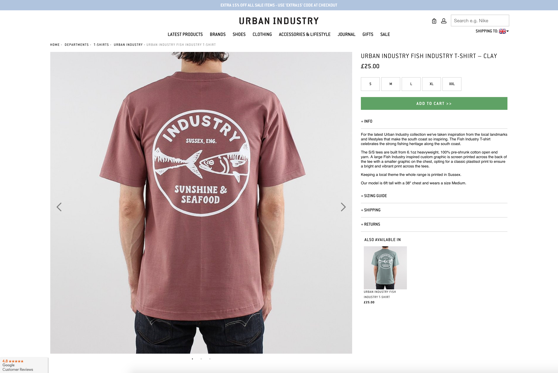
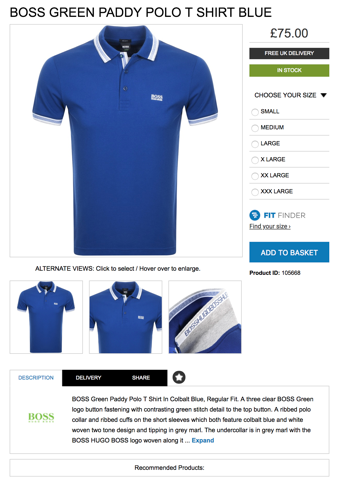
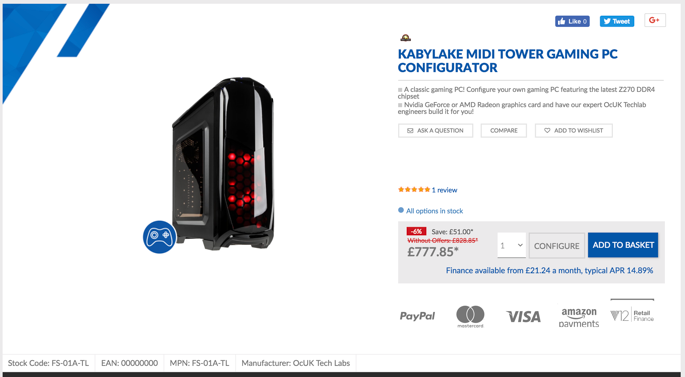
Below, you can clearly see how the CTAs stand out from the background.

If the eye is drawn, so is the cursor.


2. Simple, One-Click Checkout (For Guests Too)

Although adding clear CTAs to get visitors to add items to their cart is a good step in conversation rates, there is another step which can increase this even more.

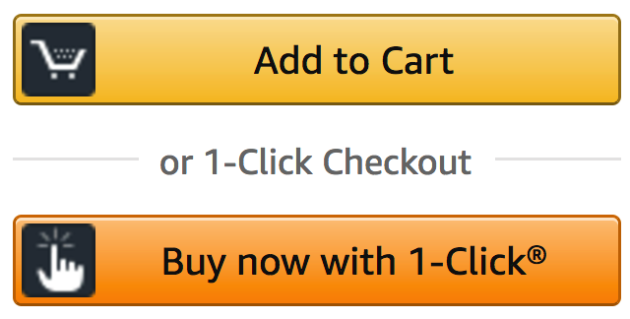
By adopting a similar checkout process to Amazon with a one-click checkout process, you can skip the ‘add to cart’ step and have visitors check out quickly and efficiently on the product page. Amazon recently lost their patent for the one-click checkout process, so you are able to implement this onto your own website.

According to a recent blog by Magento, shortening the checkout process to one-click allowed visitors to place an order in 10% of the time it takes in a conventional method, which is a big factor in the percentage of abandoned carts -- when visitors simply abandon the checkout process because it takes too long.

If we look at the top five reasons for ecommerce cart abandonment we can see that by eliminating the extra steps required in a traditional checkout process, we will significantly increase the chances of checkout conversion. A recent article by eMarketer reported that just under 75% of shopping carts are abandoned, and even more for mobile users.

Even if you do not want to implement a one-click checkout, it is critical you streamline the checkout process as much as possible by requiring the very minimum data input from the user -- Amazon does an excellent job of this with their one-click checkout system, and a well-recognized CTA.

Image result for amazon one click


3. Greenbar SSL

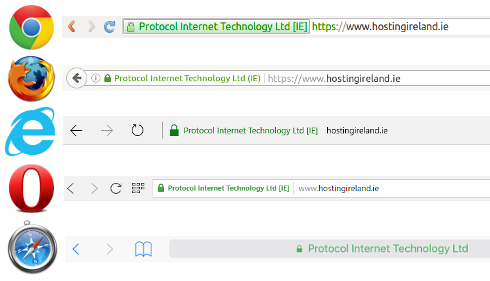
It has been shown that shopping cart abandonment dramatically decreases when you display the greenbar SSL on your website. Here is what they look like on different search engines:

Image result for greenbar ssl

The greenbar SSL is essential when conveying a trustworthy and reputable website, as it is something that all major ecommerce sites should have. It is not only a visual cue to the potential customer, but also an important security aspect as well.

Having a greenbar SSL encrypts the visitor’s payment information, which makes it harder for hackers and scam artists to steal their information. Simply put, users do not want to purchase from an unsecure website -- the large red X with an unsecured padlock can be a real barrier to converting visitors into sales.

Even Google has started to include SSL certified websites in their SEO ranking, offering up to a 5% increase (a very cheap and easy way to bump up your SEO score).

In a recent test by Blue Fountain Media, two forms were created on their website. One showing a Verisign seal (the right hand side image) and the other without (left).

Through testing they found a 42% increase in conversions on the form containing the Verisign seal, demonstrating that visitors are more inclined to share personal data and convert when they are confident that it is secure.

Visitor anxiety

4. Payment Methods (Visible with PayPal)

There are currently over 200 different ways to pay online that aren't reliant on a card, including direct debit, bank transfers, digital wallets, e-invoices, digital currencies (such as Bitcoin) and many more.

It is essential to cater to this market when designing your ecommerce website, especially when we consider that these types of transactions are predicted to be over half of all ecommerce payments by 2019, according to a report by Global Payments.

Although it is impossible to have over 200 different payment methods on your website, it is important that you understand your target market and are able to offer payment methods best suited for them. For example, a clothing website where the average spend is £50 may benefit from offering mainly credit and debit card-style payments, whereas a website such as overclockers.co.uk may want to push finance more -- as the value of the products being sold is significantly higher.

By providing the top three payments methods in your sector, you can expect to increase your conversion rates by 30% alone. However, it is not as simple as setting your payment methods and forgetting about it -- you must analyze the data received from your customers' checkouts on each payment method and be ready to adjust and tweak them accordingly.

Overclockers does a great job of this by showing all their available options to buy in the product description, and near the CTA.

5. Product or Company Reviews

Reviews are one of the most powerful tools to convert any interest in your product to a sale. Visitors want to hear from other buyers, not only if the product they are interested in is actually any good, but also about the service they received from your website.

By showing reviews directly next to or below the product, you are demonstrating instantly that you are a trustworthy seller. It has been shown that customer recommendations drive between 20% and 50% of all purchasing decisions and that 87% of people believe the reviews they read online on products and services.

It all comes back to reassuring the customer. Without reviews, the customers might ask themselves questions about your website: Why are there no reviews? Is this a genuine site?

Websites such as AO.com and Amazon give customers opportunities for instant feedback on the quality of a product or service, so much so that when it is not shown it can cause concern and worry for potential customers, thus hurting conversion rates.

Again, Amazon leads the way with reviews -- it’s the first thing you see when searching for a product, and gives you an instant indication of a product’s quality.

6. Well-Selected Imagery

Excellent photography of either the product or service you are selling is pivotal when trying to push more sales on your ecommerce website -- as the old saying goes, 'a picture is worth a 1000 words'. We’ve written on this very subject and its importance in all sectors.

Humans by their very nature are visual beings. We often look at pictures and graphic elements before reading the information about a product -- it is what initially grabs our attention. You need to ensure you have the best possible photos of your product, as well as a good range of images covering all angles and details. This gives the buyer confidence in what the product is, the quality, and what they are to expect when they receive it.

On the other hand, if you have low quality pictures, no zoom function, and a lack of detail shots, you can leave your potential customer anxious, asking themselves if you perhaps have something to hide? Maybe the product is fake? Why are the images bad quality? These are all enough to potentially deter a visitor from converting.

Data shows that visitors don't actually read the information on your websites, just 16% of readers will actually go through the entire page and read it word for word, while over 75% will just skim for snippets of information and photographs.

It is also worth noting that by creating good quality images you have more chance of them being shared on social media. Studies show that 74% of people rely on their social media networks for information about purchasing decisions.

7. Mobile Optimized

Over 50% of all web traffic is now mobile. With this number increasing drastically year over year, it is essential that your ecommerce site is mobile friendly.

In 2015, Google officially declared that mobile searches outnumbered those on desktop. When you consider that mobile shopping carts are abandoned much more than on desktops, users abondon websites if they don't load in under three seconds, and users want to check out quickly while on the move, you'll quickly realize it's critical your website is optimized for mobile. A mobile-optimized website will lead to a massive uptake in conversion rates.

Having a simple checkout process is even more important on mobile than it is on desktop. Users are working with a significantly smaller screen, so the less distractions the better. Keep it simple. Users want to add the item to their cart, pay, and get out. This can be done by stripping back any unnecessary elements for mobile and directing the user down a simple and easy to follow path towards checkout.

It is also important to remember the unreliable nature of phone data. With phone signal dropping in a split second reducing users download speeds to a snail’s pace, it is imperative that your mobile optimized site has the smallest possible page size, meaning fast load times even on a slow internet connection. Simple steps like this can make the difference between converting sales on mobile and not.

8. Concise and Effective Product Descriptions

Product descriptions are a key tool in your ecommerce selling arsenal. Without effective product descriptions that sell the product to your customer base, you are losing out on click-through rates and purchases.

Having a boring or unclear product description isn’t going to cut it -- your customers will switch their attention off and won’t be interested in purchasing. That’s why it's vital to focus on your ideal buyer and target them personally, with words and descriptions that relate to them -- doing this gives your customer a sense that you understand their wants and needs, which ultimately makes them feel more confident in choosing to purchase from you.

While we’re talking about instilling confidence in your customers, it is crucial to avoid using cliché phrases such as ‘excellent quality’, ‘genuine’ etc. These are all things that your customer should already know by your excellent product photos, slick website, and efficient checkout process that we have already covered. Trying to convince your potential customer that your product is ‘excellent quality’ gives the impression that you might have something to hide and are trying too hard to convince them what you’re selling is indeed good quality.

Above all, the most important factor to consider when writing your product descriptions is to keep it concise. As we mentioned earlier, users of your website will skim read and anything longer than a few lines is either going to get ignored or skipped over. If you do have a large amount of information that you need to convey to your customer, you might consider hiding it behind a ‘read more’ button or cutting it down in easy-to-digest bullet points.

Overclockers does really well with their product descriptions -- although they aren’t the most personal. They are concise and to the point, but also offer tons of information (if you want it) by scrolling further down the page.

9. Minimal Layout

Creating an easy to follow and cohesive journey from homepage to checkout is one of the most important factors when looking at bounce and conversion rates, as a study by EyeQuant showed websites that adopt a cleaner look (more white space, bigger images, less text etc.) saw significantly less bounce rate and higher conversion rates than those that had a more complicated website.

While it might seem daunting to think about redesigning your ecommerce site to be more minimalistic, it is actually relatively straightforward if you follow a few simple rules:

  1. Focus on product imagery with less design elements and distractions on product pages.
  2. Direct your customers to the add to cart, purchase or checkout with large CTA buttons that stand out.
  3. Test your website -- this is often forgotten but it’s crucial you make sure your checkout process is as slick on your brand new iMac or iPhone as it is on a five year old desktop PC running Internet Explorer or old smartphone.
  4. Limit your colors. Again, the less distractions the better. Get your user focused on the product itself, then onto the checkout button.
  5. Less is more. If the product page still works without it, then lose it. It’s all about focusing the customer towards the end goal -- checkout!

If you follow these four steps to rework your product pages, you will see a significant increase in checkout completion and a drop in bounce rates.


from Marketing https://blog.hubspot.com/marketing/design-ecommerce-conversions