Tuesday, 2 October 2018

The Essential Guide to Becoming a Writer

My path to becoming a professional writer is a slightly unconventional one. In college, I majored in economics, only took one English class, and originally pursued a career in financial advising. But today, instead of walking people through their retirement plan, I spend 90% of my work day writing -- and I absolutely love it.

So how did I do it? Well, once I decided to seriously pursue a career in writing, I realized it’s a craft -- sharpening my writing skills would require countless hours and repetitions. So after I finished my homework at school, that’s exactly what I did. I learned how to write.

Writing is an incredible gig for creative people -- it provides fulfillment and financial stability. If this sounds like the career you’ve always wanted -- even if you don’t have a lot of experience like I did -- writing for a living is entirely possible. You just need to be passionate about the craft and disciplined enough to put in the work. My story is proof -- and I’ll teach you how to do it.

Read Every Single Day

When I stumbled upon my first digital marketing internship, I had no idea what content marketing was. So I Googled it, and that's when I discovered HubSpot’s Marketing Blog.

Two years later, after reading posts about content marketing every day, I could distill almost any topic, like a dry economics topic about the consolidation of the grain trading industry, into a blog post-like format. And being able to structure most topics in a digestible way and writing in a conversational tone is what helped me land an internship on HubSpot’s blog team.

Reading is like listening to music when you’re a musician. It improves your writing because it inspires you to create better work. When you read great writing, especially by the masters of your genre or industry, these writers are essentially teaching you their craft -- you just have to pay close attention to their diction, syntax, cadence, voice, and structure. Jotting down your observations or some inspirational thoughts is even better for you.

Reading regularly can also arm you with some of the most important tools  in a writer's arsenal: a refined vocabulary, the ability to quickly grasp new concepts, and the versatility to adapt your voice and style to any audience.

But one of the most prevalent obstacles of regularly reading is finding the time to do it. Most people place reading at the top of their to-do-list but never seem to able to cross it off .

To read everyday, you must hold yourself accountable. Most people can finish a median-length book in only one week if they just read for 45 minutes per day, so all you have to do is keep an active reading list and block off less than an hour on your daily schedule to do so.

If you need help making a reading list, here are the following books, newspapers, magazines, and marketing blogs that I found most helpful when I first started writing:

Now that I’m a full-time staff writer on HubSpot’s blog team, I owe a lot of my development as a writer to the habit of reading one blog post everyday.

Reading and analyzing the marketing industry’s best content taught me how to write well, but it took discipline to read everyday for three years. The good news is that if you just take one hour out of your day to learn about writing, you’ll be able to hone your skills in the long-run.

Write as Often as Possible

Even though I majored in economics, I went to a liberal arts college, so my school’s curriculum was extremely focused on writing. Each class I took had multiple writing assignments. And once I knew that I wanted to work in digital marketing, I started writing all my papers in the form of a blog post. 

My professors were definitely not used to this style of writing and it probably didn’t help out my grades, but it was completely worth it -- I practiced blogging enough to smoothly transition into my writing roles during my internships and, eventually, my first job.

If you’re not in school anymore, though, it’s hard to hunker down and write when you’ve already exhausted most of your mental energy at work. We all feel like turning off our brain and relaxing once the clock strikes five. 

But to master writing and eventually do it for a living, you need to write on a consistent basis. The best writers, like J.K. Rowling, all block off chunks of their schedule to write in solitude almost every day. 

If writing after work every day is a challenge for you, try only writing about your favorite topics. Your passion for these topics can pull you out of the post-work lull. If you need a little more help deciding what to write about, consider using a writing prompt generator like Plot Generator or Writing Exercises.

If you just started writing and you don’t know what to write about or even how to write, consider doing some copyworking. Copyworking is a common copywriting practice where you take an excerpt from your favorite author’s book (or any piece of writing you couldn’t stop reading) and transcribe it word for word.

It’ll help you internalize your favorite writer’s diction, syntax, cadence, voice, and structure, just like reading does. But you'll absorb even more insight than when you read because copyworking forces you to slow down and pay even closer attention to the nuances of great writing.

In the writing community, the majority of the best writers had talent to begin with. But they also had to work incredibly hard to sharpen their skills enough and separate themselves from the rest of their competition. By constantly writing, no matter how good or bad the quality was, and honing their skills through writing exercises, they all learned how to captivate audiences. And you could too.

Fight Through the Writing Blues

I applied for HubSpot’s inbound marketing internship two times when I was in college, and, I’ll be honest, my heart stung when my first application got rejected. Looking back, though, I’m glad I didn’t make the cut.

Getting rejected was what drove me to pursue two other content marketing internships and take two additional writing classes at school, which honed my writing skills and helped me accumulate enough writing samples to prove that I could be an intern at HubSpot the next year.

Clawing your way through the struggle and self-doubt that comes with writing is exactly what you need to do to become a professional writer. It’s an arduous process, but it’s definitely worth it. And if you keep studying the craft and gleaning new insights, despite its highs and lows, you’ll start writing well enough to get hired.


from Marketing https://blog.hubspot.com/marketing/become-writer

The Ultimate Guide to Google Search Console in 2018

At any given time, I have GSC open in two to 10 tabs. It’s helpful on a macro and micro level -- both when I need to figure out what’s happened to a high-traffic blog post that suddenly dipped, and see how many impressions HubSpot is gaining month over month.

I’m a content strategist on HubSpot’s SEO team, which means GSC is particularly useful to me. But anyone who’s got a website can and should dip their toes in these waters. According to Google, whether you’re a business owner, SEO specialist, marketer, site administrator, web developer, or app creator, Search Console will come in handy.

I remember the first time I opened GSC -- and it was overwhelming. There were tons of labels I didn’t understand (index coverage?!?), hidden filters, and confusing graphs. Of course, the more I used it, the less confusing it became.

But if you want to skip the learning curve (and why wouldn’t you), good news: I’m going to reveal everything I’ve learned about how to use Google Search Console like a pro.

This guide covers:

  • Adding your website to Google Search Console
  • Setting up owners, users, and permissions
  • Submitting a site map
  • Understanding dimensions and metrics
  • Adding filters
  • Using GSC (23 use cases)

First things first. If you haven’t already signed up for GSC, it’s time to do so.

Google starts tracking data for your property as soon as you add it to GSC -- even before it’s verified you’re the site owner.

Verifying your Site on GSC

Because GSC gives you access to confidential information about a site or app’s performance (plus influence over how Google crawls that site or app!), you have to verify you own that site or app first.

Verification gives a specific user control over a specific property. You must have at least one verified owner per GSC property.

Also, note that verifying your property doesn’t affect PageRank or its performance in Google search. Of course, the more information you have, the easier it is to rank higher -- but simply adding your website to GSC won’t automatically make your rankings go up.

GSC verification methods

  1. HTML file upload: Upload a verification HTML file to a specific location of your website.
  2. Domain name provider: Sign into your domain registrar (like GoDaddy, eNom, or networksolutions.com), and verify your site directly from GSC or add a DNS TXT or CNAME record.
  3. HTML tag: Add a <meta> tag to the <HEAD> section of a specific page’s HTML code.
  4. Google Analytics tracking code: Copy the GA tracking code that you use on your site. (You need “edit” permission in GA for this option.)
  5. Google Tag Manager container snippet code: Copy the GTM container snippet code associated with your site. (You need View, Edit, and Manage container-level permissions in GTM for this option.)

Google-hosted sites, including Blogger and Sites pages, are automatically verified.

WWW domain or not?

True or false: hubspot.com and www.hubspot.com are the same domain.

The answer? False! Each domain represents a different server; those URLs might look very similar, but from a technical perspective, they’re two unique domains.

However, if you type “hubspot.com” into your browser bar, you’ll land at “www.hubspot.com”. What is this sorcery?

HubSpot has chosen “www.hubspot.com” as its preferred, or canonical, domain. That means we’ve told Google we want all of our URLs displayed in search as “www.hubspot.com/……”. And when third parties link to our pages, those URLs should be treated as “www.hubspot.com/……” as well.

If you don’t tell GSC which domain you prefer, Google may treat the www and non-www versions of your domain as separate -- splitting all those page views, backlinks, and engagement into two. Not good.

(At this time you should also set up a 301 redirect from your non-preferred domain to your preferred one, if you haven’t already.)

GSC users, owners, and permissions

There are two GSC role-types. I know you might be itching to get to the good stuff (cough the data) but it’s important to do this right.

  1. Owner: An owner has total control over their properties in GSC. They can add and remove other users, change the settings, see all data, and access every tool. A verified owner has completed the property verification process, while a delegated owner has been added by a verified one. (Delegated owners can add other delegated owners.)
  2. User: A user can see all data and take some actions, but can’t add new users. Full users can see most data and take some actions, while restricted users can only view most data.

Think carefully about who should have which permissions. Giving everyone full ownership could be disastrous -- you don’t want someone to accidentally change an important setting. Try to give your team members just as much authority as they need and no further.

For example, at HubSpot, our technical SEO manager Victor Pan is a verified owner. I’m an SEO content strategist, which means I use GSC heavily but don’t need to change any settings, so I’m a delegated owner. The members of our blogging team, who use GSC to analyze blog and post performance, are full users.

Here are detailed instructions on adding and removing owners and users in Search Console.

There’s a third role: an associate. You can associate a Google Analytics property with a Search Console account -- which will let you see GSC data in GA reports. You can also access GA reports in two sections of Search Console: links to your site, and Sitelinks.

A GA property can only be associated with one GSC site, and vice versa. If you’re an owner of the GA property, follow these instructions to associate it with the GSC site.

Do you need a site map?

A site map isn’t necessary to show up in Google search results. As long as your site is organized correctly (meaning pages are logically linked to each other) , Google says its web crawlers will normally find most of your pages.

But there are four situations a site map will improve your site’s crawlability:

  1. It’s really big. The more pages you have, the easier it is for Googlebot to miss any changes or additions.
  2. It has lots of “isolated” pages. Any page that has few inbound links from other pages is harder for a web crawler to discover.
  3. It’s new. Newer sites have few backlinks (links from other sites) making them less discoverable.
  4. It uses rich media content and/or shows up in Google News. In these cases, your sitemap makes it easier for Google to format and display your site in search.

Once you’ve built your site map, submit it using the GSC site maps tool.

GSC site maps report

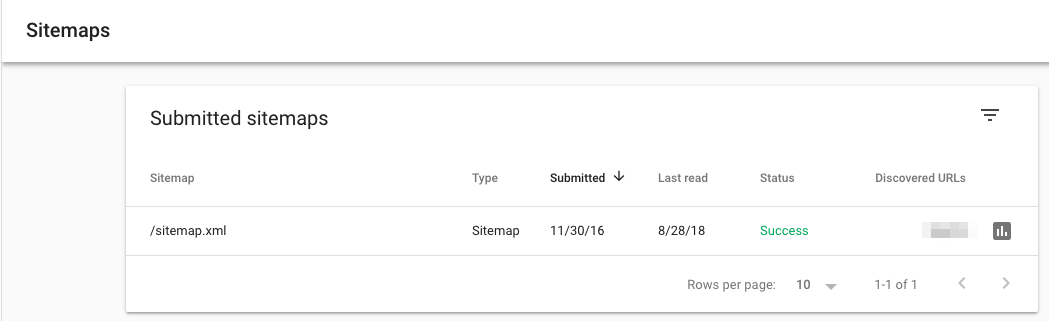
After Google has processed and indexed your site map, it will appear in the Site maps report. You’ll be able to see when Google last read your site map and how many URLs it’s indexed.

GSC dimensions & metrics

There are a few terms you should understand before using GSC.

What’s a Google Search Console query?

This is a search term that generated impressions of your site page on a Google SERP. You can only find query data in Search Console, not Google Analytics.

What’s an impression?

Each time a link URL appears in a search result, it generates an impression. The user doesn’t have to scroll down to see your search result for the impression to count.

What’s a click?

When the user selects a link that takes them outside of Google Search, that counts as one click. If the user clicks a link, hits the back button, then clicks the same link again -- still one click. If then, they click a different link -- that’s two clicks.

When a user clicks a link within Google Search that runs a new query, that’s not counted as a click.

Also, this doesn’t include paid Google results

What’s average position?

This is the mean ranking of your page(s) for a query or queries. Suppose our guide to SEO tools is ranking #2 for “SEO software” and #4 for “keyword tools.” The average position for this URL would be 3 (assuming we were ranking for literally nothing else).

What’s CTR?

CTR, or click-through rate, is equal to Clicks divided by Impressions, multiplied by 100. If our post shows up in 20 searches, and generates 10 clicks, our CTR would be 50%.

Filtering in Google Search Console

GSC offers several different ways to view and parse your data. These filters are incredibly handy, but they can also be confusing when you’re familiarizing yourself with the tool.

Search type

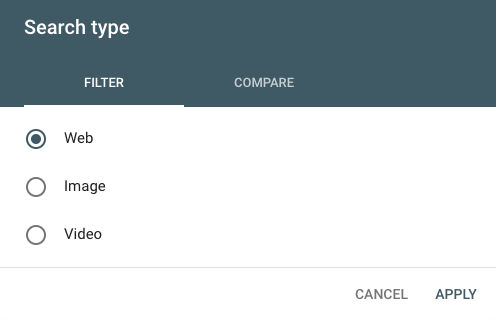
There are three search types: web, image, and video. I typically use “web,” since that’s where most of the HubSpot Blog traffic comes from, but if you get a lot of visits from image and/or video search, make sure you adjust this filter accordingly.

You can also compare two types of traffic. Just click the “Compare” tab, choose the two categories you’re interested in, and select “Apply.”

This can lead to some interesting findings. For example, I discovered this color theory 101 post is getting more impressions from image search than web (although the latter is still generating more clicks!).

Date range

GSC now offers 16 months of data (up from 90 days). You can choose from a variety of pre-set time periods or set a custom range.

As with search type, you can also compare two date ranges in the “Compare” tab.

Queries, page, country, device, search appearance

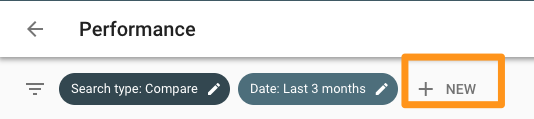
Click “New” next to the Date filter to add up to five other types of filters: query, page, country, device, and search appearance.

These filters can be layered; for instance, if I wanted to see data for SEO-related queries appearing on mobile search, I’d add a filter for queries containing “SEO” on mobile devices. If I only wanted to limit the results even further to posts on the Marketing Blog, I’d add another filter for Pages containing the URL “blog.hubspot.com/marketing”.

You can get very specific here -- I recommend playing around with different combinations of filters so you see what’s possible.

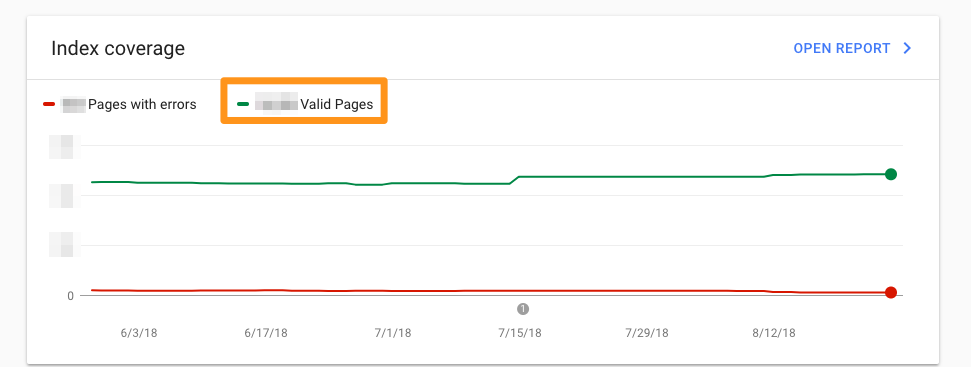
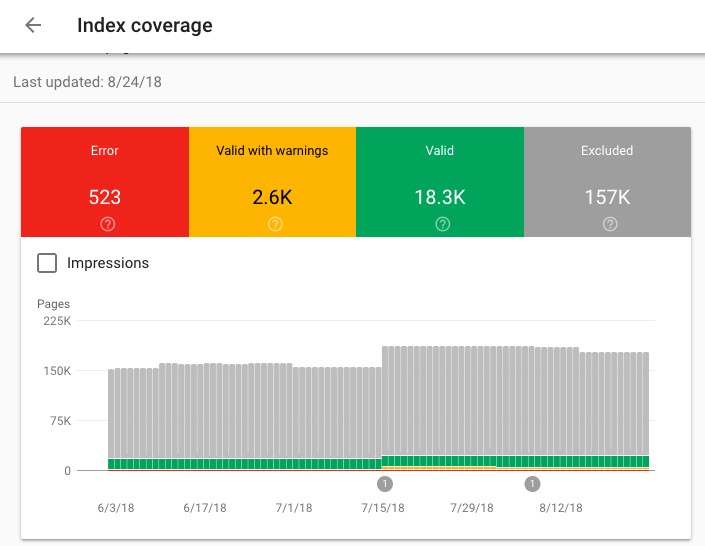
Index coverage report

Each page is assigned one of four statuses:

  1. Error: The page couldn’t be indexed.
  2. Warning: The page is indexed, but has a problem.
  3. Excluded:

Submitted sitemaps

How to Use Google Search Console

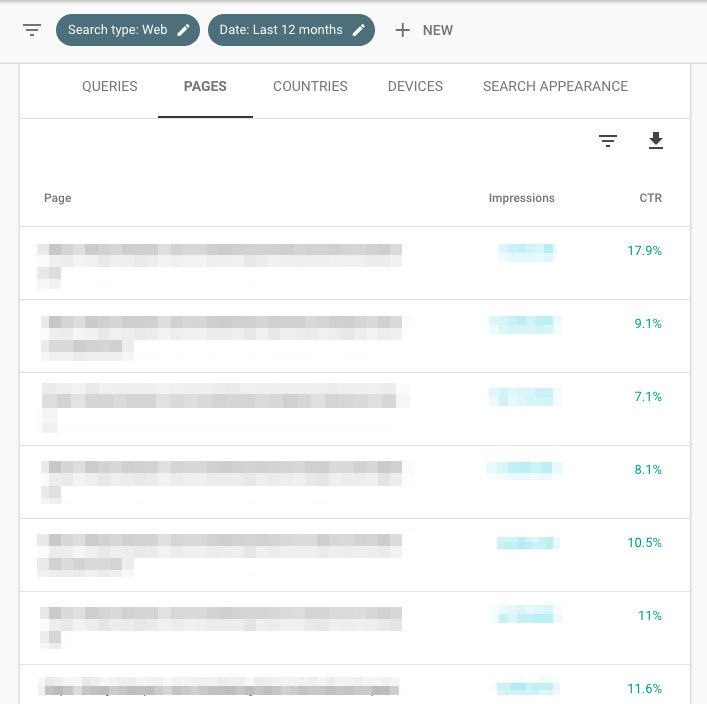
  1. Identify your highest-traffic pages
  2. Identify your highest-CTR queries
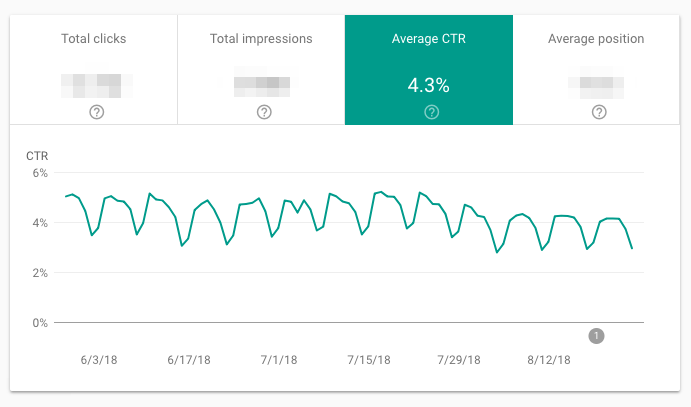
  3. Find your average CTR
  4. Monitor your CTR over time
  5. Monitor your impressions over time
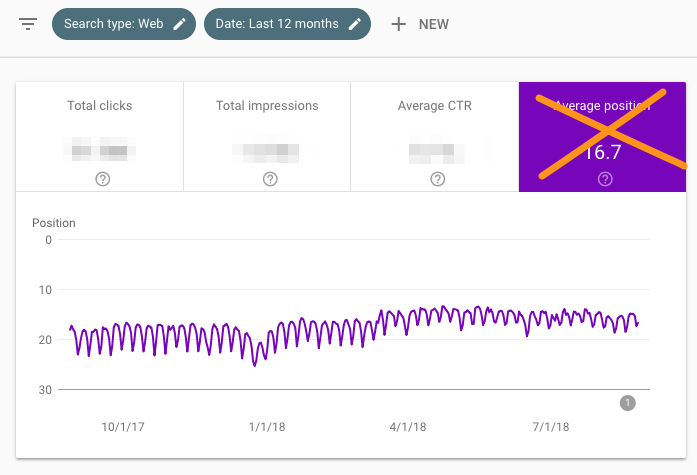
  6. Monitor your average position over time
  7. Identify ranking increases and decreases
  8. Identify your highest-traffic queries
  9. Compare your site’s search performance across desktop, mobile, and tablet
  10. Compare your site’s search performance across different countries
  11. Learn how many of your pages have been indexed
  12. Learn which pages haven’t been indexed and why
  13. Monitor total number of indexed pages and indexing errors
  14. Identify mobile usability issues
  15. Learn how many total backlinks your site has
  16. Identify which URLs have the most backlinks
  17. Identify which sites link to you the most
  18. Identify the most popular anchor text for external links
  19. Identify which pages have the most internal links
  20. Learn how many total internal links your site has
  21. Find and fix AMP errors
  22. See Google how Google views a URL
  23. Go to the old version of Search Console

Can you see why I love GSC? Let’s dig into each use case.

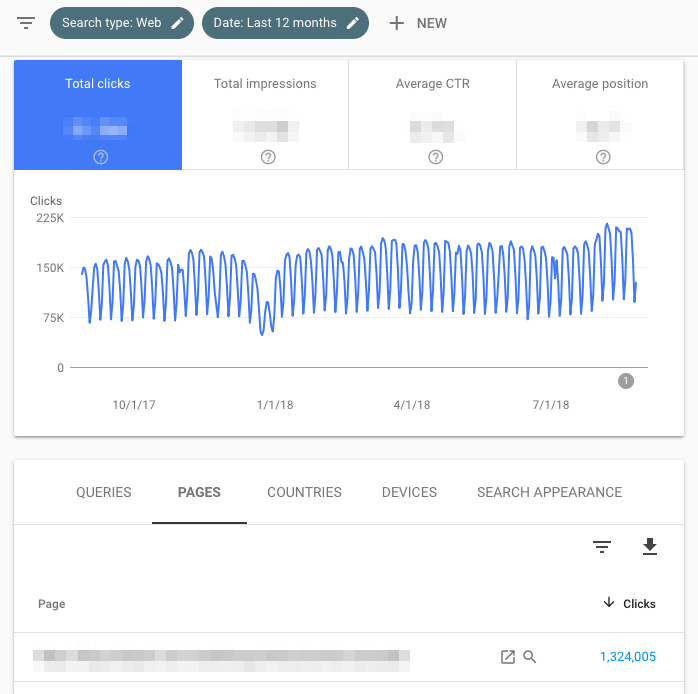
  1. Identify your highest-traffic pages
  2. Click Performance.
  3. Click the “Page” tab (next to Queries).
  4. Change the date range to “Last 12 months”. (A full year gives you a comprehensive overview of your traffic, but feel free to adjust the time period.)
  5. Make sure “Total clicks” is selected.
  6. Click the small downward arrow next to “Clicks” to sort from highest to lowest.

1. Identify your highest-CTR queries

  1. Click Performance.
  2. Click the “Queries” tab.
  3. Change the date range to “Last 12 months”. (A full year gives you a comprehensive overview of your traffic, but feel free to adjust the time period.)
  4. Make sure “Average CTR” is selected.
  5. Click the small downward arrow next to “CTR” to sort from highest to lowest.

Note: It’s useful to look at this in tandem with “Impressions” (check “Total impressions” to see this information side-by-side). A page might have high CTR but low impressions, or vice versa -- you won’t get the full picture without both data points.

2. Look at average CTR

  1. Click Performance.
  2. Click the date to adjust the time period. Choose whatever range you’re interested in. (Alternatively, click “Compare” to analyze two date ranges at once.)
  3. Look at “Average CTR”.
  4. Click Performance.
  5. Click the date to adjust the time period. Choose whatever range you’re interested in. (Alternatively, click “Compare” to analyze two date ranges at once.)
  6. Look at “Total impressions”.
  7. Go to Status > Performance.
  8. Click the date to adjust the time period. Choose whatever range you’re interested in. (Alternatively, click “Compare” to analyze two date ranges at once.)
  9. Look at “Average position”.

3. Monitor your CTR over time

I recommend keeping an eye on CTR. Any significant movement is significant: If it’s dropped, but impressions have gone up, you’re simply ranking for more keywords, so average CTR has declined. If CTR has increased, and impressions have decreased, you’ve lost keywords. If both CTR and impressions have gone up, congrats -- you’re doing something right!

4. Monitor your impressions over time

As you create more content and optimize your existing pages, this number should increase. (As always, there are exceptions -- maybe you decided to target a small number of high conversion keywords rather than a lot of average conversion ones, are focusing on other channels, etc.)

5. Monitor average position over time

Average position isn’t that useful on a macro level. Most people are concerned when it goes up -- but that’s shortsighted. If a page or set of pages starts ranking for additional keywords, average position usually increases; after all, unless you’re ranking for the exact same position or better as your existing keywords, your “average” will get bigger.

Don’t pay too much attention to this metric.

6. Identify your highest-ranking pages

  1. Click Performance.
  2. Click the “Page” tab.
  3. Change the date range to “Last 28 days.” (You want an up-to-date, accurate snapshot of your pages.)
  4. Make sure “Average position” is selected.
  5. Click the small upward arrow next to “Position” to sort from smallest (good) to highest (bad).
  6. Click Performance.
  7. Click the “Page” tab.
  8. Change the date range to “Last 28 days.” (You want an up-to-date, accurate snapshot of your pages.)
  9. Make sure “Average position” is selected.
  10. Click the small downward arrow next to “Position” to sort from highest (bad) to lowest (good).

Because you’re looking at average position by URL, that number is the mean of all of that page’s rankings. In other words, if it’s ranking for two keywords, it might be #1 for a high-volume query and #43 for a low-volume one -- but the average will still be 22.

With that in mind, don’t judge the success or failure of a page by “average position” alone.

7. Identify your lowest-ranking pages

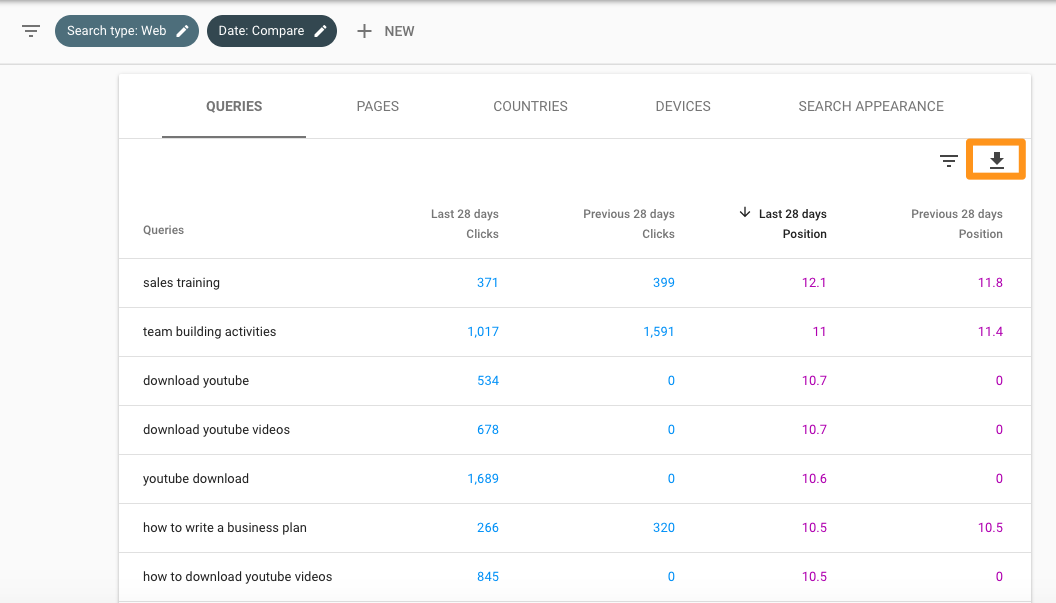
8. Identify ranking increases and decreases

  1. Click Performance.
  2. Click the “Query” tab.
  3. Click “Date range” to change the dates, then choose the “Compare” tab.
  4. Select two equivalent time periods, then click “Apply.”

At this point, you can look at the data in GSC, or export it. For an in-depth analysis, I highly recommend the second -- it’ll make your life much easier.

To do so, click the downward arrow beneath “Search Appearance,” then download it as a CSV file or export it to Google Sheets.

After you have this data in spreadsheet form, you can add a column for the position differences (Last 28 days Position - Previous 28 days Position), then sort by size.

If the difference is positive, your site has moved up for that query. If it’s negative, you’ve dropped.

9. Identify your highest-traffic queries

  1. Click Performance.
  2. Click the “Query” tab.
  3. Click “Date range” to choose a time period.
  4. Make sure “Total clicks” is selected.
  5. Click the small downward arrow next to “Clicks” to sort from highest to lowest.

Knowing which queries bring in the most search traffic is definitely useful. Consider optimizing the ranking pages for conversion, periodically updating them so they maintain their rankings, putting paid promotion behind them, using them to link to lower-ranked (but just as if not more important) relevant pages, and so on.

10. Compare your site’s search performance across desktop, mobile, and tablet

  1. Click Performance.
  2. Go to the “Devices” tab.
  3. Make sure “Total clicks,” “Total impressions,” “Average CTR,” and “Average Position” are selected.
  4. Compare your performance across desktop, mobile, and tablet.

11. Compare your site’s search performance across different countries

  1. Click Performance.
  2. Go to the “Countries” tab.
  3. Make sure “Total clicks,” “Total impressions,” “Average CTR,” and “Average Position” are selected.
  4. Compare your performance across nations.

12. Learn how many of your pages have been indexed

  1. Start at “Overview.”
  2. Scroll down to the Index coverage summary.
  3. Look at the “Valid pages” count.

13. Learn which pages haven’t been indexed and why

  1. Go to Overview > Index coverage.
  2. Scroll down to the Details box to learn which Errors are causing indexing issues and how frequent they are.
  3. Double-click on any Error type to see the affected page URLs.

14. Monitor total number of indexed pages and indexing errors

  1. Go to Overview > Index coverage.
  2. Make sure “Error”, “Valid with warnings”, “Valid”, and “Excluded” are all selected.

The total number of indexed pages on your site should typically go up over time as you:

  • Publish new blog posts, create new landing pages, add additional site pages, etc.
  • Fix indexing errors

If indexing errors go up significantly, a change to your site template might be to blame (because a large set of pages have been impacted at once). Alternatively, you may have submitted a sitemap with URLs Google can’t crawl (because of ‘noindex’ directives, robots.txt, password-protected pages, etc.).

If the total number of indexed pages on your site drops without a proportional increase in errors, it’s possible you’re blocking access to existing URLs.

In any case, try to diagnose the issue by looking at your excluded pages and looking for clues.

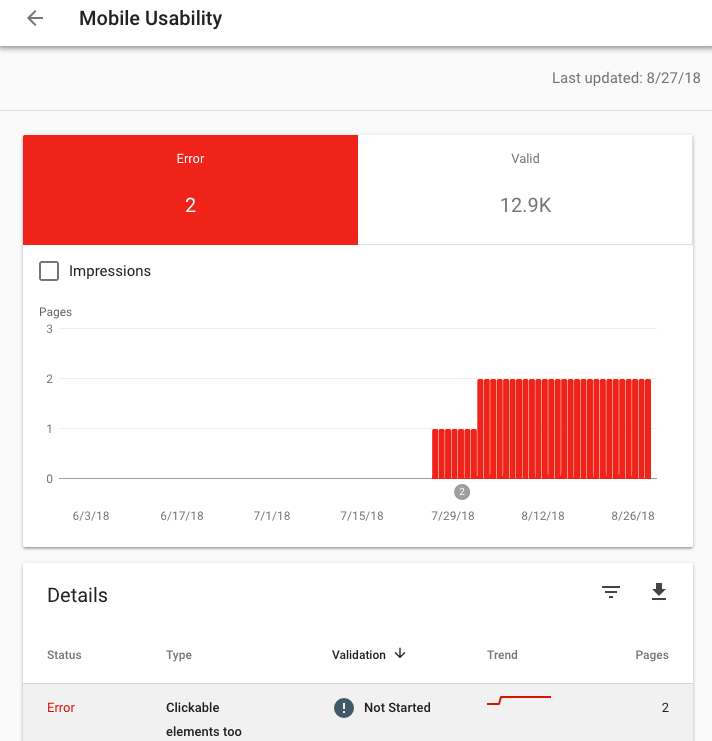
15. Identify mobile usability issues

  1. Click Mobile Usability.
  2. Make sure “Error” is selected.
  3. Scroll down to the Details box to learn which Errors are causing mobile usability issues and how frequent they are.
  4. Double-click on any Error type to see the affected page URLs.

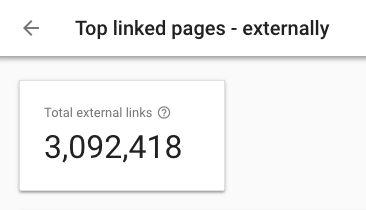
16. Learn how many total backlinks your site has

  1. Click Links.
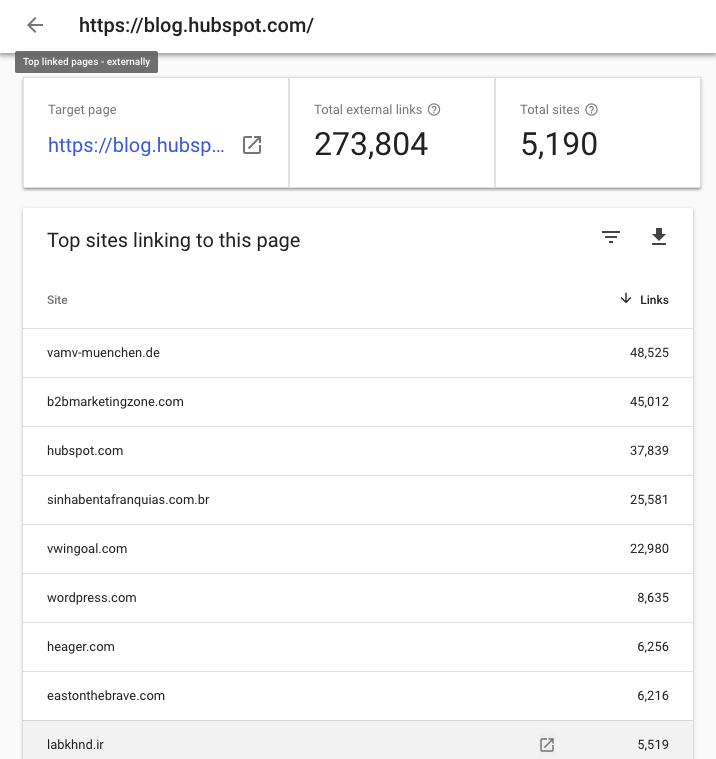
  2. Open the Top linked pages report.
  3. Look at the box labeled “Total external links.”
  4. Click the downward arrow next to “Incoming links” to sort from highest to lowest backlinks.

Every backlink is a signal to Google that your content is trustworthy and useful. In general, the more backlinks the better! Of course, quality matters -- one link from a high-authority site is much more valuable than two links from low-authority sites. To see which sites are linking to a specific page, simply double-click that URL in the report.

17. Identify which URLs have the most backlinks

  1. Click Links.
  2. Open the Top linked pages report.
  3. Click the downward arrow next to “Incoming links” to sort from highest to lowest backlinks.

If you want to help a page rank higher, adding a link from a page with a ton of backlinks is a good bet. Those backlinks give that URL a lot of page authority -- which it can then pass on to another page on your site with a link.

18. Identify which sites link to you the most

  1. Click Links.
  2. Scroll down to “Top linking sites” > “More.”

Knowing your top referring domains is incredibly useful for promotion -- I’d recommend starting with these sites whenever you do a link-building campaign. (Just make sure to use a tool like Moz, SEMrush, or Ahrefs to filter out the low-authority ones first.)

These may also be good candidates for comarketing campaigns or social media partnerships.

19. Identify the most popular anchor text for external links

  1. Click Links.
  2. Scroll down to “Top linking text” > “More.”

Anchor text should be as descriptive and specific as possible -- and best case scenario, include your keyword. If you find websites linking to your pages but using anchor text like “Click here” “Learn more”, “Check it out”, etc., consider sending an email asking them to update the hyperlink.

20. Identify which pages have the most internal links

  1. Click Links.
  2. Scroll down to “Top linked pages” > “More.”

It’s normal for some URLs to have more inbound links. For example, if you run an ecommerce site, every product page in your “Skirts” category will link back to the “Skirts” overview page. That’s a good thing: It tells Google your top-level URLs are the most important (which helps them rank higher).

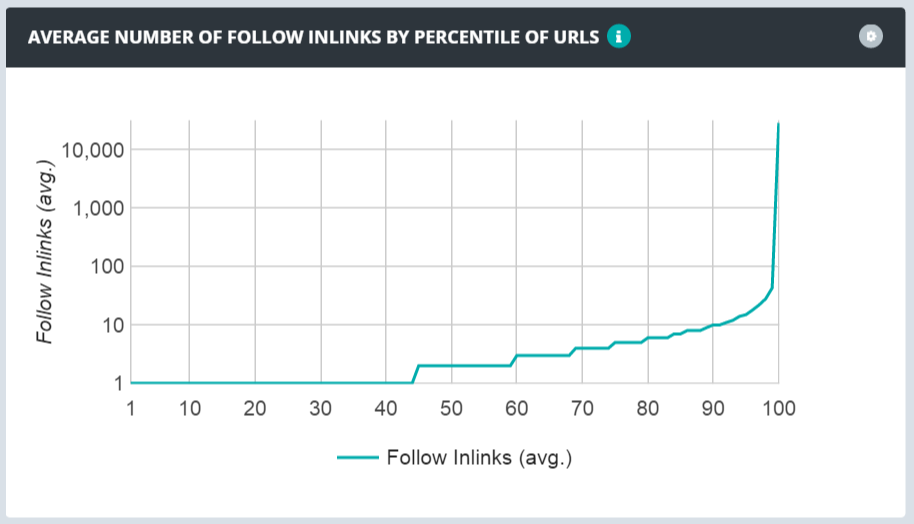
However, a heavily skewed link distribution ratio isn’t ideal. If a tiny percentage of your URLS are getting way more links than the rest, it’ll be difficult for the 95% to receive search traffic -- you’re not passing enough authority to them.

Here’s what a heavily skewed distribution looks like:

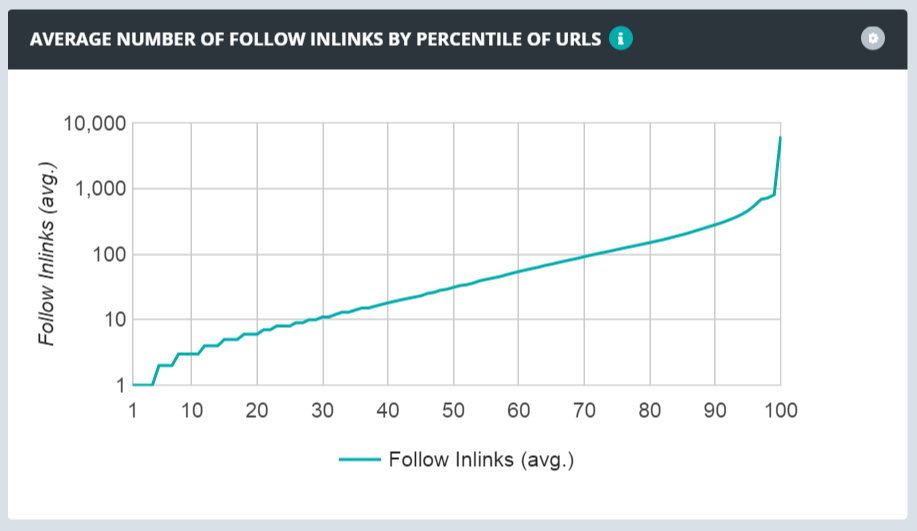
The optimal spread looks like this:

Use GSC’s link data to learn how your links are distributed and if you need to focus on making your link distribution more smooth.

21. Learn how many total internal links your site has

  1. Click Links.
  2. Scroll down to “Top linked pages” > “More.”
  3. Look at the box labeled “Total internal links.”

22. Find and fix AMP errors

  1. Click AMP.
  2. Make sure “Error” is selected.
  3. Scroll down to the “Details” box to see which types of issues you have and how frequent they are.

Google recommends fixing errors before looking at the pages in the “Valid with warnings” category. By default, errors are ranked by severity, frequency, and whether you’ve addressed them.

23. See Google how Google views a URL

  1. Click the white magnifying glass at the top of the page.
  2. Enter the page URL. (Make sure it belongs to the property you’re currently viewing.)

Here’s how to interpret the results. If the URL is on Google, that means it’s indexed and can appear in search.

That doesn’t mean it will -- if it’s been marked as spam or you’ve removed or temporarily blocked the content, it won’t appear. Google the URL; if it shows up, searchers can find it.

Open the Index coverage card to learn more about the URL’s presence on Google, including which sitemaps point to this URL, the referring page that led Googlebot to this URL, the last time Googlebot crawled this URL, whether you’ve allowed Googlebot to crawl this URL, whether Googlebot actually could fetch this URL, whether this page disallows indexing, the canonical URL you’ve set for this page, and the URL Google has selected as the canonical for this page.

The Enhancements section gives you information on:

  • The AMP version of this page, if it exists, and any AMP-specific issues
  • Status for job posting and/or recipe structured data

24. Go to the old version of Search Console

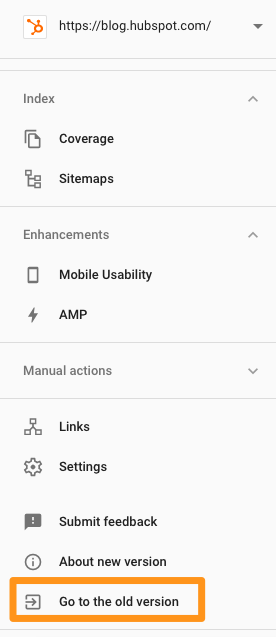
The new GSC, while intuitive and well-designed, doesn’t have all the features of the old version. If you want to use the latter, click “Go to the old version” in the left sidebar menu.


from Marketing https://blog.hubspot.com/marketing/google-search-console

5 Critical Phone Screen Questions & Tips

On average, a corporate job posting attracts 250 resumes. With such a large pile to sift through, it can be difficult to discern your best candidates from those unfit for the role.

To quickly distinguish your most qualified candidates, it's critical to conduct phone screens. A phone screen is a quick, five-to-15 minute interview to determine who should move forward in the interview process.

You don't want to waste time and effort on people who don't have the necessary skills, aren't willing to accept the role's salary, or simply aren't interested. Fortunately, there are a few questions you can ask to gain those insights quickly.

To ensure your hiring process is as efficient as possible, take a look at these five phone screen questions you should ask each candidate, as well as tips to ensure you're correctly identifying the best candidates to bring to your office for in-person interviews.

Phone Screen Interview Questions

1. Can you tell me where you are in the job search, and what you hope to accomplish?

You'll want to start by discerning whether they've had other interviews or offers, and whether they're still interested in the position. Asking this question enables you to get a sense for what your candidate is looking for in a role or company. Ideally, your candidate will give some details regarding her job search, including other companies at which she has applied. This information can help you identify whether your company, and the role, is a good fit.

Tip: If your candidate seems all over the place with her job search, it's not a good sign. For instance, if you're hiring for a writing role at your marketing firm, and she says, "I'm interested in writing, but not sure what direction to take it. I've been looking at journalism roles, and roles in the advertising industry, as well," it might not be the best time to move forward with this candidate. You want a candidate who is confident the role for which she's applying is the right one for her.


2. What attracted you to this role and our organization?

It's critical you learn what your candidate wants out of the role and organization, so you can determine whether she'll be happy in the position. This is your candidate's chance to prove she has done her homework. If she can outline specific aspects of the role and unique characteristics of your company that excite her, it shows she has researched your company and studied the job listing, an indicator she's genuinely interested.

Tip: Listen for your candidate to mention specific keywords listed in the role's description. This indicates she's interested in your role in particular. For instance, if you're hiring for a marketing manager, you'll want your candidate to say, "In particular, I'm interested in working closely with your top-tier partners to manage co-marketing efforts. I have prior experience doing that, such as …". This type of answer illustrates her understanding of the unique benefits of this role, over other leadership opportunities in the field.

3. Why are you leaving your current position?

To ensure you're not wasting anyone's time, it's critical you know why the candidate is unhappy in her current role. If she outlines aspects that are also likely to occur in this new role, it's a good indicator she's not a good fit.

Tip: Look for a candidate who is able to discuss their current frustrations with a level of optimism and professionalism. For instance, you don't want a candidate to say, "I don't like the company culture, and I feel stifled in my role." This type of negativity is toxic to any work environment, and could be an indicator of someone who complains instead of trying to improve her situation.

Instead, you'll want a candidate who frames her frustrations in a positive light -- "While I'm very appreciative of this company and everything I've learned in my current role, I feel there aren't enough growth opportunities here, and I'd like to expand my knowledge on X, Y, and Z." This type of answer allows her to highlight why your company is an excellent next step, without bad-mouthing her current employer.

4. Detail the most successful idea you have you taken from concept to launch.

This question can give you a good idea of a candidate's skills and what she has been capable of achieving in the past. Additionally, it should give you a sense for the candidate's problem-solving skills and ability to work around obstacles. Ideally, your candidate will describe how her idea benefited the business.

Tip: Listen for a candidate who is results-driven. The ideal candidate will focus on results for the business at all stages, from ideation to implementation. You want to hire someone who can brainstorm solutions to your company's problems, and better yet, execute on them.

5. What is your current and expected salary?

This is a good question to filter out any candidates who are overqualified for the role. If your candidate lists a salary well above the listed offer, you know you can't move forward with her. Additionally, it tells you how senior they are -- a developer making $150k is more experienced than a developer who makes $70k. This can help guide your conversations, and the types of questions you ask, moving forward.

If you find most candidates ask for well above the role's current salary, you might consider rethinking your offer.

Tip: Generally, you don't want to move forward with candidates who discuss money as their only true motivation. While it's natural for your candidate to expect a slight increase in salary in her next role, it's critical she is motivated by other benefits, like a good training program or the option for tuition reimbursement on classes she'd like to take. 


from Marketing https://blog.hubspot.com/marketing/phone-screen

Monday, 1 October 2018

The Great Debate: Why Experimentation Matters to Branding

We spend oodles of hours working out the kinks of our branding. As marketers, we get down to the nitty-gritty of taglines, color palettes, and guidelines. Then, get it approved,  document it, and launch it to the world.

For most companies, that’s it.

We spend all of our time making sure people use the logo and tagline correctly. But we can’t get employees to get excited about it or customers to pay attention. Even with all we’ve invested, it’s still a struggle to get noticed in a world of iconic brands with million-dollar budgets.

How do we keep a brand intact yet still keep it fresh and relevant?

The Two Sides of Branding

Branding creates a way for people to know that we sell donuts while another company sells air compressors. If we don’t have a brand, we don’t give people context for how to know us. The companies that invest the time to come up with a brand story and image that really sets them apart already have a jump on their competition. But these days, that’s table stakes.

We have to give people opportunities to play different roles in their relationship with our brand. One that moves them from passive spectators to active participators. But to make this work, we have to understand the two sides of a brand.

The Fixed Side

These are aspects that shouldn’t be changed once they’re set. The brand purpose, values, logo, tagline, typeface, and voice. Once these are established, they are important to guard because consistency gives people context. You want to always show up as the same “person,” whether you connect with someone online or in person. That’s everything from websites to emails to salespeople and customer service reps. Consistency is your golden egg.

The Flexible Side

The critical part of branding starts with your brand purpose because it’s your North Star. Without it, you don’t have a filter through which to make decisions for experiments. That’s when you see brands do all kinds of crazy things that disrupt the credibility that they’ve established. But once you’ve entrenched your brand purpose across your employee base, you now have a foundation that lets you experiment with how you express yourself.

Experimentation to Better Engage Employees

Global Manufacturing and Technology company Emerson Electric celebrated its 125th anniversary in 2015 with a year filled with brand experimentation. The innovation-driven company had seen a trend that was having a significant impact on its business. Graduate engineers wanted to work for sexier companies. Companies like Netflix, Apple, and Google. They were having a hard time recruiting young professionals to work on vortex flow meters, temperature transmitters, and garbage disposals.

To keep its innovation edge, Emerson CMO Kathy Button Bell knew she had to experiment with how the brand showed up in the marketplace. She started by partnering with Hank Green, a YouTube science sensation who already had an avid following of young people—the same audience Emerson was looking to recruit. She followed that with commercials on prime-time TV (something B2B brands never do) to announce the launch of the #ILoveSTEM (science, technology, engineering, and math) content hub. She’s continued to experiment with many things the brand does, including how it launched its new company values to employees.

For Button Bell, taking a chance and partnering with Green was worth the risk alone. With their mutual goal of encouraging people’s interest in science, their relationship has helped Emerson reach a broad audience while also building its identity. In a three-month period in early 2015, traffic to Emerson’s website spiked—from about 25,000 page views to nearly 500,000. One benefit to Emerson has been the growing number of people who visit its careers page, resulting in a larger pool of people who want to work for the company.

Racing Toward Experimentation

Then take a look at NASCAR, a brand that was losing traditional fans fast and couldn’t gain traction with a younger generation that watched any screen but television. Evan Parker, vice president of content for NASCAR, took a new look at things as simple as team structure and how they told stories. He and his team experimented with how they built relationships with fans and drivers, with short-form and long-form content, with different types of content and channels, and everything from GIFs to livestreaming. The results? Hundreds of millions of online views, a Facebook docu-series, and, most importantly, a broader audience.

Both Button Bell and Parker understand why experimenting is so important. First is that it keeps a brand fresh and relevant. Second, it opens opportunities for partnerships and potential new lines of revenue. And last, it energizes marketing teams and inspires them to think more broadly about the brand and the impact they can have on it.

Experimenting gives us the opportunity to turn a fixed, static organization into a flexible one that feels alive and thriving. It lets us express personality and allows us to show the world that we’re not an organization driven by products, but rather, businesses led by people who want to connect with other people.

Marketober has arrived

The post The Great Debate: Why Experimentation Matters to Branding appeared first on Marketo Marketing Blog - Best Practices and Thought Leadership.


from Marketo Marketing Blog https://blog.marketo.com/2018/10/the-great-debate-why-experimentation-matters-to-branding.html

14 Trompe l'Oeil Examples That Will Blow Your Mind

John Pugh, a creator of trompe l’Oeil optical illusion murals, has said, "It seems almost universal that people take delight in being visually tricked."

He has a point.

Consider the popularity of the infamous "Is That Dress White and Gold or Blue and Black?" debate. Or, the instant success of shows like Westworld or Black Mirror, both of which rely on an audience's obsession with being deceived.

Both of these examples support Pugh's statement -- people enjoy artwork that blurs the line between reality and illusion.

Trompe l’Oeil, a French expression, translates in English to optical illusion. Trompe l’Oeil murals appear to be lifelike and three-dimensional, and are typically displayed on vertical surfaces, like the walls of a building.

If you enjoy optical illusions, take a look at our favorite trompe l’Oeil examples to trick your mind.

1. "Quetzalcoatl" by John Pugh

2. "Mezzanine en trompe l'oeil" by Célia Kogut

3. "Cinema Cannes" by A.FRESCO

4. "Mueller's Waterfall" by Edgar Mueller

5. "Puzzling Realities" by Jenny McCracken

6. "Copenhagen Zoo" by Bates Y&R

7. "Venice, Italy" by Morgan Bricca

8. "Mural for Fontainebleau Hotel" by Richard Haas

9. "Flatiron Building, Toronto" by Derek Besant

10. "Le Radeau de Lampéduse" by Pierre Delavie

11. "Trompe l'Oeil books" by Paul Czainski

12. "Derelict building" by Nina Camplin

13. "Capri" by Rainer Maria Latzke

14. "Oh crumbs!" by Julian Beever


from Marketing https://blog.hubspot.com/marketing/trompe-loeil

6 Visual Merchandising Examples That Drive Sales

Designing window displays is like creating content. If you write a formulaic blog post packed with clichés, it won’t resonate with your audience. Similarly, if you plop a standard mannequin dressed in a seasonal outfit in your window display, it won’t persuade anyone to shop at your store.

Nowadays, no matter what industry you work in, most marketers generally use the same tactics. Almost every brands' creative work blends in with each other, making them unable to grab attention.

To effectively engage people, you must stick out from the crowd. But what’s the best way to do so?

A powerful way to differentiate your brand is by telling compelling stories. Even though it’s a buzzword as old as the advertising industry itself, storytelling is a timeless skill. Neuroscience proves that it’s the best way to capture people’s attention, bake information into their memories, and forge close, personal bonds. We’re programmed to pay our undivided attention to a great story -- that’ll never change.

And for this very reason, we decided to highlight the visual merchandising examples that tell the some of the most captivating stories in retail. These businesses are able to pull their audience into a story and evoke certain feelings and emotions that consumers associate with their brand, driving them to not only visit their store, but also buy their products.

6 Examples of Retail Merchandising that Drive Sales

1. School of Fashion - Seneca College

Image Credit: Pinterest

Even though this exhibit at Seneca College’s Redefining Design doesn’t have any mannequins, it can still tell a vivid story by grouping the perfect elements of a stylish outfit together.

For instance, when you first look at this display, you might start to visualize a suave professional strolling through the airport, on his way to catch a flight for an important meeting. Eventually, this story, which is only told through clothes, wooden boards, and rope, completely pulls you in, making you envision yourself as this suave professional and stimulating your desire to buy the entire outfit.

2. Berluti

Picture Credit: Pinterest

Most people aspire to transcend their current identity and lives -- that’s why everyone loves superheroes. Spiderman and Wonder Woman are normal people during the day, just like us, but when night falls or duty calls, they transform into someone much greater -- a powerful being who can fend off the evilest of criminals, protect their city, and save their fellow citizens' lives.

Bertuli, a menswear retailer, understands our desire to transcend our current selves. And by displaying an outfit with a Batman shadow, they convey to potential customers that wearing their clothes will enable their customers to channel their inner-Batman.

3. Hans Boodt Mannequins

Image Credit: Pinterest

Most brands that leverage visual merchandising are B2C companies, but that doesn’t mean B2B companies can’t do the same. Hans Boodt Mannequins, who manufacture life-like mannequins, market their products by designing their own window displays.

Their visual merchandising example above reminds me of a touching scene from The Pursuit of Happyness, where Chris Gardner finds out he landed a job and can finally lift his family out of the depths of poverty. Gratefully celebrating on the sidewalk, you can feel the overwhelming amount of happiness he’s experiencing. It even makes you feel happy too.

After looking at the display window above, brands should feel confident that incorporating Hans Boodt’s mannequins into their own visual merchandising can also evoke the same type of emotion in their customers.

4. Hackett London

Image Credit: Pinterest

Hackett London, a formal menswear retailer, prides itself on the quality of their bespoke suits. And to prove they meticulously craft every single detail of their menswear, they cleverly show little figurines diligently tailoring one of their suits. 

With this sharp window display, Hackett London communicates that anyone who buys one of their suits is guaranteed fashionable and quality menswear.

5. Isabel Marant

Image Interest: Pinterest

Connection, especially love, is the ultimate life goal for most humans. We’re biologically hardwired to search for it. And Isabel Marant, a French fashion house, definitely knows that selling the feeling of love is the best way to sell their clothing. 

By draping their dresses from pictures of happy couples embracing each other, they can successfully sell the feeling of being loved, along with their product.

6. IKEA

Picture Credit: Pinterest

There’s a reason people say it’s dangerous to go to IKEA. Once you enter one of their stores, it’s almost impossible to leave without losing a big chunk of your day. Each store has multiple levels of fun and inspiring showrooms, so it’s hard to go home when you feel like you’re exploring a modern mansion.

But hours don’t whiz by at IKEA because it reminds people of their utopian dream home. It's because each showroom is designed with affordable IKEA furniture. This makes modeling your house after a showroom a realistic possibility -- and it convinces many homeowners to buy IKEA’s furniture.


from Marketing https://blog.hubspot.com/marketing/visual-merchandising