Wednesday, 30 November 2016

How to Navigate the Social Ad Spend Solar System [Infographic]

how-to-navigate-the-social-ad-spend-solar-system-infographic

Author: Mike Tomita

Social media is a popular channel of choice, with 2.31 billion active social media users and 1.97 billion active mobile social media users worldwide, according to data from We Are Social—and it’s getting better by the minute.

Recent updates to many social networks’ algorithms give users a better experience—one with less promotional content and more relevant content that they want to see. However, this means that, as a marketer, you need to supplement your organic posts with paid promotion to get your posts seen by your audience.

Luckily, advertising on social media platforms is also improving—for both marketers and our audience. As marketers, we have an abundance of ad types, targeting, metrics, and available social platforms at our fingertips. This bonanza of improvements also benefits the end-users since they’re seeing ads that are more relevant to them and their interests, rather than a bunch of noise.

Given this expanding universe of continually evolving options, you may feel a bit overwhelmed as you’re evaluating if, when, and how to jump into social advertising. Fear not, other marketers have already planted footprints across the solar system of social advertising and we can all benefits from their brave efforts. Here are a couple of points to keep in mind as you start your odyssey.

Social Media Advertising is Pay-to-Play

While brands can, and do, have interesting things to say, their content is typically not what users are looking for when they first log into their network of choice. Posts from friends, family, and beloved celebrities are usually at the top of this list and network algorithms are designed to deliver this desired content. Therefore, most brands need to put some dollars behind their posts to get any real traction. In fact, social advertising spend is expected to increase to $11 billion by next year, according to BIA/Kelsey, so make sure you budget accordingly.

Different Strokes for Different Folks

While people may be active on several social networks, they are most likely after different content with a different mindset on each. It will take some testing to determine the right platform to reach your target audience as well as the right messaging and content to engage them. Testing ad types such as images, videos, animations, and especially mobile-optimized ads will also be critical to your social media marketing.

Check out our infographic, Navigating the Social Ad Spend Solar System, to learn how social advertising can benefit your marketing campaigns.

Navigating the Social Ad Spend Solar System - Marketo

View the infographic in a new window here.

Please use the HTML code below to embed this graphic

<a href="how-to-navigate-the-social-ad-spend-solar-system-infographic"><img alt="How to Navigate the Social Ad Spend Solar System [Infographic]" src="http://blog.marketo.com/wp-content/uploads/2016/11/Navigating-the-Social-Ad-Spend-Solar-System-Marketo.png" width="100%" /></a><br><p><small>Brought to you by <a href="http://www.marketo.com/marketing-automation">Engagement Marketing Software by Marketo</a></small>

How to Navigate the Social Ad Spend Solar System [Infographic] was posted at Marketo Marketing Blog - Best Practices and Thought Leadership. | http://blog.marketo.com

The post How to Navigate the Social Ad Spend Solar System [Infographic] appeared first on Marketo Marketing Blog - Best Practices and Thought Leadership.


from Marketo Marketing Blog http://blog.marketo.com/2016/11/how-to-navigate-the-social-ad-spend-solar-system-infographic.html

10 Examples of Facebook Ads That Actually Work (And Why)

facebook-ads-that-work.jpg

One average, Facebook is home to 1.18 billion daily active users -- from CEOs, to students, to companies. And while the community is clearly there, connecting with them from a marketing standpoint isn't always easy. 

For brands, posting on Facebook alone isn't enough anymore -- especially for ones just starting out. Sure, you can throw money at your efforts to drive people to your Facebook Page and send them to your website, but that only works if you're smart about it.

One way to do just that is to create optimized Facebook Ads targeted at the right audience. Optimized ads can help you spend your PPC budget wisely and see a positive return on your investment. Download this free guide for data-backed tips on creating the optimal Facebook Ad.

So, what does optimized Facebook advertising actually look like? If you're looking for some great examples, you've come to the right place. In this post, we'll quickly go over the three overarching formats for Facebook Ads: right column, desktop News Feed, and mobile News Feed. Then, we'll show you eight different types of Facebook Ads, each with real-life examples -- along with some insights into why that ad is so successful.

But before we get to these examples, let's discuss the four components of a good Facebook Ad (or any ad, really) regardless of its type ...

4 Components of Successful Facebook Ads

1) It's visual.

Visual content is not only treated more favorably in the Facebook algorithm, but it's also more likely to be shared and remembered than written content. The lesson for Facebook marketers? No matter what type of ad you create, your image needs to be visually appealing.

Check out this blog post for a detailed guide to image sizes for various ad units on Facebook along with some tips on posting visual content.

2) It's relevant.

Relevance is critical for success when using Facebook advertising. Remember, you are spending money when someone views or clicks on your ad (depending on the settings you use). If you're showing ads that aren’t relevant to your target audience, you're wasting your time and money and will likely not see success with any kind of advertising.

Back in February 2015, Facebook launched a feature in the Facebook advertising platform that rates your ads and gives you a relevance score, similar to Ad Rank in Google AdWords. The more relevant your ad image, ad copy, and destination page is to your audience, the higher your score is -- and the more favorably Facebook will treat your ads.

3) It includes an enticing value proposition.

A value proposition tells the reader why they should click on your ad to learn more about your product. How is your product or service different from any other? Why should the viewer click on your ad to see your website?

Your value proposition should be believable. For example, saying you have the greatest sandwiches in the world will not make people come to your business's Page, but maybe offering 20% off will. Or, perhaps adding social proof will help -- something like, "Sandwiches loved by over one million people every year! Come try yours today and get 20% off your order with this coupon."

4) It has a clear call-to-action.

A beautiful and relevant ad is great, but without a call-to-action (CTA), your viewer might not know what to do next. Add a CTA like “Buy now and save X%,” or “Offer ends soon” and add a sense of urgency to your viewer. Your CTA should encourage people to click on your ad now.

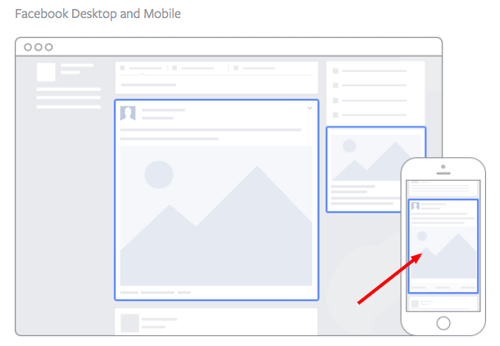
The 3 Primary Formats for Facebook Ads (With Examples)

Format 1: The Right Column Ad

Right Column Facebook Placement.png

Source: Facebook

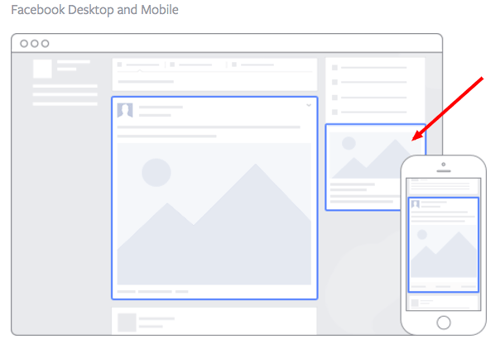
This type of ad is the most traditional on Facebook, it appears on the right side of a user’s Facebook News Feed. This is the first type of advertising Facebook had, and it still exists today.

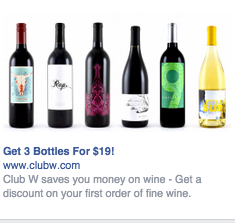
Although ads in the News Feed are likely to get higher engagement metrics due to its native advertising features, right column ads shouldn’t be forgotten. We often see less expensive clicks and conversions when using these ads. In order for a right column ad to be successful, it needs to be relevant, have a value proposition, a good visual, and have a call-to-action. Let’s look at an example below from Winc (formermly known as Club W): 


Club W FB Ad.png

Here's what makes this ad great:

  • It's visual. The visual is clear, simple, and appealing to all types of wine-lovers.
  • It's relevant. This came up in my wine-obssesed colleague's News Feed. Need I say more? Two thumbs up on relevance.
  • It includes an enticing value prop. Three bottles for $19? What a steal. They also pull the viewer in with an additional value: a discount on their first order of wine.
  • It has a strong call-to-action. The word "get" is strong call-to-action language, and it's used twice here. A time limit on this offer would have made it even stronger.

Format 2: The Desktop News Feed Ad

Screen Shot 2016-11-29 at 1.16.38 PM.png

Source: Facebook

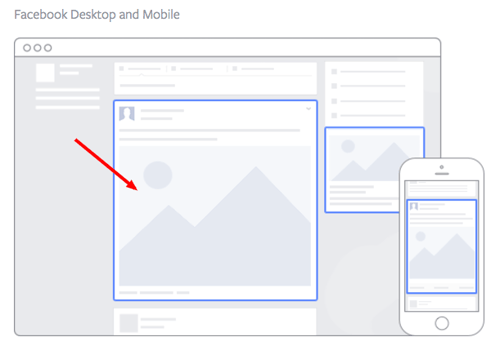
This type of ad appears directly in a user's News Feed when they access Facebook on a desktop computer, and it looks more like native advertising. In our experience, these ads have a higher engagement rate than right column ads, but they can also be more expensive. These ads must follow organic Facebook posts best practices and be both engaging and visual.

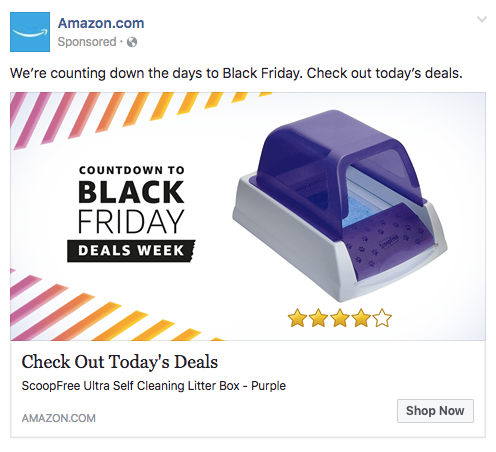
This is how an ad from Amazon looks in the News Feed on a desktop:

amazon newsfeed litter box.png

Here's what makes this ad great:

  • It's visual. Not only is this image larger than the right column ad display, but it also uses warm colors, white space, and directional lines which drew my eye towards the featured product.
  • It's relevant. As a cat mom, this offer is clearly tailored to my consumer needs. 
  • It includes an enticing value prop. Amazon has advertised a self-cleaning litter box here, which is of tremendous value for any cat owner. Additionally, it shared the strong customer ratings below an image of the product. (Social proof, anyone?)
  • It has a clear call-to-action. Amazon instructs me to click on its ad today, after which point the deal for the litter box will presumably disappear. "Now" is strong CTA language that compels clicks.

Format 3: The Mobile News Feed Ad

Mobile Facebook Ad Placement.png

Source: Facebook

Like the desktop News Feed ad, this type of ad appears in the user's mobile News Feed and displays like an organic posts from people and Pages that they follow. 

This is what a mobile News Feed ad for The New York Times looks like:

NYT mobile ad.jpg

Here's what makes this ad great:

  • It's visual. The quirky cartoon drew my eye as I scrolled on my mobile News Feed through lots of text and photography. The nontraditional illustration pulled me in for a closer look at the content.
  • It's relevant. I'm a person in my 20s, and I used to write about health care. This is an article I would definitely be interested in reading, and it helps that the ad appears like a native post promoting an article in my New Feed.
  • It includes an enticing value prop. The ad shows me which of my Facebook friends also like, and presumably read, The New York Times. This social proof makes me more likely to click and read the article.
  • It has a clear call-to-action. This ad is dedicated to increasing the page's Likes, and by asking a question in the ad, the call-to-action makes me want to click the article to learn more.

Now that we've covered the three main ad formats, let's dig into a sampling of the wide variety of post types you can use.

8 Types of Facebook Advertising & Some of the Best Facebook Ad Examples

1) The Facebook Video Ad

Video ads appear fairly large in the user’s New Feed and offer more engaging content than static posts. And with 8 billion videos being watched on Facebook every day, it serves as an interesting -- and potentially profitable -- ad type for marketers to try out. 

Need some inspiration? Check out this example from Key Jewlers below:

kayjewelersfinalgif.gif

Why this works:

  • It's visual. Even though this is a video, I have a general idea of what I will be watching, thanks to the screen capture it started with. Additionally, I can understand the gist of this ad without playing with the sound on, which is important given that 85% of videos on Facebook are now viewed without sound.
  • It's relevant. It's relevant to me because I was recently scouring jewelry websites, specifically for necklaces like the one in the ad.
  • It's valuable. Kay shows potential customers the value of purchasing with the help of the happy reaction from the woman receiving the gift in the ad. Plus, who doesn't love dogs?
  • It has a solid call-to-action. This ad is set up to drive Page Likes, which is an easy, one-click way for me to get more relevant content served up to me.

How can you create your own video ad? First, understand Facebook video ad requirements including length and video size. We suggest keeping your video as short as possible, even though Facebook allows you to upload a much larger video. Create a video that displays your product or service, and upload directly to the Facebook ads manager by following these instructions. 

2) The Photo Ad

Another type of rich media advertising on Facebook is a post of an image. This is one of the most popular types of ads ever since Facebook began favoring visual content. The optimal size for News Feed photo ads is 1200x628 pixels, otherwise your image will get cropped. Adjust your image based on the target audience’s needs and by what will appeal to them the most.

Here's an example of a photo ad from NatureBox:

naturebox-1

Why this works:

  • It's visual. The image shows you exactly what you're getting, and it calls out the “free sample” CTA well.
  • It's relevant. Everyone likes to snack. In all seriousness, the person who saw this is a fan of several lifestyle subscription companies, which is what NatureBox is. 
  • It's valuable. This ad is full of value. First, the “free trial” callout is the first thing your eyes go to when looking at the image. Second, it clearly mentions the healthy aspects of the goodies in its product.
  • It has a clear call-to-action. Nature Box is asking you to try its free sample. It couldn’t be easier to know your next step.

3) The Multi-Product Ad

Multi-product ads allow advertisers to showcase multiple products within one ad. Viewers can scroll through the images and click on individual links to each product. You can promote multiple of anything, not just products -- like different blog posts, ebooks, or webinars. These ads can be created in the Facebook Power Editor.

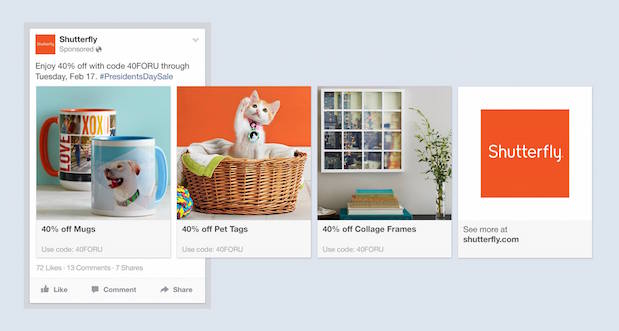
Here's an example of a multi-product ad from Shutterfly, along with the additional images that are used in the ad. Each image has a different offer, to appeal to many different demographics in one ad.

shutterfly

Why this works:

  • It's visual. This series of images leands on a consistent color pallette, making it feel both cohesive and on brand. (Having a cute cat doesn’t hurt either.)
  • It's relevant. The person who saw this loves taking photos and creating sentimental gifts. Spot on, right?
  • It's valuable. There is a very clear value for the user, 40% off each of the products being advertised. The code and sale end date are also clear in the ad description. This ad also has an added level of value, it is showing the many different ways people can use Shutterfly, in ways many may not be aware of.
  • It has a clear call-to-action. I know I need to use this before February 17th when this deal expires, so I would be encouraged to take action right away.  

4) The Local Ad

Local ads on Facebook only work if your business has a physical location that you are trying to drive real foot traffic to. If you fall into this category, then locally targeted Facebook ads may be a great fit for you, as you can hyper-target on Facebook down to the mile.

If your business has an offer or event going on at your store, set up a few Facebook ads that appear only to people within a short distance of your store. Have these ads appear a few days prior to the event and on mobile devices while the event is happening. You may want to reach some people the day of the event who happen to be in the area and checking their Facebook account on their smartphones.

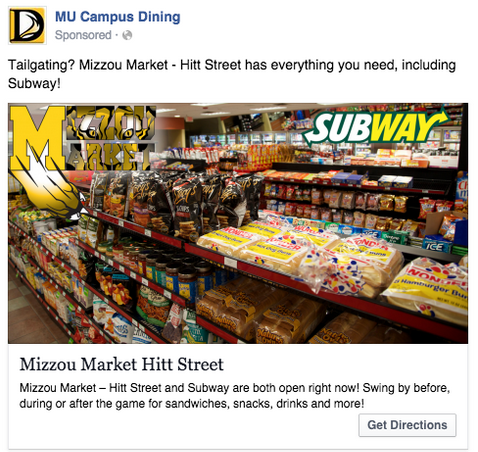
Take this ad for example from Mizzou Campus Dining:

ScreenShot2015-03-29at2.12.59PM

Why this works:

  • It's visual. This image has college pride, a variety of salty and sweet treats, and a well-known logo to attract hungry college students. 
  • It's relevant. This ad is likely only being shown to students on campus who are in its target audience. It also mentions the sports game that was going on at the time, and plays to the student’s current needs: snacks and Subway sandwiches.
  • It's valuable. Mizzou Market is telling hungry college students that it has everything students need for the big game. 
  • It has a clear call-to-action. This ad has the option to show directions, making it extremely easy for a college student on the go to follow the walking directions to this market.

5) The Offer Ad

An offer ad is a newer form of Facebook advertising where a business can promote a discount on a product or service that can be redeemed on Facebook. The benefit of this? It eliminates one step in the buyer's journey, which ultimately increases sales.

The offer ad has many benefits. First, it drives the user directly to the offer. The user claims it directly on Facebook, removing any added friction of needing to to go to your website for the offer. You also can reach any type of audience that you want, as all the Facebook targeting options are possible.

Finally, you can include all the information needed for the user to decide if they want it or not, including the time period it is usable, the number of people who has already claimed it, and the exact amount the offer is. This will eliminate any unqualified clicks, which cost you money.

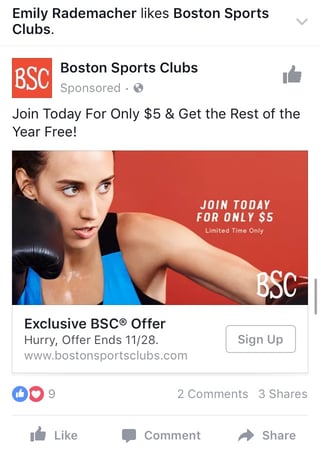
Here's an example of an offer ad Boston Sports Club:

BSCad.jpg

Why this works:

  • It's visual. The featured photo uses bold colors and clear typography to draw my attention to the details of the offer, and the woman exercising gives me an idea of what I could gain from purchasing the offer.
  • It's relevant. I recently moved to Boston and have been searching for gyms in my area online, so this ad is highly relevant to my recent Facebook and search activity.
  • It's valuable. Paying $5 for a monthly gym membership is a great deal. Even though the price may increase in the future, the low price definitely makes me want to click.
  • It has a clear call-to-action. The CTA emphasizes that the discount offer is limited and should be claimed quickly using the word "hurry" and telling me when the offer expires.

6) The Event Ad

Event ads promote a specific event. The CTA on these ads usually send users directly to the ticket purchase page, wherever that happens to be hosted.

Using this type of ad will help drive a targeted group of people to attend your event. These will show up in the News Feed of the specific audience you've chosen. Events are a big part of most businesses, but getting people to attend even a small event, can be tricky. Promoting your event to a targeted specific audience on Facebook can help drive the right kind of attendees.

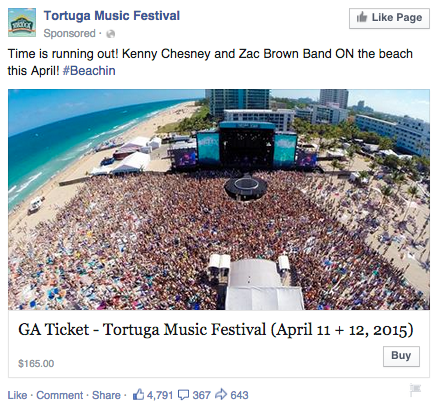
A good ad in this format will clearly show the benefit of attending the event: The price, dates, and a clear CTA to purchase a ticket. The events ad below for the Tortuga Music Festival displays the date and time and the bands playing:

event facebook ad

Why this works:

  • It's visual. The picture alone is worth a thousand words about how much fun this concert would be. Not only is it on the beach, it was also taken on a gorgeous day and the stage looks amazing. Also, it clearly represents what to expect during the event, and it catches the eye as someone scrolls through their News Feed. (The beautiful ocean water definitely helps.)
  • It's relevant. The person who saw this ad is a fan of Kenny Chesney and has been to his concerts before. They're also originally from Florida, which is where this event takes place. 
  • It's valuable. Since the image was taken on a beautiful day, it looks like an ideal place to be -- especially to those of us viewing it from our office desks. It also clearly tells you the cost of the ticket so you know before you click. (This is also good for the advertiser: By including the price, the ad allows users to self-select based on whether they can afford the ticket. If they can’t afford it, they won’t click through, thus saving the advertiser money on unqualified clicks.)
  • It has a clear call-to-action. The CTA is clear: "Buy." The advertisers also add urgent wording with the title “Time is running out!”, encouraging you to purchase your ticket now before it's too late.

7) The Retargeting Ad

A retargeting ad promotes an ad to a specific list of previously identified people. Have you ever seen ads follow you across the internet after visiting a certain website? Then you've seen a retargeting ad. 

Facebook has the same capability. An advertiser can advertise to a list of leads or customers by uploading a list of email addresses it already has into the Power Editor to make a custom audience. A good retargeting ad acknowledges that the brand knows you're already interested in its product. (Because, let’s face it ... retargeting can be a little creepy.)

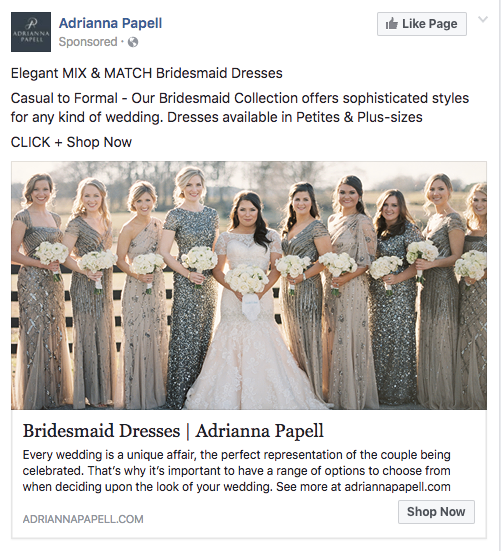
Last week, I started shopping around for a bridesmaid dress for an upcoming wedding. Today, this ad appeared in my News Feed:

Adrianna Papell wedding dress ad.png

Why this works:

  • It's visual. The image gives me a good idea of what to expect from the designer's website, and it definitely helps that the gowns are both unique and stunning. Talk about a showstopper. 
  • It's relevant. The ad called out that I was already shopping for bridesmaid dresses, and what's more, I had previously looked at dresses on this exact website, so this ad is highly relevant to my search.
  • It's valuable. The variety of dresses in the ad's image and in the description make this website worth a visit for someone trying to find the perfect gown out of thousands of options.
  • It has a clear call-to-action. The CTA is "Shop Now," which encourages me to click to purchase the beautiful dresses in the ad's image.

8) The Boosted Post

A boosted post is an organic Facebook post that was originally on the homepage of a company’s Facebook, and that later was boosted with advertising money.

This is different from the above ads because it's not created in the Facebook Ads Manager. You can include more in the description, as there is no limit to word count on boosted posts like there is in ads. You can also have a link in the copy.

The cons? Boosted posts leave you fewer options for bidding, targeting, and pricing. You also cannot run any types of A/B tests because you're promoting a post that's already been creating, not creating one from scratch.

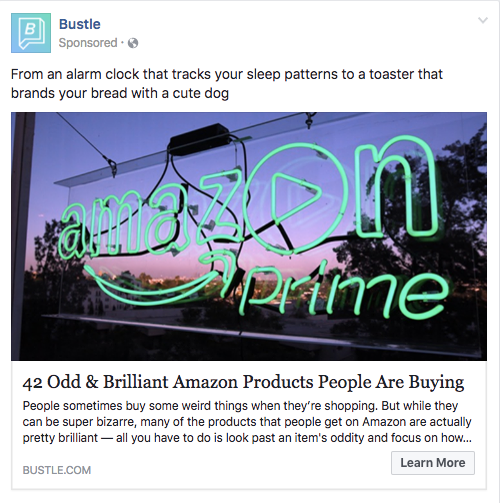
Here's an example of a boosted post from Bustle, who promoted one of its articles on Facebook:

bustle learn more ad.png

Why this works:

  • It's visual. Lots of people are familiar with the Amazon Prime logo, but not in neon lights in a window display. It made me do a double-take while scrolling through Facebook.
  • It's relevant. As we've already learned from earlier examples, I like shopping on Amazon and also read Bustle, so this article is a combination of those two behaviors.
  • It's valuable. "Brilliant" is a strong adjective to describe products, which makes me curious to learn more about purchasing them.
  • It has a clear call-to-action. The ad entices me with information about useful and "brilliant" gadgets I can get delivered to my door within two days, which I'm happy to click to learn more about.

Getting Started

There you have it: A list of all the different types of Facebook posts and a few examples of awesome ones from all different brands. The Facebook Ads Manager platform will walk you through how to set these up with simple, step-by-step instructions -- so don't feel overwhelmed.

Note for HubSpot customers: You can now integrate Facebook Ads reporting into the HubSpot Ads App to make reporting and analyzing your advertising ROI easier. You'll be able to easily see which Facebook Ads generate leads and increase your ROI without having to analyze the data yourself. You can also use this integration to edit Facebook Ads from directly within your HubSpot portal. Customers can sign up to test this integration here.

Now, stop reading and start creating.

Want to see how HubSpot uses Facebook? Like our Facebook Page here.

Editor's Note: This post was originally published in June 2012 and has been updated for freshness, accuracy, and comprehensiveness.

free guide to facebook advertising


from HubSpot Marketing Blog http://blog.hubspot.com/marketing/blog/tabid/6307/bid/33319/10-examples-of-facebook-ads-that-actually-work-and-why.aspx-0

The Top Questions to Ask & Avoid During a Phone Interview [Infographic]

phone-interview-questions.jpg

Did you know that the average job seeker spends only 76 seconds reviewing a job posting online before they decide to apply?

While this may be enough time for the candidate to determine if the role is in their area of expertise and meets their salary requirements, it probably isn’t enough for them to evaluate if they’re the best fit for the role.

If you’re an interviewer, this is where the phone interview can come in handy. Instead of taking time to coordinate an in-person interview, a phone interview requires only a few minutes of your time and can quickly and easily determine if the candidate is qualified for the role.

Hireology produced the following infographic to review questions you should -- and shouldn’t -- ask in a phone interview to decide if a candidate should move forward in the recruiting process. Check it out below to sharpen your phone interview skills.

PHONE-INTERVIEW-1.png

What questions do you always make sure to ask during a phone interview? Share with us in the comments below.

learn how to hire an all-star marketing team


from HubSpot Marketing Blog http://blog.hubspot.com/marketing/how-to-conduct-a-phone-interview

Tuesday, 29 November 2016

Virtual Reality vs Traditional Video: 7 Differences You Need to Know

ThinkstockPhotos-545792146-517239-edited.jpgVirtual reality is the hot new video marketing tool disrupting business plans and budgets across the planet. Audiences are loving it and want more: a 2015 study found that 81% of consumers would tell their friends about their VR experience, and that 79% would seek out additional experiences. The demand is so huge Deloitte predicts that by 2020 the global market may be worth around $30 billion.

Because of this growing demand everyone is jumping on the bandwagon and offering VR production as part of their services. I get it – as an integrated marketing agency with an in-house video production department, becoming a virtual reality agency was a natural next step for us, so we sent the team on training, hired in specialists and acquired the kit we needed.  

We’ve learned loads on our long VR journey; it truly is a different beast to 2D and takes some serious skills to tame. We’ve outlined 7 important differences to help you prepare for your own VR adventure – consider them carefully, they could save you buckets in tears and pennies.

1) You need specialist equipment

VR production requires some specialist equipment that can seem incredibly intimidating, not to mention expensive. At the very least you will need a 360 camera rig and editing station (with an i5 processor or above), as well as a PC and headset to review the footage. 

In terms of camera gear, there is a range of options to suit different levels of budget and ambition. The Samsung Gear 360 is one great option at entry level that consists of two cameras with a 180-degree view. It’s priced at around US $460.

If only the best will do, consider the 8K, waterproof, six-camera GoPro Omni. It captures everything – and its resolution is almost faultless with minimal stretching. The price for this fancy rig is around US $4600.

If you want movement in your video, you need to budget for extra gear like drones and dollies. 

Now that you’ve got your camera gear sorted you need to think about your editing equipment. At TopLine Comms, we recently bought a beast of an editing machine to deal with the sheer amount of high-res footage that each camera rig produces. This machine can process footage with resolutions ranging from 720p to 8K and is completely customized for VR production.

2) Avoid the danger zone

VR film sets have their very own ‘danger zone’ – usually a radius of 1.5 meters from the camera rig. Anything filmed in this zone will come out weird and blurry so your production team will need to keep it clear of any people or objects that could distort the shot.

Stitch lines can have a monstrous effect on your VR content so make sure you’re working with a crew who pays attention to where they are and keeps focal points as far away from them as possible.

But remember, even if the danger zone is kept clear, the different angles of footage will still have to be stitched together using specific software like Kolor Autopano Video Pro and Kolor Giga.

While some VR equipment – like the Samsung Gear 360 on the Galaxy s7 smartphone – have an automatic onboard stitching function, there are some drawbacks you have to bear in mind: the footage you get will have a lower resolution and the processing time will take longer.

If you want higher quality footage – Samsung Gear 360 can still do it, but then you have to use a computer and specialist stitching software. Ultimately, you need to decide what will work best for you and your budget.

3) Think about people on set

We know that when you commission your first VR project, you will probably want to be on-location. With normal video production, this is fine. With VR video production, it’s not fine. Remember, these cameras are filming 360-degree content which means everything will be in the shot. Even if you stand behind a tree and don’t breathe, you’ll get picked up.

This means that if you insist on being on set, the director will likely ask you to get in character, put on a costume and blend in. No joke. Crew on the latest Star Wars film, Rogue One, had to do it.

So if dressing up is your thing, by all means attend the shoot. If not, you can’t be on set. Sorry.

4) Give the voice over direction

Scripting voiceover for content that can literally go in any direction is tricky. Unlike 2D, your audience can look anywhere at any moment. So, if the VO is talking about something happening on the right, best the script directs them to look right. Rather than record the VO before filming, work with your production agency to do it afterwards.

You also have to keep in mind that most cameras focus on visuals at the expense of audio quality. To fix this you can hire special recorders for 360-degree sound, like Core Sound's TetraMic and Brahma Tetrahedron, for example. This will, of course, be an additional expense.

5) Be patient with the edit

Post-production is where the true magic happens but be prepared for it to take time – much more time than editing 2D footage. Merging stitch lines will take at least a week, more if your production has used multiple cameras.

The edit begins by uploading the footage into specialist software, like Kolor Autopano Video Pro and Kolor Giga. The content is sync’d and then the angles are stitched together.

Once the videos have been stitched together, your editing team will often have to fix the horizon. During the stitching process the software will automatically merge the different angles to reduce the appearance of seams. However, sometimes this results in an image that is off centre or off axis. This can only be corrected by manipulating the video.

What’s more, all objects directly above or below the camera (like tripods) will have to be ‘disappeared’ using skilful editing techniques such as superimposing a reference photo over it. Or, the editor can opt for the cruder method and stick a relevant graphic over it.

We once attached one of our 360 camera rigs to the front of a skateboard, but the clamp holding the camera up was visible in the footage. To edit this out we had to manually lay another image of a skateboard over the actual skateboard in the shot.

All of this makes VR editing a much lengthier process than traditional video editing.

6) Prepare to pay more

VR is relatively expensive to produce. It costs more than 2D but not as much as a Spielberg blockbuster (unless you’re referencing one of his epic films from the last century). Truth is, it doesn’t pay to cut corners – ultra-low-cost equipment and crews often result in ultra-low quality.

To put the costs in perspective it helps to look at the requirements in terms of time, people involved and post-production process. For a 2D filmed video you will usually need a producer or director, a camera operator and a sound recordist. Then the post-production process will involve and offline edit, motion graphics and colour grading. All of this will take about 5 weeks could cost between US$6 500 and US$10 000.

With a 360-degree video, however, you’ll need more crew members, including a producer or director, a camera operator, a digital imaging technician a sound recordist and a runner. As mentioned above the post-production process is also more extensive with VR. It will typically include stitching, offline editing, plating, motion graphics and colour grade. This pushes the project timescale to around 7 weeks with costs ranging from US$ 9 000 to US$13 000. 

But remember, VR projects don’t all cost the same – productions with bigger kit, multiple days of filming and some basic graphics could be around US$13 000 to US$20 000. A high end VR experience with lots of animation could be upward of US$130 000.

With VR it’s worth investing in an agency that won’t mess up the postproduction process, and that will be able to advise you on the best shots for your video. You might think that it’s a good idea to have a camera on the floor while people zip past on bikes. While this sounds dynamic in theory, the shot’s perspective will place your viewer on the floor too – which might not be the most comfortable experience. A good VR video agency will point these things out to you, so you can make better, more informed decisions.

That said, your VR project also should not eat your entire marketing budget – what good is cool new content if you can’t afford to take it to market?

7) Make it audience friendly

Almost everyone wants to watch VR content but not everyone has the required headsets. If you’re producing an experience to showcase at an event or in the office then no problem, you’ll have the relevant equipment on-hand.

If you’re assuming that your viewer has an Oculus Rift at home, your amazing VR experience will fall flat. The best you can do is make sure that your audiences can immerse themselves in your VR content through as many platforms as possible: from Google Cardboard to YouTube to Sulon Q.

When producing content that has to be viewed with a headset, give some thought to motion sickness and make sure your viewers won’t feel too nauseous (remember Nintendo’s first attempt at VR that had people literally throwing up?). Relatively static shots are best as they allow viewers to move their heads freely and enjoy their immersive experience without unpleasant side-effects.

If you’re still not sure if VR is right for you, consider what you want to use the video for. Will an engaging, immersive video experience get the job done better than a traditional video? If the answer is yes, then you should consider VR. However, you also have to keep your budget and project timeline into account. While VR videos create a great experience they do take longer and are more expensive to make.

If you analyze your prospective project according to the 7 characteristics of VR videos listed above, you should get a good idea of whether what you want to achieve can be done through VR and whether you have the budget to make it work. The great thing is, should you decide to attempt VR you don’t have to go at it alone. You don’t have to be a VR expert if you work with an agency that is able to advise you on everything from shooting location to sound effects.

If virtual insanity is getting you down and you need some expert guidance, download our Marketer’s Guide to Virtual Reality.

DOWNLOAD THE FREE MARKETER'S GUIDE TO VR

from HubSpot Marketing Blog http://blog.hubspot.com/marketing/virtual-reality-vs-traditional-video-differences-to-know

How Fixing Client Analytics Can Help Agencies Sell More

A completely accurate client analytics account is few and far between.

That forces you, brave agency veteran, to roll up your sleeves and try to make sense of the chaos you’re looking at for each unique scenario.

You didn’t plan for it. You didn’t charge for it. And now, if you don’t fix it, you’ll face an uphill battle in trying to prove the resulted you delivered.

Like it or not, addressing this issue head-on and fixing client analytics can help you sell more, and sell more profitable work.

Here’s why.

The Problem with Pricing Digital Services

Most clients have no idea what we do.

They pay us – very well in some cases – despite not truly grasping how we’re going to deliver the goods for them.

Sure, they might grock the buzzwords a little bit. They understand the jargon and the high level perspective. But it’s mostly a superficial understanding.

When you get down in the weeds, and start describing how exactly to get from A -> B, you start to lose them a little as glazed over eyes stare back at you.

That’s not a knock; it’s just reality.

In the same way you probably could care less about what’s wrong with your car engine and how a mechanic is going to fix it. You just want to know if you’re going to be able to make it to Happy Hour in time this afternoon.

More often than not, clients are paying us based on trust. Or a leap of faith. Or our smiles and fashionable clothes.

And when they don’t fully grasp the full context of their problem, or the work involved in each painstaking individual step you have to take to fix it, they gravitate towards the one thing that’s easy to separate you from everyone else that says they do exactly what you do: price.

Cue competitive bids and escalating downward pricing pressure.

So what do you do the next time around?

You piece together a meager cost plus estimate that rarely includes Profit (and you’ve undoubtedly underestimated Project Management), double check the marketplace, and rush it out the door.

In contrast, the best, most profitable agencies use value-based pricing. Instead of starting with what their internal costs might be, they start with forecasting:

  1. The new revenue a client can generate, or
  2. The cost savings a client might see as a result of working with them.

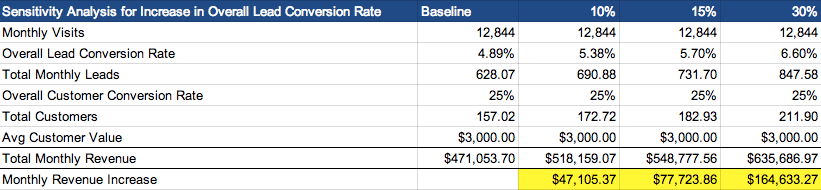
For example, you can take a look at their historical averages of traffic and leads. If you’re able to come in and bump that conversion rate by 10%, 15%, or even 30% over the course of a few months, what does that look like in new revenue based on their average customer value?
sensitivity-analysis-lead-conversion-rate

Boom. If simple conversion tweaks and changes can lead to $40K-$160K+ in new revenue, there’s MORE than enough room to pay you 20-30% of that.

That covers your software, payroll, meetings, and then some. You can actually scale a business on that.

Even better, is if you can show how increases in results – less your agency costs – results in NET gains too.
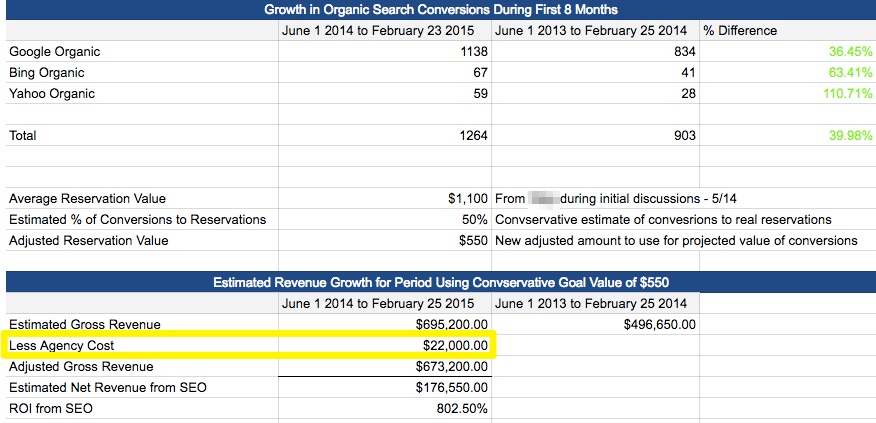
organic-search-growth-revenue-growth-spreadsheet

But there’s a problem.

You can’t even begin to forecast potential revenue for clients like this when they’re missing a critical piece of the puzzle.

Why Fixing Your Client’s Analytics Should be Priority #1

Value-based pricing includes showing a client the outcome and end results of your work in clear-cut business objectives that they can understand (like leads gained or costs saved).

But…

If they don’t have a complete view of their marketing and sales funnel – which, like 97.75% of companies are guilty of – you’ve got a problem.

To make matters worse, these issues can be tough to spot ahead of time, before you dive into their account (which means you probably didn’t plan for it in your timeline and you sure as hell didn’t charge for it as a line item).

Maybe the conversion-tracking pixel is on the wrong page (or even worse, sitewide). Or perhaps they’re using legacy CRM software that doesn’t allow you to figure out what happens after someone becomes a lead (like, where’s da revenue coming from?!).

Either way, before you even touch a single line of code, fix a broken link, or put together a wireframe, you need to get an accurate benchmark of where a company is at right now.

Here are three reasons why.

Reason #1. Determine Where Results are Currently Coming From

A quick view of a company’s Acquisition Channel performance in Google Analytics can give you a snapshot of where they’re at, and how they’re doing.

Sure, the visits or sessions piece is moderately helpful, cluing you into which campaigns are delivering (or not).

But the real value comes in analyzing which channels specifically are driving leads and customers (and how much each is worth).

Now you start crossing over from raw data to insight. You’re able to draw lines between where budget is being spent and where results are coming from.

This helps you figure out what’s already working for clients so you can pour on more, and spot what’s already been tried that hasn’t worked (so you don’t make the same mistakes).

Arguably more important though, is that it will provide you with a baseline to compare against after you deliver your services.
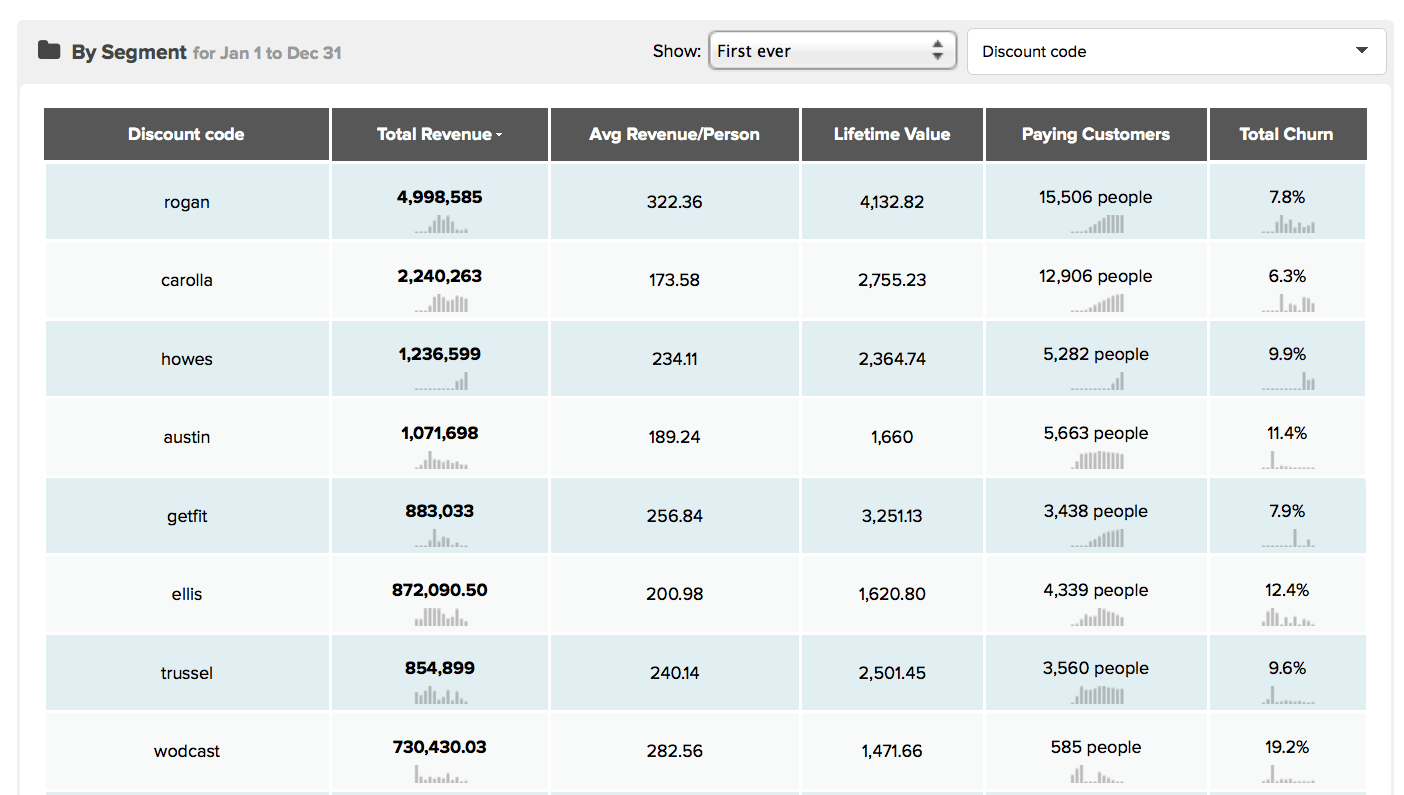
revenue-report-tracking-advertising-kissmetrics

Reason #2. Isolate Campaign/Promotion Attribution

You hear that?

The screeching tires. The scent of burning rubber. A loud crash.

That catastrophic train wreck of epic proportions you’re about to witness is your new client’s analytics.

Their complex, multi-faceted business has taken its toll, with independent systems for each department that don’t work well together (and would require a quant-jock, Business Intelligence analyst to figure out).

Instead of relying or messing with existing systems, setting up a third-party analytics solution to isolate how your campaign and promotion is performing might be an easy way to sidestep the nightmare.
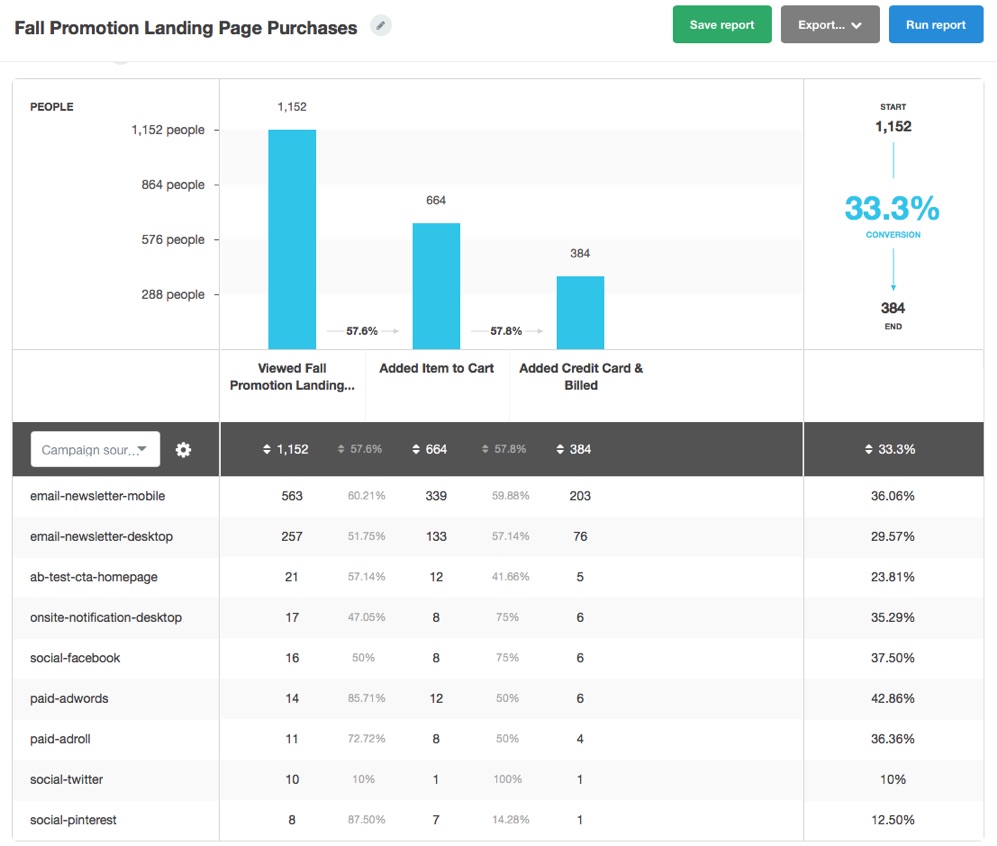
fall-promotion-landing-page-new-funnel-report

This Funnel Report will not only show you which promotional efforts are driving awareness, but also give you insight into the funnel performance for each channel, helping you identify patterns and discrepancies between how visitors from each channel (like cold vs. warm traffic) add items to your cart or complete a purchase.

You can dive even deeper into the individual customer profile, taking a look at the specific steps they took prior to purchase. This can help you identify which pages are assisting conversions, and also spot any bottlenecks or gaps that others keep hitting that causes them to bounce.
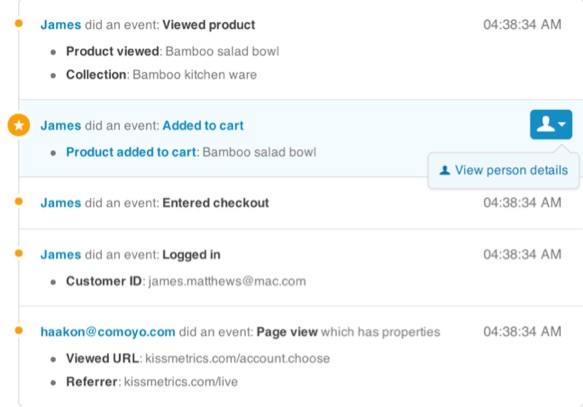
person-details-kissmetrics

Reason #3. Make Better Marketing Decisions

Leading indicators are helpful. To a point.

They give you a preview or snapshot of what might potentially happen on down the line.

For example, SEO is a lagging indicator. Sure, you can measure new pages built and new links generated, but it’s still gonna take some time for Google to reindex, new rankings to fluctuate, traffic to start dribbling, new leads converted from said traffic, and only then do you get some verifiable sales opportunities to start tracking.

That means you’ve got a waiting game, and in the meantime you’re making a bunch of changes and assumptions based on incomplete information.

Things get especially challenging when some of these indicators can lead you astray, like when that high conversion rate might backfire.

Here’s how it works: you run some headline A/B tests with generate more initial leads. Numbers go up and you pat yourself on the back. Only problem? Sales – the number that actually matters – go down as a result.

Fortunately, the Kissmetrics A/B Test Report can help you run split tests that will only declare a winner when an event is met further down the funnel, which helps you avoid getting too excited over an increase in clicks (which aren’t super helpful) and waiting for the big payoff instead (conversions).
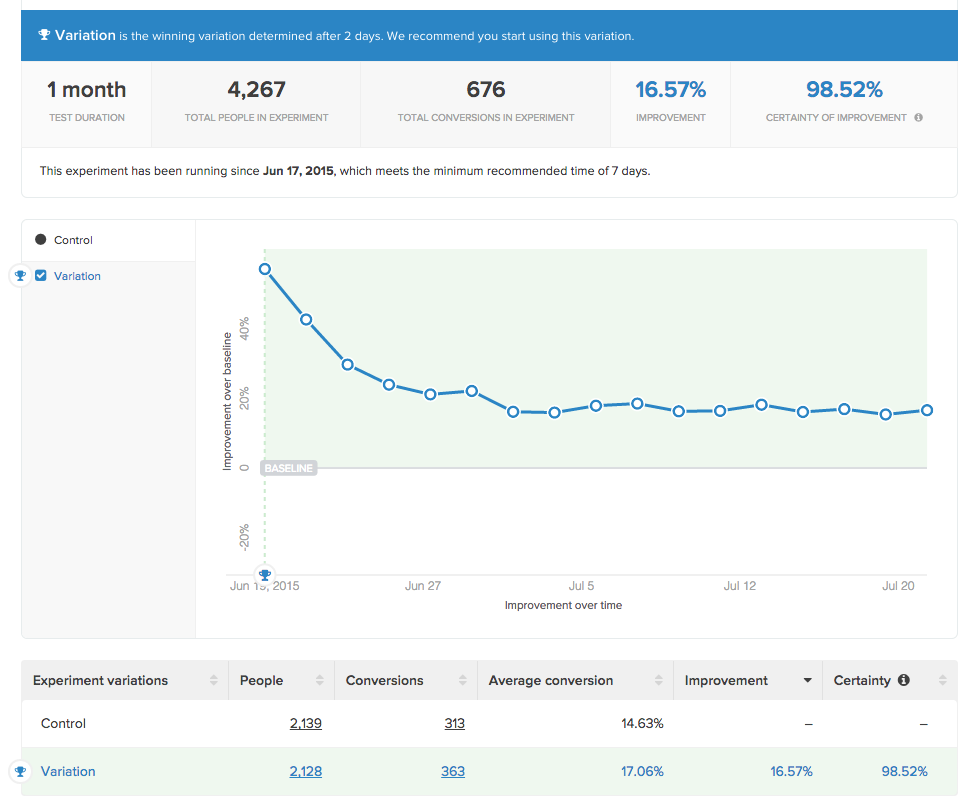
kissmetrics-ab-test-report-on-engage

How to Sell Extra Work with Analytics Insight

Design is subjective. It shouldn’t be, but it is.

My favorite thing to witness is a fiftysomething executive who has literally zero knowledge of art and design, or the owner of an old-school insurance brokerage, make specific design critiques and changes (like, “I think that shaded border should be gold instead of gray”).

Which, if I were a designer, would surely cause me to become a statistic you hear about on the Nightly News.

So how can design, something so subjective that every client thinks they can do better than your Creative Director, deliver quantifiable results that will allow you to charge more?

Look for leverage points.

For example, why does someone need that new landing page?

“I need a landing page design for an AdWords campaign,” says the client.

Ok cool – then in reality they don’t just want or need one landing page, but they’re gonna want (and need) multiple ones. Here’s why (and how to sell it).

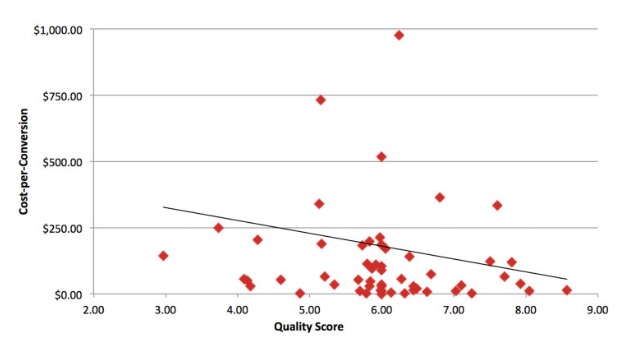
Landing page design will help dictate Quality Score, which has been proven multiple times to influence your Costs Per Click (and thus, Cost Per Conversions).
cost-per-conversion-quality-score-graph

Image Source

“If your quality score increases by 1 point, your cost-per-conversion decreases by 13%,” according to Jacob from Disruptive Advertising.

Awesome. So in order to increase that quality score as much as possible, you’re going to need specific and relevant landing pages for each campaign you’re running. Which means you’re going to need multiple versions of the same page so that you can align message match to drop your Cost Per Conversion and increase the total conversions you’re getting.

Now, that’s going to require some extra work.

You, dear client, will also want to make sure that copy and content changes for each page and that you set-up at least basic analytics to make sure we can track all of this and make iterations on-the-fly. That’s going to require these new additional line items to our scope.

We recently went through this exact process on a new website redesign and performed a quick analysis after 30 days with the new AdWords landing pages.

The results?

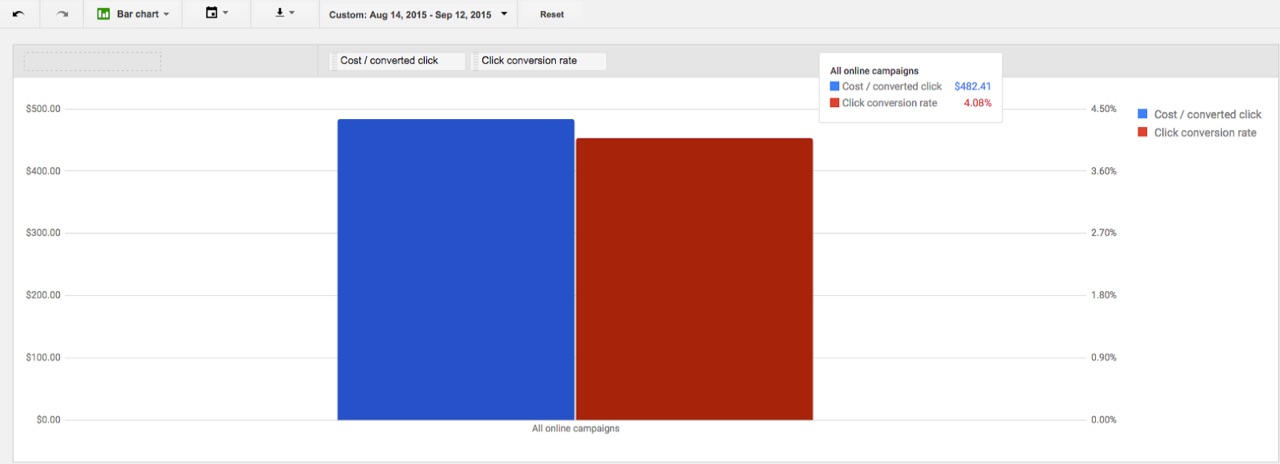
We compared results to the same period, prior year to rule out seasonality. So in 2015, their Cost Per Converted Click was $482.41 and their Conversion Rate was only 4.08%.
cost-per-converted-click-1

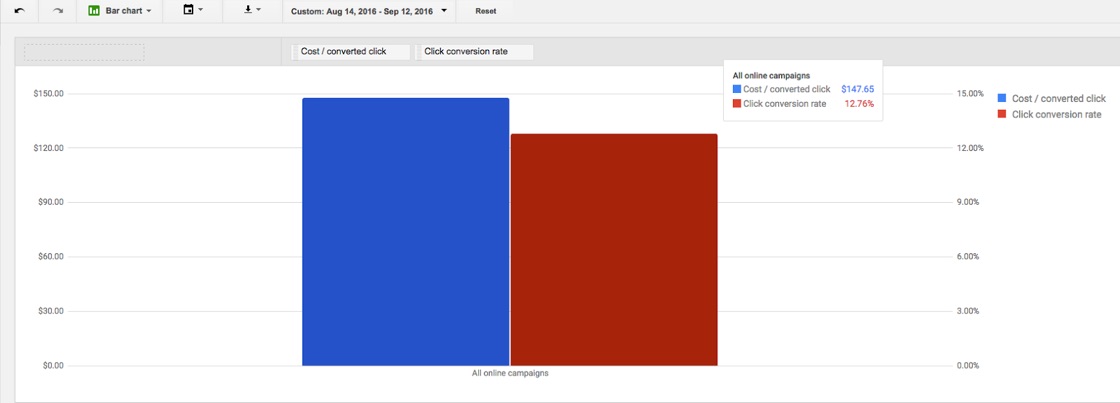
During the new 30-day window in 2016, their Cost Per Converted Click dropped to $147.65 and their Conversion Rate jumped to 12.76%.
cost-per-converted-click-2

Total score?

  • Cost/Converted Click: 69.39% cost reduction
  • Conversion Rate: 212.74% conversion rate lift

Now multiply those ‘efficiency’ metrics against the results (like total leads, or the amount spent for those leads), and you can quickly highlight your financial value.

Think there was enough room in that budget for a few extra landing pages? And now some more work?

Our only job as a consultant is to improve the client’s position. (I think that comes from Alan Weiss.)

You’re the expert, not them. And as such, you need to fight for the scope (and thus the required resources and budget) it’s going to take in order to deliver the results a prospect or client is looking for (whether they understand what it’s going to take or not).

Because my hairline is becoming increasingly more like Jason Statham’s, and jawline has never resembled Brad Pitt’s, the only way I can figure out how to do this is through cold, hard, analytical data.

Conclusion

Clients commonly don’t fully understand the scope of what you’re being asked to do.

That’s OK. It’s manageable.

But only if you can translate your value into something they do understand – like marketing KPI’s or business objectives like revenue and costs.

The problem is that becomes impossible without a strong foundation for analytics.

There’s no way to benchmark past performance, to isolate your individual campaigns, or spot customer bottlenecks along the way.

Fixing or addressing a client’s analytics problems then should become priority #1.

Because it will not only help you justify the current work you’re doing for them, but also sell the results in the future to them and new ones just like them.

About the Author: Brad Smith is a founding partner at Codeless Interactive, a digital agency specializing in creating personalized customer experiences. Brad’s blog also features more marketing thoughts, opinions and the occasional insight.


from The Kissmetrics Marketing Blog https://blog.kissmetrics.com/fixing-client-analytics/

3 Marketing Operations Mistakes That Will Break Your Sales and Marketing Alignment

3-marketing-operations-mistakes-that-will-break-your-sales-and-marketing-alignment

Author: Tanya Chu

What do the marketing leads look like? Where are all our leads going?

On the marketing operations team, we get asked these questions often by the demand generation and sales teams. Lead management is a critical piece to effective sales and marketing alignment, and without proper planning and execution, leads cannot move smoothly through the funnel. Marketing operations is responsible for this on both a tactical and strategic level, and we need input and feedback from demand generation and sales.

However, things do not always go as planned. We get asked all the time about the validity of a lead or why a lead was routed to a certain person or team. In this blog, I’ll share some common marketing operations mistakes I’ve come across. If you’re interested in learning about more, you can register for my upcoming webinar (tomorrow), 8 Biggest Mistakes Marketing Operations Makes and How to Avoid Them.

Let’s take a look at three big marketing operations mistakes and how you can avoid them:

Myopic Lead Scoring

One of the biggest mistakes in marketing operations happens when leads are not properly qualified, or prioritized, as they enter the funnel. This is often the result of faulty lead scoring. For one, scoring can be done on an ad hoc, as needed basis, but it will lead to inconsistent results. Another pitfall is that lead scoring may be designed through the lens of marketing without critical input from sales.

To combat these issues, follow the recommendations below:

1. Centralize global scoring. Regional demand gen marketers may feel that scoring should be localized because of their unique understanding of their markets. However, regional scoring may lead to fluctuating lead scores and confusion about lead performance globally.

At Marketo, we work with our global demand generation teams to determine how we want to score based on demographics and behavior. For example, we normalize how leads are scored based on their job title. We set up a rule that recognizes a job title containing “gerente” for the European Spanish version of “manager and then scores the lead accordingly. On the behavior side, we have matrices that dictate scoring by program channel type, investment level, and lead response action. This centralized approach has greatly helped us evaluate the quality of top-of-funnel leads coming in and understand our program performance.

2. Align scoring with sales efficiency and incentives. While systematized lead scoring provides invaluable metrics to the demand generation team about which programs to drive more of, the lead score should also resonate with the sales team as well. Too often, we hear that sales distrusts the lead score, which leads to them not utilizing the scores at all. To curb this, it’s important to ensure that the scoring is valid and works to support sales.

One way we have done this at Marketo is by bumping up lead scores for those who fill out a “Contact Me” form. We also score accounts, which aligns with an account-based marketing strategy for both marketing and sales. We built in a component of our scoring that takes into account (pun intended) the lead’s account score, and sales is incentivized to go after accounts with a higher propensity to buy.

As our business has grown, there has also been a greater need to drill down on scoring granularity. Two years ago, we started scoring on product interest to give our internal sales team an idea of the products a lead was researching. This year, we did a deep dive on looking at leads in specific industries that we wanted to grow sales in.

Unorganized Lead Routing

After you properly qualify inbound leads, you’ll want to decide when they should be routed and to whom. Lead routing can vary from being quite simple to fairly complicated depending on the needs of your organization.

When I started at Marketo more than three years ago, the company was much smaller and our lead routing requirements were much simpler in both scope and magnitude. It was fairly easy to update teams and territory assignments. Fast forward three years—our sales team has more than doubled, there is a strategic shift to an account-based marketing strategy, and our international teams have expanded. Our lead routing needed to change accordingly and we had to have a solid plan in place from start to finish.

From my experience, lead routing mistakes manifest in three ways–unknown processes, the question of fairness, and lack of agility. All three issues lead to inefficiencies in delivering leads to sales.

To address this, follow these steps:

1. Communicate processes with sales. It sounds simple, but if you lift up the hood of your marketing automation engine, you may find that marketing says “Here!” and sales says “Where?” Sales teams are often unaware of the process in place for follow-up and how certain steps need to be followed in order for activities to be logged.

Organize a training with sales so they understand the processes that you have created. If there are certain views or reports that you are using to identify leads that are passed to the sales team, make sure they have access to identical views and reports. You’ll also want to explain how leads should be prioritized for follow-up. It’s a good idea to create a feedback loop and ask the sales team if they are seeing patterns in how the leads are coming into their views. There could be better ways for you to automate the flow that reduces manual work done by the reps when they see misrouted leads.

2. Drive fairer distribution of leads. The question of fairness always arises because sales teams are under pressure to deliver based on the leads that get assigned to them. A key marketing and sales exercise is to investigate the quality and quantity of lead flow in each territory. Sales coverage and performance results should reflect varying demand. In some territories, a round robin may be the easiest and most balanced way to distribute leads. However, in the example of our lead routing in Europe, language preference is used for distributing leads.

Make sure that you have the proper data to support your organization’s routing needs. One area of lead routing that we’ve been optimizing at Marketo is passing more highly qualified leads to more senior members of our sales team. This strategy gives more junior members experience with working leads and allows senior members to follow up with “hot” leads more efficiently.

3. Understand tradeoffs. When it comes to maintaining your lead routing, there are tradeoffs. The first consideration is quality vs quantity. Routing can be designed to filter out leads that do not meet stringent criteria. Are your sales teams trained to quickly sift out junk leads? If they are, are there just too many leads coming in daily to get through all of them? It’s up to marketing operations to understand the sensitivity of sending too many leads versus only delivering the most highly qualified leads to sales.

A second consideration is between volume and velocity. Even with the volume of your leads determined, there are still leads that need to be channeled very quickly to the sales team, such as a lead who fills out a “Contact Me” form. This means that leads with “less” scrubbing may move into a sales view rapidly.

The last consideration is designing an articulate lead routing engine and having enough resources to manage it versus a simpler routing engine with less maintenance overhead. Do you and your team have the time to manage complex rules, along with understanding edge case scenarios? Make sure the tradeoffs are understood between your marketing and sales teams.

Undefined Marketing and Sales Handoff

Once you have your lead routing and lead scoring in place, it’s also critical to have a workflow for handing qualified leads off to sales. Mistakes with the handoff lead to lost time and money and could even jeopardize a sale. Because there are gray areas of ownership and contention, we’ve learned to do the following:

1. Agree on definitions. Agreement on what is a marketing qualified lead is the first step in the marketing to sales handoff process. A marketing qualified lead, or MQL, must meet certain criteria in order for sales to begin follow-up. This should be aligned with lead scoring, as mentioned above. An MQL must also be easily identifiable as one and there needs to be a process in place for the sales team to follow up so marketing knows that the lead is being worked on as well.

2. Monitor accountability with SLAs. Enforceable SLAs (service-level agreements) should be put in place so sales can be accountable for leads that have been passed over. SLAs help ensure that sales is following up with given leads in a set amount of time. While marketing drives MQLs, sales also needs to take responsibility for giving feedback on the quality of MQLs and timeliness. SLAs help with improving lead management alignment, which includes understanding issues with lead routing and lead data and assessing if you have the right tools in place for measurement.

3. Run uniform reports. You should create official reports to run metrics on MQLs and sales performance. Even though data can be sliced a number of ways to support managing teams, the source of these reports should be the same. Oftentimes, sales will run their version of reports and marketing will run their version, and meetings will be about the data source and not about improving the business itself. Instead, public reports should be shared and vetted by both marketing and sales. Here at Marketo, we share the marketing operations-approved dashboards and the fields that we use to report on MQLs across both teams.

Marketing sales alignment is a never-ending process because it is ever-changing. However, the best way to consistently meet business demands is to make incremental improvements and constantly evaluate how you’re building processes.

If you want to learn more about the challenges that marketing operations faces, register for my webinar, 8 Biggest Mistakes Marketing Operations Makes and How to Avoid Them.

Marketo Summit 2017 - Nov Banner


3 Marketing Operations Mistakes That Will Break Your Sales and Marketing Alignment was posted at Marketo Marketing Blog - Best Practices and Thought Leadership. | http://blog.marketo.com

The post 3 Marketing Operations Mistakes That Will Break Your Sales and Marketing Alignment appeared first on Marketo Marketing Blog - Best Practices and Thought Leadership.


from Marketo Marketing Blog http://blog.marketo.com/2016/11/3-marketing-operations-mistakes-that-will-break-your-sales-and-marketing-alignment.html

How to Validate Your Blog Post Topics: A 3-Step Process

validate-blog-post-ideas.jpg

Imagine you own a business that films and produces yoga routines for at-home practice. As search engine results pages become more crowded, your chances of ranking for a popular industry keyword -- such as "yoga" -- begin to diminish.

But as it turns out, that's not the end of the world. These days people are actually conducting more specific, conversational queries -- think: "how do I teach myself yoga?" -- to get the information they're looking for, faster.

Unsurprisingly, Google responded to this change in behavior by introducing RankBrain -- a machine-learning artificial intelligence system -- as well as Hummingbird -- a search algorithm designed to focus on the meaning behind the search terms being used.

The result? An increased number of long-tail keyword variations that are regularly searched within a topic. Jackpot. Learn more about HubSpot's latest tools to power your growth here.

But with more topic opportunities on the table, how can you be sure that you're going after the right ones? To help you avoid wasting time on topics and keyword plays that won't generate a meaningful return for your business, we've put together a simple process for validating your ideas before you start writing. Check it out below. 

How to Validate Your Blog Post Topics: A 3-Step Process

1) Get to know your audience really well.

Ideally, you’re already conducting market research and thinking about your audience before you start writing a piece of content. But in case you’re not, or you need to refresh your memory, here are a few questions you should be asking when you’re brainstorming blog content ideas:

  • Who searches for information on this topic? What are their ages, job roles, and demographic traits?
  • What emotions do you want to evoke? What are their goals?
  • What do you want viewers to do with your blog posts once they read it?

When you have a clearer idea of the demographic and psychographic traits of your ideal audience, you can then use this information to substantiate your list of ideas. Chuck the ideas that don't fit their mold, and keep the ones that do -- it's that simple.

2) Create a topic cluster based on your persona research.

Once you know who you’re writing for, figure out what questions they need answers to. To start, think about providing solutions to challenges your audience is facing.

For example, in the yoga example above, your audience’s problems might include: not having enough time to go to the gym, a lack of nearby gyms, an inability to afford a gym membership, or high levels of stress.

From there, marketers should ask questions to determine the specific angle of their content. What’s the best way to deliver this information -- a blog post, an infographic, or a video? What content has already been published about the topic, and what angle can I pursue to differentiate mine?

One of the best ways to organize your thoughts and finding here is through a topic cluster -- a new way to strategize blog content geared toward how search has evolved.

Continuing with the yoga example, you'd want to create a topic cluster centered around "yoga" as the main topic. Then, you'd come up with subtopics that are related to yoga but based on long-tail keywords that are easier to rank for in search. These could include “at-home workouts,” “exercises for stress relief,” “yoga for beginners,” and “online yoga classes.”

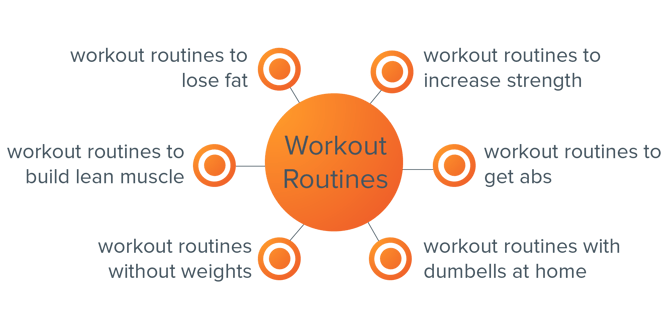
Here’s an example cluster that HubSpot's Head of Growth & SEO Matt Barby created. Notice that while the core content topic is "workout routines," the cluster content -- referred to as pillar content -- spans a wider variety of related topics.

workout routines topic cluster-1.png

By clustering ideas around one core topic that is relevant to your audience, it become easier to generate content that you know will resonate.

"This is a very simplistic overview but can work as a light framework for prioritizing content ideation and production," explains Barby in an article detailing the full process. "The role of the pillar content is to cover the core topic broadly and also perform well at converting visitors into leads (or whatever your conversion goal is). The cluster content that is built for each of the subtopics will focus on gaining greater topic visibility and funneling traffic through to the pillar content in order for them to convert."

3) Use tools to gut check your topics.

Once you have topics in mind for blog posts, do some testing: Just because you think the topic is interesting and good for search engine optimization doesn’t always mean it will resonate with your audience.

Here on the HubSpot Blogging team, we propose blog topics and titles alongside a reason why we think they will perform well. Here are some of the tools we use to determine if an angle is worth writing up:

  • TitleTester: As the name of the tool suggests, TitleTester allows you to plug different title options into its tool to analyze which has the highest clickthrough rate. Use this tool to test different angles on a topic to see which generates the most interest.
  • Twitter Polls: Ask your followers to vote for topics they’re most interested in reading more about using Twitter Polls. Use that data to guide your topic choosing before starting to write.
  • Twitter Chats: Figure out which Twitter Chat most closely aligns with the topics you’re writing about, click on the hashtag, and see what types of questions people are asking about. That will give you an idea of a content gap that your blog post could fill with resources for your audience.
  • BuzzSumo: BuzzSumo analyzes how many times a URL has been shared via social media or linked to by another domain. Do some quick competitor analysis by dropping in links to content on the topic you’re writing about to see how different angles have performed in the past.
  • Blog Comments: Does your blog have commenting enabled? If not, it should, because feedback from your subscribers is the exact answer to the questions you’re asking -- what content is my audience interested in? Take positive and constructive feedback from readers to inform your strategy.

Once you’ve aggregated responses to different tests and questions you’ve asked your audience, choose a topic and title with the greatest level of engagement and response, and start writing your blog post.

Quality > Quantity

The biggest takeaway for marketers is to emphasize blog post quality and relevance over quantity. Instead of writing multiple blog posts without a review of the strategy behind them, it will be difficult to rank in search and achieve lead generation goals.

For HubSpot customers, HubSpot Content Strategy will help guide you through the process of creating a topic cluster. Based on data from the HubSpot Keywords App, Content Strategy and the Blog Topic Generator will recommend topics that you should create content around, and advise against topics that will be hard to rank for or are unrelated to your central topic. It’s coming soon to the HubSpot software, and users can sign up for early access now.

How do you decide which topics to write blog posts about? Share with us in the comments below.

Product Launches INBOUND 2016


from HubSpot Marketing Blog http://blog.hubspot.com/marketing/validate-blog-post-topics