Tuesday, 29 August 2017

Here Are the Top Employer Branding Challenges [New Report]

Around here, we’re not exactly shy about our nerdiness.

We love data. We love running experiments. And upon the release of a new report that combines the two, we gleefully geek out and immediately devour the results -- always keeping in mind what they mean for marketers.

One of the more recent instances of this phenomenon is Hinge Research Institute’s 2017 Employer Brand Study. It’s full of data about the latest challenges faced by B2B firms, especially those within the realm of professional services -- with particular emphasis on recruiting and retaining the best talent.Click here to download our ultimate toolkit for social and PR branding.

As it turns out, a lot of that comes down to branding -- specifically, branding your firm as an employer, as well as a service provider.

In this post, we’ll dive into the report’s findings, and what marketers need to know when it comes to building a brand as an employer.

What Is Employer Branding?

According to BusinessDictionary, a brand is the “unique design, sign, symbol, words, or a combination of these … creating an image that identifies a product and differentiates it from its competitors.”

In the past, we’ve written about the importance of and ways to brand your business based on an audience of current and potential customers, as well as buyer personas. But when it comes to recruiting the best talent to help your organization grow, branding remains key -- but how you position your company as an employer might look different than the way you do as a service provider.

In no way does that mean you should falsify your brand for a different type of audience. It just means that you might use different (factual) information to build a value proposition as someone who’s hiring, as opposed to that for your products and services.

In a nutshell, your employee brand should encompass three key pieces:

  1. Your employer value proposition (EVP). According to Hinge, that’s “an engaging appeal to prospective employees … made up of a set of characteristics, features, and values that describe what it’s like to work in your organization and how it improves employees’ lives.” But in order to authentically communicate that, you should also include …
  2. The voice of your current employees. From their perspective, what’s it like to work for your company? How would they describe the culture? What do they love most about it?
  3. Specialized marketing content. That can include any current content you have that establishes your firm as an authority or thought leader -- in some cases, this content might need to be repurposed for employer branding and recruiting purposes, but anything that builds your appeal as an exciting place to work is worth considering.

The Top Employer Branding Challenges for Marketers

The Methodology

In publishing the Employer Brand Study, Hinge sought to answer several questions -- for the exhaustive list, check out the full-length study here. But we wanted to dig into the two that intrigued us the most:

  1. What challenges are professional services firms faced with today?
  2. What is marketing’s role in employer branding?

In answering these questions, Hinge surveyed a sample of 801 professionals, who fell into one of two categories:

  1. Talent-Evaluators: employees who are directly involved in the company’s recruiting and hiring efforts, who were asked to answer questions about these internal processes.
  2. Employee-Candidates: employees who are generally removed from recruiting and hiring efforts, who answered questions about how they approach their own respective job searches.

Here’s a breakdown of how each category was represented:
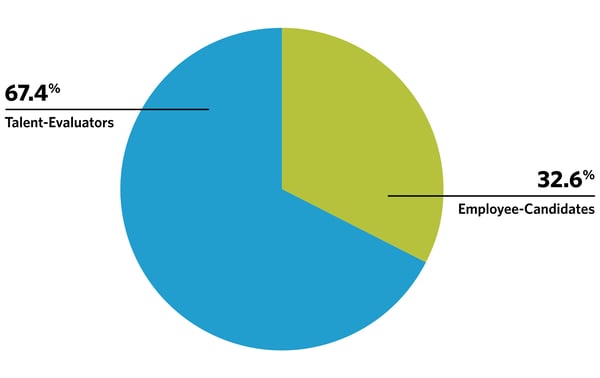
Research-EmployerBrandStudy-1.jpg Source: Hinge Research Institute

And, a look at the industries represented:
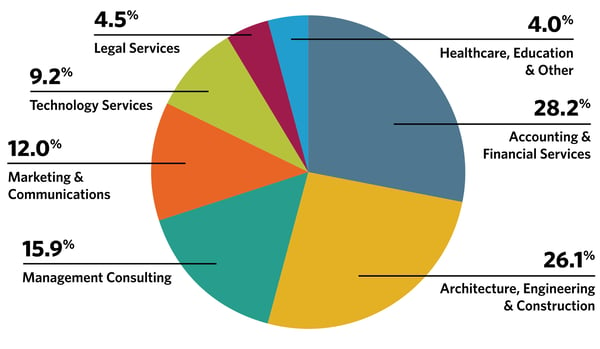
Research-EmployerBrandStudy-2.jpg Source: Hinge Research Institute

The Data

What challenges are professional services firms faced with today?

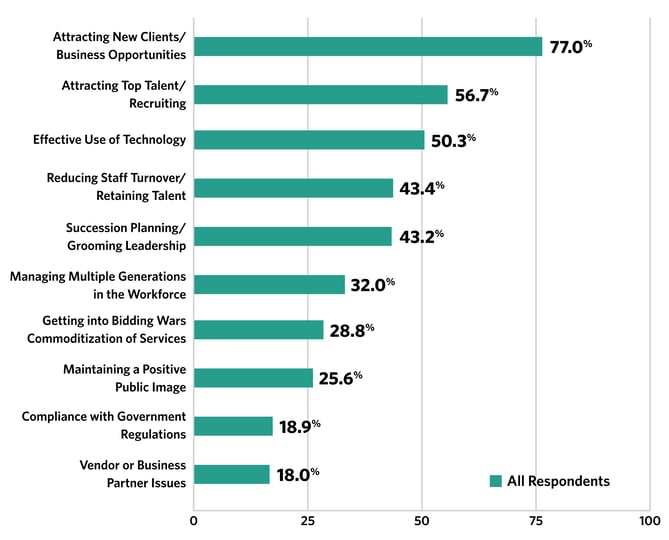
When Hinge asked respondents to identify their top professional challenges, they weren't restricted to one particular business category. And yet, have a look at how many of the top challenges fall within the realm of recruiting, developing, and retaining talent:
Research-EmployerBrandStudy-3.jpg Source: Hinge Research Institute

In fact, over half of the respondents identified “attracting top talent/recruiting” as their biggest challenge, making it the second-highest-cited difficulty facing both talent-evaluators and employee-candidates. In fourth place, meanwhile, there was the reduction of turnover.

In other words: People operations -- as we call them here at HubSpot -- impact all areas of a business. Not only does something like turnover lead to extensive costs to employers, but it also leaves individual teams and employees in a lurch when they lose talent. In addition to their own workloads, they now have to take on the tasks of those who have left, all while trying to find fitting replacements.

Notice that “maintaining a positive public image” is also on the list. That’s reflected in recruiting efforts -- according to Harvard Business Review, a company’s bad reputation can cost it 10% more than a firm with a good reputation to acquire a new hire.

So how can firms manage their reputations in a way that heightens their appeal to talent? It goes beyond doing the right thing -- which, yes, is imperative -- and often involves managing their brands, too.

That’s where marketers come in. After all, the subject of the study was employer branding -- and branding is a category of marketing. That could be why Hinge also posed the questions to respondents: “What is marketing’s role in employer branding?” Next, we’ll explore those findings.

What is marketing’s role in employer branding?
Research-EmployerBrandStudy-4.jpg Source: Hinge Research Institute

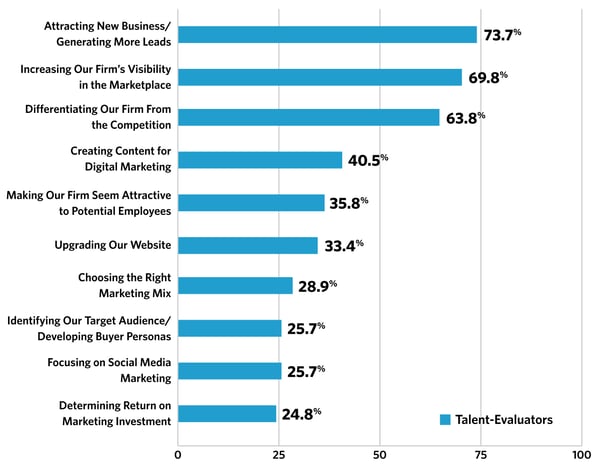
When looking at the previous two charts side-by-side, it's interesting to note the similarities between the top challenges identified by professionals, as well as those named as the biggest responsibilities of marketers within employer branding. Both questions generated answers identifying lead generation (whether in the form of a customer or talent pipeline), a positive public image (or making the firm seem attractive), and best leveraging technology (we include maintaining a website and focusing on social media here) as priorities.

But we want to dig into some of those marketing responsibilities a bit more, especially “creating content for digital marketing.” We’ve covered a lot on the topic of content strategy, including that within the digital realm. And while creating quality, valuable content can attract an audience of business leads -- one of the main principles of inbound marketing -- it could potentially do the same for talent leads.

When I was preparing for my interviews with HubSpot, one of the first things I did was voraciously read the Marketing Blog. Of course, that’s the team I was interviewing to join -- but reading that content, as well as looking further into the downloadable offers created by the team -- provided me with some insight into the company’s culture, and got me thinking about the creative process. What do brainstorms look like there? How are all of these ideas for blog topics and downloadable content generated? It was very intriguing and contributed to my excitement to be part of it.

But before I read the blog, I did a general search for information on the company. I read Glassdoor reviews, perused the Culture Code, and even came across the HubSpot culture and careers blog, Move On Up. And while that first piece -- the Glassdoor reviews -- weren’t technically owned by HubSpot, the company was still managing its presence there, by providing a detailed response to every reviewer. And when combined, all of that content composed a cohesive presence: the employer’s brand.

See what we’re getting at?

What to Do With This Information

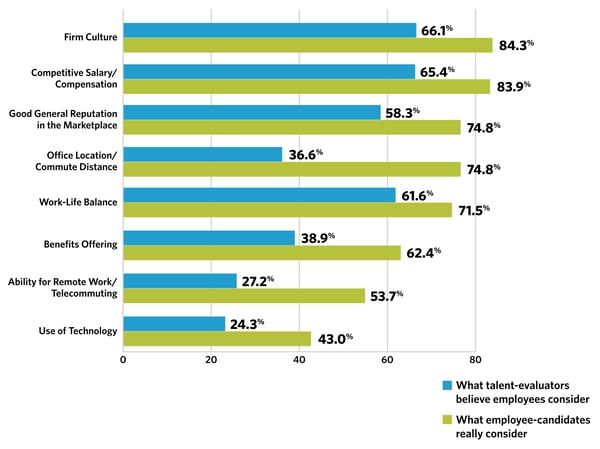
Now, just for fun, let’s have a look at the report’s findings with regard to “Top Criteria Candidates Consider When Evaluating Opportunities”:
Research-EmployerBrandStudy-5.jpg Source: Hinge Research Institute

Aha! The top response from employee-candidates was, “firm culture.” And while your firm might have a remarkable culture, it won’t do anything to benefit your recruiting efforts if you keep it a secret. It should be part of your employer brand and communicated across the content you produce.

And if you don’t already have an established culture -- or Culture Code, like we have here -- here’s a great opportunity to establish one. Not only will this work toward your recruitment efforts, but it can also force you to acknowledge exactly what type of business and team you want to have, and how (or if) your actual culture presently aligns with what you’d like it to be.

These principles can guide the type of hiring decisions you make in the future, and can even influence the way you manage your current teams, ideally supporting talent retention.

That speaks to the importance of internal employer branding, too. I’m a big fan of the phrase, “Practice what you preach.” While it’s much easier said than done, the employer messaging you broadcast externally should truthfully reflect what actually happens inside your company. The last thing you want to do is focus all of your employer branding efforts on recruiting outside talent, only to have those new hires enter the company to witness something completely different, or high turnover -- that can position them as flight risks.

So, remember: As you build your employer brand, think about where you want your workplace culture to be -- and just how much you’re currently missing the mark on those criteria. An important element of branding is honesty, with both target audiences, and with yourself.

Oh, and by the way: We’re hiring.
New Call-to-action


from Marketing https://blog.hubspot.com/marketing/employer-branding-challenges

Monday, 28 August 2017

Homepages Rarely Convert Because These 6 Elements Are Often Ignored

No, this headline isn’t clickbait.

This article does contains critical homepage elements that are often overlooked. And you might be ignoring them. In fact, the examples I share here are a sure sign that many marketers still ignore critical homepage elements. And conversions are lost for these simple reasons.

I’m not going to rehash what you already know about homepages.

You are a smart marketer. You already know a homepage is your website’s front door. It’s where most of your customers expect to find the #1 thing you do that can solve a specific problem for them.

Okay, enough talk. Here are six homepage elements you’re probably overlooking that are costing you conversions:

1. Homework (a.k.a. doing customer research)

Homework ‘on people’, that is. And yes, it’s a homepage element—because it shows when you do it well.

Imagine this for a second: Your high school teacher assigns you homework and asks you to submit it in three days. For the next two days, you stay up late and wake up early to deliver your best. You faithfully turn in your homework on the third day.

Question: How long would it take your teacher to score your work? A few seconds to five minutes. That’s how long it will take to score something you worked on for days.

It’s the same with your homepage. Your homepage (or even any landing page for that matter) is like homework given to you by your target audience. It takes them a few seconds or minutes to score you, before deciding to bounce or stay.

Homework shows on your homepage—because, if you do it, your copy will be saying what your prospects want to hear. If they land on your page and find that you’re not speaking their language, it shows you haven’t done your homework, and things can get ugly. You may even leave such a bad impression that they make a point of not going back.

Example, Ashdown People—a firm specializing in HR for IT businesses:

If you’re a tech firm who visits this page for the first time, here’s a couple of questions you’d naturally have in mind:

  • What does Shaping The Digital And Technology Workforce mean?
  • How are you shaping it?
  • What’s the exact HR problem that this brand solves for IT organizations?

The page looks nice, but imagine the confusion its visitors may be experiencing.

In contrast, take Solertia — another HR firm:

Their homepage copy speaks directly to a specific challenge folks running HRs face—developing compensation strategies to avoid losing key talent. This will catch the attention of an HR pro because it deals with problems that hurt and offers a solution.

This is a good example of someone doing their homework. Whoever wrote this copy studied their audience well enough to find that ‘developing strategies to keep key players in an organization’ is a goal HRs always try to reach.

Doing your homework on your target audience reflects in your messaging.

How do you do your homework? Talk to the very people that visit your homepage: customers. In other words, get feedback. There are great tools that will help you here, some of which include:

  • SurveyMonkey: Create surveys and generate quality feedbacks.
  • Kampyle: Get feedbacks from users.
  • Get Satisfaction: Build a forum where customers talk to one another about your product, while you just watch, listen and act accordingly.
  • AnyMeeting: Schedule live meetings with customers and get actual feedbacks from them.
  • IdeaScale: Allows users to make and vote suggestions about your product. And feedbacks with the most interactions gains higher recognition than others.

These tools will help you know your customers’ pain points, goals and how they will need your product to solve their problem. Then, you’ll be able to create a homepage (and even any other landing page) that speaks directly to those problems.

Next, brevity and clarity.

2. Brevity and Clarity

Brevity doesn’t necessarily mean copy is short. It does imply there are no redundancies, and yet enough clever repetition to convince visitors to take a specific action.

Chris Garrett, Chief Digital Officer at Rainmaker Digital, wrote that a landing page should be, “as long as necessary. And no longer.”

That’s brevity. As long as necessary. No longer. And clarity, on the other hand, is self explanatory enough. Is the problem you solve for your audience crystal clear?

When your homepage doesn’t briefly and clearly explain your offerings, people lose interest. It’s that simple.

Another case in point is where you have brevity on your homepage, but not clarity—a case where your homepage copy is brief, but it isn’t clear how visitors will benefit from your business.

A typical example of that is ZOHO’s homepage:

It’s a well designed page and it sure is brief; not much to read here. But to me, it lacks clarity.

If, like me, you knew nothing about ZOHO before visiting their homepage, you have no idea what The operating system for your business OR A revolutionary all-in-one suite to run your entire business means. If you’re curious, though, you might want to click the “learn more” link to find out.

But according to some sites, Zoho gets about 18 million monthly visits. What if 400k, 1mm, 5mm … of those monthly visitors aren’t curious enough to click learn more? They were probably looking for a specific solution before landing on this page, and that’s what they expect you to communicate to them.

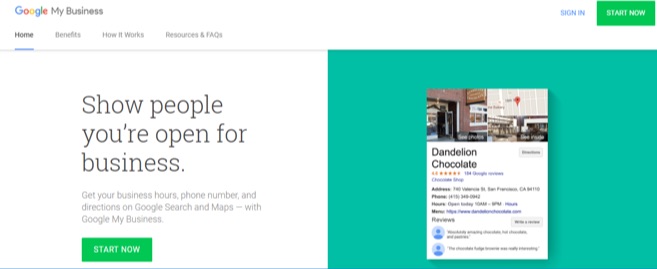
Your best bet is to communicate whatever you’re offering in the clearest and shortest way possible. A perfect example of “brief and clear” is Google My Business’ homepage:

In just over 20 words, with an image on the side, Google My Business clearly and briefly explains how they help your business get found when your brand name is searched.

So brevity and clarity could mean five, ten, 200 words. What matters is that your page provides enough information for your visitors to become convinced and take action. And this why not hiring a good copywriter for your business is a terrible idea. A good copywriter will do enough dirty work to produce copy that has both brevity and clarity.

3. Active voice on CTA Buttons

(Active voice describes a sentence where the subject performs the action stated by the verb.)

In other words, a CTA button with active voice is one that says “This is what will happen when you (the visitor) click this.”

And active voice goes beyond just using verbs on your CTA.

It’s easy to think that all visitors understand what a colored CTA button means, but you’d be surprised. Sign-Up.to recently mentioned in their study that “Images are good, but it’s not always clear that the image is also a call to action.”

Just because you have a colored button on copy doesn’t mean visitors know where the button will lead when clicked. Example:

Where will Click Here lead when clicked? Is that button for a call, an email, or a link to another page? You need to let people be certain what your button is for, or you risk confusing people.

A good CTA button has active voice on it—one that says “This is what will happen when you click this.” Here’s a perfect example of that from Toyota:

“Explore Prius” is active voice. It says exactly where the CTA will lead after it’s clicked—a page where you get to explore the Toyota Prius.

That’s active voice in action. Don’t put your visitors in a position where they’re not sure what your button is meant for. Make it as descriptive as it needs to be — Explore [my product], See a demo, Check out this case study, etc.

4. Specificity Over Hyperbole

Why not hyperbole? Because overstating can lead to visitors questioning your sincerity.

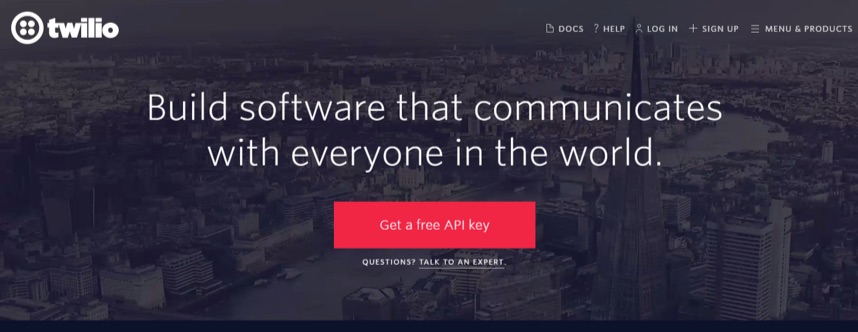
Instead, use copy that specifically communicates how you actually add value to people’s life and businesses. Twilio’s homepage is a good example:

Twilio is a tool that software developers use to add communication capabilities to the applications they build. And that’s exactly what they explain in the homepage: “Build software that communicates with everyone in the world.”

No overstatements. No hyperbole. Just the specific problem Twilio solves for people.

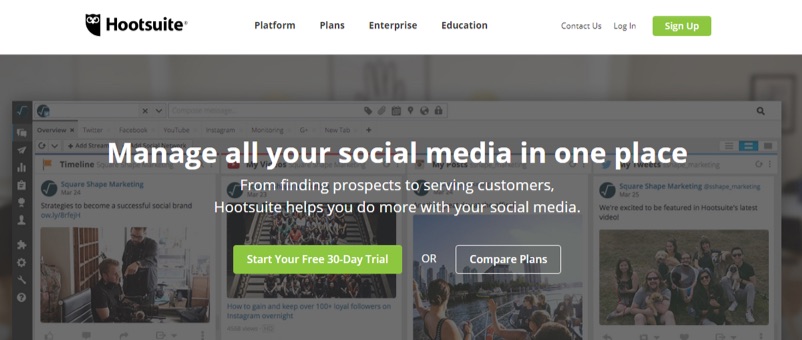
Hootsuite’s homepage is another good example:

According to SEMrush, Hootsuite gets about 7.2 million monthly visits. That’s impressive, yet, there’s no mention of how big they are on the homepage, but a brief and clear explanation of how their product solves problems for people.

Adding hyperbole to your copy doesn’t communicate any value. ConversionXL Founder Peep Laja says it this way (54:21): “You don’t add life to copy with hyperbole. [For example,] ‘We have the best pizza in town VS. We deliver pizza in 10 minutes’. [Pick] specific [over] hyperbole”.

5. Testimonials With Smiling or Happy Faces

Testimonials are powerful already, but one with a smiling face pictured? Terrific!

One Swedish study reveals that your smile has a huge effect on people around you— try smiling at someone and you’d see they almost can’t help but smile back, unless they consciously don’t want to. Amazing, eh?

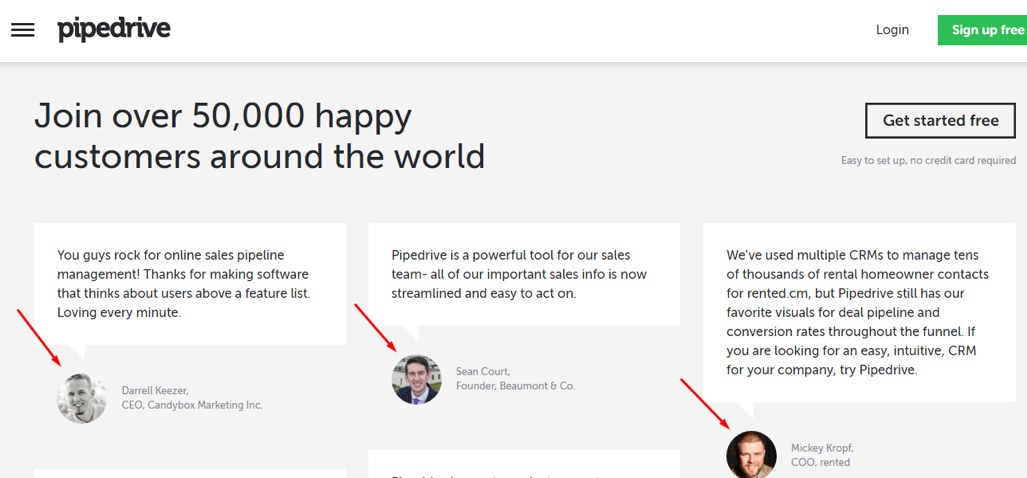
Pipedrive lay emphasis on the fact that their customers are actually happy people. Then they put those happy, smiling faces about 40% down their homepage.

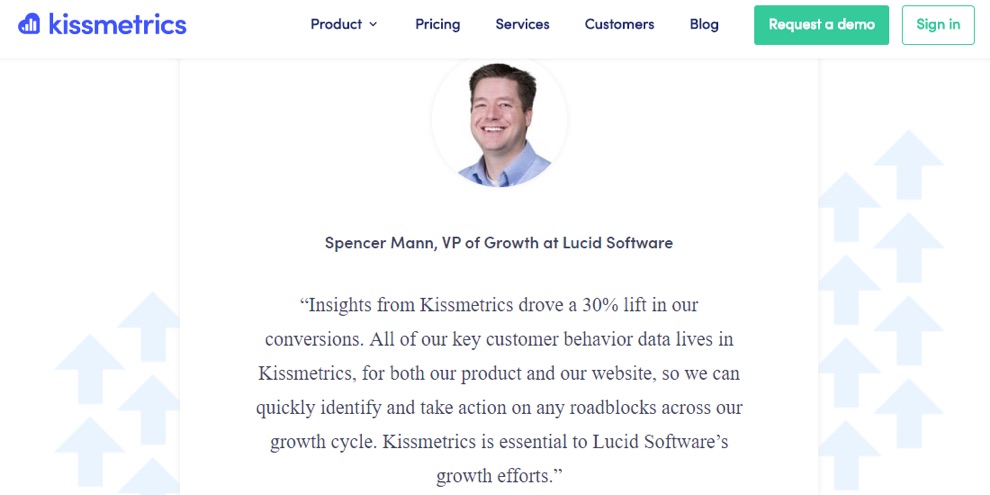
Kissmetrics understands this concept as well:

So, if you’re going to use testimonials with customer headshots, use those that are smiling already since they have a positive effect on viewers.

6. One Page, One Goal

You’d think every marketer by now gets the concept of one page, one goal, until you see a homepage like this in 2017:

Several CTAs on one page. What’s the one goal that a page like this is trying to achieve? Virtually everyone would have no idea. And several studies have proved it’s far better to use one page for one result. The more specific you are, the better you’ll be at converting specific visitors.

A good example of a homepage with one goal is this one on QX Recruitment Services:

In contrast to HR Consultants homepage (above), this one has only one goal. Which means if the homepage gets 2000, 5000, 20000, etc. monthly visitors, this report will be the number one thing catching their attention. And it’s the only action they’re first asked to take. Brilliant.

This way, QX Recruitment Services know how to measure the homepage’s success — it’s as successful as the number of downloads the report gets.

Start Converting With Your Homepage

If you’re going to have a homepage (or even any landing page) at all, you want to ensure it drives optimal conversions. And the tips above have hopefully inspired you to make specific corrections on your homepage, or even create a compelling one from scratch.

About the Author: Victor Ijidola is a conversion-driven freelance writer and content marketer. Need help with landing pages, ebooks, blog posts, guest blogging, email newsletters, etc? Contact him at Premium Content Shop.


from The Kissmetrics Marketing Blog https://blog.kissmetrics.com/homepages-rarely-convert/

How to Create Quality Blog Posts Surprisingly Rapidly

The dreaded blank screen stares back at you. Your to-do list is growing. You’re bleary-eyed. All you want to do is to kick up your feet at the end of a long day and enjoy your favorite beverage. It’s up to you, however, to turn the stubborn empty page into a tasty blog post that your audience devours. And that leaves you struggling to shoehorn the creation of a blog post into the days when you don’t have a minute to spare.

You try to avoid it. Perhaps you could get away with creating fewer blog posts. But who are you kidding? You’ve seen the stats. Like it or not, the more you blog, the more visitors your website will attract, and your website is the center of your online marketing universe.

The truth is, blog posts feed your inbound marketing program’s success. You can’t afford to have it fall flat on its face because it’s starved of content. After all, your reputation is on the line. So how do you go lickety-split from that blank screen to words that tempt and satisfy? You have to change how you write.

In this blog, I’ll give you 7 easy ways to beat writer’s block and become a content creation machine.

Don’t Skip Your Homework

I know. You didn’t want to hear that you had to do your homework. Can’t you just say the dog ate it and move on? Perhaps. But you’ll pay the price. If you do the upfront work to set the foundation, everything else will fall into place more easily.

Start with your persona research. Understand your buyers and the questions they ask throughout the buying cycle, then fill your editorial calendar with topics they want to learn about. That way you’ll always have ideas up your sleeve. You won’t be wracking your brain each time you write or second-guessing whether your audience is interested in the subject matter.

Learn to Steal

Now that you know what you’re writing about, it’s time for a little pilfering. Yes, I agree. Stealing is not ethical. Also, your blog post needs to be original to climb the search engines and to turn people’s heads.

So where does stealing come in?

Headlines.

Headlines can make or break your post. Remember, attention spans are shrinking. You have eight seconds or less to capture someone’s attention.

Where’s the proof for that 8-second mantra? Well, Microsoft did some digging into the question “How is technology impacting attention spans?” They discovered the average human’s attention span had shrunk from 12 seconds in 2000 to 8 seconds in 2013. (Apparently, that’s less than the attention span of the average goldfish. But I’m not sure how they measured that one.) Who knows what the attention span has shriveled to by now? The point is, you have to grab attention immediately.

Attention Span Infographic

Fortunately, there’s a time-saving way to do that—use tried and proven headline formulas. Yes, just like math there are formulas for writing too. Just fill in the blanks and work your magic.

Finally, to make sure you’ve put the right words into the blanks, plug your headline into this handy headline analyzer, courtesy of the Advanced Marketing Institute. It measures the emotional content of your headline. Since emotion moves people, it can tell you when you have a winner.

Play with it to increase your score. It’s fun.

Headline Analysis

Break Your Outline

To write quickly, you need an outline. It’s the bare bones that give you confidence that you’re headed in the right direction.

It should include the key points you want to make and, of course, your introduction and conclusion.

Be prepared to break it.

As you write, you’ll continue to research and new juicy thoughts will float into your brain. When they do, reevaluate. Maybe there’s a new fascinating twist your article can take. Use your judgment, but allow your blog to take on a life of its own. Perhaps you’ll even surprise yourself with your conclusion.

So, don’t let your outline stifle your creativity, but do let it create momentum that moves you forward effortlessly.

Don’t Write

It seems paradoxical that you can write a blog post without writing. With today’s technology, however, you can do just that!

All you have to do is speak to a voice recognition app. These apps can transcribe up to around 160 words a minute. But it’s not just the speed at which they put words on a page that makes them powerful. It’s the speed at which you can release those words from your brain.

If you’re typing, you have to focus on the words that spring from your fingers until they’re firmly planted on the page. On the other hand, if you’re speaking, you can release them from your mind as soon as you’ve said them. The app continues to transcribe them as you proceed to the next thought.

Voice recognition software frees up critical brain space.

There’s another situation where speaking works well—that’s with those subject matter experts who too often refuse to write articles. But you know what? They love to chat about what they know best.  Interview them. They’ll be flattered.

They know their stuff well, so you don’t want to slow your interviewees down. Record what they say and get a service to transcribe it. Afterward, you can take the transcript and shape it into something valuable.

Blog Drunk

Ernest Hemingway once said, “Write drunk, edit sober.” Now, given his love of martinis and mojitos, Hemingway just might have been serious.

However, don’t take me literally on this one. I just want to emphasize that the first time you write something, treat it as a big ugly draft, a.k.a. a brain dump. Let go of your inhibitions. Don’t judge as you write. Judgments are just speed bumps in your writing process.

You can edit your thoughts once you have them on the page. Then edit it again and again. It’s like putting the finishing touches on a sculpture.

Hemingway Quote

Get Distracted

You’ve heard the advice. Shut down your email alerts. Turn off your phone. Close the door to your office. Set a timer. Get it done. Nope. That’s not the best approach. You’re not reading a legal document or crunching numbers. You can’t power your way through it. You’re creating something out of nothing. According to an article in Scientific American, “Insight problems involve thinking outside the box. This is where susceptibility to ‘distraction’ can be of benefit.” They conclude that when you’re less focused, you may consider a broader array of information and gain more insight.

Play some music. Let the cat sit on your lap. Take a break to gossip with your officemate.

Here’s the really good news. You don’t even have to sit (or stand) at your desk to get your blog done. You can do it in chunks, allowing for distraction breaks. Alice Flaherty, a neuroscientist, says dopamine in the brain is the key ingredient for creativity. The more, the better. So how do you get more of it? Do something that helps you to relax. Start your blog, then leave it. Go for a run. Sleep on it. Break for lunch. After all, your brain needs to mull it over—not in the forefront, but in the background. So why strain yourself when you can let your unconscious mind do the heavy lifting?

Writing a blog in pieces may take more time from start to finish, but overall, you’ll spend less time in front of that screen.

Hire Some Help

One way to rid yourself of blog writing is to hire it out. That way you can conquer the other items on your to-do list. You could, for instance, enlist the services of a freelance writer or marketing agency. You’ll find they have expertise in writing blogs and offer rapid turnaround. If you’re not ready for the works, there’s one thing you absolutely should move off your desk—proofreading. Even the best writers use proofreaders.

Here’s why: most people’s brains are wired to screen out the details and see the big picture. The ability to generalize allows us to take in a lot of information at once without becoming overwhelmed. The problem, however, is that proofing is all about the details. Also, as Nick Stockton, a science journalist for WIRED Magazine explains, our brains create maps of familiar places, enabling them to consider other things. That’s why you forget the details on your daily commute. Even without them, your car practically drives itself to its destination.

The same is true for proofreading. When you proofread your article, you already know where it’s going. If a word is missing, your brain fills it in. Result? It’ll take you forever to proof your own work, and because your mind plays tricks on you, you’ll likely mess it up.

Clearly, looking at a blank screen and hoping for it to turn into a blog article is no fun. If you make a few changes to how you approach blogging, you’ll no longer dread it. Just pluck one, two, or all of these tools from your writing toolbox, and you’ll feel empowered to conquer your editorial calendar. After, you can bask in the satisfaction of watching your web traffic and engagement skyrocket. End the workday on time and go home feeling successful, satisfied, and relaxed.

How do you beat blogger’s block? What methods have you incorporated from my tips above in your writing practice? Tell me about it in the comments!

The post How to Create Quality Blog Posts Surprisingly Rapidly appeared first on Marketo Marketing Blog - Best Practices and Thought Leadership.


from Marketo Marketing Blog http://blog.marketo.com/2017/08/create-quality-blog-posts-surprisingly-rapidly.html

12 Free Social Media and Brand Monitoring Tools We Love (and Why)

Reputation is everything. And on the internet, that couldn't be more true.

It's important to always know what people are saying about you -- whether it's your customers, your competitors, or the press. And on any given day, it can be tricky to keep up with what your audience is sharing across a variety of social media platforms.

So, we've rounded up some of the best free social media and brand monitoring tools from around the vast web of social networks. Nearly all of these tools are free, but some offer paid versions with more features and capabilities. Let's dive into each one -- and see if you want to test them out today.

12 Free Social Media and Brand Monitoring Tools to Try

1) TweetDeck

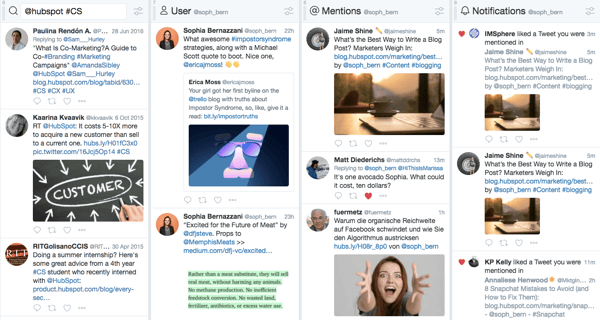
tweetdeck-exmaple.png

TweetDeck lets you create a more customized Twitter interface to monitor different users, hashtags, search terms, and lists. From one panel, you can look at Twitter content from the groups you want -- whether that's customers, competitors, or employees.

TweetDeck is a great tool to use during events or live-tweetstorms to keep up with live conversations -- while also keeping an eye on you or your brand's notifications and mentions.

2) Social Mention

socialmention-example1.png

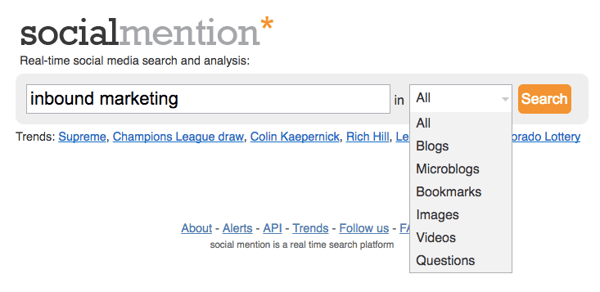
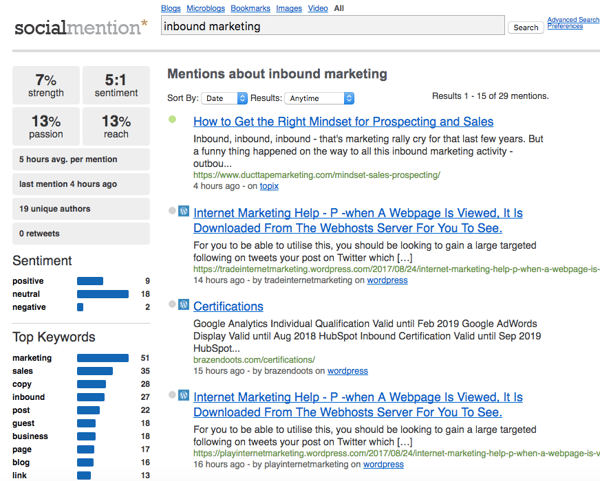
Social Mention aggregates all of the blog, microblog, image, and video content related to the search term you provide from a variety of search engines and social networks. This makes it easier to digest and view what’s being said about your brand in one comprehensive view.

socialmention-example2.png

3) Followerwonk

followerwonk-example.png

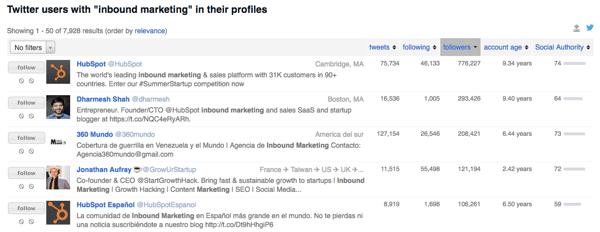
Followerwonk lets you quickly and easily search users' Twitter bios and profiles for mentions of you or your brand. Log in with your Twitter credentials to check it out, or subscribe to the paid versions to get even more social insights.

4) SumAll

sumall-example.png

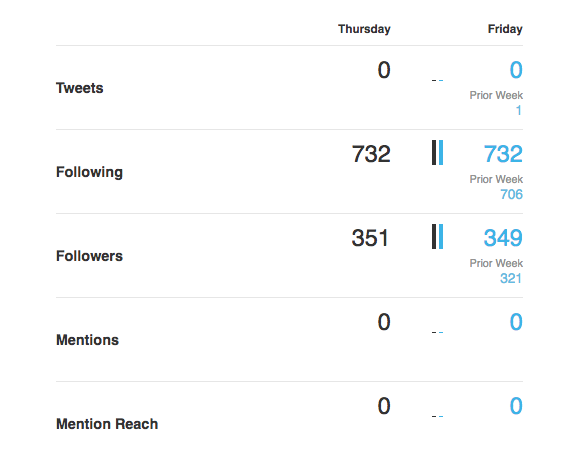
SumAll connects to a variety of different social accounts -- including Twitter, Facebook, Instagram, and LinkedIn -- to provide you with insights about your followers, interactions, and engagements. The paid version provides content recommendations and automatic post scheduling.

5) Mentionmapp

mentionmapp-example.png

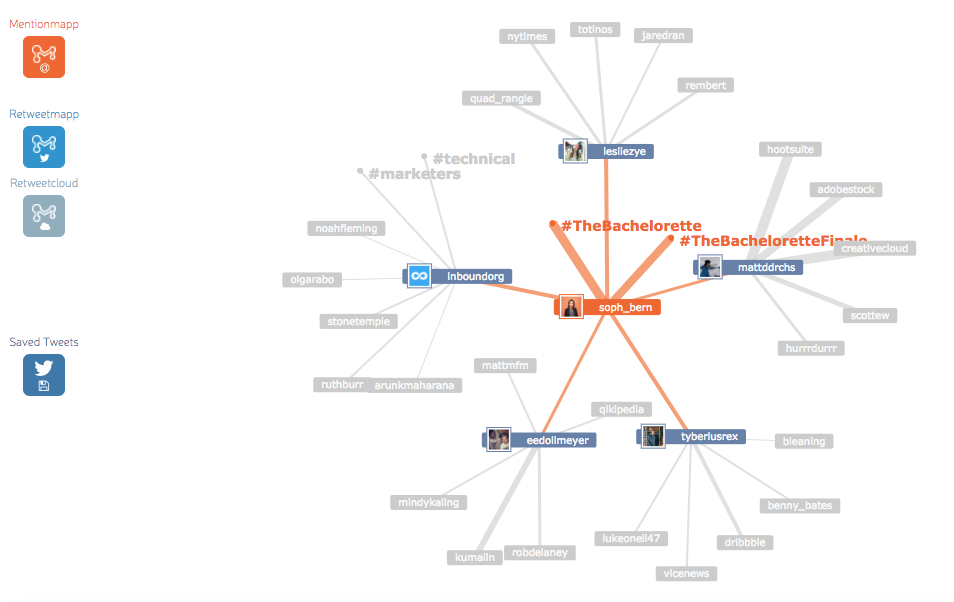
Mentionmapp connects to your Twitter API and see what’s going on in your Twitter network. You can see who mentions you the most, as well as who retweets you the most (using Retweetmapp). It's interactive, too. That way, you can click through and see how your interactions are connected -- if you want to keep an eye on the impact or reach a positive (or negative) tweet about your brand can have.

6) Klout

klout-example.png

Source: Klout

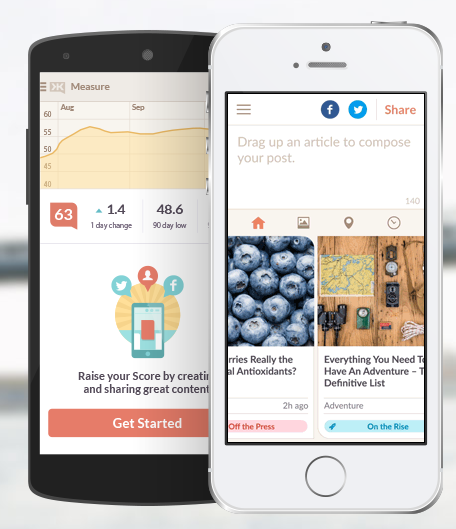
Klout connects to your Facebook and Twitter accounts and provides suggestions of content you should share with your network -- as well as the ability to share said content natively from the app.

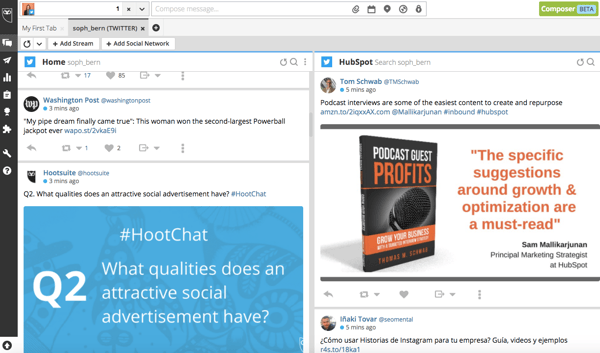
7) Hootsuite

hootsuite-example.png

Hootsuite works like TweetDeck -- but for all of your social networks. From your Dashboard, you can carry out social monitoring, scheduling, campaigns, and analytics -- all in one place. Hootsuite integrates with Twitter, LinkedIn, Facebook, Instagram, YouTube, and Google+, and although it's free for individuals' accounts, businesses and enterprises have to purchase paid versions.

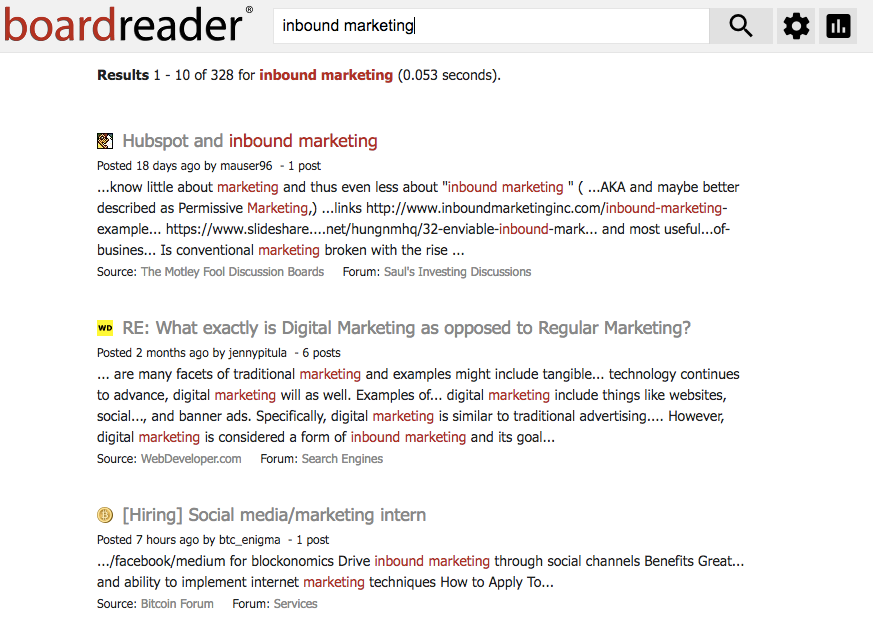
8) BoardReader

boardreader-example.png

BoardReader does what its name suggests -- it crawls message boards and discussion panels to see what people are saying about you and your brand in the dreaded comments sections, which otherwise seem impossible to parse through. Commenters often have stronger words than social media posters, so make sure you have a thick skin before diving in.

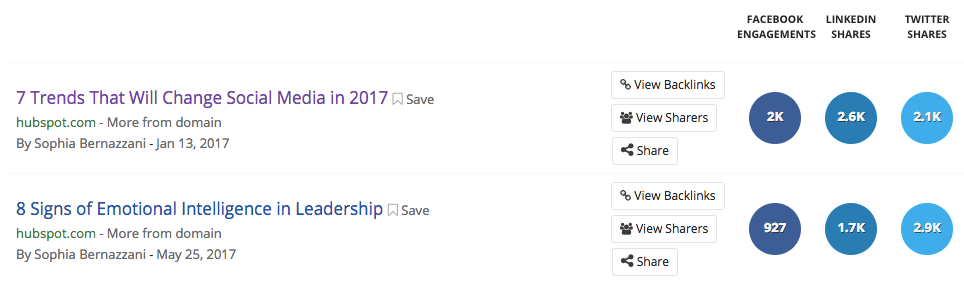
9) BuzzSumo

buzzsumo-example-1.png

BuzzSumo aggregates data about the number of links to your domain and pieces of content receive -- on social media, and via backlinks. These insights can help you determine which content formats perform best on each network, giving you ideas for web pages and pieces of content to replicate again. It's freeup to a certain number of links, but after that, you have to pony up some cash for the Pro version.

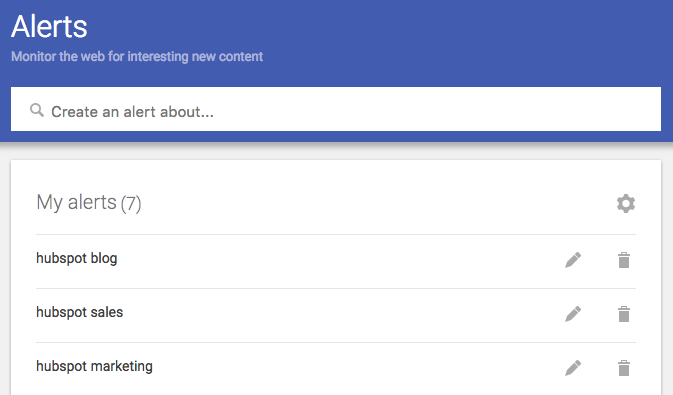
10) Google Alerts

googlealerts-example.png

You can set up Google Alerts to see where people are mentioning you or your brand in search results, too. Enter specific terms that might be included in news story titles, and you'll receive regular emails updating you to mentions from around the internet.

11) Native Analytics Tools

twitteranalytics-example.png

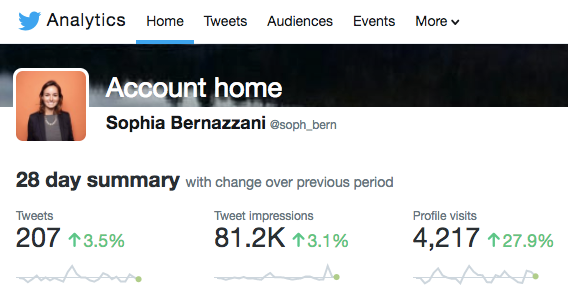
A few social networks provide free analytics to users -- or, sometimes, analytics viewing is included in a business subscription for brands. Above is an example of what Twitter Analytics looks like for individuals, with more data and insights provided for business accounts.

12) HubSpot

hubspot social inbox example.png

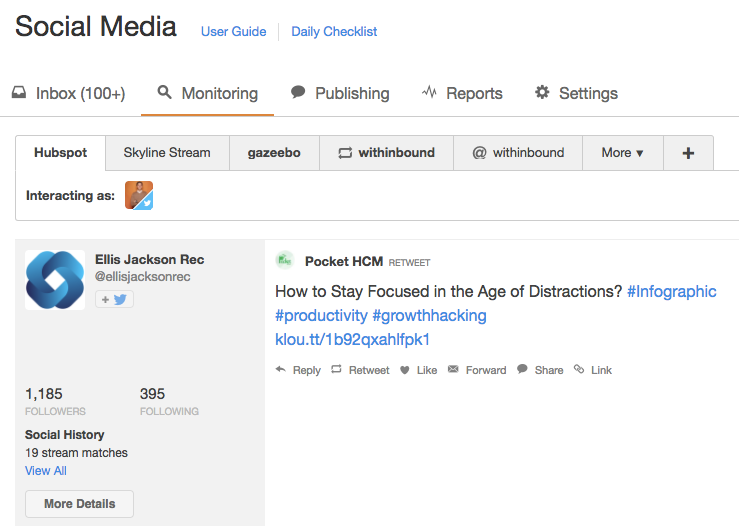
If you're a HubSpot customer, HubSpot Social Inbox lets you set up specific streams for users and search terms you want to monitor. Check out this video tour of different HubSpot tools to get an idea of how it works.


from Marketing https://blog.hubspot.com/blog/tabid/6307/bid/29437/20-free-social-media-and-brand-monitoring-tools-that-rock.aspx

5 Myths About Video Marketing, Debunked

By now, you've probably heard video marketing is a powerful tool for generating leads and capturing new customers.

So why aren’t you using it yet?

For many small to medium businesses, the reluctance to adopt video comes from a fear of the unknown. Video marketing feels expensive, cumbersome, and difficult to track. And these would be valid reasons … if any of them were still true in 2017.

Video technology has come a long way in the past five years. We’ve gone from “put it on YouTube and hope the millennials find it” to video enablement platforms which empower small businesses to create, share, and analyze videos without the agencies, actors, or expense. Some 70% of businesses report that video now their top channel for driving conversions, according to Demand Metric.

If you haven't seen what video can do for your company, t’s time to stop putting it off.

5 Video Marketing Myths, Debunked

1) Video is too expensive.

Sure, HBO's Westworld may have beaten The Game of Thrones’ record with a price tag of $10 million per episode, but you don’t have to play their game. In fact, stay as far away from it as possible.

Video doesn’t have to be expensive. Today’s buyers and consumers actually appreciate authenticity over production value.

According to Fast Company, consumers prefer lower quality but “authentic” goods and services over those of a higher quality but which seem “inauthentic.”

This craving for authenticity is why we’re seeing such an explosion in micro-influencer marketing and user-generated content. With both of these marketing strategies, brands rely on their own buyers to create content, usually with little more than an iPhone.

With your own video content, don't stress over having a low production budget if you have something valuable to say. Here at Vidyard, we produce Chalk Talks where we ask experts within our company to chat about topics like outbound sales, analytics, and video strategy in front of a chalkboard. The videos have been shared thousands of times, and the cost? A few minutes of someone's time and a lot of colored chalk.

2) Video is cumbersome.

What many small business owners typically mean by this is “I don’t know where to begin.” When they think of video, they imagine a time-consuming process of coming up with scripts and storyboards, procuring actors and equipment, and hiring someone in jockey pants to operate the clapperboard and shout, “Action!” Yet modern video marketing is worlds apart from Hollywood and requires a lot less effort.

When it comes to camera equipment, the age-old aphorism still holds true: the best camera is the one that’s with you.

Today, most iPhone cameras rival all but the top-of-the-line DSLRs and video equipment and are a great substitute. You can easily capture videos of yourself, your office, events, and customers giving off-the-cuff testimonials when your sales and account teams pay them a visit.

And when it comes to actors, don’t worry that you can’t afford Gal Gadot: you don’t need her. Your employees will do a far better job because they actually know your products, your customers, and the details of your industry. After the initial awkwardness of seeing themselves on camera fades, you’ll have all the actors you need.

And finally, not everything needs to be scripted. Writers are great and preparation has its place but a lot of great content can be created with little or no forethought. Take entrepreneur and internet personality Gary Vaynerchuk, for example. He built a media empire from selfie videos recorded on his mobile phone. The below video of him giving advice to young entrepreneurs might be what the internet would call “potato quality” but it still gets the powerful point across.


3) Our industry doesn’t really use video.

What most brands hopefully mean by this one is “our industry doesn’t use video yet.” Video is industry agnostic and the demand is being driven not by businesses, but the people who work within them. Remember, both B2B and B2C are really just B2H (business-to-human), and humans love video. One need only look at the numbers for a reminder:

  • 82 percent of all internet traffic will be video by 2021, up from 73 percent in 2016. - Cisco
  • 55 percent of people watch videos online every day. - Invisia
  • 500 million hours of video are watched every day on YouTube alone. - Buffer

In fact, the industries with the greatest opportunities are those where video has classically been underused. Just look at the recent proliferation of online video in places like real estate, where agencies are suddenly embracing everything from drone flyovers to virtual reality walk-throughs. To see similarly outsized gains ask yourself, "what would the people who make up our customer base, business or otherwise, like to see?"

4) Video is hard to track.

Videos can indeed be difficult to track, but only if you’re using a bare bones video hosting platform like YouTube or your website’s video feature. These platforms only show you total video views which is like measuring your website’s success based solely from visits.

What if 95 percent of your video's viewers dropped off in the first three seconds? You’d never know. A true video enablement platform, on the other hand, can give you insights into how people watch your videos, who they are, what they liked and didn’t like, and what they did afterward.

You see, video has some unique characteristics that make it highly trackable. Because it's linear and people watch it from end-to-end, video enablement platforms can tell you what parts viewers watched, where they skipped, and where they revisited. From this, you can automatically infer an individual’s interest in particular products or value propositions that appeared in the video.

And, with CRM and marketing system integrations, you don’t have to spend all your time on these analytics. You can trigger actions based on how your viewers watched the video. Did they only complete 25 percent of it? Better send them a different video. Did another viewer rewatch the part where the product is shown over and over? Better ping your sales team because you might have a qualified lead on your hands.

5) Video doesn’t have enough uses.

Of all the excuses, this one invariably makes our editor cough and spit out her coffee in surprise. Video is perhaps the most dynamic and repurposable type of content that you have: It increases open rates for email, boosts click through rates for landing pages, encourages shares on social media, increases time on page for websites, and drives more leads than text alone. And, with a great video editing platform, you can optimize one video for all channels.

A good video editing platform provides small to medium businesses with the tools they need to easily cut up, edit, and optimize one video into many formats for many channels. This scales easily because users can easily A/B test videos just as they would an email and can render dynamic content to personalize videos to viewers, such as inserting logos, names, or even swapping out different products. With the right tools, video has more uses than you’ll know what to do with.

Video is easier than you think.

Once you have the epiphany that unscripted and low production value videos are both desirable and trackable, you’ll also realize that it’s useful for more than just marketing and sales. You can use video in your customer support to demonstrate how to use your product, in your internal communications to update your remote teams, and as a way for people within your company to communicate on a day-to-day basis.

So, knowing that video isn’t nearly as expensive, difficult, or untraceable as you previously thought, are you ready to stop putting it off?


from Marketing https://blog.hubspot.com/marketing/myths-about-video-marketing-debunked

Friday, 25 August 2017

4 Ways Digital Marketers Can Make Data Work for Them

There’s no doubt that data is a marketer’s very best friend these days. According to Forbes, best-in-class marketers are 56% more likely to use data and analytics platforms and 64% of marketing executives see data-driven marketing as crucial to success in a globalized economy. But, as the importance of data in marketing has greatly increased, the line between art and science has blurred. Is marketing more of an art, or is it becoming a hard science?

The easiest way to find answers is often to follow the money—MediaMath reports that nearly two-thirds of marketers report that their spending on data-driven marketing and advertising grew over the last year. However, despite this increased spending, only 19% of marketers are bothering to track their marketing efforts for better reporting in order to drive improvement. That means approximately 67% of marketers are spending more on data-driven marketing, but only 19% are using that data to improve. Very bad scientists, indeed!

Marketing data should be used to drive improvement, inform decisions, and increase lead generation. If you’re spending all of your time gathering data from disparate sources, you’ll lose agility and time to innovate. This seems like an obvious contributor to the fact that only 19% of marketers are tracking their work. Especially because they don’t appear to be oblivious to the problem: Skyword reports that 87% of marketers consider data their organizations’ most underutilized asset.

It shouldn’t be difficult to use the data you’re investing in. In this blog, I’ll cover four ways digital marketers can make data work for them.

1. Send All Your Leads to One Place

Today, Netskope reports that the average marketing department uses 67 apps while Skyhigh says the average employee actively uses 36 cloud services at work. It’s no wonder that people don’t want to move data around from that many apps.

However, sending all your leads to one central app (or platform, ideally) enables much better reporting, and it doesn’t have to be a time-suck. By integrating your peripheral apps (such as Eventbrite, Unbounce, the list goes on), you can quickly and easily see what’s working and what isn’t.

For many cloud apps, there are out-of-the-box integrations you can set up between your apps and if that doesn’t do the trick, you can use an integration platform. You may already have some integrations going, but it’s important to choose one system of record with integrations that can do duplicate control and error handling. In other words, even if you already have data flowing from Eventbrite into Unbounce, don’t forget you need that same data to go into whichever app you’re using as hub.

Taking the time to create these connections will pay off in the long term—the Aberdeen Group finds that marketing data and analytics users are 57% more effective at increasing their productivity with integrated marketing technologies.

2. Get Data Delivered to You

If you’re not a numbers person by nature, data can easily sink to the very bottom of your to-do list. It’s hard to remember to log into Google Analytics or Mixpanel every single day to look at your stats, but having an acute awareness of your performance will make you a much more effective marketer.

Workbot Screenshot

Luckily, there are many great tools you can use to stay on top of your data without doing extra work or logging into your apps to generate a report. For example, you can receive Mixpanel analytics reports in Slack or get a notification each time someone downloads your ebook on Unbounce using tools like Workbot. This will make data consumption a natural part of your day and you’ll find that you’re keenly aware of your conversion rate, the impact your programs are having, and are better informed in your everyday decisions.

3. Automate Around the Lead Enrichment Process

Lead enrichment can be a tedious task because it involves manually adding data. Tedious as it may seem, this data is often critical to getting a lead to the next level in the sales cycle. “Enriching our leads is a very important part of our overall growth strategy and we automate around the process using People Task,” said Marc Matrocola, Director of Growth at Sonder. “My goal is always to build a solid demand generation funnel, which increases user acquisition, and improves pipeline conversion at key points. It needs to be a system-oriented process, meaning if you can’t show me metrics, your system probably isn’t working.”

You can save a lot of time by automating human workflows. When a new lead comes in, with the right technology, the information will be automatically added to the lead’s profile inside of your CRM or app of choice. No logging in and out of apps or navigating to the lead’s profile.

Automating a human workflow is also imperative for things that require human judgment, like accepting or rejecting someone based on their submitted materials. The collaboration company Box automates around their acceptance process to their partner program using Marketo, Salesforce, and Workato.

4. Segmenting Marketing Efforts

Many marketers wish they had a painless method for segmenting leads—especially according to purchasing habits, like what the customer has bought in the past. However, email marketing apps aren’t made to hold excessive amounts of customer data, they’re made to design and send emails.

Shopify-Marketo

To segment effectively, you’ll need to use data that is trapped in other apps. For example, moving purchase data from your eCommerce app into your marketing automation platform to understand past purchases. And if you’re looking to segment non-commerce efforts, the data you already have in your CRM app, or Engagement Platform will open up a whole new world as you can segment on company size, location, subscription plan, birthdays and more.

With proper segmentation, you’ll see open rates go way up. Tara Humpries, Head of Digital Marketing at WavHello has seen this first-hand. “Integration is huge for marketers, but because it seems more technical I think it’s often overlooked. Our integrations have allowed us to not only map the customer journey but also to send segmented emails, which has already increased our repeat customers by 65%,” said Humpries.

Getting Started with Integration and Automation

A 2017 study commissioned by the MarTech Industry Council found that marketers’ top frustrations with MarTech are too many technologies (50%), followed by problems integrating that tech (49%). The first step to overcoming this challenge is to use as many out-of-the-box, pre-built integrations as you can. A few clicks and your data will be flowing from one app to another. You may eventually hit a wall with these pre-built integrations because they lack a capability you need or one does not exist. Now it’s time for step two: finding an integration platform that both you and IT can be happy with.

Be careful when choosing a tool. Very simple, DIY integration platforms often used by marketers can fall short—you need to control for duplicates and avoid propagating bad data as you move things around. More than half of companies say their biggest challenge to data-driven marketing success is the lack of data quality and completeness according to Ascend2; both are issues increased by blind data shuffling.

At the same time, overly complicated, traditional integration platforms will cost a lot and take a long time to implement changes, effectively squashing the agility needed in marketing. “Many integration tools on the market are struggling with digital transformation themselves,” explains Holger Mueller, VP of Constellation Research, “For the most part, there are two sets of vendors: there’s the traditional ones who offer to move things from on-premise to cloud and there are newer ones, which are called cloud native and have struggled to support integration on the on-premise side.”

At the end of the day, your integration platform should work with you (intelligently), not pose a barrier to your productivity. What methods do you use to make your data work for you? What will you be integrating after reading this blog? Tell me about how you handle your data in the comments!

The post 4 Ways Digital Marketers Can Make Data Work for Them appeared first on Marketo Marketing Blog - Best Practices and Thought Leadership.


from Marketo Marketing Blog http://blog.marketo.com/2017/08/4-ways-digital-marketers-can-make-data-work.html