Friday, 28 September 2018

20 of the Best Form Builder Tools for 2018

You’ve heard it before -- forms are the gold standard when it comes to capturing leads, learning about industry trends, doing market research, and even just getting some customer feedback. It might be one of the older methods in the book, but old is gold.

Before we dive into the best form builder tools for 2018, though, let’s talk about what a form builder exactly is.

With no shortage of options, the best form builder apps tend to be quite similar and user-friendly. Whether you want to make a contact form, a sign-up form, or a survey, form tools are the easiest way to create web forms, with drag and drop questions, multiple form fields, and different color and structure options.

Once your responses start coming in, most forms will also import each entry into a spreadsheet or centralized database and send you notifications when people complete them.

Form tools today usually offer many different features too, like progressive profiling, smart fields, and interactivity.

Easily build and embed forms on your site. Try HubSpot Forms for free!

Ultimately, there’s a form for each of your business’ needs and goals -- and we’re here to help you pick the best-fit tool specifically for you.

20 of the Best Form Builder Tools for 2018

1. HubSpot’s Free Online Form Builder

HubSpot’s online form builder is one of the most powerful form builder tools available. The tool combines the foundations of form creation with cutting-edge technology to give you much more capability than a normal online form builder can -- and it’s also free.

Even though it’s one the more advanced form builder tools, you don't need any technical expertise when you use HubSpot’s form builder. You can quickly create forms with the drag-and-drop form builder and convert anonymous website visitors into leads with unlimited forms, fields, submissions, and custom forms that all connect to your contact database.

Once someone fills your form out, they’re automatically routed to HubSpot CRM. Once they’re in your CRM system, you can set reminder tasks, call them, and send them one-to-one personalized emails, letting you better manage and nurture relationships with your contacts.

HubSpot's form builder also has data enrichment for contact profiles and deep integration with HubSpot's marketing hub, making it a good option for teams who want a single system to manage their forms, contacts, and marketing efforts.

2. Google Forms

Google Forms’ unique selling point is that it’s fast, free, and easy to use, with unlimited forms and entries. It’s also built into the Google Docs suite, so it automatically pulls your data into a Google Sheet for you to analyze.

While Google Forms’ design may not be customizable, this form tool is best for quick market surveys, rather than a professional survey or lead capture form placed on your website.

Image Source: Google

3. Typeform

Typeform takes an innovative approach to the world of form building. With an intuitive design, the tool guides you through the form creation process one question at a time and makes the experience of building a survey fun and interactive.

Typeform is also great for customer surveys and user research -- you can create and send standalone survey links out to your list. If you want to try something with an engaging, straightforward user experience, the tool is a solid option.

Image Source: Typeform

4. Microsoft Forms

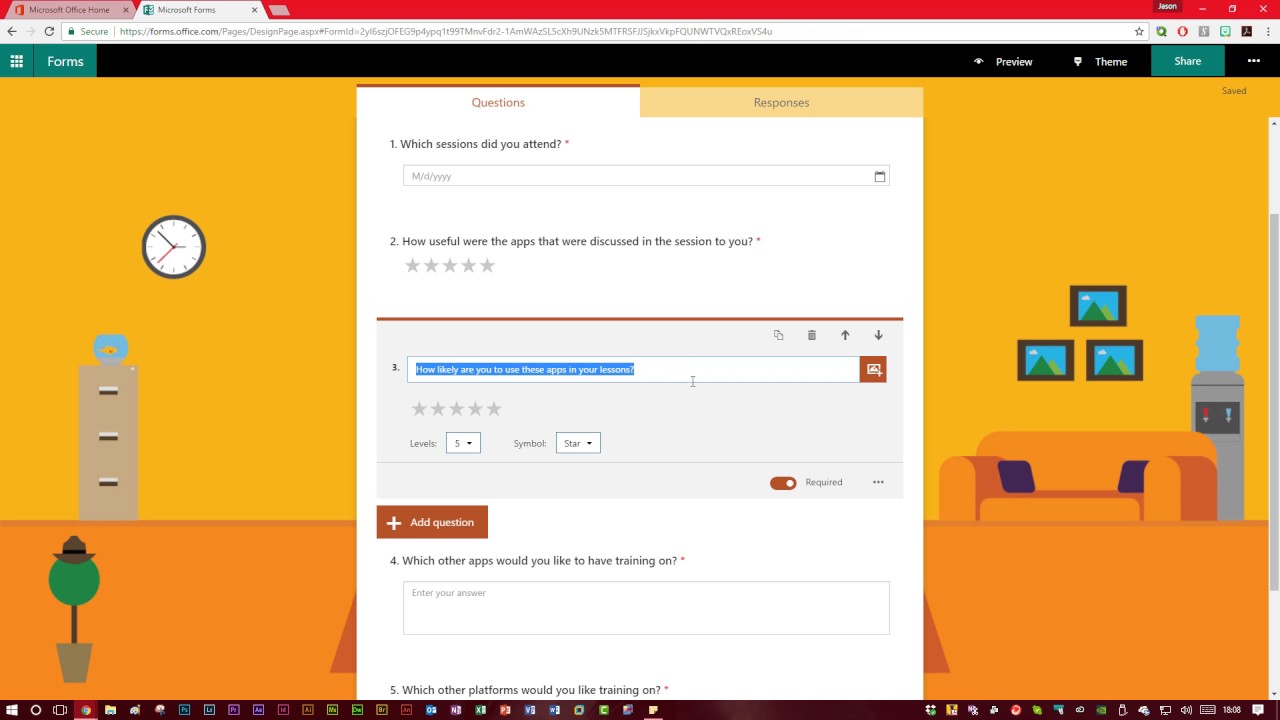
Microsoft Forms is a simple, easy-to-use form creator that integrates with the Microsoft Office suite. With full customization options, users can quickly make surveys, feedback forms, quizzes, and lead forms.

Since Microsoft forms doesn't integrate directly with an online CMS, the tool might not be the best option for lead generation. But the form builder can collect data in real-time and import all your responses in an Excel spreadsheet, so you can perform powerful yet simple analysis with Excel filters and pivot tables.

maxresdefault

Image Source: YouTube

5. Form Crafts

Form Crafts is a basic form builder tool that has a user-friendly interface and simple design.

The WordPress plugin allows you to create moderately customizable lead capture forms, email sign-up forms, surveys, and feedback collection forms. One of Form Crafts’ best features is that it’ll send you email notifications about your lead generation process, so you don’t need to constantly monitor your results anymore.

Image Source: WordPress

6. FormTools

FormTools is a flexible form creator that focuses on feedback, data, insights, and beautiful form building.

The form builder tool allows you to create most types of forms and tracks your results on a visually appealing dashboard. FormTools also give you an option to integrate their app with a third party provider of your choosing, like Salesforce or Dropbox.

Image Source: Form Tools

7. Wufoo

Part of the SurveyMonkey family, Wufoo is one of the oldest form tools in the space. You can design some appealing online forms with it and it’s super easy to use.

The app also allows you to embed forms on your website, set up payment fields that are compatible with a number of payment processing services, and turn on automatic email notifications to alert you when someone fills out your form.

Image Source: WuFoo

8. Ninja Forms

Ninja Forms is a powerful WordPress form tool that’s used by wide range of marketers, from novices to gurus.

The tool is free, integrates quickly and easily with a number of different tools, and it can greatly boost your marketing efforts. Ninja Forms also offers unlimited forms, fields and submissions. But, sometimes, the tool lacks clear documentation and can be difficult to use when you want to customize your forms.

Image Source: CodeCanyon

9. Cognito Forms

If you’re looking for a form builder with sound logic branches and robust payment fields, Cognito Forms is for you. The form tool also offers calculated fields, conditional logic, repeating fields, and more, making it easy and simple to create advanced forms.

Cognito Forms integrates with Stripe, PayPal, and Square and offers a free version that includes unlimited forms with 500 entries per month.

Image Source: Microsoft Store

10. FormStack

FormStack is mostly focused on building business and professional style forms. The tool’s best features include intelligent forms, built-in workflows, and seamless integrations with Google Sheets, PayPal, and MailChimp (and others through their API).

One of FormStack’s more sophisticated features is an A/B testing tool that can compare different versions of your forms and tell you what performs better.

The tool also offer electronic signatures and payments, and users can save their form drafts and return later to finish them.

Image Source: GetApp

11. FormSite

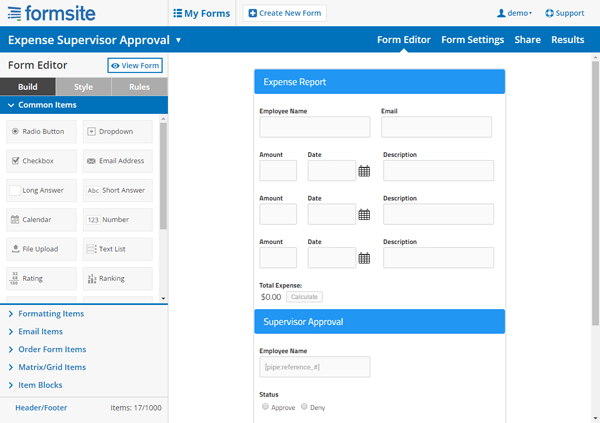
FormSite has all the essential features you need for cranking out some quick “prototypical” web forms. As one of the more basic form builders, it’s often used for simple contact or feedback forms.

The tool also has a number of pricing plans that can suit your specific business needs. The free version offers 5 forms each month with 10 results per form.

formsite-makeover-form-builder

Image Credit: FormSite

12. Clearbit Forms

Clearbit Forms lets you leverage smart forms and flexible data enrichment technology to automatically collect specific user information. This lets you create shorter forms with less fields, and, in turn, produce happier customers (because who doesn’t love a short survey?)

With two plans designed for startups and enterprises, Clearbit can definitely meet your modern marketing needs.

Image Source: Clearbit

13. FormKeep

FormKeep is a tool unlike most on this list -- it’s an easy-to-use tool that finds a happy medium between coded and drag and drop forms.

With FormKeep, you have the option to code your own form, style it according to your brand guidelines, and integrate it with Zapier to manage your submission data.

Image Source: Intercom

14. Gravity Forms

Another WordPress-powered plugin, Gravity Forms helps you create amazing forms with the help of multi-page/multi-step forms and a number of time-saving features.

With this tool, you have access to a variety of integration options and add-ons for email software, messenger platforms, payment options, and automation software. You can also create advanced forms, but, for non-techies, they can be a little complicated to set up.

Image Source: WPML

15. Jotform

Jotform is an online form builder with an intuitive visual editor, known for making form building faster than ever.

The tool has all the normal form building capabilities as well as unique fields to customize your own forms. It also integrates with almost every marketing platform.The free plan caps out at 5 forms, with up to a 100 entries per month.

Image Source: Weebly App Center

16. SurveyAnyPlace

SurveyAnyPlace has proven that surveys don’t have to be boring. With their gamification elements, interactive features, and incentives like coupon codes, you can make all your surveys and quizzes fun and enjoyable.

By leveraging SurveyAnyPlace’s unique approach to form building, you can easily collect leads, information, and insights from visitors.

Image Source: GetApp

17. Contact Form 7

One of the most popular WordPress plugins, Contact Form 7, has upwards of 5 million active installations on the CMS.

A free tool for everyone to use, it’s a super simple and basic form creator with a heavy focus on contact forms. But it’s also important to note that the tool has some limitations, especially with its customization options.

Image Source: WordPress

18. Conversational Form

An open source platform, Conversational Form lets you transform your web form into a simple chatbot.

By using a novel and clever way to gather data, this form builder is bound to drive user engagement. At the same time, though, due to its new entrance into the marketing space, it might be difficult to learn your way around the tool.

Image Source: Pagely

19. FormBakery

As one of the easiest drag and drop form tools out there, FormBakery lets you build professional forms in the most straightforward way possible.

For those looking to build a super simple form in under 5 minutes, the tool is a great choice. You can quickly customize forms with your own designs, with no coding necessary. If you’re looking to build a more advanced form, though, FormBakery may not be the right choice for you.

Image Source: AppStorm

20. DeviceMagic

DeviceMagic is a mobile form solution on a mission to ditch all paperwork, automate lead generation processes, and enhance data collection.

Since the tool solely focuses on building mobile forms, it has a number of great benefits over other form builders, like quick and accurate data collection, lower operations costs, and less time wasted on administrative work.

Image Source: Device Magic

The options are endless for form builder tools.

Most form builders offer all the essentials needed to make a basic form, but your options start to narrow down when you want better customization and deeper data analysis. Ultimately, for you, the best form tool depends on your team’s purpose and particular business needs.


from Marketing https://blog.hubspot.com/marketing/form-builder-tools

Gender Neutral Pronouns: What They Are & How to Use Them

In the past few years, the U.S. has made some small but mighty strides towards inclusivity, and language plays a big part in that.

We've become rightfully cautious when we label other people, and are learning the importance of asking permission before identifying someone as a certain gender.

In my English class in college, for instance, my teacher was progressive enough to say, "Please let me know which pronoun you'd prefer I use for you." While this might seem arbitrary or unnecessary, it's not -- everyone has the right to self-identify with whatever pronoun they feel comfortable (or, to avoid identifying altogether).

To avoid accidentally offending someone at the office before you know their preferred pronouns, it’s important to use gender-neutral pronouns in your workplace conversations.

Since gender-neutral pronouns have only recently become more commonplace, it's likely you aren't sure how to use them, or even what they are. Here, we've provided you with a list of gender-neutral pronouns and examples of how to use them, so you can begin creating a more inclusive workplace.

Gender-neutral Pronouns, and How to Use Them

There are a few benefits to using gender-neutral pronouns. First, in the English language, "He" has often been used as an automatic fill-in for generic individuals. By using gender-neutral language, you're ensuring your sentences are inclusive for everyone.

Second, "he and she" are two extreme binaries that don't leave room for other gender identities. This can be hurtful for individuals, such as transgender or gender queer communities, who don't identify with "he" or "she".

Ultimately, you don't want to make incorrect or hurtful assumptions about someone's gender. Just because someone appears feminine or masculine doesn't mean they are a man or woman -- they could be agender, nonbinary, or uncomfortable identifying with "he" or "she".

Here is a list of gender-neutral pronouns:

  • He/She -- Zie, Sie, Ey, Ve, Tey, E
  • Him/Her -- Zim, Sie, Em, Ver, Ter, Em
  • His/Her -- Zir, Hir, Eir, Vis, Tem, Eir
  • His/Hers -- Zis, Hirs, Eirs, Vers, Ters, Eirs
  • Himself/Herself -- Zieself, Hirself, Eirself, Verself, Terself, Emself

Typically, you won't use one of these gender-neutral pronouns unless a colleague asks you to identify them as such.

However, there are more traditional gender neutral pronouns you can introduce into your everyday conversation, regardless of the individual. These include "Them", "They", "Their", "Everyone", and "That Person".

When in doubt, refer to someone by their name, rather than "him" or "her".

"They" is one of the more common gender-neutral pronouns, and it's easy to incorporate into your daily conversations. Here are some examples of how to use it:

  • "I spoke to the marketing director and they said they'd get back to me."
  • "I think someone left their laptop behind."
  • "Who's in charge of that campaign? I'll email them."

You probably use "they" "them" and "their" often in your everyday language, even when you know someone identifies as "he" or "she". It's a natural substitute, but can go a long way towards creating a more inclusive office culture.

Finally, when addressing people in a meeting, it's best to say, "Hello, everyone," or "Hey, team." You'll want to avoid "Hey, guys", or similar phrases, since "guys" is typically masculine.

How to Learn Someone's Pronouns

When you first meet someone, you don't want to ask about their pronouns. This could make them feel like you're asking them to out themselves as transgender, agender, or nonbinary, which they might not want to do, particularly if you work in a conservative office.

Instead, introduce yourself with your pronouns: "Hi, I'm Caroline, and my pronouns are she/her." By sharing your own pronouns, you're allowing the other person to share theirs, but not forcing them to.

Additionally, avoid saying "preferred" pronouns. Despite the popularity of the term, it's incorrect, since "preferred" implies someone's gender is a preference.

Ultimately, using gender-neutral pronouns doesn't require too much effort on your part, but it could make a huge difference in creating a warmer, more inclusive workplace environment for everyone. 


from Marketing https://blog.hubspot.com/marketing/gender-neutral-pronouns

Thursday, 27 September 2018

4 More Digital Marketing Strategies You Need to Know for 2019

Digital marketing is ever-changing as innovation creates new opportunities for marketers every day. Along with it, your strategy must change and grow with technology to keep ahead of your competitors. Trending digital marketing strategies keep marketers on their toes trying to innovate new and different ways to engage their audiences.

In this blog, we’ll take stock of the digital marketing landscape in 2018, discuss what’s changed and what’s new, and see where you should be investing your energy for 2019.

1. Virtual and Augmented Reality

Smart companies are leveraging mobile cameras to improve their customer experience. Through VR and AR, you can improve brand engagement and help with pre-purchase decisions by bringing your products to life. By allowing customers to engage in more profound ways through immersive experiences, they are better equipped to find what they are looking for and be delighted in doing so.

Consider Amazon, who set up Oculus Rift VR booths around Prime Day, allowing shoppers to experience a wide range of products from nerf guns to refrigerators as they would in physical reality. By empowering potential buyers to literally picture themselves owning products and simulate this potential reality, VR preemptively addresses needs and pain points, greatly enhancing the customer journey.

When getting users to a specific physical location isn’t possible, augmented reality can provide greater flexibility and reach through integration with mobile apps. StubHub executed this masterfully, introducing an AR feature that allowed fans to better understand the city and stadium ahead of this year’s Super Bowl. Potential ticket buyers could click to see a 3D map of the stadium, parking, transit lines, and more, making it easier to envision themselves at the event.

By deploying virtual or augmented reality strategically, you have a unique opportunity to supply consumers with the depth of pre-purchase information they crave, while minimizing the effort they must take to obtain it.

2. Artificial Intelligence

In the past, digital marketers have been hesitant to incorporate artificial intelligence into their strategies. But as AI continues to prove itself useful for simplifying data-based experiences and improving user experience, confidence in it has increased.

KLM has done a great job with this, creating a plug-in with Messenger that streamlines everything from booking to check-in and flight status updates. It’s a win-win for both sides: travelers can access all their travel info from anywhere, and KLM can supply it to them without tying up personnel.

Chatbots can also be valuable for facilitating pre-purchase decisions. For instance, Bing’s Business Bot, which is embedded into search results, allows interested users to have basic questions answered by the businesses around them. If their query is not on the pre-configured list, the bot refers them to a phone number. The bot also asks business owners additional questions based on what users are looking for, so that common requests can be answered faster in the future. By refining responses to fit user needs, artificial intelligence allows you to help users better and faster over time.

3. Visual and Voice Search

Search is evolving beyond its text-only origins, meaning that visual and voice search deserve serious consideration now. Think of visual search as a sort of reverse search, using images to find text-based info instead of the other way around. Google, Microsoft, and Pinterest have all jumped into the fray, and it’s only going to get bigger over time. Marketers can gain an edge here by preparing tailor-made content to await potential customers after their image searches, while also gaining even more insights into their preferences.

Dominos Voice Search Example

Voice search also continues to grow as a way for consumers to find more information without even having to lift a finger. Domino’s has done well here, teaming up with Amazon Echo to let customers order pizza hands-free. Allowing people to interact with you via voice search makes their life easier, and offers a chance to incorporate brand personality and tone in the way you respond. The dynamics of voice search also present a challenge for digital marketers, who must figure out how to optimize for both humans and devices.

4. Vertical Video

With the shift from desktop to mobile a consistent digital marketing consideration, it should come as no surprise that mobile video ads continue to be hot. Savvy marketers are using videos to both engage their audiences in-app between tasks and on social platforms.

What’s new, however, is the movement towards more vertical video. Instagram’s recent introduction of IGTV continues this trend, allowing users to create long-form vertical videos. While advertising is not available (yet) on IGTV, its great place for brands to share their longer content organically. The success of IGTV and other similar platforms is worth keeping an eye on, as it could cause a major shift in favor of vertical video. If this is the case, marketers will need to create horizontal and vertical assets to reach their audience fully.

Staying Ahead of the Competition

These emerging digital marketing strategies make it easier to both reach customers when and where they are ready to buy and improve their experience post-purchase. Competitive companies know that capitalizing on new forms of content and technology will help them capture new audiences on fresh playing fields.

So which of these hot new digital marketing strategies do you plan on implementing? Let me know in the comments below!

The post 4 More Digital Marketing Strategies You Need to Know for 2019 appeared first on Marketo Marketing Blog - Best Practices and Thought Leadership.


from Marketo Marketing Blog https://blog.marketo.com/2018/09/4-more-digital-marketing-strategies-you-need-to-know-2019.html

The Key to Productivity Isn't Your Mind, It's Your Body

Welcome to The Science Behind Success -- a new blog series that explores the best ways to help our brains perform better at work. With psychological research and interviews with leaders in the field, we're showing you how psychology can help you overcome workplace obstacles and excel in your career. Because a little mindset change could go a long way.

If you're anything like me, you don't feel like the day is over until your to-do list is complete.

You wake up in the morning with a long list of everything you need to get done, and you move on autopilot throughout the day, checking off tasks as you go.

When you feel you've hit a good spot to pause (after a few hours laboring away), you eat a quick meal and maybe grab a second cup of coffee. Then it's back to work.

You finish most days around 5 or 6 PM, wishing you had more hours to tackle your projects. You hit the gym for an hour, and then head home for a quick dinner and maybe some TV.

Oftentimes, the only real break you give yourself is when your head hits the pillow.

Sound familiar?

Here's the problem -- in our quest for optimal productivity, we often ignore our body's needs. But, unbeknownst to most, that actually makes us far less productive.

Josh Davis, Ph.D., the Director of Research and Lead Professor at the NeuroLeadership Institute, addresses this very paradox in his international best-seller, Two Awesome Hours: Science-Based Strategies to Harness Your Best Time and Get Your Most Important Work Done.

In his book, Davis writes, "Staying on task without a break and working longer hours are wonderful solutions for a computer or machine. But … We are biological creatures. Continually demanding one kind of work -- and a consistent level of effectiveness -- from our brains is like continually demanding the same speed from a runner under any circumstances."

Davis argues we don't take our biological factors into consideration enough when making decisions regarding our efficiency and productivity at work.

He's not wrong -- when was the last time you stopped and said, "Hang on a minute, I bet I'd be better in this meeting if I got my blood sugar levels up with a snack?" Or, when was the last time you considered jogging in place at your office desk, just to relieve some stress? Probably never.

Davis's research is based on the theory of embodied cognition, a psychological phenomenon that suggests our biological needs should be considered more prevalently when we structure our days.

Essentially, Davis surmises that if we can change how we treat our bodies at work, we can change how our brain functions as well.

I spoke with Davis to gain unique insights into his research regarding how our bodies affect our productivity.

He told me, "The more we can all become educated about what really leads to being most effective, the more we can create work cultures that support the right behaviors. Rather than reinforcing cultures that reward trying to be busy all the time, we can support one another in becoming our best, most effective selves."

Here, we're going to dive into Davis' tips for learning how to use our biology to achieve better results in the workplace. But first, in order to fully grasp the concept of Davis' research, it's critical you understand what embodied cognition is, and how it affects the decisions we make every day.

Embodied Cognition -- What Is It, and How Can It Help You?

Embodied cognition is essentially the idea that our bodies can influence our minds just as much as our minds can influence our bodies.

Rather than assuming your brain is the center of all knowledge and command, embodied cognition proposes that any solution we come up with when we're decision-making includes elements from our physiological and neurological systems, as well. In other words, our brain isn't solely responsible for our thoughts and behavior -- our body's play a part, too.

There have been numerous studies to support the notion that our body influences our thoughts. For instance, the way you sit can increase your testosterone levels, a concept known as "power posing". You might think your confidence and assertive behavior comes solely from your brain, when really, your body language and hormones have a lot more to do with it.

In another example, John Bargh, a social psychologist at Yale, conducted an experiment and found participants who interviewed job candidates took their roles more seriously if they held a very heavy clipboard, versus a light one.

Ultimately, understanding your environment's impact on your body is critical for knowing when and how you'll perform best at work. Productivity isn't only a matter of willpower, or telling yourself, "Come on, I've got to focus now." It's more than that -- it's linked to your body, and how your environment affects it.

Davis's Tips for Tricking Your Brain Into Working Better in Less Time

The premise of Davis' book centers around the notion that staying on task and working long hours without breaks is a fundamental misunderstanding of how our brains work.

We don't need more hours in the day, or to work faster. We simply need to create optimal conditions for our bodies, and brains, to function at peak efficiency for shorter periods of time.

When I spoke with Davis, he mentioned a familiar scenario -- "There is a culture in many places where people try to impress one another with how exhausted they are from work. Endless hours, no down time. They pride themselves on being responsive to every email within minutes at any time of day. It helps them look and feel busy, and the culture of many workplaces rewards them. Coworkers are impressed by it and often feel embarrassed that they have not done the same."

But, he goes on to note, "I can usually correctly expect that those same people who are constantly working and are primarily being reactive are feeling like they are treading water and hardly get a chance to come up for air."

Ultimately, the solution for feeling overworked is simple. If you learn how to listen to your body, and use your natural biological needs to your advantage, you can structure your day to ensure you're working when your body's at its peak efficiency level, and taking breaks when it's not.

Let's dive into some examples of these strategies to see how you can put them to use immediately.

1. Exercise for immediate, daily benefits.

We often think about exercise in the long-term: "I want to live longer, I want to lose weight, I want to lower my cholesterol".

This type of thinking makes us feel like exercise must happen, but it can happen after work. We compartmentalize our lives -- we tell ourselves we can exercise at 6 PM, after our workday.

While there's nothing inherently wrong with this way of thinking, Davis explains it can cause us to miss a more immediate benefit of exercise.

"The cognitive and emotional benefits include reducing anxiety and making it easier to focus or be present. Various studies put it around 20 minutes, and some as little as about 10," Davis told me, adding, "It was surprising that moderate, rather than intense, exercise was actually better for the cognitive and emotional benefits."

There are plenty of short-term benefits of exercise for daily productivity. A brief, 20 minute workout, like walking up and down the stairs at your office, can decrease your stress hormones, and allow you to think more clearly.

Next time you have an important meeting or upcoming deadline you're stressed about, give yourself some time for moderate exercise. Take a walk, jog in place, or walk up and down the stairs to reap the benefits. While it might make you feel like you're procrastinating or wasting time, remind yourself you're not -- you're actually setting yourself up to perform better.

2. Eat and drink for increased productivity.

While you might not think about it a lot, food is critical for stable blood sugar, which is necessary for productivity and focus.

If you don't believe me, consider this: in one 2012 study, employees with unhealthy diets were 66 percent more likely to report losing focus.

If you think of food as the fuel for your career success, it might increase your motivation to eat small, healthy snacks throughout the day. Rather than waiting until you're starving at lunch and then quickly eating a Chipotle burrito, Davis recommends potentially splitting up a healthy lunch into two parts, and eating them at different times. By splitting up your food breaks, you're more likely to reap the benefits all day long, rather than only right after lunch.

If you don't want to split up your lunch, Davis also recommends eating snacks to maintain energy, like a handful of nuts. When you're losing focus at work, it's critical you consider eating food that can help you get back on-track. Rather than considering food a nuisance to your productivity, you should begin viewing it as a necessary component to your efficiency.

Davis also urges people to stay away from too much caffeine. Your third cup of coffee might make you feel like you're a superhero, but in reality, the increased caffeine could distract you and make you less focused.

3. Use mindfulness to assess your body's cognitive energy.

In his book, Davis describes a situation where a man is sitting at his desk with ten minutes until an important meeting, and he knows he should be preparing for the meeting, but then he sees an email in his inbox.

The temptation to feel accomplishment is too much -- he ends up wasting time trying to respond to the email, and before he knows it, he only has one minute until the meeting, he hasn't finished the email, and now he's rushing off, frustrated and unprepared.

We've all felt this similar desire to check things off our list for the sake of checking them off. That sense of accomplishment can make you feel productive, but in reality, it's not important enough to necessitate time during your peak productivity window.

Davis' advice for combatting this is relatively simple, but it requires practicing mindfulness when making decisions, and assessing how your body actually feels. He says we often behave on autopilot -- we respond to that email because that's what we do whenever we see an email in our inbox.

As Davis described to me, "What is absolutely key [ … ] is pausing. For example, I know I can easily tell myself after working for two hours, 'I still feel energetic. I'll just keep going.' But most of the time, when I pause and walk away for a minute or two, I realize how much harder it is to think than when I'm fresh."

If the man sitting at his desk who received an email took a moment to intentionally connect with his priorities, he'd recognize that the email could wait until after the meeting. That action -- pausing -- could be the difference between wasted time and ultimate productivity.

4. Let your mind wander.

In his book, Davis writes, "Our attention systems are designed to regularly refresh -- to be ready to discover what is new in the environment and help us navigate a constantly changing world."

You can't fault yourself for losing focus when you hear colleagues chatting behind you, or when a car drives by the window. Those are primitive and healthy responses. Biology has given us the advantage of awareness to the outside world.

It's important to recognize how biology might work against our preconceived notion of what it means to be productive. We might feel frustrated when we are distracted by our environment, believing it to reflect a lack of focus or willpower -- but it's our body's natural response, and doesn't need to be fought.

When you're distracted, Davis says it's important you let your mind wander. Then, when you return to your work, you will be cognitively refreshed from the momentary distraction.

5. Create an ideal physical environment.

In his book, Davis talks about how the mood we set can genuinely affect our performance. There's a lot of research to support your environment's impact on your productivity.

You'll want to create a restorative rather than distracting workplace environment. Choose bright and cool lighting (rather than warm and dim), keep your desk clean, and whenever possible, find a quiet place to focus.

Ultimately, the benefits of tricking your brain into working harder aren't just obvious in the workplace. Increased productivity can lend itself to a happier lifestyle overall, as you make space for hobbies, passions, and people.

Davis writes, "We must choose to either enjoy life or succeed. The good news is this is a false choice. We feel pressured to choose when we mistakenly assume that productivity depends on finding enough hours in the day."

Hopefully, his research gives you hope that productivity and career growth don't have to come at a cost to your passions, family, or genuine enjoyment. If we learn to work with our biology, rather than in spite of it, we can become more efficient at all facets of our life, in far more balanced ways.


from Marketing https://blog.hubspot.com/marketing/the-key-to-productivity-is-your-body

The Ultimate Guide to the Internet of Things (IoT)

Raise your hand if you’ve heard of the Internet of Things (IoT).

I’m guessing most of you have your hand up.

Now, keep your hand raised if you understand how the Internet of Things (IoT) actually works. 


If you’re anything like me, you’re probably scanning your brain trying to recall information from an article you read about smart homes two or three years ago … and your arm is probably getting tired. I get it. I'd lower mine, too.

The Internet of Things (IoT) was so elusive to me that I found myself thinking, I know the Internet of Things (IoT) is “here,” but what exactly is it? And how is it impacting my life?

Let’s dive into what IoT is, how it will change the future, and how you can put it to use for your business.  

Feel free to jump to a specific section or email this to yourself for later:

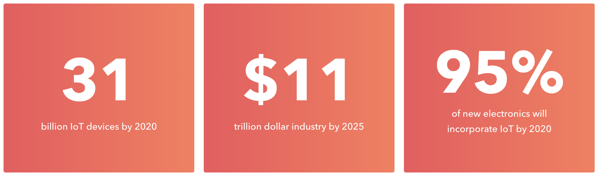
Your Apple Watch? That’s part of IoT. Google Home? Yup, that’s an IoT device too. Heck, the entire city of Barcelona is made up of IoT devices. Over the last few years, IoT has quietly taken the world by storm, and it isn’t slowing down anytime soon. In fact, by 2020 there will be 31 billion devices connected to the Internet of Things. To put things into perspective, that’s more than three IoT devices for every person on earth.
internet-of-things-iot-1

IoT Devices

So we have a general idea of what IoT devices are — you’re currently using one to read this article. But phones and computers only make up a small part of IoT. IoT devices include anything that can connect to the internet to send and receive data. And it turns out that almost anything can be connected this way.

There are IoT coffee machines that send out alerts when you’re running low on coffee. IoT connected beds monitor your sleep and adjust the temperature to optimize your sleep patterns. More practical applications of IoT include connected cars that can drive and update themselves and Amazon’s dash buttons that allow customers to reorder everyday products like Tide Pods or razor blades at the touch of a button. The Dash Replenishment Service takes this one step further by allowing the products to automatically reorder themselves when a sensor records that supplies are running low. When extending a market is as easy as slapping a button onto something, it’s not hard to see how companies will start to adopt this new level of connectivity.

internet-of-things-iot-2

Department stores like Macy’s are using in-store iBeacons to send customers targeted rewards and experiences like celebrity meet and greets on Black Friday. Beacons are small, Bluetooth transmitters that connect with corresponding apps installed on connected devices like iPhones or iPads. iBeacon technology allows businesses to have multi-channel communications with their customers — to reach them where they are. It also enables companies to connect with a mass audience. Before iBeacons, individual sales associates would have to tell each customer about a promotion, leaving room for error. With iBeacons, anyone who enters a store with that store’s app can receive an alert.

Let’s say you own a small business, can you still benefit from the Internet of Things? (Spoiler alert: Yes, you totally can). Actually, you may already be benefiting from it. If you use Square to accept payments, you’re using an IoT device. Since 2014, the popular credit card processing company has been connecting and sharing its data via the internet — making it easy for small businesses to receive payments.

According to Forbes, only 18% of small businesses and 13% of mid-sized companies considered IoT a priority in 2015. However, many SMBs are already reaping the benefits of the technology.

Quansett Nurseries, in Westport, Massachusetts, grows microgreens to sell to restaurants year round. Because all of the greens require different microclimates, the nursery set up sensors throughout the greenhouse so farmers could remotely control factors like humidity, temperature, and hydration. The system also automatically adjusts the climate if it senses that one of the elements is off. IoT enables Quansett Nurseries to deliver the best produce possible all year long and reduce waste.

IoT Platforms

The connected devices themselves are only half of the IoT equation though. For these connected devices to even exist, they first need to be created. And to create an IoT device, you need an IoT platform.

IoT platforms allow developers to manage the applications they build as well as store, share, and analyze data. Think about the iOS and Android platforms. Both the iOS and Android platforms allow developers to create apps faster and for less money by providing the underlying technology to solve a specific problem or need. For example, the basic technology behind optimizing connected HVAC systems to lower heating costs is the same regardless of whether a developer is using it for a small apartment or a 50-story office building. However, unlike smartphone apps, developers can choose from hundreds of IoT platforms. AmazonGoogle, and IBM are a few of the major platform providers, but countless others offer different solutions for specific needs. 

IoT Applications By Industry 

All of these IoT devices and platforms around us accomplish a diverse range of tasks that go way beyond just reordering coffee capsules. According to Forbes, 84% of the growing IoT applications will be dominated by a few main industries: Smart Cities (26%), Industrial IoT (24%), Connected Health (20%), and Smart Homes (14%). What does that mean? Let’s find out.
internet-of-things-iot-3-1

Home and Security

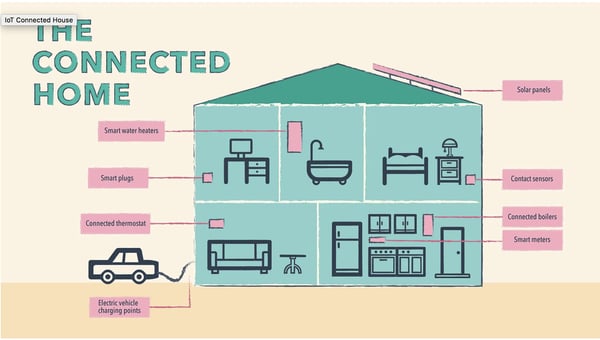
This first category hits close to home … because it’s about your home. A few years ago, 83 million smart home devices shipped to consumers. By 2020, that number will swell to 193 million new devices per year. While seemingly every area of IoT is rapidly expanding, IoT devices within our homes are some of the most noticeable. A world where your house can talk to you and make decisions? Yeah, that’s already a thing. Connected devices currently inside homes include the usual suspects like lights you can control with your smartphone, as well as more advanced options like smart refrigerators that allow you to reorder food from built-in interfaces.

Amazon’s Alexa is currently one of the most popular and well-known smart home devices, with over 10 million new devices shipped in 2017 alone. Alexa can perform a wide variety of tasks like calling an Uber, reading you a recipe, and of course, ordering items instantly from Amazon. Affordable smart devices like AlexaGoogle Home, and Apple HomePod help make IoT technology accessible to a broad audience and allow more people to become comfortable with bringing IoT into their personal spaces.  

From a home security standpoint, homeowners can install IoT connected doorbells that broadcast live video to their phone when someone approaches the door or smart locks that can be pre-programmed to allow access during certain hours of the day. Say goodbye to ding-dong ditch.

Once again, Amazon is leading the way with their Amazon Key service. Using a compatible smart lock and Amazon’s cloud cam, couriers can scan the barcode on their package to unlock the door and drop it off inside your home. When the door opens, the camera starts recording and then sends a video confirming the delivery to the homeowner. It may sound creepy, but consumers have found this technology to be so useful that Amazon has already rolled it out in 37 cities.

Smart security features aren’t just good for consumers; they’re beneficial to businesses, too. By placing your products directly inside the safety of consumers’ cars or homes, businesses can avoid uncomfortable customer service calls about stolen or damaged packages, and customers get their packages on-time. It’s a win-win.
internet-of-things-iot-4

Energy

Okay, we briefly touched on how smart energy appliances can impact your home. Smart lights, like the Philips Hue bulb, and smart thermostats allow users to remotely control their heating, cooling, and lighting. And while these might seem like just cool, tech gadgets, they can have a significant impact on both homes and businesses.

IoT connected lights can help homeowners save on energy costs by automatically shutting lights off when no one is home. Smart thermostats work similarly by automatically adjusting the temperature to reduce heating and cooling costs.

Consider this: When you walk into your home, you automatically flip on the lights, adjust the temperature, and go about your business. Now, what happens when you go away for the weekend? I’m sure you occasionally forget to adjust your energy settings. So what? Your energy bill may go up a little that month, but it’s nothing you can’t handle. Right?

Now imagine that same scenario taking place in a multi-story office building. The energy cost doesn’t seem so nominal anymore, does it? Smart energy appliances can automatically combat unnecessary energy usage to help increase savings.

And the benefits don’t stop there. IoT devices can collect energy data at a granular level, making it easy for home and business owners to identify issues and plan for the future.


IoT Healthcare

Outside of the home, IoT is beginning to revolutionize the healthcare and health monitoring industries. Hospitals are already able to remotely monitor their patients’ health and collect data using connected medical devices like insulin pumps and heart monitors. This allows doctors to catch early signs of problems and take preventive action.

Within hospitals themselves, connected devices help staff more efficiently manage resources and space. In some cases, that can literally save a life. Sensors on hospital beds that tell when and where beds are open reduce wait times by up to four hours. And monitoring on critical equipment prevents vital hardware from breaking when it is needed most.

Outside of the ER, connected activity trackers like Fitbits enable athletes of all kinds to track their performance and progress. If you’re like me and consider walking the quarter of a mile from your car to the office an athletic activity, you can track and log all of those precious steps. (Ed note: I also walk from my couch to the refrigerator.)

In all seriousness, connected fitness trackers are so helpful even insurance companies are encouraging their customers to wear one. Aetna recently starting giving their employees Apple Watches to keep track of their health and fitness goals, but soon they may be handing them out to all their eligible customers. Why? They hope the watch will encourage users to lead healthier lives, which means fewer insurance claims.

Urban Planning

Imagine a world where there’s always Wi-Fi, city trash cans never overflow, and parking spots are readily available. With the Internet of Things, that world can be a reality. The technology is increasingly influencing urban planning and design to make cities smarter — or wicked smart as we like to say in Boston. The adoption of IoT by smart cities is also increasingly important for a larger portion of the population. Every week, 1.3 million people move into cities. This type of mass migration can put a massive strain on a city’s infrastructure.

By building up information and communication technology, or ICT infrastructure, and sharing data through IoT connected devices, cities can alleviate some of the issues that come with all that growth. In smart cities, sensors embedded in roadways that detect traffic volumes and adjust street lights accordingly reduce commute times. Once you arrive at the office, other sensors send the location of all nearby available parking spaces directly to your GPS.

Smart cities are pristine because smart garbage cans and dumpsters automatically compact the trash or send alerts to waste management officials to be emptied. The structural integrity of bridges, tunnels, and buildings can be monitored in real time to avoid catastrophes.

All this technology is closer than you think. London, New York, Philadelphia, and Kansas City are just a few of the many cities who have appointed Chief Technology Officers to pursue smart city technology. San Diego is already installing 3,200 roadway sensors and may add an additional 3,000 to help manage traffic and parking. Connected trashcans are present in numerous cities including Boston and Pasadena. We may still be waiting for flying cars, but free Wifi in Seoul, Tel Aviv, and Helsinki is a pretty cool perk while we wait.

internet-of-things-iot-5

Transportation

Smart roads. Smart parking. Sounds good, right? Now imagine driving on those smart roads and parking in those smart spots in a new smart car. In two years, experts project 250 million smart cars will be on the roads. 10 million of those cars will drive themselves. And that’s only the start.

Remember those little electronic speed boats you played with as a kid? Imagine if those were life-size and filled with millions of dollars in consumer goods and commodities. Rolls-Royce is currently working on remote-controlled drone ships operated from a central hub. They predict the first fully autonomous ship will set sail by 2020.

And who can forget Amazon’s infamous drone delivery service? Amazon’s Prime Air promises to deliver small packages in 30 minutes or less via autonomous aerial vehicles. With the Internet of Things, the drone can use connected sensors to track potential hazards both on the ground and in flight. While this delivery method has only been tested on a small scale in England, it has the potential to reach millions of consumers — allowing users to safely ship and receive products.


Now you may be thinking, this all sounds cool, but is it really necessary? Smart transportation doesn’t just include self-driving cars and drones, sensors inside airplanes can alert maintenance crews of any issues, GPS apps can help safely navigate you to your destination, and IoT car sharing programs allow you to access a vehicle when you need one. IoT is revolutionizing the way humans and physical goods get from point A to B.

Manufacturing

If smart transportation is revolutionizing the way goods get to customers, smart manufacturing is revolutionizing how those goods are produced and tracked. Industrial IoT, or IIoT, while not as attention-grabbing as smart lights and cars, is one of the most successful applications of IoT.

According to a TATA Consultancy Survey and Business Insider, “Manufacturers utilizing IoT solutions in 2014 saw an average 28.5% increase in revenues between 2013 and 2014.”

That’s pretty substantial growth.

IIoT allows business to quickly and precisely track their merchandise. According to Forbes, “New RFID and GPS sensors can track products ‘from floor to store.’” Retailers can now collect data on how long a package was in transit, the condition it arrived in, and even the temperature it was stored at — making it easier for companies to deliver their products on-time and in perfect condition.

And not only can smart manufacturing track shipments, but it can also track inventory. All of the data it collects makes it easier to forecast manufacturing trends — no more missed deadlines, no more missing packages.


How the Internet of Things (IoT) is Changing Business

For Customers

So far, the future is looking pretty exciting thanks to the Internet of Things. Cities are cleaner and more efficient, you’re saving money on your electric bill, and you never run out of household essentials. But what does this all mean for business owners? We’ll get to that in a minute, but first, let’s talk about what the adoption of IoT means for customers.

The greatest thing IoT will change for consumers is their experience with customer service representatives. Companies, instead of customers, will start initiating customer service interactions, and these exchanges will often begin before a problem has even occurred. Essentially, customer service will switch from a reactive to a preventative model.

For example, sensors in Michelin truck tires allow the company to monitor the wear and tear of the tire tread and air pressure and alert transportation companies to change their tires before a dangerous blowout occurs.

When customers do get in touch with companies to solve a problem, IoT will also allow customer service representatives to enter the interaction with a trove of information. Instead of describing your problem, you’ll be able to skip right to solving it thanks to the information sent to the manufacturer from your connected device. With this data, customer service will be ready to quickly identify the source of the problem and walk you through a solution or ship out a replacement.

IoT’s impact on customer service extends far beyond just simple problem-solving. For example, Diageo used IoT whiskey bottles to allow people to send personalized messages to their dads on Father’s Day.

In 2013, Disney launched one of the most impressive IoT use cases with their MyMagicPlus Program. With this program, the park now provides a connected MagicBand bracelet to every guest. Once guests enter the park, their connected bracelet lets Disney guide them towards attractions with shorter lines, find them if they need help, unlock their hotel room, and make purchases. With access to more data, there are even more possibilities for enhancing the MagicBands. Disney characters could use data from the bands to greet guests by name, guests who get stuck in long lines could automatically be given food and drink vouchers, and photos taken by connected cameras could be sent to guests every day. In a world where IoT is increasingly integrated into consumer experiences, this level of service will become the new normal.

This doesn’t need to be intimidating. SMBs can start experimenting with low-cost, low-risk Internet of Things implementation to determine the best use of the technology for their business. IoT can be as simple as attaching an external sensor to a package to track its shipment or setting aside a small portion of funds to invest in experiments with IoT. Dedicate a small, separate team to exploring new types of innovation. By keeping this team separate from day-to-day operations, they will be able to focus on using IoT to solve big-picture problems instead of day-to-day ones. Companies that use IoT to reduce friction in their customer experience will see the greatest benefits as adoption grows.

For Business Operations and Supply Chain

Internally, connected devices within companies will improve operational efficiency by allowing management to identify unprofitable or unproductive processes and remove or enhance them. By converting the physical world into digital data, IoT allows every step to be measured and managed. In the short term, this may result in staff reductions within less productive areas or staff increases to support the implementation of IoT into the business.

Once IoT is integrated into a business's day-to-day process, it can become a powerful enabler for monitoring and improving operations. Manual data collection is slow and inefficient, but connected devices allow information to be continuously gathered and analyzed which enables employees to focus on more strategic, impactful tasks. In one example, Shimane Fujitsu, a leading manufacturer of notebooks and tablets, used IoT tracking technology to reduce lead times by 20% and reduce shipping costs by 30%. This optimization freed up their employees to work on new projects.

Opportunity for Alternative Business Models

Widespread adoption of the Internet of Things will also create entirely new fields of opportunity for savvy companies. John Rossman, a former Amazon executive, discusses several options in his book The Amazon Way on IoT. Based on what he observed, we think there are three major options for small- to medium-size businesses to adjust their current business model with IoT. These include building a platform business, switching to an outcome-based model, or using data as your business.

Some, but not all, businesses will be able to create their own platforms using IoT. Although this option is not right for every company, organizations with widespread reach and the infrastructure to support an IoT platform can spin off their investment into an entirely new business. Amazon’s Alexa platform is one of the strongest examples of this approach with over 15,000 third-party skills already available.

With new IoT-collected data, some businesses may want to switch to an outcome-based model. For example, Progressive introduced Progressive Snapshot, a program that uses a detachable sensor connected to clients’ vehicles to track their driving and adjust their insurance rate accordingly. Customers are increasingly becoming used to paying for results instead of a flat rate for a product or service, and it’s not hard to see why. For Progressive customers, the company’s experiment with IoT has generated over $600 million in insurance discounts.

Every implementation of IoT produces volumes of information and, just like user data from social networks, IoT collected data is already creating new markets for sellers and buyers. Companies who can successfully manage customer data from their IoT devices can sell that information to other marketers and research organizations. According to Rossman, 10% of organizations will soon have entire departments dedicated to selling and trading IoT collected user data. And that’s got some people concerned...

IoT Security

Okay, now we’ve discovered the true hidden gem of the Internet of Things: data. Just imagine what marketers and businesses could do with all this new data.

But while IoT is extremely useful, it doesn’t come without baggage. Data security in the age of IoT is more crucial than ever. While the mountain of consumer data is useful for businesses and governments looking to help their customers and citizens, it’s also useful for malicious groups seeking to disrupt the system. In 2015, hackers used an unprecedented cyber attack to shut down the power grid in Western Ukraine, which left over 230,000 people without power or heat. As more infrastructure and consumer goods become connected to the internet, they also become vulnerable to these kinds of cyber attacks.

According to a report from the FTC, fewer than 10,000 smart homes can produce over 150,000,000 data points … in a single day. Those points represent more opportunities for hackers to enter a system and steal customer information. In the wake of disastrous incidents like the Equifax breach in 2017, companies have scrambled to maintain consumer confidence by adding additional protections and security measures. However, the rapid pace of IoT evolution and implementation makes it hard to keep up.

Currently, no foolproof solution exists for securing IoT devices. Government regulators are still catching up to the technology, which means some IoT products are not entirely secured. For now, that means companies and consumers need to make security a priority of their own. For consumers, the benefits of more secure IoT devices are fairly obvious, but businesses that prioritize IoT security will likely benefit in the long term by avoiding damaging lawsuits and public relations disasters. As a first step, the Department of Justice recommends that IoT devices implement secure password practices and that users keep their devices’ firmware updated to help protect against cyber attacks.

Conclusion

With the promise of 31 billion connected devices by 2020, it’s safe to say that the Internet of Things has arrived, and it’s here to stay. And with the rise of IoT, comes an onslaught of data. Connected communities will have the luxury of total convenience and personalization, as well as access to massive amounts of data. This data will allow businesses and consumers to proactively engage instead of react.

While this data will have a significant impact on marketing as we know it, it will also require unprecedented amounts of security. Without the proper protection in place, individuals or entire infrastructures could be at risk.

IoT and the data it collects will change life as we know it, but the technology alone will not help businesses. Companies that hope to flourish must use IoT to up-level the customer experience, increase operational effectiveness, and improve how they grow their businesses.


from Marketing https://blog.hubspot.com/marketing/internet-of-things-iot

Wednesday, 26 September 2018

How to Add a Secondary Axis to an Excel Chart

Have you ever wanted to create a single chart for two different (yet related) pieces of data? Maybe you wanted to see the raw number of leads you're generating from each channel and what the conversion rate of the channel is.

Having those two sets of data on one graph is extremely helpful to picking out patterns and identifying full-funnel trends. Click here to download our collection of free Excel templates that will make your life easier.

But there's a problem. Those two sets of data have two Y axes with two different scales -- the number of leads and the conversion rate -- making your chart look really wonky.

Luckily, there's an easy fix. You need something called a secondary axis: it allows you to use the same X axis with two different sets of Y-axis data with two different scales. To help you solve this pesky graphing problem, we'll show you how to add a secondary axis in Excel on a Mac, PC, or in a Google Doc spreadsheet.

(And for even more Excel tips, check out our post about how to use Excel.)

Note: Although the following Mac and Windows instructions used Microsoft Excel 2016 and 2013, respectively, users can create a secondary axis for their chart in most versions of Excel using variations of these steps. Keep in mind the options shown in each screenshot might be in different locations depending on the version of Excel you're using.

Free Download_ Facebook Live Guide for Business (2)

On a Mac Computer (Using Excel 2016)

1. Gather your data into a spreadsheet in Excel.

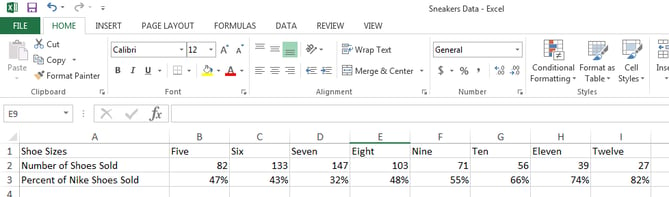
For the purposes of this process, we'll create three rows of data on Nike shoe sales in a blank spreadsheet:

  • Shoe sizes
  • Number of shoes sold per size
  • Percentage of that size's inventory that was sold

Make Row 1 your X axis and Rows 2 and 3 your two Y axes. For this example, Row 3 will be our secondary axis.

excel-data-two-y-axes-1

2. Create a chart with your data.

Want a detailed guide to creating a chart in Excel? Click here.

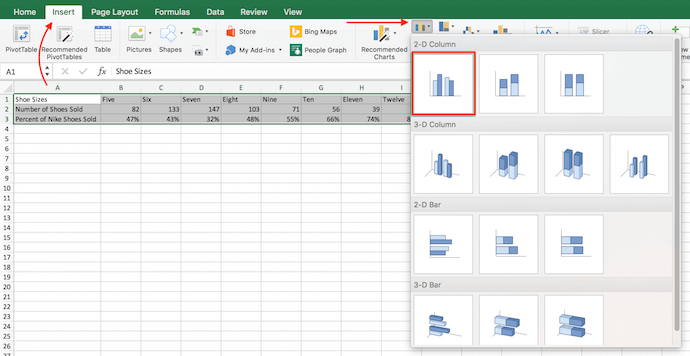
Otherwise, you can highlight the data you want to include in your chart and click "Insert" on the top-lefthand corner of your navigation bar. Then, click "Charts," navigate to the "Column" section, and select "Clustered Column" -- the first option, as shown below.

Instructions to insert a clustered column chart in Excel 2016 on a Mac computer

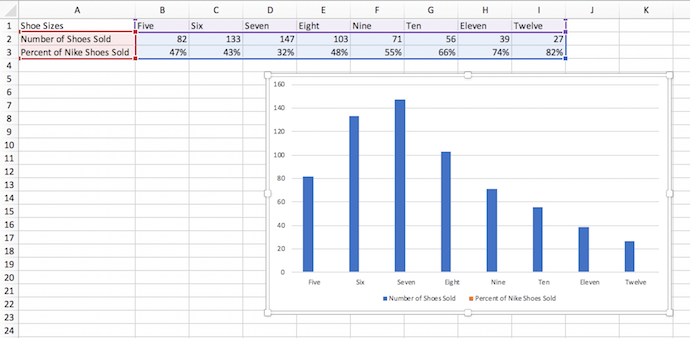
Your chart will then appear below your data set.

excel-chart-mac

3. Add your second data series.

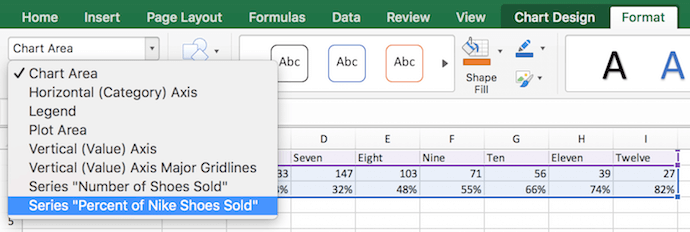
Now it's time to turn the "Percent of Nike Shoes Sold" data -- currently row 3 in the spreadsheet -- into your chart's secondary Y axis. Head over to your top navigation bar and click on "Format." This should pop up in dark green next to "Chart Design," as shown to the far right in the screenshot below.

Having selected "Format," navigate to the dropdown menu on the top-lefthand corner of your menu bar, where it might currently say "Chart Area." Click this dropdown and select "Series 'Percent of Nike Shoes Sold'" (or whichever series you want as your secondary axis).

Adding Series "Percent of Nike Shoes Sold" as an additional data set in Excel for Mac

After you select "Series 'Percent of Nike Shoes Sold,'" click on the "Format Selection" button -- it's right below the dropdown. A pop-up will come out that gives you the option to select a secondary axis. If you're using a version of Excel that doesn't provide you with this formatting button, move on to the fourth step below.

4. Switch this data series from your primary Y axis to your secondary Y axis.

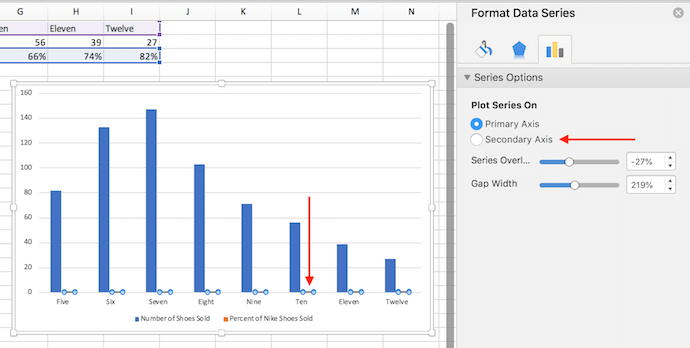
You'll see your new data series added to your chart, but currently, this data is being measured as a low-laying series of columns on your primary Y axis. To give this data a secondary Y axis, click on one of these bars just above the X axis line until they become highlighted.

Having highlighted this additional data series on your chart, a menu bar labeled "Format Data Series" should appear on the right of your screen, as shown below.

Format data series window in Excel 2016 for Mac to add data to secondary axis

In this menu bar, click the "Secondary Axis" bubble to switch your Percentage of Nike Shoes Sold data from your primary Y axis to its own secondary Y axis.

5. Adjust your formatting.

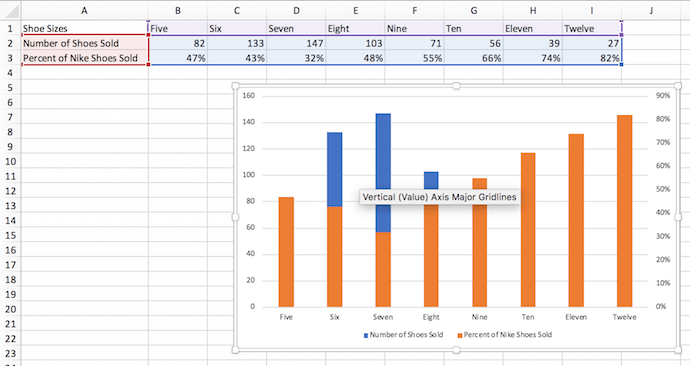
You now have your percentages on their own Y axis on the right side of your chart, but we're still not done. See how you have "Percent of Nike Shoes Sold" overlapping with the "Number of Shoes Sold" columns? Ideally, you want to present your secondary data series in a different form than your columns. Let's do that.

secondary-axis-overlapping

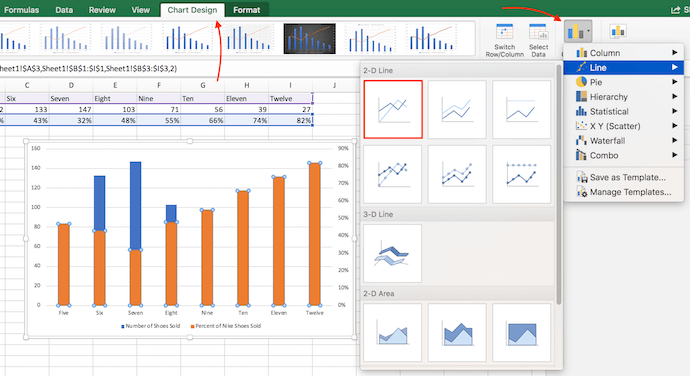
Click your orange columns -- as shown in the screenshot above -- to highlight your second data series again. Then, click into "Chart Design" on the menu bar on top of your Excel spreadsheet.

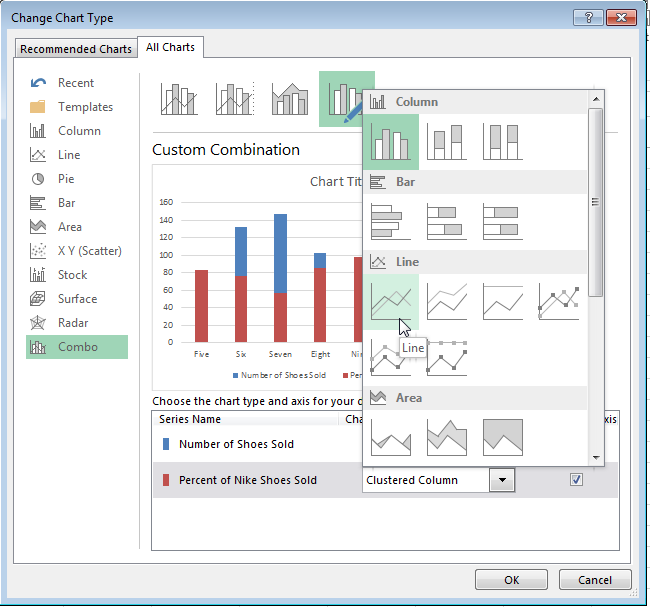
On the far righthand side, select the "Change Chart Type" icon and hover over the "Line" graph option. Select the first line graph option that appears, as shown below.

Instructions to change chart type in Excel and add orange bars to secondary Y axis

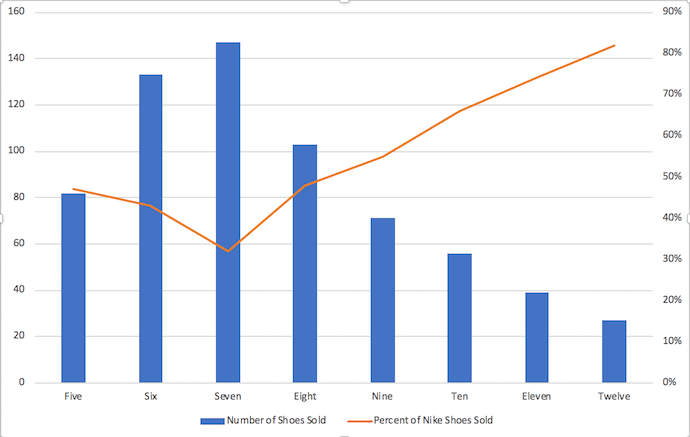
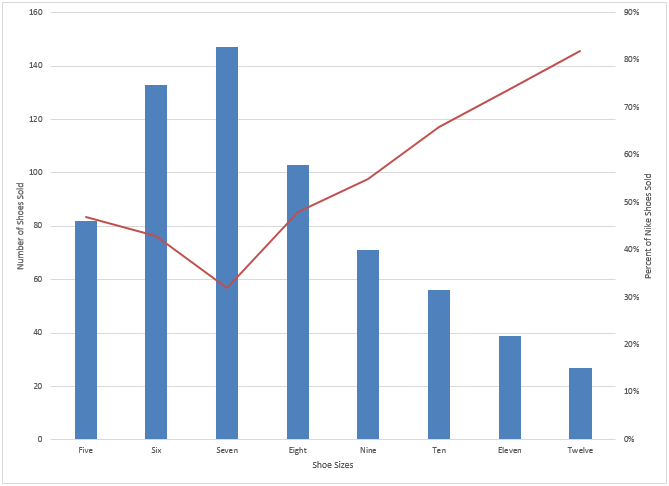
Voilà! Your chart is ready, showing both the number of shoes sold and percent, according to shoe size.

excel-chart-secondary-axis-line

On a Windows PC (Using Excel 2013)

1. Gather your data into a spreadsheet in Excel.

Set your spreadsheet up so that Row 1 is your X axis and Rows 2 and 3 are your two Y axes. For this example, Row 3 will be our secondary axis.

pc step 1

2. Create a chart with your data.

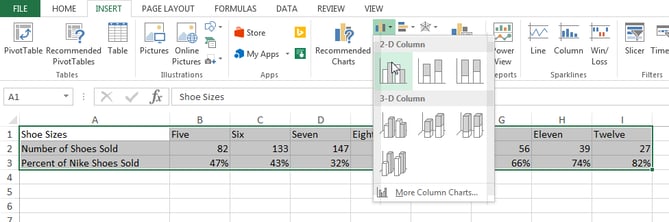
Highlight the data you want to include in your chart. Next, click on the "Insert" tab, two buttons to the right of "File." Here, you'll find a "Charts" section. Click on the small vertical bar chart icon at the top left of this section. You'll now see a few different chart options. Select the first option: 2-D Column.

pc step 2

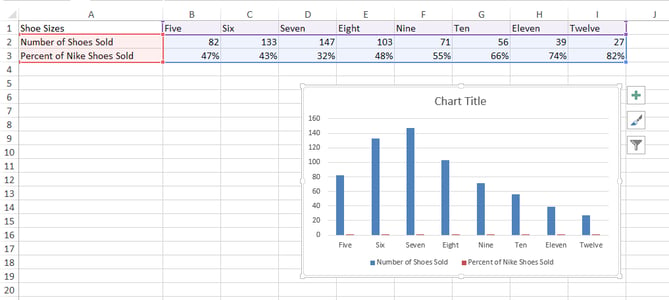
Once clicked, you'll see the chart appear below your data.

pc step 3

3. Add your second data series.

Now it's time to add the "Percent of Nike Shoes Sold" data to your secondary axis. After your chart appears, you will see that two new tabs appear at the end of your dashboard: "Design," and "Format." Click on "Format."

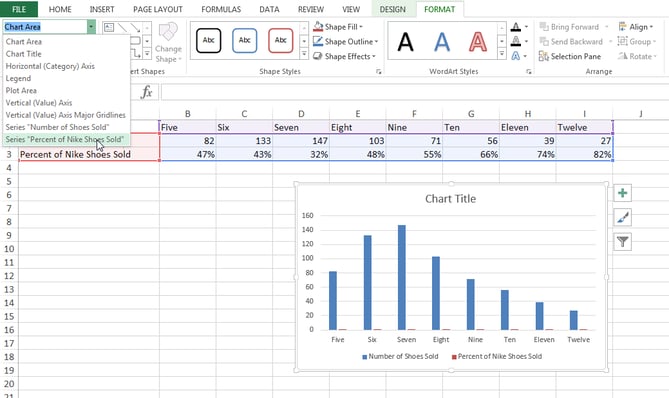
Then, on the far left where it reads "Current Selection," click on the dropdown that reads "Chart Area." Select "Series 'Percent of Nike Shoes Sold'" -- or whichever you want your secondary axis to be.

pc step 4

4. Switch this data series from your primary Y axis to your secondary Y axis.

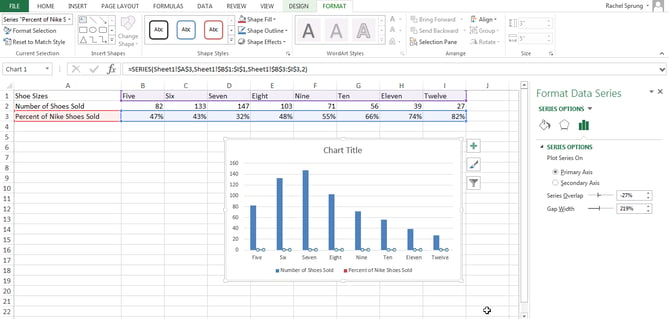
You'll see your new data series added to your chart, but currently, this data is being measured as a low-laying series of columns on your primary Y axis. To give this data a secondary Y axis, double-click on one of these bars just above the X axis line until they become highlighted.

Having highlighted this additional data series on your chart, a menu bar labeled "Format Data Series" should appear on the right of your screen.

In this menu bar, click the "Secondary Axis" bubble to switch your Percentage of Nike Shoes Sold data from your primary Y axis to its own secondary Y axis.

pc step 5

5. Adjust your formatting.

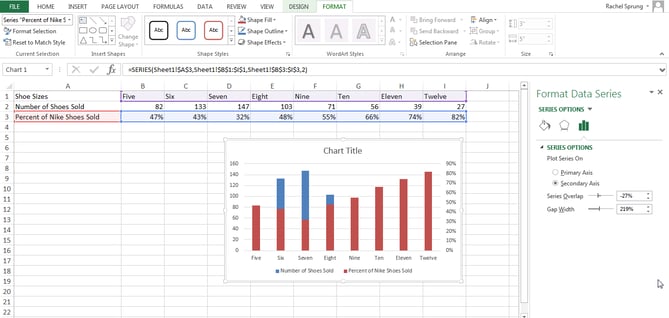
Notice how your "Percent of Nike Shoes Sold" data is now overlapping with your "Number of Shoes Sold" columns? Let's fix that so your secondary data series is presented separately from your primary data series.

pc step 6

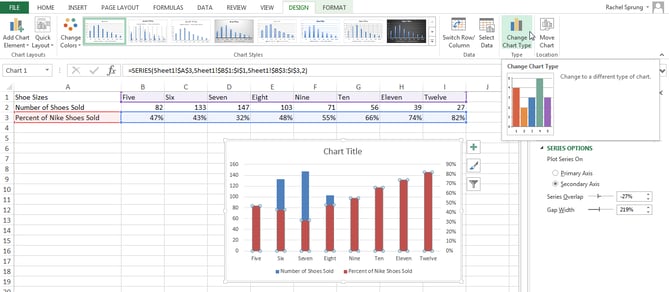
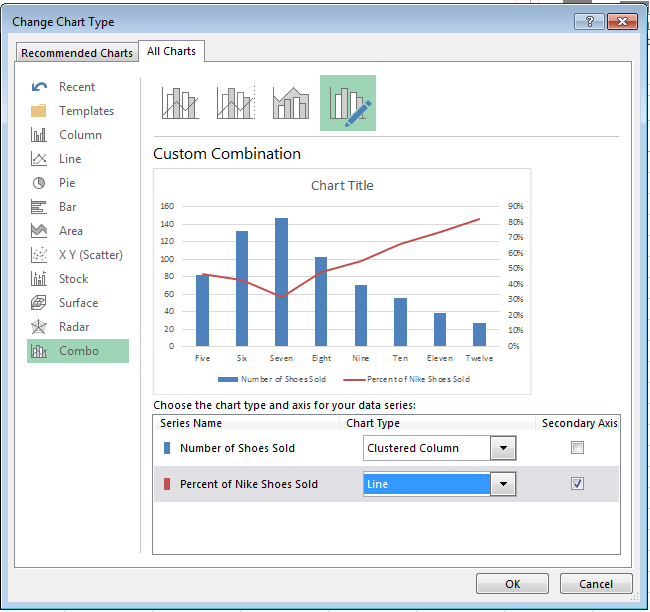
Click and highlight your secondary bar data -- the red columns -- and select the "Design" tab (which is located next to the "Format" tab at the top of your screen). Then, click "Change Chart Type."

pc step 7

You will see the following pop-up modal. Next to "Percent of Nike Shoes Sold" at the bottom, click on the dropdown, and select an option below "Line." This will change this data series into a line graph.

pc step 8

Make sure the "Secondary Axis" check box next to the dropdown is selected as well.

pc step 9

Voilà! Your chart is ready.

pc final chart

How to Add a Secondary Axis in a Google Doc Spreadsheet

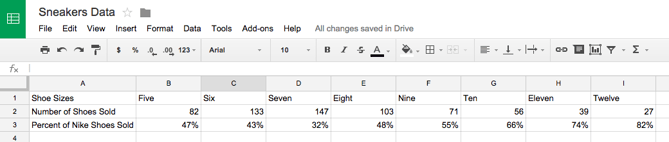
Step 1: Gather your data into the spreadsheet.

Make Row 1 your X-axis and Rows 2 and 3 your two Y-axes.

google doc step 1

Step 2: Create a chart with your data.

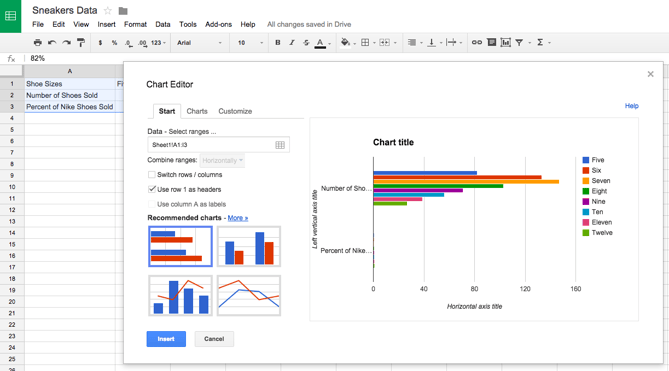
Highlight your data. Then click on "Insert" on your menu, and click "Chart" -- it's located toward the bottom of the drop-down. This module will appear.

google doc step 2

Step 3: Add your secondary axis.

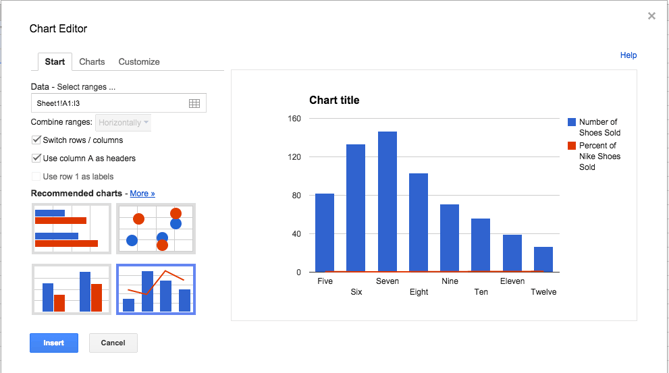
Under the "Start" tab, click on the graph at the bottom right showing a bar graph with a line over it. If that doesn't appear in the preview immediately, click on "More >>" next to the "Recommended charts" header, and you will be able to select it there.

Make sure that "Use column A as headers" is checked at the top. If the chart still doesn't look right, you can also check the option to "Switch rows / columns."

google doc step 3

Step 4: Adjust your formatting.

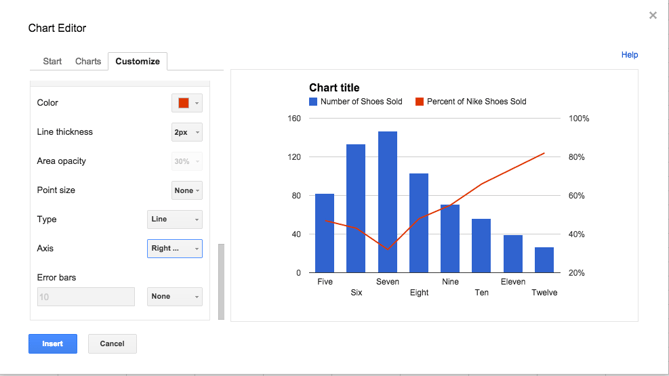
Now it's time to fix your formatting. Under the "Customize" tab, scroll down to the bottom where it says "Series Number of Shoes Sold." Click on that dropdown, and click on your secondary axis name, which, in this case is "Percent of Nike Shoes Sold." Under the "Axis" drop-down, change the "Left" option to "Right." This will make your secondary axis appear clearly. Then click "Insert" to put the chart in your spreadsheet.

google doc step 4

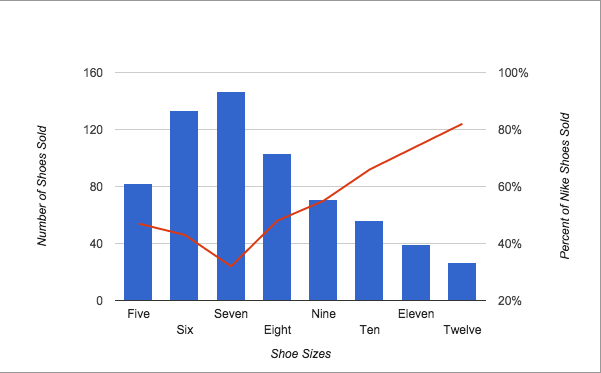
Voilà! Your chart is ready.

google doc step 5

Want more Excel tips? Check out this tutorial on how to create a pivot table.

free excel templates for marketing
Free Download Excel Templates


from Marketing https://blog.hubspot.com/marketing/add-secondary-axis-chart-excel