Tuesday, 29 January 2019

The Ultimate SEO Tool: Ubersuggest 3.0

ubersuggest

In 2018, I promised you I would release a better version of Ubersuggest for free, and I did that.

But there was one big issue: Ubersuggest only worked on a keyword level. When you put in a keyword, you get a list of more keyword ideas and content ideas.

And then when you put in a URL, nothing happened.

Well, that was before.

You can now get domain level metrics!!!!

So let’s dive into the new Ubersuggest.

Traffic Analyzer Overview

The traffic analyzer is broken down into 3 main sections: overview, top pages, and keywords.

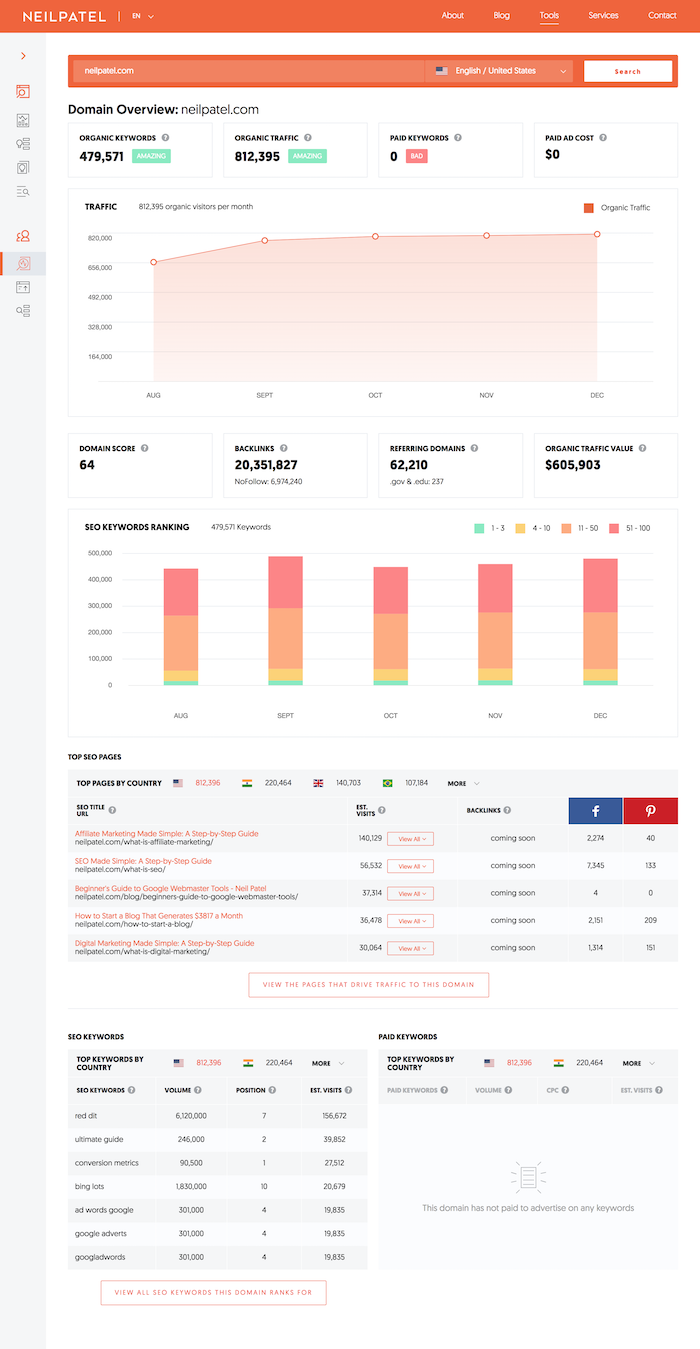
The overview looks like this:

overview

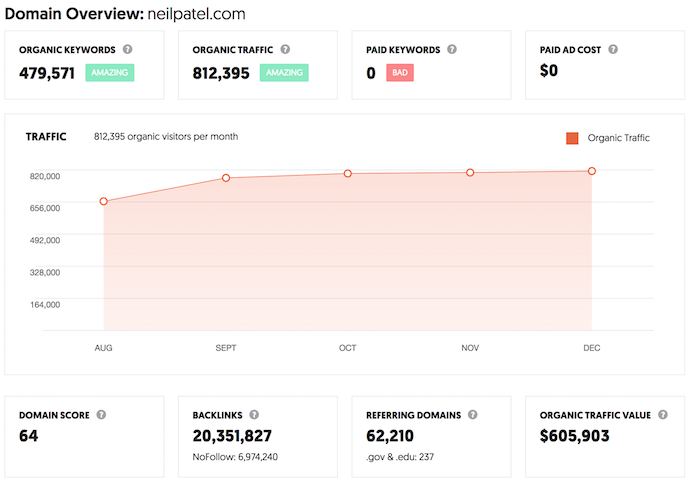
The first section breaks some basic stats and a graph of the domain’s search traffic.

domain metrics

As you can see from the screenshot above, you’ll see how many keywords a domain ranks for, the total estimated search traffic from that region, the number of paid keywords a site is bidding on, and how much they are spending on Google Ads.

In addition to that, you’ll see a traffic graph that shows estimated search traffic a site receives over time.

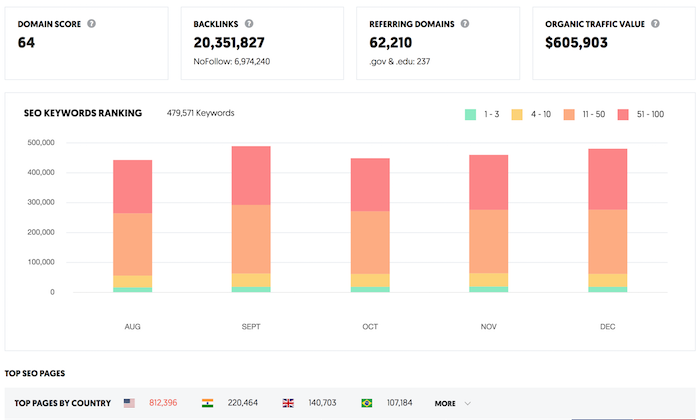
And of course, a domain level overview won’t be complete without data such as backlinks, referring domains, the number of .edu and .gov links, and how much the organic traffic is worth if you had to pay for it.

Now, before you head over to Ubersuggest and type in a domain, there is one thing you need to keep in mind… Ubersuggest treats subdomains as a separate site. So if you enter in store.nike.com you will get different results than if you typed in nike.com. By typing in nike.com, you would NOT see any of the data from their store unless you typed in store.nike.com.

We did this on purpose as it allows you to analyze sites more thoroughly.

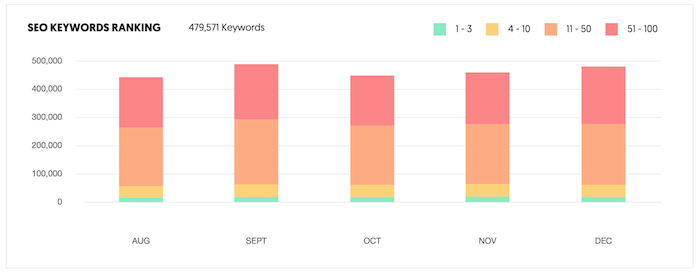
Also, within the traffic analyzer, you’ll see bar graphs that contain the overall positioning of the keywords you rank for over time.

keyword rankings

The chart above shows how many keywords a domain ranks for that are in the top 3 positions in Google, the top 10 positions, the top 50 positions, and the top 100 positions.

You already know no one clicks beyond page one, but over time you’ll want to see your site climbing the ranks. Hence, we track how many keywords are ranking in the first 100 positions.

Now let’s get into my favorite feature of the traffic analyzer.

Top SEO Pages

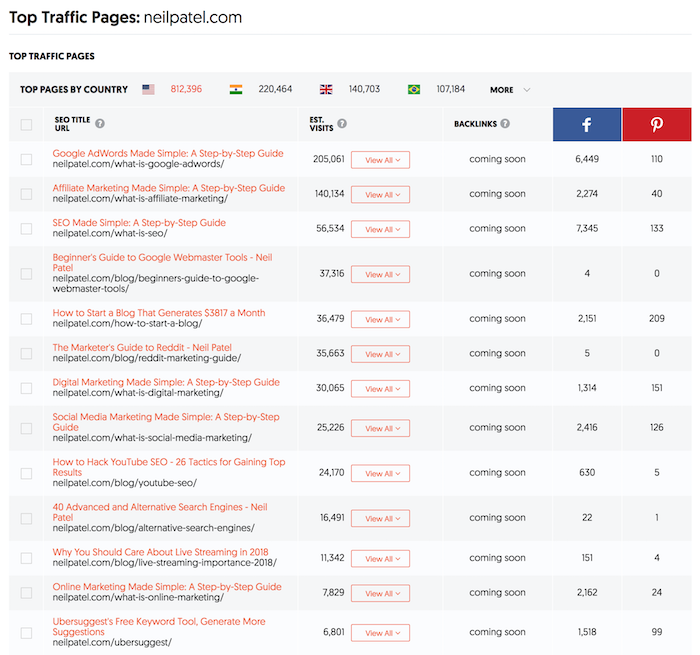
The second part of the traffic analyzer is a list of the most popular pages for a given domain.

top pages

For each page, you are given the title, URL, the number of visits a page receives from Google on a monthly basis, and the number of times the URL has been shared on the social web.

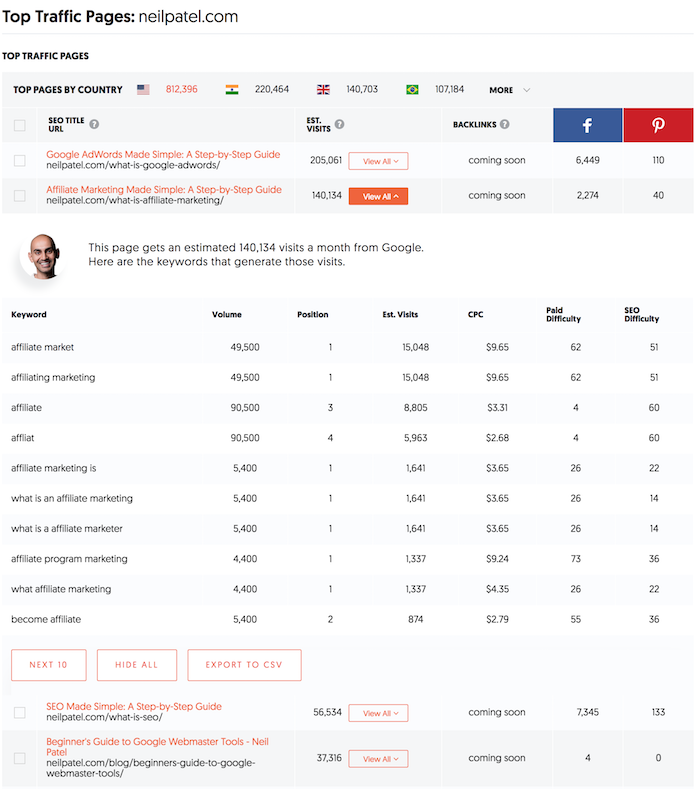
My favorite part about the top SEO pages report is when you click on “view all” you’ll see a list of keywords a page ranks for.

top pages

This one report will not only list out each keyword a webpage ranks for, but the position, estimated visits, cost per click data if you paid for that keyword, and how difficult it would be to rank for it.

What I love about this report is that I can put in a competing URL and see what’s working really well for my competition and then copy them. Or even better, create a more in-depth page than my competition.

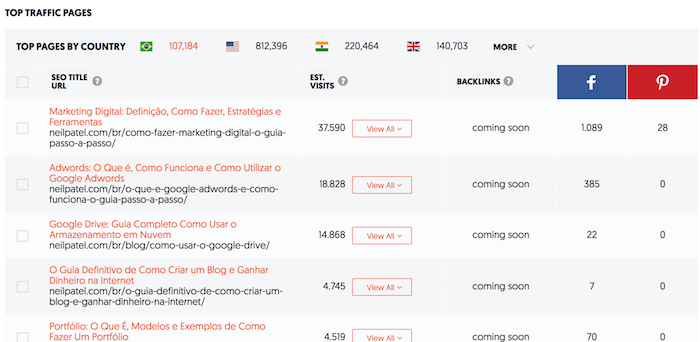
Plus, if you have clients who are global, you can click on the flag at the top and see the top pages for any domain in all of the major countries.

For example, here are my most popular pages in Brazil.

top pages brazil

Top Keywords

The last section in the new Ubersuggest is top keywords.

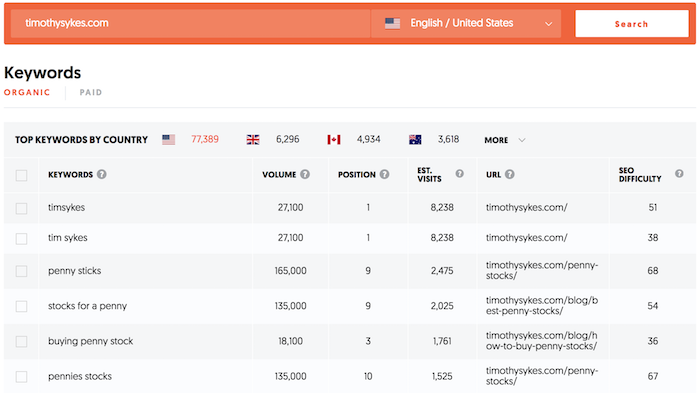
Whether you put in your own domain or competitors, you’ll be able to see all of the organic keywords and paid keywords a site is going after.

organic keywords

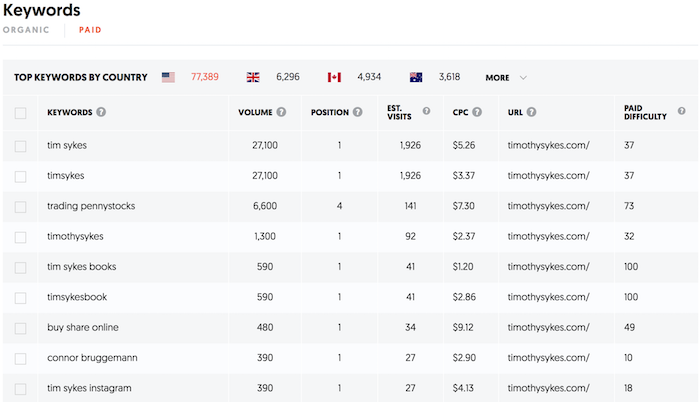
When you click on the “paid” button you’ll see the list of paid keywords as well.

paid keywords

And just like the keyword research reports within Ubersuggest, you’ll have data on URLs, paid difficulty and SEO difficulty.

Conclusion

I hope you enjoy the new version of Ubersuggest. I know there are still some bugs in which the reports don’t load as fast as you want (Top SEO Pages can take up to 20 seconds to load) and you may have to clear your cache to see the new features, but hopefully, you enjoy the updates.

There are also some issues with duplicate keywords and misspellings. The engineering team is continually looking to fix this.

We do know there are many issues with duplicate keywords and misspellings in our Japan database, but we are working on fixing this as soon as possible.

So overall, I know it’s not perfect, but what do you think so far?

And if you haven’t tried it, head over to Ubersuggest and type in a domain.

PS: If you find any bugs, please email carlos@neilpatel.com

The post The Ultimate SEO Tool: Ubersuggest 3.0 appeared first on Neil Patel.


from Blog – Neil Patel https://neilpatel.com/blog/ubersuggest-3-0/

How to Tell a Compelling Brand Story [Guide + Examples]

Last year, a buzzword ripped through the content marketing space that most marketers were surprisingly thrilled about and eager to implement. Shockingly, it didn’t start with “virtual” or end with “intelligence”. Instead, it was what attracted most marketers to the industry in the first place -- "storytelling".

Content marketing’s steady adoption of storytelling is an exciting new opportunity for content creators. But since we’ve spent the majority of our careers optimizing content for algorithms, it can be challenging to flex a creative muscle that’s slowly withered away from inactivity.

To help you strengthen your creative muscle and write compelling stories again, we’ll teach you the fundamentals of brand story structure and show you how three small-to-medium sized businesses have leveraged their brand story to resonate with huge audiences, despite their comparatively small size.

When HubSpot first started, we noticed traditional, interruptive marketing didn’t appeal to consumers anymore. Due to the digital age, people were in complete control of the information they consumed -- and they were sick and tired of receiving direct mail, email blasts, and cold calls. People wanted to be helped, so we started creating educational content that aided people in solving their marketing problems.

Today, we’ve built a passionate community of inbound marketers, expanded our inbound marketing approach to the sales and customer service industries, and strengthened the inbound movement more than ever before.

This our brand story -- a simple, digestible narrative that recounts the reason why HubSpot began, and how it still serves as our purpose today.

How to Write a Brand Story

1. Highlight Your Story’s Conflict.

Check out the following story. Does it resonate with you?

A girl wearing a red-hooded cloak is strolling through the woods to give her sick grandma some much-needed food and TLC. She passes by a wolf on the way. They exchange a slightly awkward soft smile-nod combination that random colleagues usually greet each other with as they pass in the hallway. She makes it to her grandma’s house without a scratch. They eat lunch and play a game of Clue together. Grandma wins by deducing that Colonel Mustard killed Mr. Boddy in the Billiard Room with the candlestick -- what a shocker! The End.

So ... what’d you think? Did this story keep you on the edge of your seat? Or does it feel … off? For some reason, it doesn’t work, right? That’s because there’s no conflict. Despite the intense game of Clue at the end, there’s nothing at stake. There’s no tension. The wolf didn’t try to eat the girl. He didn’t even go to Grandma’s house. He barely acknowledged Little Red Riding Hood.

At their core, stories are about overcoming adversity. So if there’s no conflict presented, there’s no drama or emotional journey that people can relate to. And if your story has no drama or emotional journey, it won’t hold anyone’s attention -- let alone resonate with and inspire them.

Unfortunately, in the business world, brands are horrified to reveal any adversity or conflict they’ve faced. They believe that spinning a rosy, blemish-free story about how their company only experiences hockey stick growth will convince people that they’re the industry’s best-in-class solution. Any adversity or conflict during their company’s history will expose their imperfections, deterring potential customers from buying their product.

But, in reality, this is a huge misconception. Nothing’s perfect. Everything, including companies (especially companies), has flaws. Plus, people don’t relate to perfection. They relate to the emotional journey of experiencing adversity, struggling through it, and, ultimately, overcoming it. Because, in a nutshell, that’s the story of life.

Conflict is key to telling compelling stories. So be transparent about the adversity your company has faced, and own it. The more honest you are about your shortcomings, the more people will respect you and relate to your brand.

2. Don’t Forget About Your Story’s Status Quo and Resolution

Conflict isn’t the only thing you should focus on when crafting your brand story. A compelling story has two other fundamental elements -- the status quo and resolution.

The status quo is the way things are or the initial nature of your situation. The conflict disrupts this situation and puts something at stake, forcing the protagonist (your brand) to actively find a solution to this problem. The resolution describes how the protagonist solves the problem, giving your audience an emotional payoff.

In sum, your brand’s story structure should look like this -- status quo, conflict, and resolution. It’s as simple as that.

If you need an example to crystalize brand story structure in your mind, let’s go over the actual Little Red Riding Hood story, as well as some brands who are nailing their brand stories right now.

Little Red Riding Hood

Status Quo: Little Red Riding Hood walks through the woods, on her way to deliver food to her sick grandma.

Conflict: A Big Bad Wolf approaches her, and asks where she’s going. She naively tells him where her grandmother’s house is, so he suggests she picks some flowers as a present for her. While she’s distracted, he breaks into Little Red Riding Hood’s grandmother's house, eats her, and puts on her clothes to impersonate her.

When Little Red Riding Hood gets to her grandmother’s house, she notices some subtle changes in her grandmother appearance but ultimately ignores them and hops into bed with her. The wolf swallows her whole. He falls asleep from a massive food coma.

Resolution: A hunter hears Little Red Riding Hood’s screams, bursts through grandma’s door, and cuts open the wolf’s stomach, setting Little Red Riding Hood and her grandmother free. They then fill the wolf’s body with heavy stones, and when he wakes up and tries to run away, he topples over and dies.

Now -- wouldn’t you say that was a little more compelling and entertaining than finding out Colonel Mustard can wield a candlestick as a murder weapon? I would, too.

The thing is, some small brands are leveraging this same exact story structure to generate massive amounts of brand awareness and affinity. Read on to find out exactly how they do it.

1. Unthinkable Media

Unthinkable Media is a creative agency that produces original, narrative-driven podcasts for B2B brands. Their mission is to create refreshing, entertaining shows for clients that can actually retain people’s attention, not just acquire it.

Here’s a rundown of their brand story, which is also fleshed out in one of the founder’s blog posts:

Status Quo: As makers and marketers, we want our audience’s attention, and so for years, we focused our efforts on acquiring it.

Conflict: But today, thanks to multiple screens, ubiquitous and instantly accessible content, and endless choice in nearly every competitive niche, the buyer now has total control. They only choose experiences they genuinely enjoy. It is no longer enough for us to simply acquire our audience's attention.

Resolution: We need to hold it. That is our new mandate as makers and marketers. We need to shift our focus from impressions and traffic to subscribers and community. Everything we are trying to achieve becomes possible and gets easier when our audience spends minutes or even hours with us, not seconds. Don't just acquire attention. Hold it.

2. Grado Labs

Grado Labs is a third-generation, family-owned headphone and cartridge company. They don’t believe in advertising, have operated in the same building for over a century, and even make their headphones by hand. So why do they choose to operate like this when huge brands like Beats by Dre, Sony, and Bose have celebrity endorsers and mass-produce their headphones? Check out our interpretation of their brand story to find out.

Status Quo: Music is an essential part of the human experience. Without it, life just isn’t as colorful and exciting. And we believe quality headphones amplify the pleasant, emotional experience of listening to music.

Conflict: In a market where every headphone brand has an enormous advertising budget, state-of-the-art facilities, and high-tech machines that can churn out as much product as they want, all of which we don’t have, why do we choose to not conform?

Resolution: Sound comes first. We’re craft-driven creators, meaning we prioritize producing the best product over generating the most hype. And by creating a better pair of headphones at the expense of publicity and growth, we can serve our customers better and foster a fervent passion for our product.

3. Drift

Drift is a conversational marketing platform that helps businesses connect with prospects through genuine, empathetic conversations and interactions. In 2016, they shocked the content marketing world by scrapping arguably the most reliable lead generator from their website -- forms.

Even though they were initially anxious about getting rid of a lead generation machine, they knew ungating every piece of content on their website would allow them to align with their mission, put their customers first, and offer as much value as possible, which would produce better long-term results. Here’s our interpretation of their brand story.

Status Quo: The crux of content marketing is treating people like humans. So, we’ve done what most other companies have done: created content that aims to help and educate our customers. And in exchange for adding value to their lives, customers are likely to return the favor with their attention, trust, and action.

Conflict: But as much as we preach about putting the customer first, we don’t practice it. Instead of offering the most value we possibly can, we make people give us their contact information in exchange for the very thing we promise is free. Then, with their contact information, we email and call them until they either unsubscribe or eventually buy. No one actually enjoys filling out forms, becoming a lead, and getting nurtured. Our ulterior motive is crystal clear. So are we actually being customer-centric?

Resolution: Let’s get rid of all our forms. If we really want to practice what we preach -- putting our customers first and providing a more human and empathetic marketing experience -- we should offer all of our content for free, with no strings attached.

Tell Your Brand’s Real Story, Not It’s Highlight Reel

Whether you’re publishing your brand story on your website or using it to inform your overall mission, make sure it’s fact, not fiction. Spitting out a highlight reel, like almost every other brand does, won’t actually resonate with people. Instead, it's crucial you tell the honest truth about the adversity your company has faced, and how you’re working to overcome it. Because what people relate to and get inspired by isn’t endless success -- it’s the rocky journey of pursuing a goal, getting knocked down, and, ultimately, finding a path toward success.


from Marketing https://blog.hubspot.com/marketing/brand-story

What Is Twitter and How Does It Work?

Twitter, a social networking site launched in 2006, is undoubtedly one of the most popular social media platforms available today, with 100 million daily active users and 500 million tweets sent daily.

Twitter can be used to receive news, follow high-profile celebrities, or stay in-touch with old high school friends.

But its popularity can be intimidating -- if you don't know how to use Twitter in 2019, should you even bother trying to join the masses who've acquired years of experience on the site?

Fortunately, Twitter is incredibly easy to use. Here, we'll cover what Twitter is, who uses Twitter, and how you can get started on the site, today.

Click here to access a free Twitter for Businesses kit.

What is Twitter?

In 2006, Jack Dorsey, co-founder of Twitter, had an idea -- he would create a SMS-based communications platform in which friends could keep tabs on each other by updating statuses. In the beginning, Twitter was an idea all-too-similar to texting.

The idea evolved, in large part due to brainstorming sessions with Dorsey's co-founder, Evan Williams.

On March 21, 2006, Jack sent the first tweet, which read -- "just setting up my twttr."

Twitter saw explosive growth at the 2007 South By Southwest Interactive conference, during which more than 60,000 tweets were sent. The Twitter team took advantage of the conference to begin growing their user base.

Twitter began as an SMS-based platform, so the 140 character limit was initially simply a necessity -- mobile carriers imposed the limit, not Twitter.

However, as Twitter grew to become a web platform, they kept the limit simply because it aligned with Twitter's brand -- Twitter is a platform that aims to create highly skimmable content for our tech-heavy, attention-deficit modern world.

Twitter has grown exponentially over the past 10+ years. Its purpose is ultimately to spread information fast -- while that information is not always serious (Kim Kardashian's thoughts on makeup, for instance), it sometimes is (like when Iranian protesters used Twitter to assemble marches).

what-is-twitter-powerful

In many ways, Twitter has both unlimited meaning and immeasurable potential. It can connect you with someone in Thailand as quickly as it can introduce you to your next-door neighbor. You might choose to fill your feed with industry professionals, news sites, celebrities, comedians, or friends.

By enabling each user to curate their content to their personal desires and interests, Twitter has successfully created a highly-addictive platform.

Twitter for Marketers

Twitter can be a very helpful platform for growing a following and providing your audience with valuable content before they even become customers. The character limit can also help you create quick-and-compelling advertisements, like a shout-out to a webinar your business is conducting, or a free e-book.

It's important to note, you can use Twitter to advertise your products or services, but you should do so sparingly. Like any social media marketing strategy, your primary focus should be on attracting an audience with useful content and growing brand awareness.

Additionally, you can use Twitter to connect with your audience in personal and meaningful ways. If someone mentions one of your products or services, you can "like" or "retweet" their comment. Alternatively, if a customer complains about your services on Twitter, you can reach out to rectify the situation in real-time.

To learn more about how to use Twitter for marketing purposes, take a look at How to Use Twitter for Marketing & PR.

Twitter for Reporters

Twitter has often been used to spread breaking news quickly -- at times, it's even faster than traditional media outlets at spreading groundbreaking information quickly.

For instance, when the US Airways plane crash-landed in the Hudson River in 2009, Janis Krums was one of the first to spread the word via Twitter, before many media outlets even caught on:

As a reporter, you could amass a large following by tweeting short descriptions to alert your audience of daily events.

Additionally, many celebrities, athletes, and politicians choose to post on Twitter directly rather than speaking through media outlets when they want to share information with their fans -- so Twitter is often a helpful avenue when you're looking for insider information or direct quotes to use for an article.

Of course, there's a danger in using Twitter as a primary source of news -- the limited character count, for one thing, enables Twitter users to spread one-sided information without having the space to offer the full-story. If you're a reporter, it's likely best if you use Twitter to post short snapshots of larger events, but stay clear of offering controversial opinions when you don't have the text space to back it up.

Twitter for PR Teams

If you work in PR, you might consider using Twitter to post announcements about one of your clients -- for instance, you could tweet about a release date for a client's product, or an upcoming event.

Twitter can also help you quickly figure out what your client's competitors are discussing, to ensure your client is up-to-date on industry trends, and participating in the larger conversation.

Finally, Twitter allows you to network with professionals or influencers who might have an interest in working with your client.

Twitter for Individuals

You can use Twitter for entertainment purposes, or to stay in contact with friends and family. At its most basic, Twitter is similar to sending out a 140-character mass text to everyone you know -- you could use it to share a funny story, post a compelling video, or ask your audience a question. The choice is yours.

If you're ready to get started with Twitter, here's how it works -- don't worry, it's relatively simple.

First, create a Twitter account. Then, once you're ready to use Twitter, follow these steps:

How to Post a Tweet

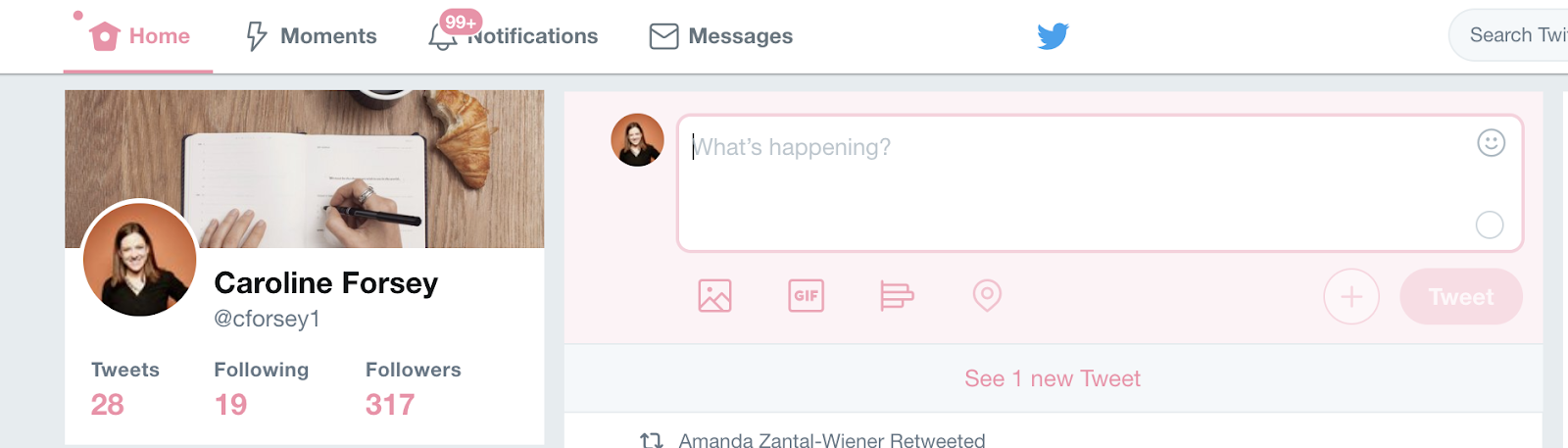
If you're interested in posting something, you'll want to click the text box that says "What's happening?". You can include pictures, a GIF, or a poll using the icons below the text box.

If you're not sure what to post, consider pasting a URL into the box of a funny video or interesting article, with your own brief personal take on the content.

When you're ready, press "Tweet".

Also, yes -- I should probably read through my 100+ notifications.

How to Peruse Popular Content and Follow People on Twitter

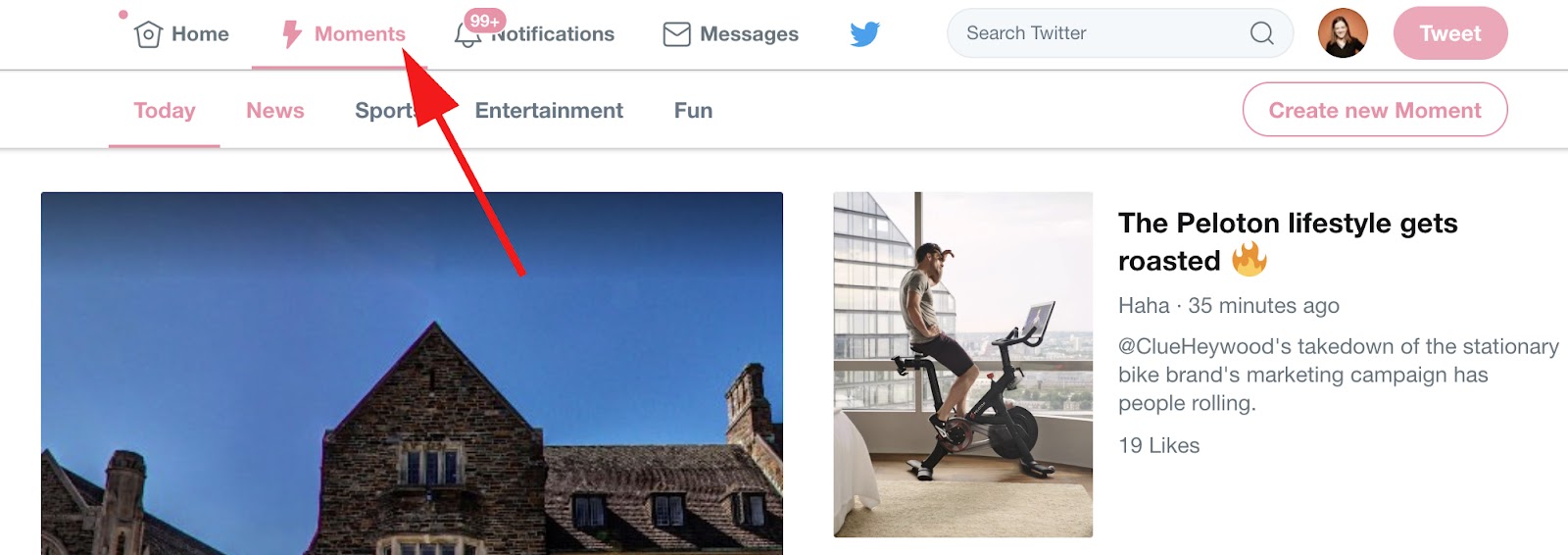
To peruse popular content, you can click the "Moments" section at the top. This will show you trending topics in a variety of subjects, including News, Sports, Entertainment, and Fun.

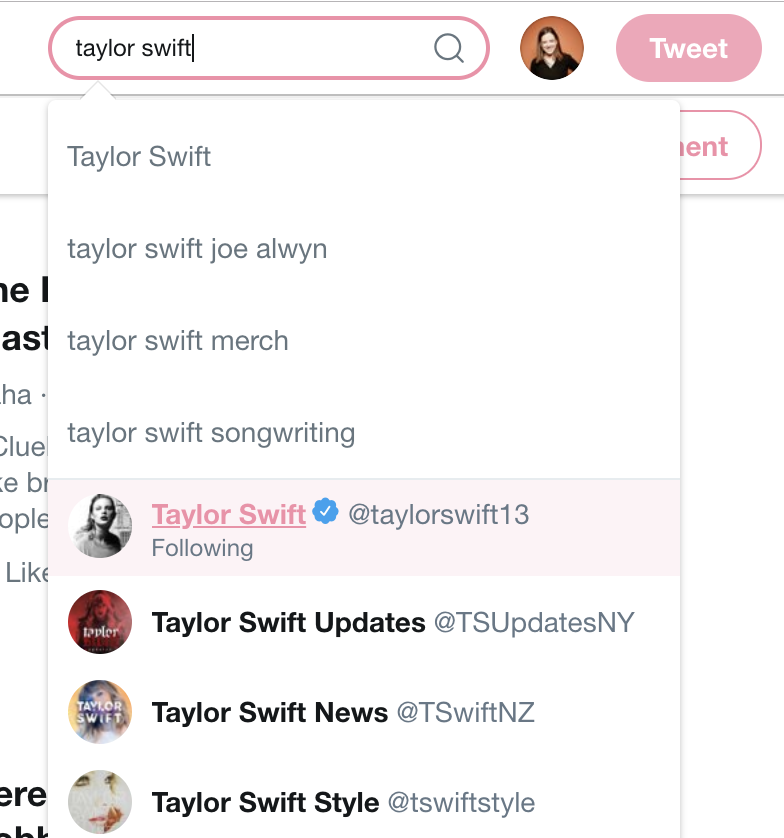
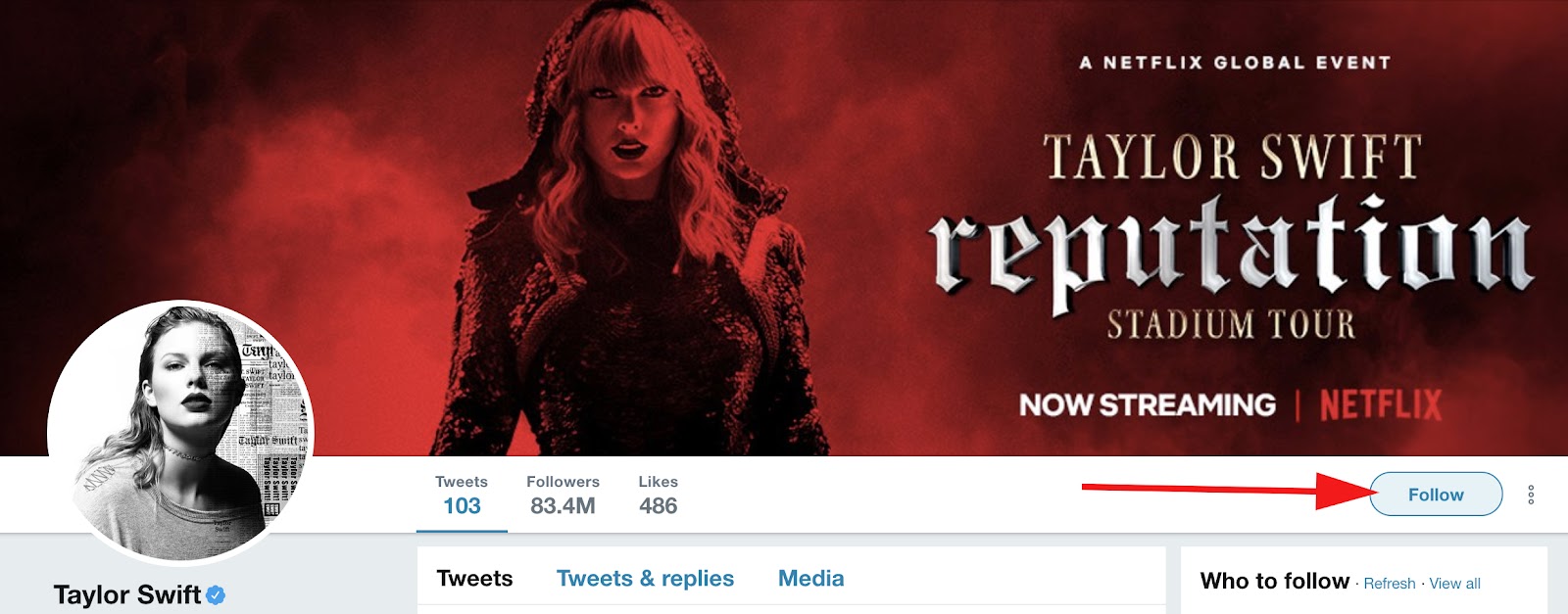
To follow specific people, you can type their name into the search box. When you click on their name, you'll be directed to their profile. There, click the "Follow" button to the right to begin following them -- this means any tweets they post will appear on your homepage.

How to Engage With Other People's Tweets

To engage with someone else's content, you can "Retweet" it. This allows you to share someone else's tweet with your own audience, and to show your agreement or approval of the tweet (for instance, if someone posts a video of a good song and says "This is the best song!" and you retweet it, you're signaling to your audience that you also like the song and want to share it).

Alternatively, you can click the speech bubble to the left of the Retweet button if you want to comment on the tweet, or the heart to the right of the Retweet button if you want to "like" the tweet.

Finally, you can click the mail icon if you want to Direct Message the tweet to just one person, or just one specific group of people.

And that's it! You now know how to post a tweet, engage with other Twitter users, follow people, and peruse popular content on the platform. While there's still other handy tips and tricks to figure out, you have the basics down. 

Next, to learn how to use Twitter for your business, check out How to Build a Community of Twitter Followers for Your Company.

New Call-to-action


from Marketing https://blog.hubspot.com/marketing/what-is-twitter

HubSpot's Guide to Becoming a Better Writer

When I was nine, I wrote a short story for my avid reader base … a.k.a. my mom and dad and dog, Maggie. It was about roller coasters and featured my best friend Abby, but that’s about all I remember from my first literary masterpiece.

I’ve always loved writing, and I’m so grateful that I get to write every single day (albeit about marketing and not theme parks). I mean, I get paid to do this. How cool is that?

But just because I landed my dream job doesn’t mean I’ve stopped improving my writing. In fact, I feel more motivated than ever to discover new habits and master new writing skills.

Writing is an integral part of life. Regardless of what your job is, writing is a key part of being a great employee, student, and communicator.

We believe everyone can become a better writer — even those of us on our blog team here at HubSpot. Consider us your partners on this journey and this guide as your beacon. Use the chapter links below to jump ahead to a particular section, or keep reading to dive right in.

Download our free guide here for tips to become a better writer. 

Writing skills improve grammar, spelling, punctuation, language, and writing style. There are also different writing skills required for different types of content, such as memos, letters, and emails.

Lastly, mastering the art of writing and the discipline required to be a writer is a skill in itself, too! (And, believe me, these skills are sometimes the hardest to master.)

Why Writing Skills Matter

Writing is a form of communication, and becoming a better writer is essentially becoming a better communicator.

We communicate all day, every day. Even when we’re not opening our mouths, we’re communicating through our body language, facial expressions, physical movements — and with our written words.

Whether you’re sending an important memo to your team at work, writing a letter to your child’s teacher, building a presentation for a potential investor, or simply emailing your doctor, writing skills help you communicate in a clear and confident manner.

Where Writing Skills Matter

Writing skills are universal. They’re applicable to almost every part of our lives.

At work, writing skills help us communicate with co-workers, managers, and customers. They help us create effective emails, presentations, blog posts, social media posts, and marketing campaigns. They also come in handy when you might be applying to new jobs using resumes and cover letters.

Writing skills also apply at home. Perhaps you’re writing an important letter to your child’s teacher, or maybe you have to state your case when applying for a bank loan or attempting to purchase a home.

Becoming a better writer can help you in a myriad of ways — and make you sound smart and confident.

Improving Your Writing Structure

Sometimes I like to think of writing like making chili … weird, I know, but let me explain.

My dad is a self-proclaimed chili master. He always says that there’s a lot that goes into making a good chili: your choice of meat and how you prepare it, your choice of beans, your level of spiciness and what seasoning you choose, how long you cook it, and — finally — what you put on top. (Cheese and sour cream, anyone!?)

Weird story, Allie … what’s the point?

My point is that there’s a lot that goes into writing, too. And when you combine its components correctly (commas, gerunds, metaphors, etc.), your writing becomes a very powerful recipe.

Now, let’s talk about those individual writing “ingredients”. Below, I’ve provided a handful of tips for each component — some featuring a pretty list with bullet points.

Featured Resource:

Grammar Skills

You’ve heard people talk about grammar … probably something along the lines of: “Sorry, I am SUCH a grammar freak!” Or, the infamous you’re vs. your debate.

writing-skills-1
 
The official definition of grammar is “ the study or use of the rules about how words change their form and combine with other words to express meaning.” I like to think about it as the way you use words and put them together.

Grammar encompasses a lot of rules and techniques. Here are a handful of my favorite grammar tip lists.

Some writing skills are repeated in these lists, but that means they’re that much more important!

Spelling Skills

Remember when spelling was its own subject in school? As we grew up, it was phased out of our daily learning, but spelling is still a vital writing skill.

We all struggle with certain words (Feb-ru-ary, anyone?), but certain misspellings can completely change the meaning of a phrase or piece of writing — and mean massive confusion for co-workers or customers.

Below, I’ve aggregated some of the most common misuses and misspellings (as inspired by this list from the B2B Insights blog).

Continual vs. continuous

“Continual” means always occurring, whereas “continuously” means never-ending.

i.e. vs. e.g.

i.e. stands for “id est” meaning “”in other words,”” while “e.g.” stands for “exempli gratia” meaning ““for example””.

Elicit vs. illicit

“Elicit” means to evoke some sort of response, whereas “illicit” means “illegal.”

Alternately vs. alternatively

“Alternately” means to take turns –or alternate, whereas alternatively” presents one or more options.

Refute vs. rebut

Refute” is to disprove with evidence, whereas “rebut” is to disagree.

Farther vs. further

“Farther” refers to physical distance, whereas “further” refers to a greater degree of something.

Alright vs. all right

Alright is actually not a legitimate word … use “all right instead.”

Uninterested vs. disinterested

Uninterested” means to have no interest, whereas “disinterested” means to be removed or neutral to a situation.

Who's vs. whose

Who’s” is a contraction for ““who is,” whereas whose is used to show ownership of something. (The same goes for it’s vs. its.)

Than vs. then

Than is used when comparing two things, whereas then is used to express a sense of time, such as what comes next or what used to be.

Punctuation Skills

Punctuation refers to a whole host of symbols used in writing, but I’m going to review the few most popular in this section.

Periods (.), exclamation points (!), and question marks (?)

Periods should be your go-to way to end a sentence. Every sentence should end in a period (if you’re not using a question mark or exclamation point.

Exclamation points — which are used to express excitement, accentuate an important point, or get the reader’s attention — should be used sparingly! If you overuse them, they won’t be effective when you need them to be! These sentences are great examples of completely unnecessary exclamation points! Woot!

Question marks are appropriate for — you guessed it — questions. Using questions throughout your writing can help create a conversational, friendly tone (which we talk about in our language skills section below).

Commas (,), semicolons (;), and colons (:)

When I started at HubSpot, my editor told me that I was “comma happy.”

writing-skills-2
 
I used commas a lot, so I understood why she was giving me that feedback. In my defense, commas are important in writing and apparently very financially valuable for businesses.

Commas pack a punch in your writing. They’re also easy to overuse and misuse. Because of that, it’s crucial to master the rules of the comma.

Next: semicolons. Where commas connect two phrases, semicolons connect two complete, related sentences. For example, the previous sentence could be re-written with a semicolon by saying: Commas connect two phrases; however, semicolons connect two complete, related sentences.

Always use “____; however, ____” when using a semicolon.

Colons are used to introduce a new point, just like in my sentence above, “Next: semicolons.”. They’re pretty easy to utilize in your writing.

Dashes (—) and hyphens (-)

Writers often confuse dashes and colons. Colons introduce something and are typically used near the end of a sentence, whereas hyphens are used to offset a phrase — not unlike commas — in the middle or end of a sentence.

Dashes just put a little more oomph on the phrase that’s set apart.

Hyphens are used to connect words to make them compound words. They’re used to connect two words that serve as an adjective for a noun (such as well-known, or caramel-covered) as well as clarify the meaning of a word (re-sign vs. resign). Hyphens also produce numbers (thirty-seven) and, with prefixes, set apart one word from another (boyfriend vs. ex-boyfriend).

Language Skills

Language refers to using certain words and writing techniques to create a great piece of writing. Consider language skills to be the proverbial “bow” on top of your grammar, spelling, and punctuation.

Here are some of my favorites.

  • Employ transition words to help your reader glide from sentence to sentence and paragraph to paragraph.
  • Use colorful and creative metaphors to help get difficult, complicated, or uncomfortable points across.
  • Don’t be afraid to incorporate a personal anecdote or two … like my comma story above. This helps connect to your reader and present something more interesting than a simple how-to or definition.
  • Look up colorful, flavorful synonyms to basic words. Painful = excruciating. Fast = rapid. Scary = chilling. Noisy = deafening. These words are more fun to read and present a more visceral, interesting piece of writing.
  • Pepper in questions in your writing to become more conversational. Try not to overdo it, though, or your reader might feel like he or she is being interrogated.
  • Study your audience to know which words to use (and not use) to have the greatest impact. Put yourself in your reader’s shoes.
  • Read your writing out loud to test for rhythm and awkward phrasing.

Developing Your Written Content

Different types of writing require different skills. What makes for a great business memo might not be needed when writing a blog or email. Note: The writing skills we discussed above are universal and apply to each of these types of content.

Writing a Letter

There are a lot of types of letters out there: formal letters, cover letters, letters of recommendation, letters to Grandma … but the letter format you choose should always depend on your audience. If you know your recipient, a casual letter is appropriate. If you don’t know your recipient or are writing a business letter, a formal letter is best.

Featured Resource:

You should always address formal letters in a specific way, unlike informal letters to friends or family. When starting your letter, the greeting should align with your familiarity with the recipient. Informal letters can start with “Hello” or another common greeting. Formal letters should begin with “Dear _______” if you know the recipient’s name or “To whom it may concern” if you don’t. All greetings should be followed with a comma.

The body of your letter should be concise and accurate, whether informal or formal. Avoid contractions, slang, and inappropriate language in formal letters.

Always include a complimentary closing at the end of your letter. Informal letters can be closed with “With love,” “Sincerely,” or any other customary closing. Formal letters should be signed off with “Sincerely” (typically the safest bet), “Cordially,” or “Warmly.” All closings should be followed with a comma as well.

Writing a Business Memo

A business memo (short for “memorandum,” or reminder) is a type of internal business communication sent to a large team or entire organization. Business memos typically follow a simple template to ensure consistency.

When writing a business memo, you should always prioritize accuracy and brevity. Consider your audience when choosing what words and language to use. Double-check for grammar, spelling, and punctuation errors that could confuse or distract the reader. Be sure your memo is concise and to the point so that recipients clearly understand its purpose. Lastly, don’t forget to attach any necessary data and documents.

Writing an Email

Like letters, emails come in all shapes and sizes. There are marketing emails, sales emails, emails to pitch media relations, and emails that communicate with international teams.

Regardless of what kind of email you’re writing, here are a few tips that can help you write a great one:

  • Write an outstanding subject line … literally. Make it stand out so people open your email.
  • Keep your email focused. Consider dropping any extraneous greetings or unnecessary information. Break up your message so it’s not just one long block of text.
  • Watch out for robotic writing. Read your message out loud to help combat this.
  • Avoid hedging language, which can make you sound less confident and weaken your writing.

Featured Resources:

Writing a Blog Post

At HubSpot, we love writing blog posts. They’re fun, straightforward, and often informal ways to connect with our customers and readers.

Everyone should know how to write a blog post. While maintaining a blog takes some extra work, writing up the blog posts isn’t hard at all. In fact, we’ve made it easier — simply download our five free blog post templates and dive right in.

In the meantime, here’s our super-simple blog writing formula:

  1. Identify your blog post topic
  2. Brainstorm a working title
  3. Draft a captivating intro
  4. Outline your content
  5. Write the blog post
  6. Edit, proofread and format the post
  7. Add a CTA and optimize for SEO
  8. Finalize your title, and publish!

Learn more about this process in our step-by-step guide on writing a blog post. Want to learn how to write other types of content? Check out our guides on writing video scripts, compelling copy, business proposals, and press releases.

Featured Resources:

Nurturing Your Writing Habits

Writing skills are both technical and habitual. You could become a grammar guru, punctuation pro, or master of business memos … but if you never actually sat down to write, it wouldn’t matter. While the technical skills make you a better writer, building up your habitual skills actually makes you write.

Here are some writing skills and habits to build for both professional and personal purposes. Every writer (me included!) implements at least a few of these habits in order to improve their writing.

Book time on your calendar to write

Set a meeting with yourself that you can’t break, and let your co-workers and friends know that you’re unavailable for that block of time.

Assign yourself a task for each weekday

For example, I try to outline my pieces on Mondays, write on Tuesdays, submit my first draft by end-of-day Wednesday, make edits on Thursday, and submit by final draft by Friday. You could also set a word count goal for each day, such as 500 or 1,000 words. This can help break up your piece into digestible bits so it doesn't’ seem overwhelming. Each day, you can say to yourself: “I only have to get X done today.”

Go somewhere that doesn’t have Wi-Fi

Maybe you need a change of scenery. This removes the temptation to respond to emails, check social media, and generally procrastinate. Save these trips for days on which you don’t have to do research.

Give yourself time away from your writing

This is especially important if you have to do a final sweep-through or round of edits. After spending hours and hours on a piece, it can be hard to see minor errors or gaps in the writing. Sometimes stepping away and coming back can give you a fresh set of eyes.

Read. Read. Read.

Read the writers and writing styles that you admire and aspire to be/recreate. Subscribe to your favorite blogs. Bookmark those websites and publications that you love reading. Download any e-books or digital guides that catch your eye. Buy your favorite books — which supports your favorite authors, too! You’ve heard the saying, “You’re a byproduct of your environment,” right? The same goes for your writing.

If you’re interested in writing — whether professionally or personally — and not sure how to get started, becoming a writer is actually a pretty straightforward process.

Using Writing Resources to Become a Better Writer

Even the best writers are continuously learning. Below, we’ve collected a handful of writing resources for you to bookmark and use as you improve your writing skills.

Courses

Tools

  • Grammarly, a free digital copyeditor. Available as a web or desktop app and for a fee, you can access many premium features.
  • Hemingway Editor, a free digital copyeditor for more editorial, creative writing. Also available as a web or desktop app.
  • Definr, a super quick digital dictionary.
  • Jargon Grader, a simple tool to check your writing for jargon and fluff.
  • Tone Analyzer, a pretty cool tool that assesses the different tones (anger, confidence, tentativeness, etc.) in your writing.

Blogs and Guides

Over to You

Building and improving your writing skills is a continuous process. From technical skills for grammar, punctuation, and spelling to skills that help you hone a disciplined writing process, there are many tips and techniques to master and remember.

Whether you’re learning how to write better emails to your team at work or are chipping away at that dream of writing a book, we’re here to help. Bookmark this guide for future reference, and start writing!
free guide to writing well


from Marketing https://blog.hubspot.com/marketing/writing-skills
Monday, 28 January 2019

21 Great Examples of PowerPoint Presentation Design [+ Templates]

We can all agree there's more than one way of doing something.

For example, some people default to the "loop, swoop, and pull" method when they tie their shoes, while others swear by the "bunny ears" technique. Either way you swing it, your shoes get tied, right?

The trouble is, in some areas of life, different approaches don't always return the same results.

When it comes to presentation design, for instance, there's no shortage of avenues you can take. And while all that choice -- colors, formats, visuals, fonts -- can feel liberating, it's important that you're careful in your selection as not all design combinations add up to success.Click here to download our free templates to create beautiful PowerPoint presentations.

We're not saying there's one right way to design your next PowerPoint presentation, but we are saying that some designs make more sense than others. Luckily, new versions of PowerPoint actually suggest ideas for you based on the content you're presenting. In this blog post, you'll learn how to create an awesome PowerPoint deck and then see 21 real presentations that nail it in exactly their own way.

PowerPoint Design Ideas

It's impossible for us to tell you which design ideas you should go after in your next PowerPoint, because, well, we don't know what the goal of your presentation is. But, as it turns out, PowerPoint can make these suggestions.

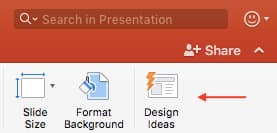
In PowerPoint 2016 and later, PowerPoint is filled with interesting boilerplate designs you can start with. To find these suggestions, open PowerPoint and click the "Design" tab in your top navigation bar. Then, on the far right side, you'll see the following options:

powerpoint-design-ideasClick the "Design Ideas" option under this Design tab, as shown in the screenshot above. This icon will reveal a vertical list of interesting slide layouts based on what your slides already have on them.


Don't have any content on your slides yet? You can easily shuffle this vertical list of design ideas by clicking various slides themes inside the color carousel to the far left of the Design Ideas icon, as shown below:

powerpoint-design-carousel

As you browse and select from the themes shown above, your Design Ideas pane to the right will interpret them and come up with layouts such as:

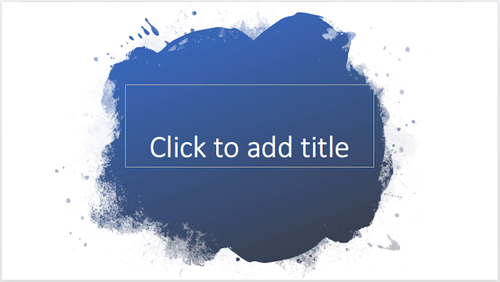
Paint Splash

paint-powerpoint-design-idea

Covering a more creative subject for a younger or more energetic audience? On behalf of PowerPoint, might we suggest the cover slide design above?

Artistic Curves

PowerPoint cover slide design idea with green artistic curvesThis design doesn't have the intensity of the first slide on this list, but it maintains a sense of informality that all PowerPoint presentations benefit from.

Wallpaper

leafy-powerpoint-design-ideaThere's an old-fashioned feel to the design above that sets a fun but relaxing tone for its audience.


Warm Tiles

red-powerpoint-design-idea

This design idea focuses on warm colors, helping to emphasize the black title tile on top of it.

Textured Backdrop

PowerPoint cover slide design idea with wooden textured backgroundWe're particularly fond of this PowerPoint design style. By using real textures -- like wood, as shown above -- you add depth to your slides. This can help your content capture and hold your audience's attention more easily.

To see some examples of the best PowerPoint presentation designs, check out the following decks.

Powerpoint-presentation-templates-1

21 Good Examples of PowerPoint Presentation Design

1. "The Search for Meaning in B2B Marketing," Velocity Partners

We've said it once, and we'll say it again: We love this presentation from Velocity Partner's Co-Founder Doug Kessler. Not only is the content remarkable, but the design is also quite clever. While each slide employs the same background visual, the copy in the notebook unfolds brilliantly through a series of colorful doodles and bold text. This gives the presentation a personal feel, which aligns with the self-reflective nature of the concept.

2. "You Don't Suck at PowerPoint," Jesse Desjardins

If the contrast used throughout this PowerPoint presentation design were a human, we'd marry it. This skillful presentation from Jesse Desjardins employs the perfect color palette: balancing black and white photos with pops of florescent pink, yellow, and blue. The cheeky vintage photos work to reinforce the copy on each slide, making the presentation both interesting and visually appealing.

3. "Build a Better Entrepreneur Pitch Deck," Center for Entrepreneurial Innovation

Balancing visual backgrounds with text isn't easy. More often than not, the text is formatted in a way that winds up getting lost in the image. This presentation from the Center for Entrepreneurial Information combated this issue by combining a blurring effect with a shaded filter to create contrast between the bulleted text and the busy background. Well done.

4. "40 Tools in 20 Minutes: Hacking your Marketing Career," Eric Leist

When you're tasked with presenting a lot of information in a little bit of time, things can get sort of messy. To simplify this type of presentation, it's a good idea to use a visual table of contents like the one shown above. This color-coded index clearly signifies the start and finish of each section to make it easier for the viewer to follow along and keep track of the information.

5. "How to Craft Your Company's Storytelling Voice," MarketingProfs

Do you love these hand drawn illustrations ... or do you love these hand drawn illustrations? I mean, c'mon, this is amazing. Certainly it would have been easier to generate these designs online, but this approach highlights MarketingProf's commitment to investing the time and thought it takes to create an out-of-the-box piece of content. And as a result, this presentation stands out in the best way possible.

6. "2015 Travel Trends," Creative Lodging Solutions

If you're going to go the minimalistic route, take note of this PowerPoint presentation example from Creative Lodging Solutions. This clean design adheres to a simple, consistent color palette with clean graphics peppered throughout to make the slides more visually interesting. Overall there are no frills or unnecessary additions, which allows the informative content to take priority.

7. "Healthcare Napkins," Dan Roam

This presentation dates back to 2009, but the design is still as good as ever. The colorful, quirky doodles help tell the story while also serving as an interesting way to illustrate data (see slides 20 and 21). For visual learners, this approach is much more inviting than a series of slides riddled with text-heavy bullet points.

8. "Eco-nomics: The Hidden Costs of Consumption," Josh Beatty

This presentation employs both powerful images and playful graphics to illustrate the point. While many of the slides contain numbers, they are broken up in a way that makes them easily digestible. Not to mention all of the text is crisp, clean, and concise.

9. "10 Powerful Body Language Tips for Your Next Presentation," SOAP

This simplistic presentation example employs several different fonts, but instead of coming off as disconnected, the varied fonts worth with one another to create contrast and call out specific concepts. Also, the big, bold numbers help set the reader's expectations, as they clearly signify how far along the viewer is in the list of tips.

10. "Pixar's 22 Rules to Phenomenal Storytelling," Gavin McMahon

This presentation by Gavin McMahon features color in all the right places. While each of the background images boasts a bright, spotlight-like design, all of the characters are intentionally blacked out. This helps keep the focus on the tips, while still incorporating a visual element. Not to mention, it's still easy for the viewer to identify each character without the details. (I found you on slide eight, Nemo.)

11. "Digital, Social & Mobile in 2015," We Are Social

Here's another great example of data visualization in the wild. Rather than displaying numbers and statistics straight up, this presentation calls upon interesting, colorful graphs and charts to present the information in a way that just makes sense.

12. "6 Snapchat Hacks Too Easy to Ignore," Gary Vaynerchuk

This wouldn't be a true Gary Vaynerchuk presentation if it wasn't a little loud, am i right? Aside from the fact that we love the eye-catching, bright yellow background (which aligns with the SnapChat theme), Vaynerchuk does a great job of incorporating screenshots on each slide to create a visual tutorial that coincides with the tips.

13. "20 Tweetable Quotes to Inspire Marketing & Design Creative Genius," IMPACT Branding & Design

We've all seen our fair share of quote-chronicling presentations ... but that isn't to say they were all done well. Often times the background images are poor quality, the text is too small, or there isn't enough contrast. Well, this PowerPoint presentation from IMPACT Branding & Design suffers from none of said challenges. The colorful filters over each background image create just enough contrast for the quotes to stand out.

14. "The Top 20 Facts About High Fructose Corn Syrup," Corn Refiners Association

This is another great example of minimalistic design done right. There's nothing overly complicated about this presentation's design, which is why it works. The text is large and legible, the images are high quality and placed in a way that's not obtrusive, and the facts are called out from the rest of the text.

15. "Creating Powerful Customer Experiences," Digital Surgeons

This presentation offers up a lot of information in a way that doesn't feel overwhelming. Different colors are used to differentiate one set of numbers from another (see slide eight), and colorful graphics are used to make the information seem less buttoned-up.

16. "All About Beer," Ethos3

Not going to lie, it was the title that convinced me to click through to this presentation ... but the awesome design kept me there once I arrived. This simple design adheres to a consistent color pattern and leverages bullet points and varied fonts to break up the text nicely.

17. "Digital Transformation in 50 Soundbites," Julie Dodd

This design highlights a great alternative to the "text-over-image" display we've grown used to seeing. By leveraging a split screen approach to each slide, Julie Dodd was able to serve up a clean, legible quote without sacrificing the power of a strong visual.

18. "SMOKE: The Convenient Truth," Empowered Presentations!

All of the elements are working together here to create a compelling, unified presentation. From the font choice to the color palette to the dark visual background images, this design aligns perfectly with the context of the copy.

19. "Fix Your Really Bad PowerPoint," Slide Comet

When you're creating a PowerPoint about how everyone's PowerPoints stink, yours had better be terrific. The one above, based on the ebook by Seth Godin, keeps it simple without boring its audience. Its clever combinations of fonts, together with consistent color across each slide, ensure you're neither overwhelmed nor unengaged.

20. "How Google Works," Eric Schmidt

Simple, clever doodles tell the story of Google in a fun and creative way. This presentation reads almost like a storybook, making it easy to move from one slide to the next. This uncluttered approach provides viewers with an easy-to-understand explanation of a complicated topic.

21. "What Really Differentiates the Best Content Marketers From The Rest," Ross Simmonds

Let's be honest: These graphics are hard not to love. Rather than employing the same old stock photos we've seen time and time again, this unique design serves as a refreshing way to present information that's both valuable and fun. We especially appreciate the author's cartoonified self-portrait that closes out the presentation. Well played, Ross Simmonds.

Want more? Read How to Create Infographics in Under an Hour [15 Free Infographic Templates].

powerpoint presentation templates
download free powerpoint templates


from Marketing https://blog.hubspot.com/blog/tabid/6307/bid/6012/17-examples-of-great-presentation-design.aspx

What’s the Mesh and Why It Matters for Marketers

“I read Peter’s notes, all of them, and he knew that a peer-to-peer Internet was possible in the future, but he was also basing that on, what, old desktop computers. He never, ever foresaw the ubiquity or power of all of our modern-day smartphones. He was also dealing with a completely different Weissman limit. So… uh, yeah. Yeah. Okay.”

If you’re a viewer of the HBO hit, “Silicon Valley” then you probably recognize this quote. It is from the main character and CEO of “Pied Piper,” Richard Hendrix. So what is he going on about? Is it completely fiction or is it based in fact?

The truth is that Richard isn’t crazy, and his new internet may soon be coming to a home near you in the form of Mesh Networking. So what is Mesh Networking and how does it differ from traditional networks…and how will it change marketing?

Traditional wireless networks transmit a signal from a central router, creating a radius in which devices can connect directly to the source and receive the signal. In the traditional network, devices which are farther away may experience attenuation in signal strength, and eventually at a certain distance the range of the signal is too weak for a device to connect.

Traditional Wireless Network

Alternatively, think of a mesh network like a woven fabric in which each device is interconnected. Rather than the wireless signal being distributed in a wide range, each device connected to the mesh network acts as a node, connecting to the signal and passing it on to the next device. Nodes create network links with other nodes around them, letting signals pass from node to node in a number of paths throughout the mesh. Each device thinks that it is connected to the central router. Signal strength is not lost as it makes small jumps from device to device. Because of their decentralized nature, mesh networks can continue to scale almost endlessly, maintaining signal strength and the ability to send and receive data.

Digital Mesh Network

Why Mesh?

Mesh networks are resilient, self-configuring, and efficient. You don’t need to mess with them after what is often minimal set up, and they provide arguably the best and highest coverage that you can achieve in your home.

Outside the home, mesh networks enable IoT devices to function in remote areas where a traditional network may not be able to reach, and help ensure devices are continually connected to networks without downtime. According to a Research and Markets report, the wireless mesh network market is expected to grow to $8.9 billion by 2023, growing at a rate of 9.6 percent CAGR during the forecast period (2017 to 2023).

Problems to Solve

Physical Attacks: Internet access speeds up when more users contribute to the network, but it also opens up the network to multiple points of access. As all computers in a wireless mesh function as routers, each computer represents a possible point of attack. Computer nodes also can be compromised by the loss or theft of a laptop or desktop computer. In this case, the attacker stealing the computer can use the access provided by the stolen computer to enter the network, or simply disrupt the entire system by removing crucial routing nodes.

Denial of Service: Even without physical access to the network, hackers can create “zombie” computers using virus infections. Once infected, each computer does the bidding of the attacker without direct monitoring. Meanwhile, the hacker launches a concentrated denial-of-service attack, which floods a particular computer or system with overwhelming bits of information to effectively shut down that system’s ability to communicate with other networks. If a computer in a mesh network becomes infected, it can attack other computers inside its own network, and infect them as well, causing a cascading effect.

Passive Monitoring: A zombie computer doesn’t need to attack the system to cause damage. Hidden and compromised computers can passively monitor Internet traffic moving through the network, giving the attacker the ability to intercept bank information, login credentials for any website accessed and routing information for the network itself. At this point, the attacker can choose to leave the network without anyone knowing, while possessing enough data to steal bank funds, commit identity fraud or re-enter the network at will.

Gray, Black, and Wormholes: If a computer becomes infected or malicious computer enters a mesh network, it can pretend to be a trusted member of that network and then modify sent data and disrupt how the network passes information. In a black hole attack, information passing through the infected computer will not continue through the network, blocking the flow of data. In gray hole attacks, some data may be blocked, while other data is allowed, making it seem like the computer is still a working part of the network. Wormhole attacks are harder to detect: They tunnel into a network computer from the outside and pretend to be other nodes in the network, essentially becoming invisible nodes. They can then monitor network traffic as it passes from one node to the next.

Mesh Marketing

So how is this relevant to marketers and how will it change the scope of marketing? To begin, the rise of “smart” devices is continuously increasing the capabilities of social media and digital marketing sectors. By having every device connected into an interlinking system, the possibilities of communication, cookies, and advertisements increases with every new device added. Fridges can send information about buying habits and your phones can detail everything about your travel routines. While scary at first, in a world where the consumer is put first, it opens up the doors for a truly massive addition to marketing campaigns.

Additionally, by essentially becoming our own wireless networks, we are then given the opportunity to market our own social pages as well as businesses for traveling entrepreneurs. By setting up “localized push notifications” we could have events and people be “live” broadcasting at all times for special offers. This could allow for flash sales in certain areas and during events as well as provide free promotion for traveling artists.

This leads into the final benefit, which is that mesh networking helps to expand internet connection and thus digital marketing outreach into low-populated areas. This not only is great for businesses but consumers in rural areas as well. No more going to Grandma’s and being disconnected from the world. With interconnected devices sharing bandwidth and publicly owned terminals extending into rural areas we will have most of the planet with access to internet. The best part is that it will probably (at least a small part of it) be free.  What’s really revolutionary about mesh networking is the fact that it provides a means for people to self-organize into communities and share resources among themselves: Mesh networks are operated by the community, for the community. Self-organization means less groundwork for you as a marketer!

The post What’s the Mesh and Why It Matters for Marketers appeared first on Marketo Marketing Blog - Best Practices and Thought Leadership.


from Marketo Marketing Blog https://blog.marketo.com/2019/01/whats-the-mesh-and-why-it-matters-for-marketers.html

7 Creative Company Profile Examples to Inspire Your Own

We all know about the infamous rivalry between Dunkin' Donuts and Starbucks. At the end of the day, they both sell coffee -- but they've each cultivated strong, unique brands, and have attracted very different audiences as a result.

You can often overhear heated arguments regarding the topic, with people vehemently claiming one coffee chain to be better than the other.

But let's say you didn't know about the rivalry, and you'd never heard of either Starbucks or Dunkin' Donuts before.

Instead, you stumble across these two very different company profile statements:

Image courtesy of Dunkin' Donuts

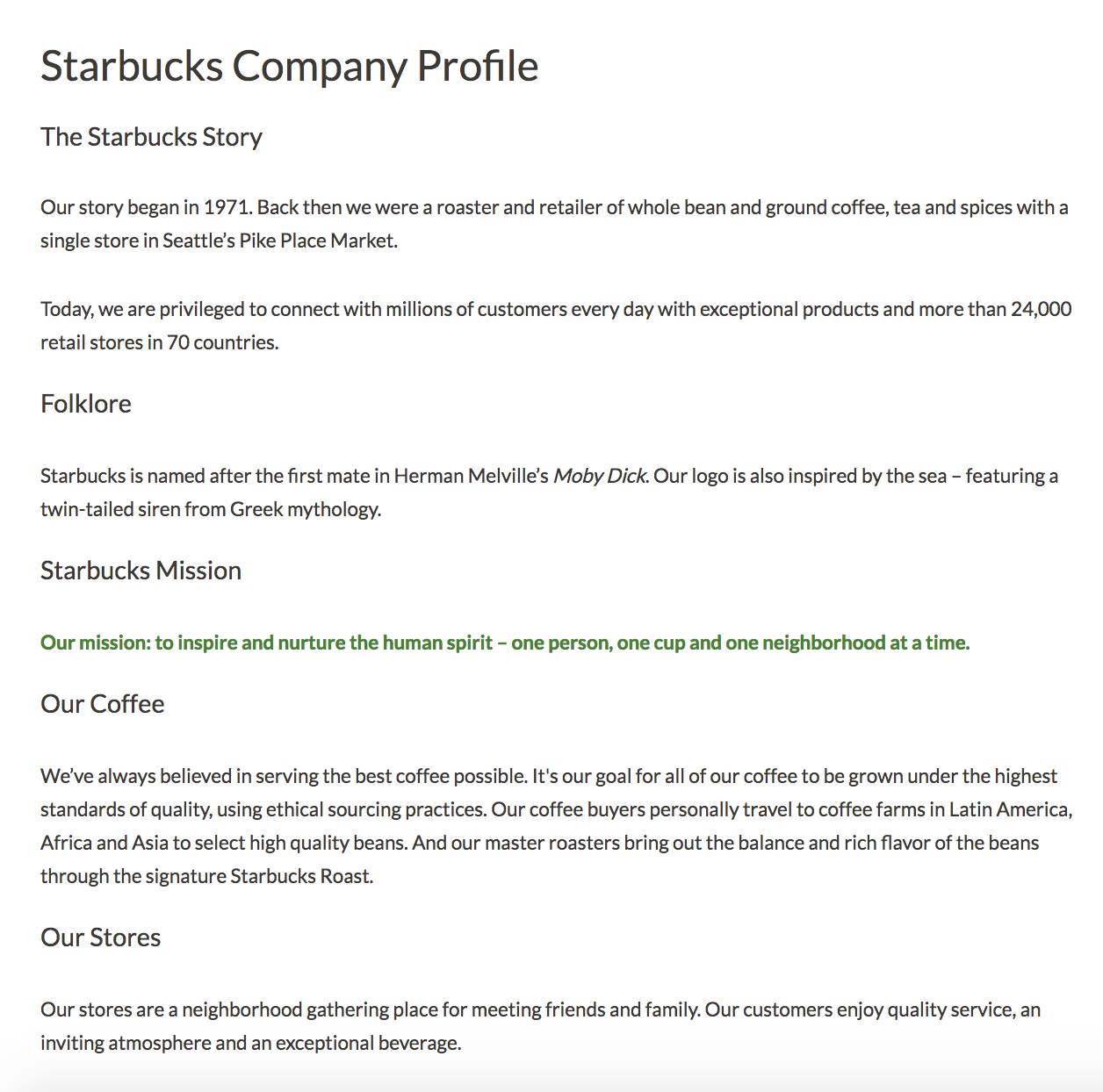
Image courtesy of Starbucks

From their opening paragraphs alone, I'm willing to bet you're persuaded to check out one brand in more detail over the other. It isn't just the language itself that gives you a sense of their business -- it's the design, the font, and the color.

Ultimately, your company profile matters. It can intrigue a new visitor to check out your products or services in more detail, and nudge potential customers into choosing your business over competitors.

Here, we'll explore seven of the most creative company profile examples, to ensure you're able to create a company profile in 2019 that will attract and engage the right audience. Once you're done perusing these impressive examples, take a look at our template to get started designing your own.

Company Profile Examples

1. Starbucks company profile

Starbucks' company profile has it all -- the company's mission, background story, products, store atmosphere, and even folklore regarding the name. Best of all, they somehow manage to pull off sounding both genuine and grandiose. I don't know many other coffee stores that could claim, "our mission: to inspire and nurture the human spirit". Starbucks' company profile is a fantastic example of a store with a common household product -- coffee -- managing to stand out from the competition through their mission and values.

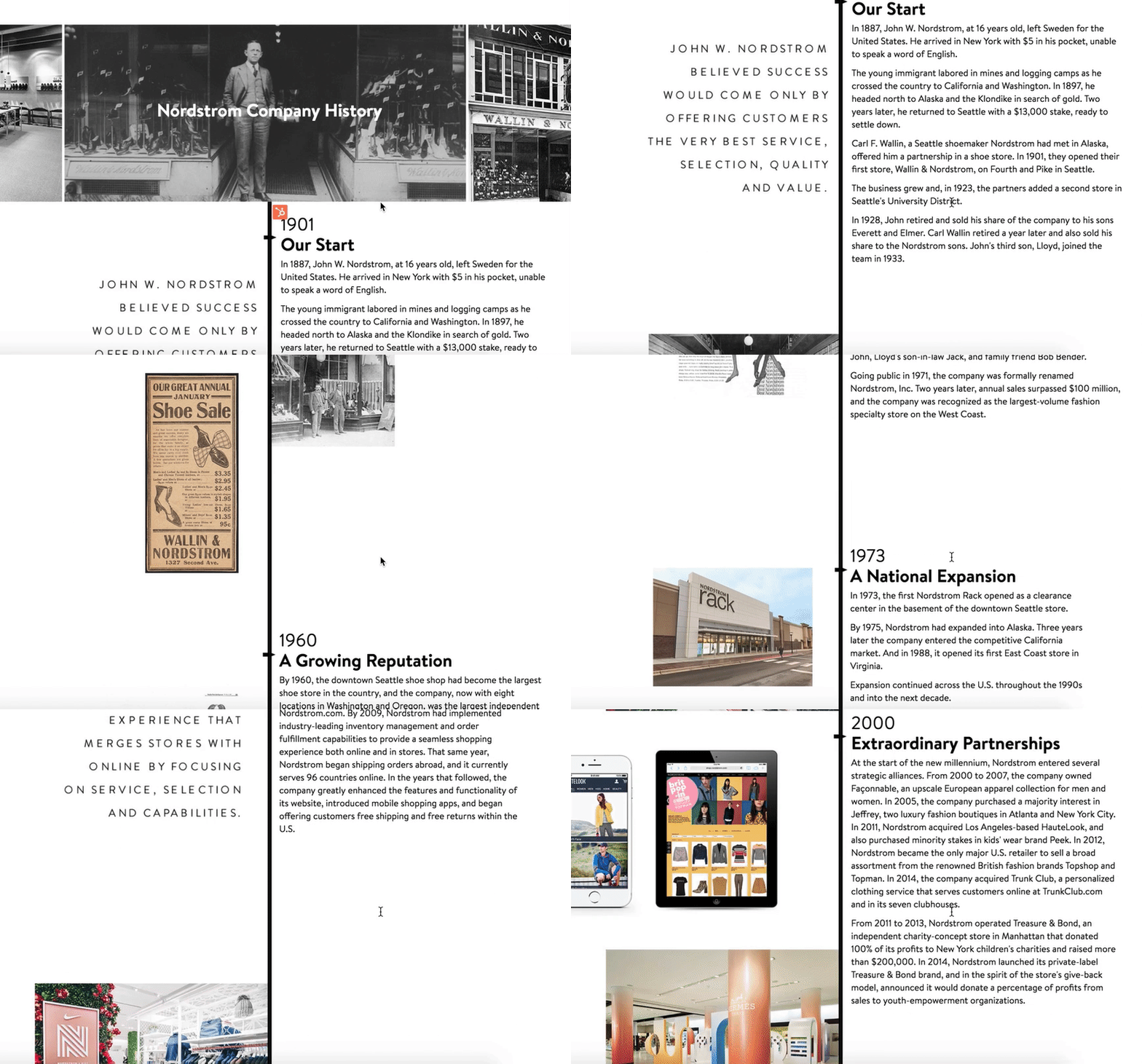
2. Nordstrom company profile

If your company has an interesting and lengthy history, you might consider creating a visual timeline, like Nordstrom did on their company profile. The profile reads like a creative story from the very first line -- "In 1887, John W. Nordstrom, at 16 years old, left Sweden for the United States. He arrived in New York with $5 in his pocket, unable to speak a word of English." With a good balance of image and text, the timeline serves as a reminder of Nordstrom's stability and growth.

3. Diehl Group Architects company profile

For both cleanliness and ease-of-use, take a look at Diehl Group Architects' company profile. The web page uses clickable boxes to separate topics, allowing users to choose which subject they'd like to learn more about. Additionally, the entire design -- including the page's background, which displays a floor-plan -- mirrors the company's purpose.

4. Bloomberg company profile

If both video and text are available on the same page, 72% of people would rather use video to learn about a product or service. You might consider using a compelling video to convey your company's story, like Bloomberg does in their company profile.

Additionally, Bloomberg's profile proves the company knows its audience -- they offer a few quick statistics, and then link to other areas of the site, such as Careers and Tech. While another business might do well offering a creative, long-form story, Bloomberg's typical demographic is likely more analytical.

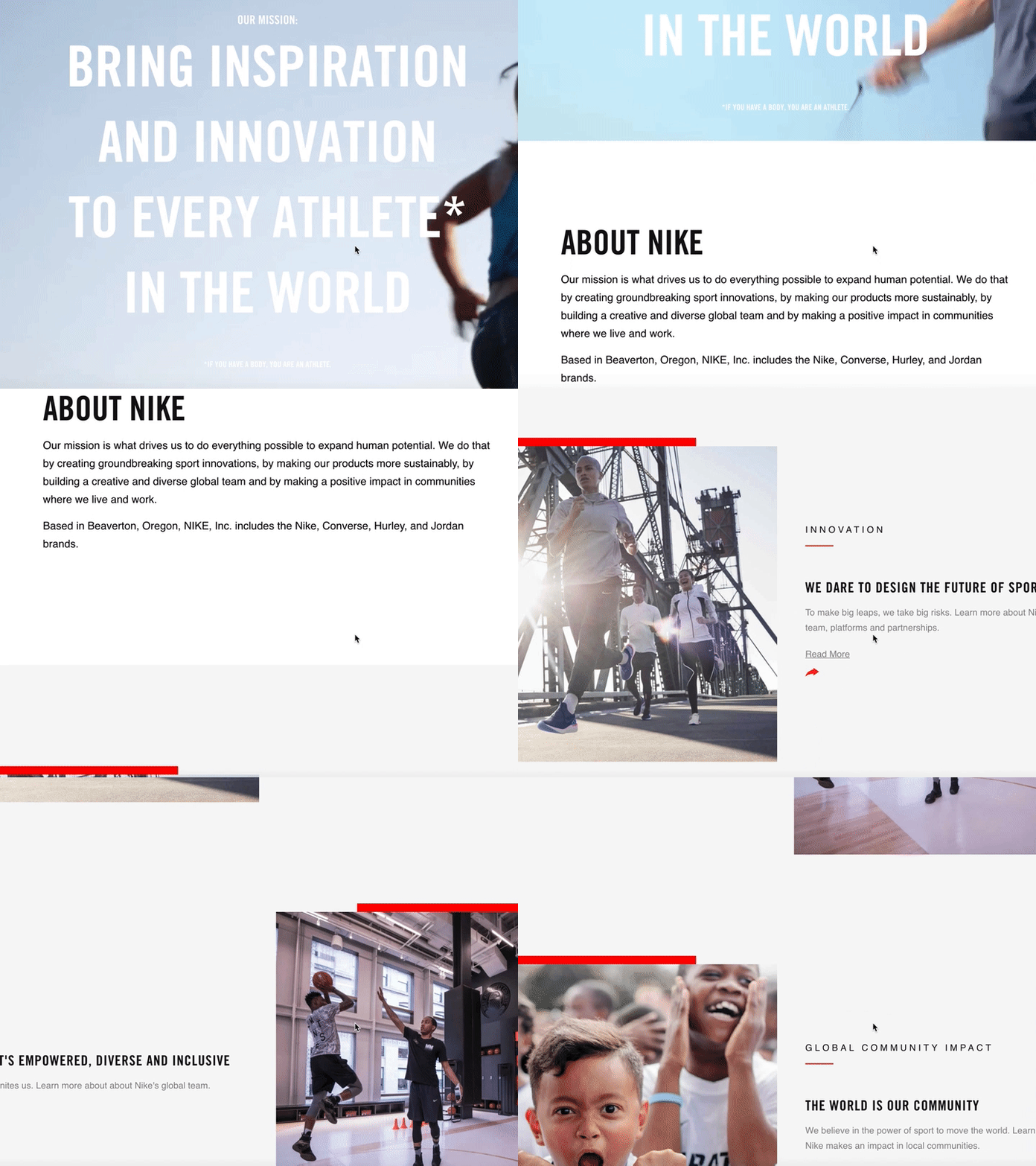
5. Nike company profile

You can get a sense for Nike's two primary purposes almost instantly -- fitness, and people. When you first open their company profile you're greeted with videos of people of different ages, gender, and nationalities playing sports.

Additionally, their initial introduction is this: "Bring inspiration and innovation to every athlete* in the world". Below, beside the asteric, it says, "If you have a body, you are an athlete". As you scroll, you'll see information on their internal diversity and inclusion initiative, their global community impact, and their sustainable business program, with very little mention of their products.

Nike's company profile portrays a larger, grander vision, compelling an audience to believe in their brand even before they purchase a product.

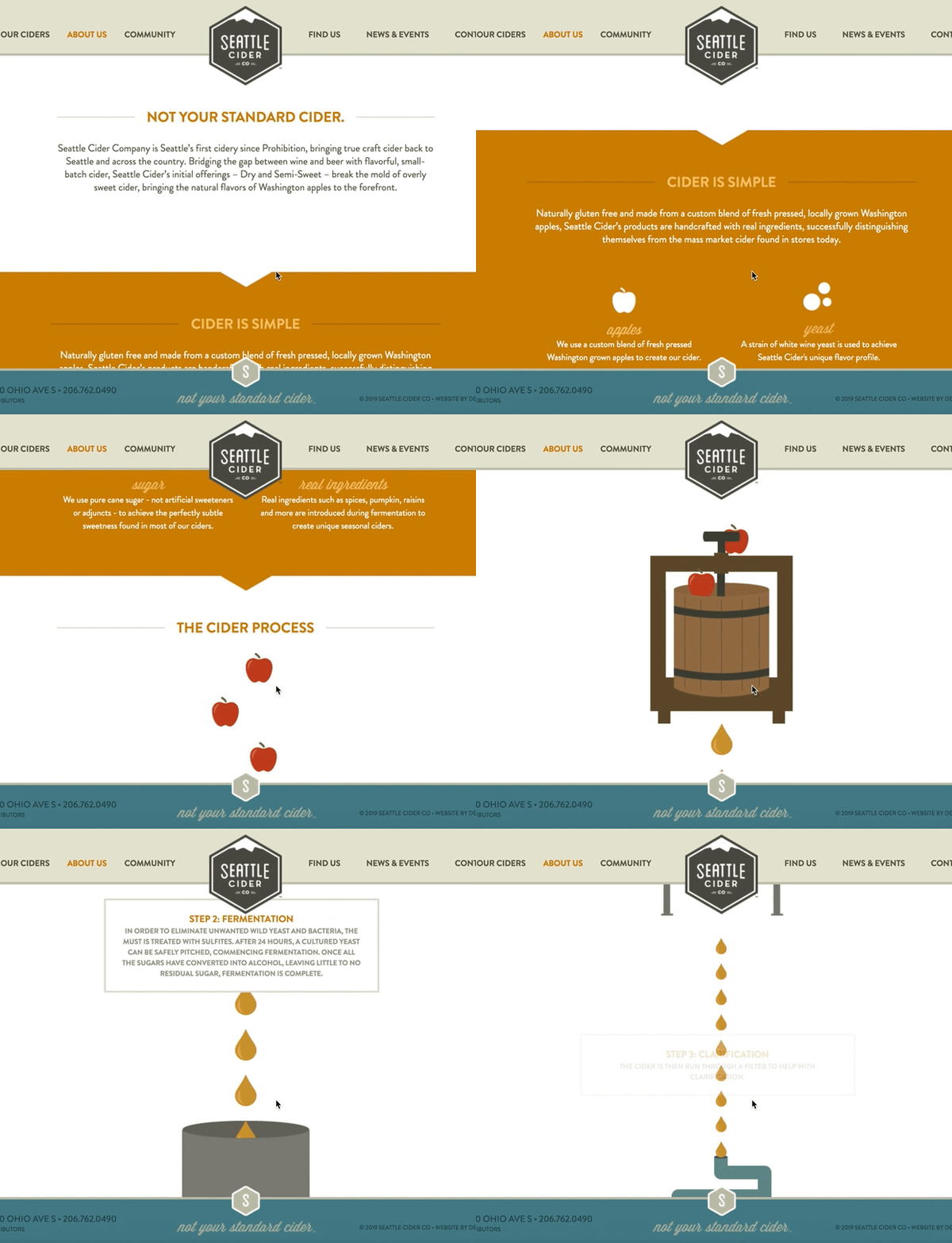
6. Seattle Cider company profile

Seattle Cider Company's profile is fun, and engages the user through compelling graphics that demonstrate the company's cider process. The page flows seamlessly, and provides critical information regarding the product before displaying the company's mission and values. This profile is a good example of a company that understands its users' concerns (in this case, quality ingredients), and addresses those issues while still displaying personality and flair.

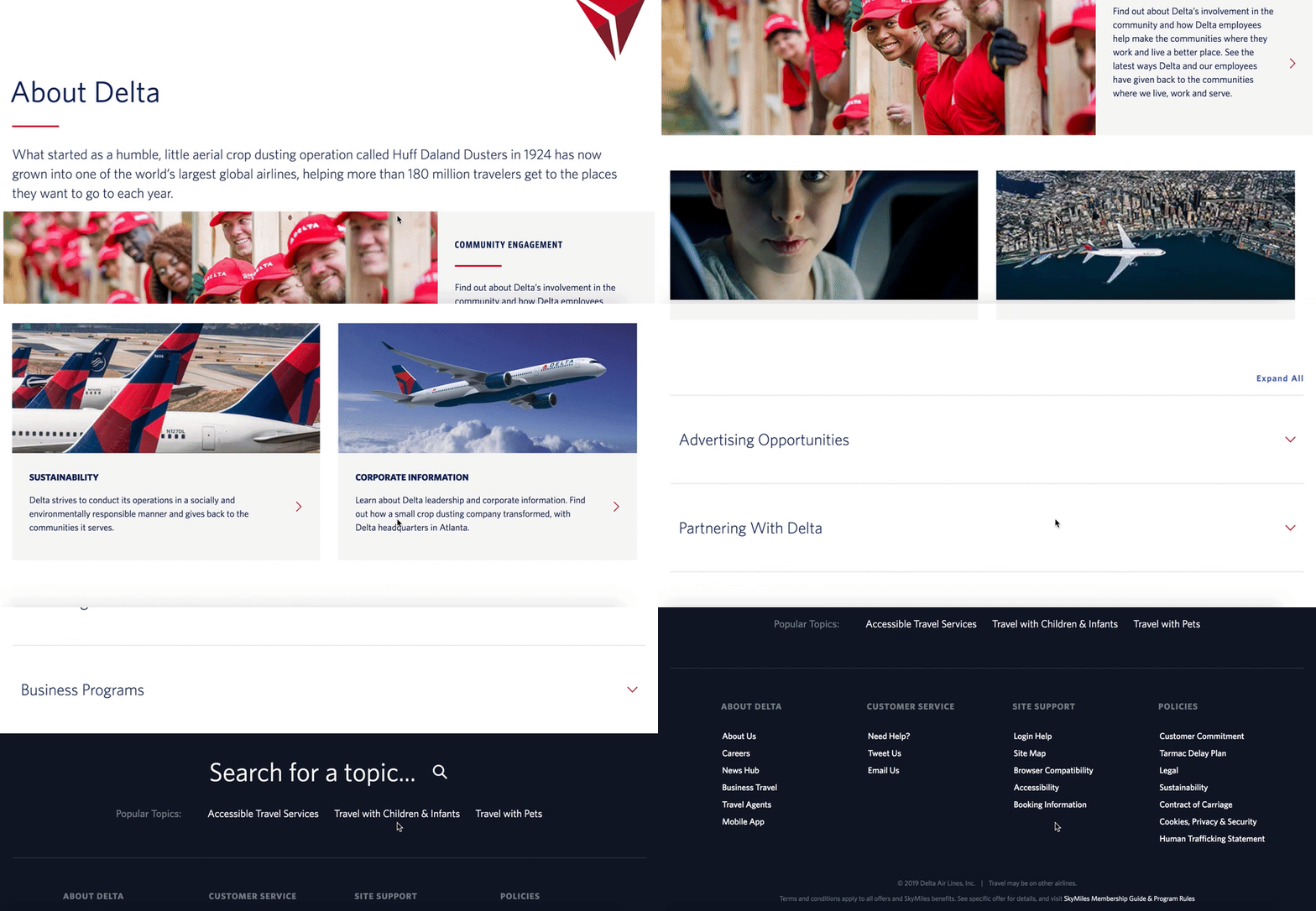
7. Delta company profile

Delta's page is well-organized by topic, and showcases the company's values, including efforts to engage with the community and promote sustainability. They've included brief meta-descriptions below each category. The design allows for users to click-through if they want to learn more. Overall, Delta's company profile is simple and uncluttered, but includes all the necessary information to demonstrate why Delta is unique.

Company Profile Template

  • Company name
  • Established date
  • Physical address per location
  • Contact information

About Us / Our Story / Our Beginning

[Here, you'll want to include a brief introduction to your company, including where, when, and by whom the company was founded, the company's mission statement, and/or the company's vision and purpose. In this section, you don't necessarily want to include products or services -- instead, focus on your bigger meaning, and how you stand out from competitors. Tell your story in a compelling way -- for instance, HubSpot starts their About Us section with, "More than ten years ago, we had a vision -- an inbound world". HubSpot doesn't mention their products until further down the page.]

Our Mission / Values

[Here, you'll want to say what your company stands for on a larger scale. What is your ultimate goal, and what do you hope your products or services will give people? Take a look at 17 Truly Inspiring Company Vision and Mission Statement Examples for ideas.]

Our Team

[Provide a picture or brief paragraph describing your team -- you might focus on leadership, or provide an explanation of your company's culture. Ultimately, this section should help users understand how your employees can uniquely serve them.]

Our Product / Services

[Describe a high-level overview of what your product is, and how you hope it will positively impact the user's life. You can link to a Product page if necessary, so keep this section relatively general.]


from Marketing https://blog.hubspot.com/marketing/company-profile