Thursday, 7 December 2017

What Happens When Your Startup is Acquired by a Big-Name Brand?

Editor’s Note: Jeff Seibert spoke at Stanford University to discuss what he learned by building and selling startups. This post is a summarization of the talk.

It finally happened. Your promising little startup finally found its niche, got noticed, and got acquired by a big-name technology company. So what’s next? One need only look at Jeff Seibert, former senior product director at Twitter, to learn valuable lessons about how to proceed when your startup is acquired by a larger brand.

Jeff’s first company, Increo, was sold to Box in 2009. His second startup, Crashlytics, was sold to Twitter in 2013, and then, when he became the senior product director at Twitter, he got to see things from the other side of the table. What happens from the big brand’s perspective? How is the startup integrated as smoothly as possible? Jeff played a major role in several notable Twitter deals as well – Periscope being the largest of those. Here are just a few of the many lessons he learned.

Start by Building Tools to Help People

Increo was a company founded on the sharing of ideas and collaboration. The company’s first product Feedbackr, was build around the simple premise of uploading a document, and then getting feedback on those ideas and making changes to the file accordingly. Feedbackr was designed during Seibert’s senior year of college, and was launched in May – just a few weeks before graduation.

The product was featured on TechCrunch, where it enjoyed an initial spike of traffic, and then flat-lined. Seibert mistakenly thought that getting showcased on TechCrunch was their big break into the world of startups — but it was only the first step on what would become a long and ever-changing journey.

Throughout that summer, Seibert and his team continued to work on and refine the product – eventually paving the way for it to accept 100 different file formats — a feat that was fairly complex for the time. Since everything was in real-time, people could be drawing on the document while others left comments and notes. The product was immensely popular with freelancers, but never really broke the 20,000 user mark.

Back to the Drawing Board

The pressure was on to keep the company afloat. Despite over three dozen interviews around Silicon Valley to acquire funding, nothing was happening. Keep in mind that this was 2009, a time when investors were wary of spending a lot anyway because of the lessons learned from the first dot-com bubble burst.

The team went back to the drawing board to look at their core product. There were lots of companies out there that dealt in documents, but very few of them would let you display those documents in the browser, much less add markup and such to them. So the team theorized that instead of having a standalone product – they could partner with other companies to allow their document conversion to power their own platform.

Not a Partnership – An Acquisition

The companies that Seibert and his team approached had a few notable constraints. They wanted exclusive use of the technology and they had to be able to host it themselves, since using a third party would’ve opened them up to all kinds of legal snafus.

Jeff and his team stepped back — realizing this looked a lot less like partnership and more like an acquisition. Suddenly, offers were on the table. Pros and cons were quickly hashed out, and some really pertinent issues percolated to the top. Most importantly:

  • The technology had to be right – One of the companies Seibert was considering used Ruby on Rails to power their platform, whereas Feedbackr used Java. It would take over a year to rewrite the product.
  • The culture had to be a good fit – If the company culture isn’t quite right — for example, the business is older and set in their ways about how to do things, it may not work out to everyone’s benefit.
  • The roadmap for the future had to be clear – One of the companies was looking to build a presence in the Wiki space, whereas the team at Feedbackr really didn’t see the potential or the purpose.
  • The company had to have growth – A company that was fairly stagnated wouldn’t show much promise for the future of the product. They had to need the product as much as the product needed them.
  • The product had to be scalable – Where would the product be five years from now? Could it grow to accommodate demand?

All of these questions helped the Increo team rule out different offers before finally being acquired by Box. Not only was Feedbackr Seibert’s first experience with having a company acquired, but it was also Box’s first experience acquiring another startup.

Making Up for Lost Technology

One of the biggest lessons Seibert (and Box) learned from this acquisition was that even though the deal was small and simple, they couldn’t afford to rest on their laurels. Other companies, like Crocodoc, were leveraging new technology to make document conversions and previews even more user and technology-friendly. Not one to be left behind, Box purchased them as well.

If you’re the purchaser – the one place you don’t want to find yourself in is making up for lost technology — by concentrating too much on what you have, and not what else is out there, it gives your competition time to seize upon something newer and fresher — and being an afterthought is not what you want to be.

Ideas in Sync

Jeff’s second product was actually born out of a frustration with the complexity of syncing systems together. After some time working with document previewing technology, he began working on Box’s sync project to help users keep versions of files neatly synced up and updated. Working on systems to make this happen is highly complex, buggy and cumbersome. These kinds of clients crashed constantly — which in turn lead to the idea of Crashlytics.

In short, Crashlytics detected crashes and uploaded reports to the server. In the beginning, it was cryptic at best, but through further refinement, the process could be automated: detect when the crash happened, where it happened, and save it to the server. As you might imagine, developers and programmers loved the idea — the waiting list was long and people couldn’t stop talking about it.

Happy Tweets

One of Crashlytics big brand customers was Twitter. They became very attached to the technology and used it in their apps. So focused were they on how useful Crashlytics was that they continued to invite the team to come out to their headquarters and consider working for Twitter. Seibert and his team had no intention of leaving Crashlytics or even selling it to Twitter. They were 100% focused on their own goals and creating a product that people loved.

With a bit more prodding, a few of the Crashlytics team, including Jeff, met with Twitter executives. That’s when it became apparent that Twitter had a set vision for the future of mobile and software development kits — a vision that perfectly gelled with Crashlytics own vision. Here was this complete strategic alignment that meshed together so fully that it was impossible to deny.

Yet Crashlytics was still its own company. Twitter invested heavily in the company and helped them further build and refine their own product, while the Crashlytics team helped Twitter reinvent their brand and rework their focus on bringing in the very developers that helped make Twitter great.

So here you have one person with two very different acquisition perspectives — one of having their product become part of another brand that needed what they had created, and another where the result is less of an acquisition and more of a “melding of the minds” to create something bigger and better than either could have done alone.

What Big Companies Look For in Startups

Beyond the cultural and technology fit, as well as future plans, there’s the team. It may sound like a small and insignificant piece of the puzzle, as there are countless highly qualified individuals out there. But they must be willing to work within the established company’s culture and brand.

Can they build a solution that’s powerful, scalable, and elegant to solve a pressing need? Have they already built such a solution? And perhaps most importantly, can they, and the solution they’ve built, help win over this market? There’s a big focus on building a team that’s highly energized, highly intelligent and highly productive. The people are what makes the product, and the product is what solves the need. If some of these things aren’t in alignment or agreement, the deal doesn’t happen — which is more often than not.

That’s right. According to Seibert, almost all deals fail. This is just something you come to expect as you do it a few times. From the startup’s point of view, you can’t afford to be burnt out, tired or simply floating about day-to-day, unsure of where or how to best spend your energy. From the company’s point of view, they can’t afford to invest in something that’s just a hobby or an experiment. They need a long-term solution because they have strategies in place both today and well into the future. If both groups aren’t completely committed – things are not going to end well.

Striking the right balance is the bottom line. Making sure everyone is clear and amenable about the path forward is what’s going to make or break an acquisition. Sometimes it works out, sometimes it doesn’t — and there’s nothing wrong with that.

Have you been part of a startup that has been acquired, or were you the one involved in the acquisition? We’d love to hear your perspective on buying, selling or valuing a startup. Share your thoughts and comments with us below!

About the Authors: Sherice Jacob helps business owners improve website design and increase conversion rates through compelling copywriting, user-friendly design and smart analytics analysis. Learn more at iElectrify.com and download your free web copy tune-up and conversion checklist today!


from The Kissmetrics Marketing Blog https://blog.kissmetrics.com/acquired-by-a-big-name-brand/

How to Measure Digital Marketing Metrics and ROI

Research shows that email, social media, and websites are the top three channels for engaging with consumers. Whether they’re using mobile or desktop, the majority of your customers use these channels to learn and compare products and services. They are also best used for engaging with the customer before and after purchase. If executed correctly, all three can work together to form a smooth, positive experience. And after all of your hard work creating the campaign, you as a marketer are tasked with measuring the metrics and return on investment (ROI) of your campaigns. But measuring your digital campaigns’ ROI can be difficult if you don’t know what you’re looking for. With so many numbers out there to crunch, how do you know which ones to focus on?

You can use soft metrics like impressions, engagement, and visitors which are essential for shaping your marketing strategy into a winning game plan. Or you could focus on hard metrics, like spend and revenue, and are typically where your execs’ will focus. Both hard and soft metrics feed into calculating ROI

You can think of ROI metrics as three separate categories: front-end, middle, and back-end.

  • Front-end metrics, such as click-through-rate (CTR) and engagement ratio, tell you if your content is relatable enough to inspire action by your target audience.
  • Middle metrics note measures like conversion rate and bounce rate that show you the number of leads inching closer to client status.
  • Back-end metrics like pipeline and revenue show you not only how your marketing efforts have been hitting the company card but also how much revenue you’re receiving in return. These are the usual metrics for measuring your financial ROI.

In this blog, I’ll cover how to measure digital marketing metrics and ROI for email, social media, and website landing pages. 

Email

Email has come a long way since its inception—the year when Jean Knight’s “Mr. Big Stuff” swayed all of the hips—to where we see it today, and it continues to be a primary source for brands to engage with their consumers. Whether it’s through newsletters, inquiries, or purchase confirmations, email remains a quality avenue of information and communication between consumers and brands. Thanks to new advances in technology and email marketing services, we now have more efficient ways to carry out campaigns and access to various ROI metrics.

If you’ve run an email campaign before, then most of the following metrics should be familiar to you. But as email evolves, it’s important to keep an eye out for new updates and features—there just might be something new to add to your reports. Don’t forget! Incorporate tracking parameters in your emails, so you know where to attribute any leads and successes.

When measuring the initial success of your email campaign, especially when using A/B testing, pay attention to the following:

Bounce Rate. Are there any emails that failed to send? Remove false emails from your list, so you don’t continue paying for inactive addresses. Plus, a high bounce rate will count negatively towards your campaign and might even label you as SPAM.

Open Rate. Are your emails not getting opened? Test a new headline (or several) to catch their attention.

Unsubscribe Rate. Hello, darkness, my old friend. This metric is an easy way to determine something is wrong. If your consumers are getting turned off by your content, at any rate really, put on your Batman mask and investigate.

Clicks & Click-Through-Rate (CTR). How many clicks are your emails receiving? Are they clicking your links or images? Give your consumers a reason to engage with your email.

Conversions & Conversion Rate. How many people are following through to your email’s end goal? You can have a high open and click rate, but if you’re not converting, then there is room for improvement. You might need to make some adjustments to your email and/or your landing page.

Leads. Add up the number of conversions earned on your emails and note any replies and regularly engaged subscribers. These are your leads—follow up with them!

Though these are important metrics, they may not be your campaign’s sole reason for success. If your campaign’s goal is to bring in pipeline (expected future business) and revenue (dollar dollar bills), the success of these metrics depends on bringing in as many conversions as you can to generate a monetary return.

Ask yourself these questions once you have a fair amount of data from your campaign and/or tests:

  • How many of these conversions became quality leads that led to pipeline? What is my pipeline-to-cost ratio for this campaign? For this quarter, month, etc.?
  • How much revenue did this campaign generate? At what rate?
  • How much did each email, open, click and conversion cost? How much did it earn?
  • Where can this campaign improve to help these ROI metrics grow?

All of these metrics give you a solid summary of your email campaign with great detail to make adjustments and record ROI.

Social Media

Remember the early days of Facebook when you were so stoked the first time you hit double-digit likes? Triple-digit? For new brands and small business, likes were hard to come by at that time, and it’s probably not getting any easier. If it wasn’t already apparent that Facebook and other social media platforms are legitimate advertising spaces, Facebook recently announced that they are testing the removal of organic page posts in a few countries. Organic content reach has been running out of steam for years now, so this move essentially brings business pages to a “Go Paid or Go Home” mentality.

With Facebook ads, in particular, coming to a wild west shootout between brands, where bullets are replaced with four bits (look it up), it’s going to be very important that your marketing campaigns take precise aim rather than a good ol’ shotgun blast. Build on your strategy and take a deep look at what has or hasn’t been working in your previous campaigns. Facebook’s Insights tool offers a good amount of data from your page as a whole to an individual post.

Before you spend dinero (that’s money) on your next campaign, take a look at these metrics:

Engagement and engagement ratio. Are people reacting, commenting and sharing your boosted posts? The #1 obstacle to consumer engagement is irrelevant content, so find out what it is that gets them to act on your posts.

Clicks and click-through-rate. Engagement on your ad is fantastic, but are consumers actually clicking on your call to action? Choose the route that gets more people to your website over the one receiving plenty of blind-shares and likes.

Though Facebook Insights are great for front-end metrics like engagement ratio, clicks, and click-through-rate (CTR), you won’t have much data on conversions & conversion rate from your website. To really maximize the data—and your spend—out of Facebook, be sure to implement the Facebook pixel on your website for “conversion tracking, optimization, and remarketing.” The way your Facebook fans convert on your campaign depends on what goal you set. If the goal of your campaign is to fill out a form on your landing page, for example, the pixel will record that as a social conversion. These goals are triggered by actions on your Facebook page, and a follow through on a call to action (CTA).

To see how many leads you generate from your social marketing efforts, be sure to include tracking parameters in the URL you are advertising. From here you can see which campaign(s) bring in the best lead conversion rate. With this data and tracking in place you can determine how Facebook and other social platforms are contributing to your pipeline, therefore allowing you to gather more data on pipeline to cost and the cost/earning per click and post.

Here are some questions to consider:

  • How many of these conversions became quality leads that led to pipeline? What is my pipeline-to-cost ratio for this campaign? For this quarter, month, etc.?
  • How much revenue did this campaign generate? At what rate?
  • How much did each impression, click and conversion cost? How much did it earn?
  • Where can this campaign improve to help these ROI metrics grow?

You’ll want to look and pull reports from both Facebook Insights and your web analytics platform to get the full picture of your paid social campaign’s success.

Website Landing Pages

Consider your website as a digital Disneyland: it’s where the magic happens. Though, instead of a shirtless giant mouse in short shorts selling you an overpriced funnel cake, it’s where you send your potential customers to find quality content and information on your products or services.

Be sure to take a look at these metrics on your website analytics using your tracking parameters:

Traffic. See how many visits your landing page received from your campaigns.

Unique & Returning visitors. This is the number of individuals who came to your page and how many kept coming back!

Total page views. Note any other pages visited on your website after your landing page.

Time spent on your page. Not only can you see how long people are on your website, but it also lets you know if your visits are engaged or immediate exits.

Conversions. Whether it’s an online purchase or signing up for an event, find the value generated from users that complete a goal on your website.

Use these initial metrics to gather details as you go further down the lead conversion funnel from campaigns, to website, and finally to revenue. Pulling consumers in through email and social is the first step, now you have to retain them. Pay attention to the bounce rate and exit rate on your landing page or website from these campaigns. Are people exiting at a high rate without converting? Might be a hint that you need to make some adjustments to your site. You could have a significant campaign that falls flat if your landing page doesn’t match your consumer’s expectations.

Is your website generating newsletter signups and email inquiries? These are leads! Perhaps a consumer came through a campaign and didn’t convert initially, but they came back to your website later for more information. Signing up for a newsletter or filling out your contact form can become a potential lead for you to continue your marketing.

Your website also has metrics that your social and emails may not: direct sales attribution. With transactions and revenue records on your site, you can see how much money your campaigns and website are generating. This gives you an immediate sense of ROI, but these are not the only two metrics to look at when it comes to money. If you operate through eCommerce, make sure to look at your cart retention rate. How many people are following through with their purchase after placing an item in their cart? Be sure to always test every function of your campaign, including following through on a purchase, to make sure that everything is working.

Take a look at the funnel visualization data to follow your buyer’s journey on your site. Your campaigns can bring you revenue outside of your initial promotion, so it’s a significant additional metric to see which campaigns and actions are contributing to conversions and sales. Here you can measure each channel’s contribution to your website’s success and compare it to your social metrics and email metrics.

Moving Forward

As marketers, it’s vital for us to pay attention to every detail to ensure that the customer journey is flawless, enjoyable, and shareworthy enough for them to recommend their experience. When presenting campaign data, create your reports using high-level reviews to provide knowledge on where the financial investment is going and how exactly it’s bringing a return. Email and social campaigns work directly with your website for a smooth customer experience—if you do it right. Not only do these metrics help you determine your overall ROI, but it also enables you to find room for improvement on each channel.

What metrics do you measure for your digital channels? How have you adjusted these as innovation happens in the digital space? I’d love to hear about your best practices in the comments.

The post How to Measure Digital Marketing Metrics and ROI appeared first on Marketo Marketing Blog - Best Practices and Thought Leadership.


from Marketo Marketing Blog https://blog.marketo.com/2017/12/measure-digital-marketing-metrics-roi.html

How to Get Started With LinkedIn's New Website Demographics

I don't know about you, but I have an odd fascination with LinkedIn's "Who's Viewed Your Profile" feature.

There's a natural curiosity about who's checking it out, and why. A fan of my writing? My manager? An ex-boyfriend who’s feeling remorseful as a result of seeing all the great things I’m doing with my life?

Regardless of my own profile viewers, the fact remains that LinkedIn has always served as an interesting platform to digitally network, share information, recruit, and advertise.

It's that last part where one of the newest developments have taken place. LinkedIn has provided helpful insights and ad tracking for some time now, allowing advertisers to view details about the composition of who this promoted content has reached. But now, LinkedIn has developed new tools for marketers who want to see that same information about the users visiting their websites.Click here to learn about using social media in every stage of the funnel.

Ladies and gentlemen, I'd like to introduce you to LinkedIn's Website Demographics.

Getting Started With LinkedIn's Website Demographics

1. Make sure you have a LinkedIn Ads account.

Website Demographics are only available to those who already have a LinkedIn Ads account. If you don't have one, check out this beginner's guide to setting up and running LinkedIn Ad campaigns.

2. Generate your Insight Tag and add it to your Website.

Once you've established an Ads account, go to your Campaign Manager, and click "Website Demographics."

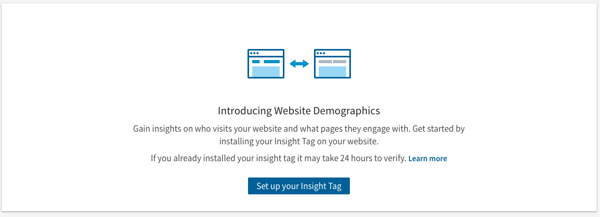
If you haven't previously set up Website Demographics, you'll receive this message prompting you to set up an Insight Tag:

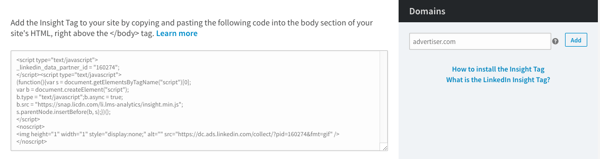
The Insight Tag is essentially a short blurb of JavaScript code that allows Website Demographics to track visitors to a page, as well as conversion and analytics that are crucial when evaluating the performance of a LinkedIn ad campaign. In other words, without it, Website Demographics won't be able to track any visitor behavior or insights.

Screen Shot 2017-11-27 at 4.35.33 PM

Copy and paste this code, and it to every page on your domain. According to LinkedIn, the optimal placement for the code is right before the end of the <body> tag, in the global footer.

Once the code has been added to your web pages, add your domain (or domains, if you added it to multiple pages) to the area to the right of the code, where it says "Domains," as per the image above.

LinkedIn will have to verify that the tag has been added to these URLs correctly, which could take up to 24 hours, but once that's done, each URL will have the word "verified" next to its name in the domain list.

Be careful: According to LinkedIn, domains must not include "www" when you're adding them.

3. Build your audience.

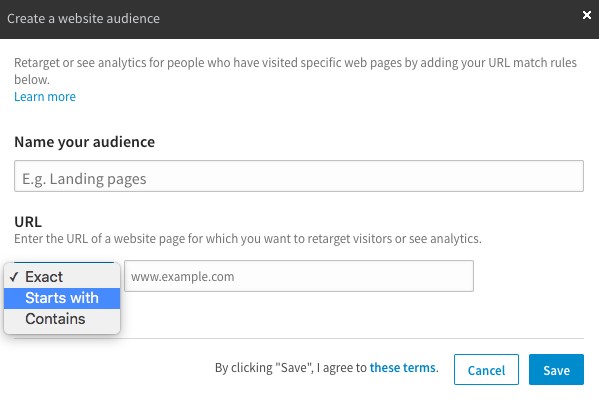
Once your Insight Tag has been added and all associated domains have been verified, you'll need to create a website audience. Don't let the name of this step fool you -- rather than customizing the desired composition of your audience, you'll actually just be segmenting different URLs for which you want to analyze visitors.

It'll look like this:

Source: Distilled

For example, you might want to drive a different audience to a specific landing page than you do to a certain blog post. That's where segmenting audience analytics becomes helpful.

You'll need a minimum of 300 LinkedIn members to visit a given domain that you're tracking -- until you do, there won't be any data available in the Website Demographics section of your Campaign Manager. How long that takes really varies -- it depends on each page's average traffic.

4. Monitor and analyze the data.

According to Distilled, "LinkedIn developed and released Website Demographics because it anticipates that with this new information, companies will be more likely to spend on their platform." That makes sense -- the demographics available to track within this new tool match the same targeting criteria available for LinkedIn Ad campaigns. 

That said, the purpose may also be to help LinkedIn advertisers spend more effectively. Let's say, for example, that prior to setting up your Website Demographics, you already have a LinkedIn Ads campaign running. Once you're able to capture more detailed data on which types of users are visiting your web pages -- according to job title, industry, and more -- you'll be able to see if that information aligns. Does the Website Demographics match the targeted audience criteria you used in your Ad campaign? If not, you now have the data to better inform your audience targeting.

The best part is that this information isn't restricted to your promotion efforts within LinkedIn. Now, you're newly equipped with details about the actual human beings visiting your website (with respect to member privacy, says the platform). And while every social media channel has its own trends and patterns of users, having these insights can help you gain a better idea of who's clicking, and why they might be seeking information from your brand.

I'll be keeping an eye on the results as more advertisers begin to use and track the results of this tool, but as always, feel free to reach out on Twitter to share your own experience with it.

How to Use Social Media at Every Stage of the Funnel

 I How to Use Social Media at Every Stage of the Funnel


from Marketing https://blog.hubspot.com/marketing/linkedin-website-demographics

Wednesday, 6 December 2017

8 Overlooked Social Media Tactics That Can Increase Conversion Rates

“Wash. Condition. Rinse. Repeat.” Sound familiar? It’s a common morning routine. And we all know how things run when we settle into a comfortable routine: it feels like life is on autopilot.

Sometimes, that works. However, you might perform your routine so well that you forget to look for improvements. Perhaps your hair would look better without conditioner, but if you never stop to question your routine, you’ll keep going down the same path. You’ll be stagnant.

The same logic applies to your social media strategy. It’s easy to repeat the tactics that have worked well for you so far, generating a little bit of buzz and keeping you hooked into what’s happening on Twitter.

But are you just going through the motions without considering how you can use social media to improve conversion rates?

If you’ve been using the same social media strategies for ages and your impact has leveled off, it’s probably time to review your goals and make sure that your social media tactics are increasing conversion rates, building brand awareness, and bringing in new customers.

Here’s how.

1. Double Down on One (or Two) Channels That Work For You– And Share Videos

Let’s face it: Internet users are addicted to video, and that’s great for publishers and marketers.

On average, Facebook users devour 100 million hours of video every single day. About 82% of Twitter users watch video on that particular medium. Marketers are also seeing positive results with LinkedIn Video, which was introduced this past August to help users introduce themselves, explain their professional processes, or reach out to new people.

If you want to increase conversion rates on social media, double down on the channels that are already working for you. For example, if you see more engagement on Twitter than you do on LinkedIn, it’s a good idea to direct your efforts on Twitter.

After we saw higher engagement with Facebook videos, especially the one about the three essential ​WordPress plugins for websites, we narrowed ​our targeting ​to ​people ​that are ​interested ​in ​WordPress ​as a ​software ​and ​those ​who ​work ​in ​IT ​industry such as the ​web ​developers ​or ​freelancers. As the result, we’re able to ​reach ​more ​potential ​customers ​and ​generated ​immediate page ​likes ​and ​engagements, increasing ​the ​average ​daily ​registrations by 71%.

2. Use Thoughtful, Conversion-Oriented Social Sharing Buttons

Many publishers simply work hard to create content and trust that readers will figure out how to share their content. However, it’s easy for publishers to integrate compelling social sharing buttons onto their blogs– and these easy-to-click buttons help drive virality.

That’s why it’s crucial for publishers to optimize their social sharing buttons to drive more content engagement. But before we get into the tactics, let’s talk about what makes a good social sharing button in the first place:

  • Clarity. Social sharing buttons should be both easy to spot and understand. Remember those “Try me!” toys in the toy store? Those are great examples of buttons with clarity. All you have to do to have fun is press the button. Don’t make users work to share your stuff.
  • Non-interference. Social media buttons that interfere with the content tend to get on our nerves. Users will have no qualm sharing your content if they think it’s worthy of sharing — your job is to make it easy to share and the sharing button doesn’t get in the way of the content.
  • Strategic placement. What do we mean by “strategic”? You should place your social media buttons just at the moment someone feels compelled to share your quality content. Don’t jump the gun or make users search for a long time for your buttons, only to finally give up.

Depending on your specific blog and its graphic style, you’ll likely want to choose between two types of social buttons: inline or sticky share buttons. The choice is ultimately a matter of your own strategy and preference, but here’s an overview of each type:

  • Inline share buttons are arranged together, which makes them easy to sort and insert into your content without interfering. When you hear “inline,” think “inline roller skates”–where the wheels are arranged neatly together.
  • Sticky share buttons are a little more interactive. For example, they can include a floating sidebar or a floating banner. As the user scrolls down, the buttons follow along, without getting in the way of the reading experience along the way.

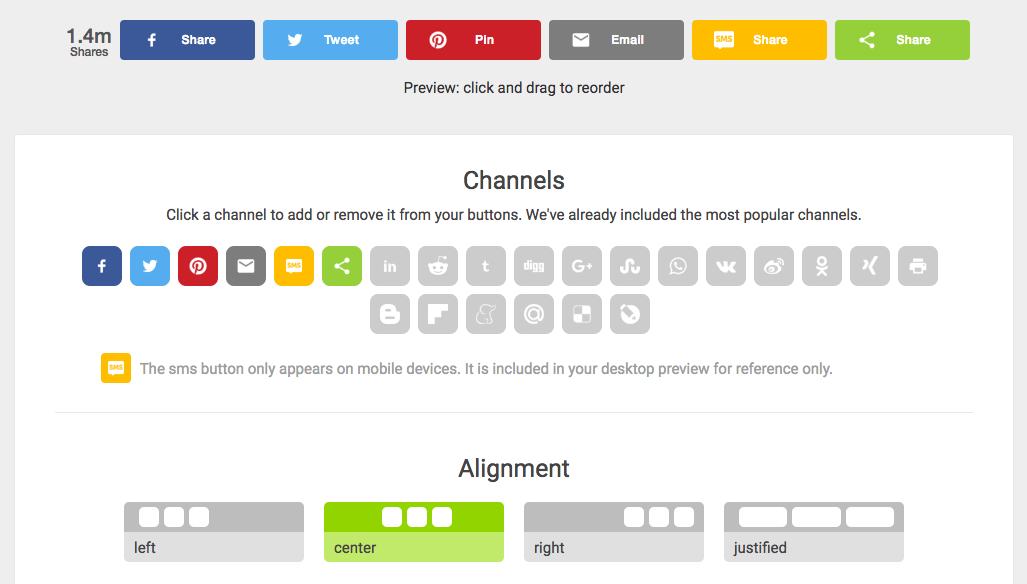
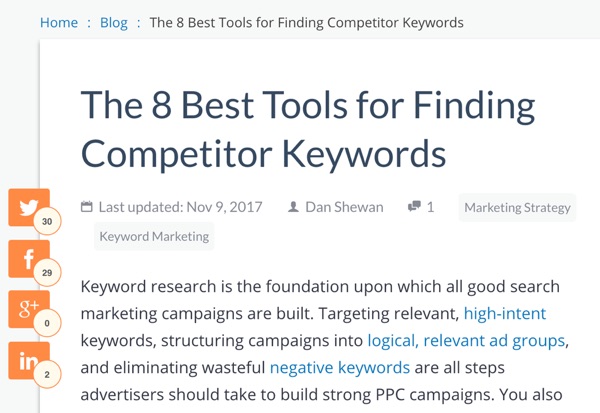
Below, you’ll see examples: first, inline buttons arranged neatly together for a graphically-satisfying result. Second, a “floating sidebar” that makes its presence clear:

Your choice? Simple. Pick the style that suits your site the best.

3. Participate in Social Forum Sites and Add Value

When it comes to social forum sites, you’re looking at three main contenders: Reddit, Quora, and Inbound. Each of these sites is full of active communities that are chatting, sharing, and getting support.

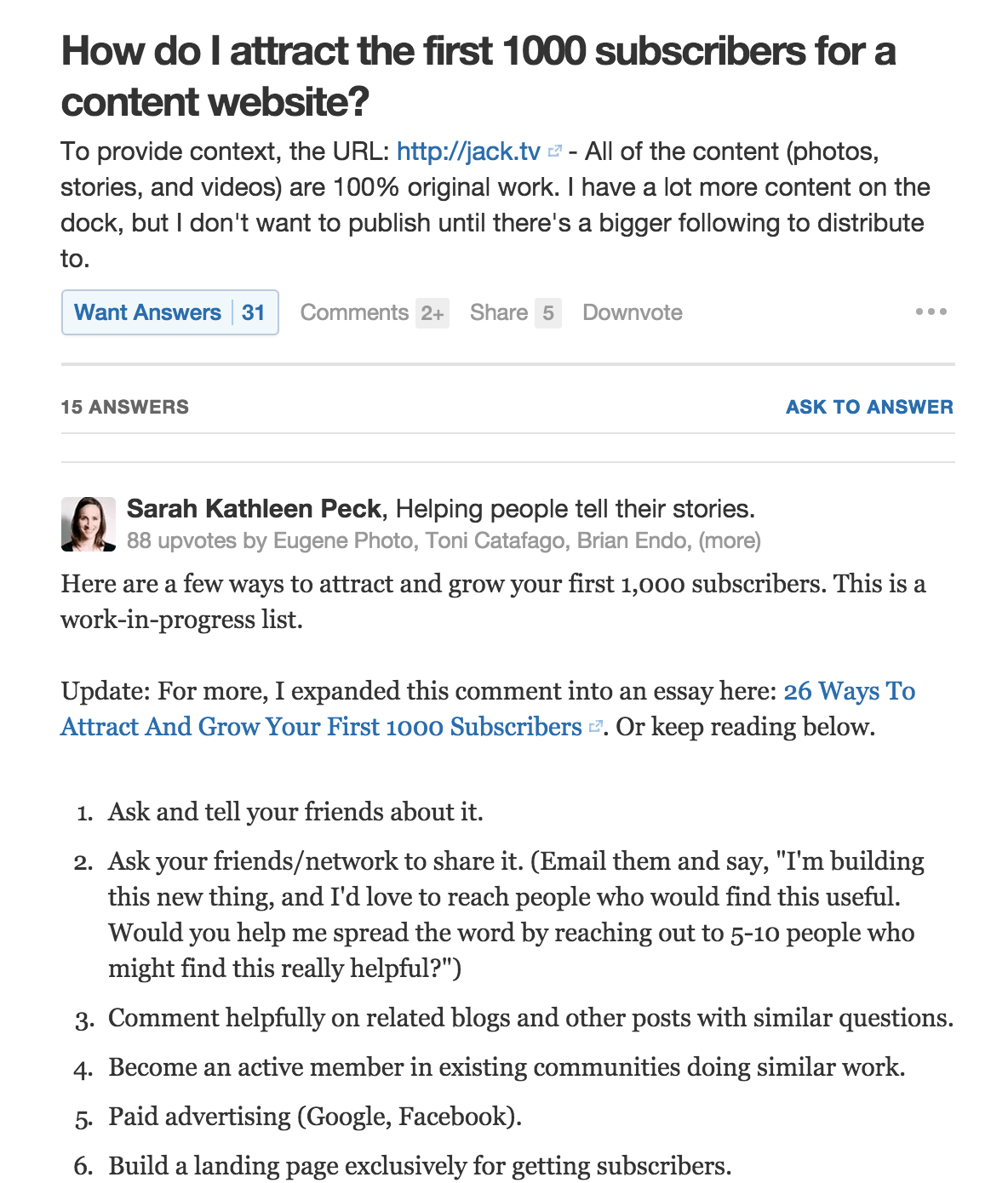
If you participate on these sites, you’ll get more attention on your brand. Here’s a great example of a Quora answer that shot to the top because of the time and insight shared in the answer:

If you have read this Quora marketing guide, you’ll remember the site gives you exposure to 1.5 million monthly viewers so you stand a good chance of drawing more attention to your site. If even a fraction of those eyes want to check out more about you and what you do, the investment you’ve made in sharing value online will pay off.

4. Test the Life Out of Social Ads

Are you thinking like a data-driven marketer? If not, you should. You need to analyze data to figure out which platforms performs the best in driving brand awareness, engagement, and ultimately conversions.

A key component of data analysis is A/B testing. Perform A/B tests on your social ads to find out which version resonates more with your audience. On most of the social media platforms, you can invest a relatively small amount of money to gain insights that could generate huge returns. Facebook is big on promoting its own A/B testing platform, which means that most of the work is already done for you.

Not sure you want to spend any money on social A/B testing just yet? You can even use strategies to test your Facebook posts without putting a single penny down.

5. Consider Exactly How Your Audience Buys on Social Media

Given the variance in demographics of different social media platforms, it’s not surprising to see that some products sell better on one platform than another. Some sales processes are built for the platform. Others…well, they’ll take a while.

For example, an email service provider may not capture many direct sales from Twitter, but that doesn’t mean it can’t build brand awareness and long-term name recognition. On the other hand, when Kylie Jenner announces a new lip kit on social media, she can expect instant sales.

The bottom line? Understand the sales process of your audience and create a social media strategy tailored to the demographic of each platform.

6. Use Emotional Cues to Spruce Up Your Headlines

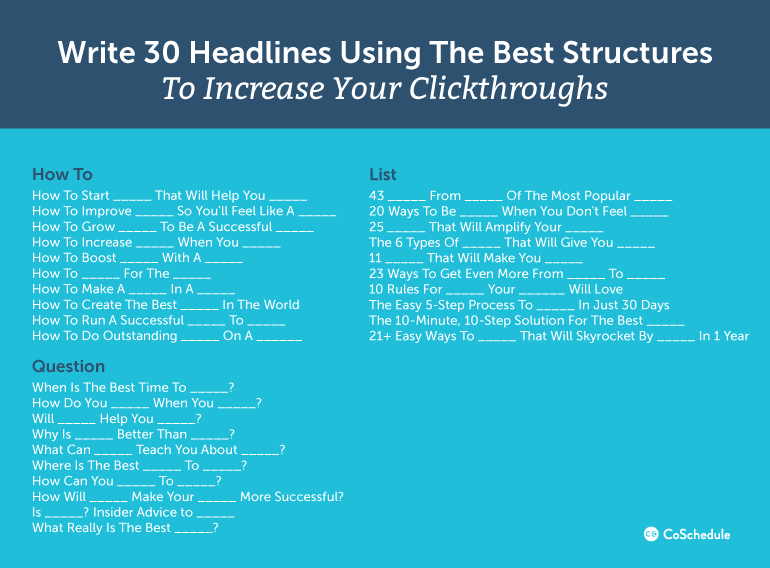
According to CoSchedule, there are three headline formats that perform particularly well. These can be used as headline for your blog posts, and can then be used on social media to increase conversions.

  1. How to {Do Something} That Will {Help You Experience Desired Result}
  2. {#} Ways to {Do Something} to {Produce Desired Result}
  3. What is the Best {Topic} That Will {Do Something Desirable}?

These headlines share a few things in common. First, they get to the point: there’s no doubt in what you can expect to get or learn when you read the post. Second, they take on the customer’s perspective — some of them even sound like keyphrases that customers and readers are entering as they search for your solutions.

When it comes to headlines, start from the customer’s perspective. Think about what will resonate most with them, and you’ll rarely go wrong.

7. Play Nice With Others

No one wants to follow a social media robot online. Follow this golden rule: be the kind of social media account you would want to follow. For example:

  • Participate. Tag those you’ve quoted and mentioned when you share on social. You won’t only share insights with your audience, but you’ll earn some brownie points along the way.
  • Curate content. Think of your social media like a blog. Promote the work of other companies if you think a link is something your audience might want to check out. Some people will follow you online just because you’re so good at finding interesting tidbits and links.
  • Give, give, give. Infographics, statistics, insights, stories–if you can provide something that your followers will find valuable, make sure you share it. After all, social media is a two-way street: don’t just promote your company and forget to give valuable information to readers.

For example, toilet paper is the opposite of a sexy product, but Charmin’s Twitter account is so generous and engaging that social media users can’t help but interact. The brand replies to Tweets that come in, and runs campaigns, such as #Tweet4ATree to encourage participation.

8. Use Social Media as a Primary Support Channel

Did you know that in the last two years, customer service interactions on Twitter have increased 250%? That’s a lot of people asking for help on social media.

Today’s social media user expects your service to be timely and responsive, even in matters of customer support. Why not give them what they want? Send personalized and timely replies on social media, even if it’s simply to direct someone to the right customer support channel.

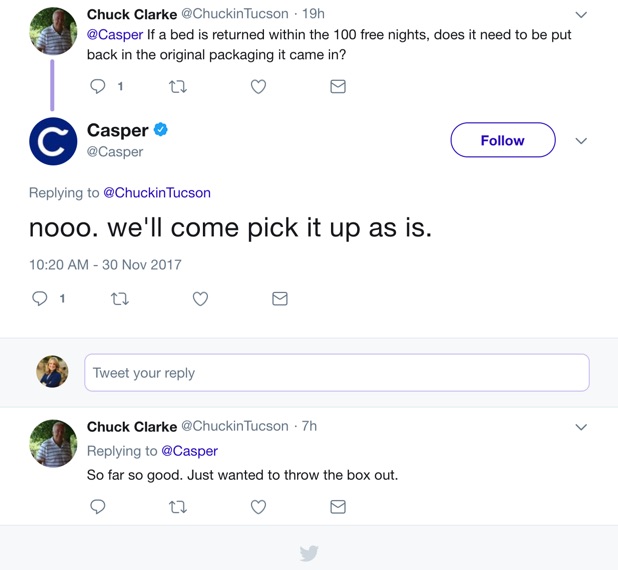
For example, Casper, an online retailer for mattresses, responds in a natural, friendly way to customers with questions. They don’t be belabor the interaction or make it tough on the customer– they simply give a friendly answer quickly and efficiently.

Take Advantage of Your Social Media

Let’s face it: you’re on social media anyway. If your old routine has gotten you nowhere, it might be time to incorporate the overlooked tactics that boost conversions and even sales. Let us know about any of your experiences with these tactics below!

About the Author: Paul Lentz is the SVP of Publisher & Business Operations at ShareThis, a technology company that provides free sharing and content optimization tools to help more than three million publishers grow their digital audiences. When not doing what he can to support the publishers, he’s taking a break from digital devices and experiencing nature through skiing, hiking, and running.


from The Kissmetrics Marketing Blog https://blog.kissmetrics.com/overlooked-social-media-tactics/

Brainstorming: You’re Doing It Wrong [Video]


from Marketing https://blog.hubspot.com/marketing/brainstorming-doing-it-wrong

Should You Be Gating Your Content Offers?

Can you remember the last time you were on a website that failed to offer you a guide, coupon, ebook, white paper or something else in exchange for your contact info? (And no, Facebook doesn’t count.) If you spend a good amount of time on the internet, it’s likely you run into a dozen of these every day (I actually have a library of “free” content offers collecting dust on my hard drive). The practice of generating leads through gated content offers, also known as lead magnets, has become so widespread that if you don’t encounter a pop-up or slide-in form during your visit, you might get the feeling something’s missing.

10 Percent Example Email

As a marketer, you might click these things away out of habit. But the pervasiveness of this trend testifies to the fact that they do work—or at least they’re working on someone. The fact is, many of the leads generated by such offers are fake (i.e. people using bogus email addresses). This is becoming easier to do with more temporary email address services becoming available. And on top of that, if these offers incorporate intrusive overlays, they tend to drive most people crazy. So, the question is whether the advantages of gating your content outweigh the disadvantages. Are the leads you’re gathering really worth the damage to your user experience? More importantly, are you really getting the most out of your content assets if they’re sitting behind a form?

In this blog, we’ll explore the pros and cons of gating content so that you can decide for yourself which option is best for your business.

Arguments For Gating

  1. Generating Inbound Leads

The most obvious argument for putting your content behind a form is that it gives you the opportunity to collect contact information from your visitors. Few website visitors are willing to give you their email addresses for nothing. But bribing them (or what should really be called a value exchange) with a quality piece of content is an effective way to get them in. If a visitor is interested enough to download an ebook or white paper and is even willing to give up contact information, it’s likely they’re a good candidate for further sales and marketing engagements.

  1. Coming Across as Premium

In the mind of a consumer, quality is almost always connected to price. If you have to pay for something, you will inevitably attach more value to it than if you received it for free. The same principle is applicable to your content assets. In a sense, users are “paying” with their contact details. The mere fact that they must fill out a form to get your ebook, white paper or brochure will cause them to attribute greater value to it and see it as more authoritative.

  1. Gauging the Level of Interest in Your Content

Gating your assets allows you to determine just how much your readers want your content—especially if you perform some testing. If you begin by offering your ultimate guide for free, and later put it behind a form, the change in download volume will give you some clues. If the downloads stop, it may indicate that the general level of interest in your guide is not so high. If the decrease is only marginal, it means you have something your visitors really want—and that they see you as a trustworthy source.

Arguments Against Gating

  1. Greater Reach

The biggest reason to avoid gating your content is that it will inevitably increase your content’s reach. More people will see it, and—if your content is really good—you’ll have the chance to impress more people. Many internet users are loath to give up their info on principle. And if you’ve spent a lot of time producing your content, it would be a shame to limit its exposure only to those willing to provide contact details.

  1. (Controlled) Shareability

The problem with gated PDFs is that, once they’ve been downloaded, users can simply email them to whoever they want and you lose the ability to track and measure your content’s performance. If your content is freely accessible online, however, you can both include sharing options to increase reach and maintain an overview of how many times your content has actually been accessed, shared and read.

  1. SEO

If your content assets cannot be accessed without first filling out a form, it means that web crawlers won’t be able to access them either. Ebooks, white papers, and guides are typically rich pieces of content that are likely to boost your SEO—but if they’re gated, you forfeit some of that benefit.

It All Boils Down to Your Content Goals

Like so many things in life (and in business), there is no single correct answer. The best choice is always contingent upon your goals. For each piece of content, you need to decide what your primary objective is before you decide whether to gate it or not.

Gated Content Goals

Source: Statista; MarketingProfs; Content Marketing Institute

If your goal is lead generation, gating makes a lot of sense. But if you want the best of both worlds, you may also consider semi-gating your content—allowing users to freely access the first few pages and then asking for contact details to gain access to the rest.

If your goal is brand awareness, it makes sense to aim for maximum reach and shareability. Leave your content freely accessible so that it can be shared, indexed by search engines and found by as many people as possible.

If your goal is customer engagement, then gating your content is probably not going to be of much value considering you already have your customers’ info. If you don’t want content to be freely accessible, you should allow customers to access it with their existing credentials.

If your goal is sales enablement, you probably want to introduce as little friction as possible. Product brochures, pricing pages, specifications and other sales collateral should be easy to access for prospects nearing a purchasing decision.

So, before you jump on the bandwagon and put your new ebook behind a gate like everyone else, take a moment to think about your content goals and overall marketing strategy.

What successes have you had with gating content? What successes have you experienced with ungated content? Do you have hard and fast rules that you follow at your company as to what content is gated and what content is ungated? Let’s keep our conversation going in the comments.

The post Should You Be Gating Your Content Offers? appeared first on Marketo Marketing Blog - Best Practices and Thought Leadership.


from Marketo Marketing Blog https://blog.marketo.com/2017/12/gating-content-offers.html

7 Phrases That Indicate You Might Be in a Toxic Work Environment

It's a situation familiar to many of us: That moment when something just feels off.

You have a less-than-great feeling about your work environment, and then, someone utters a phrase that gives you a sinking feeling.

It's a feeling that makes that "off" sensation feel even worse -- a feeling that makes you think, "Hmm. Maybe it's not me."

That's the feeling that indicates you might be in a toxic work environment.

But how can you be sure, exactly? What do these signaling phrases sound like?Download our complete productivity guide here for more tips on improving your productivity at work.

We collected the seven that we've heard the most -- outside of HubSpot, of course -- and compiled this list to help you figure out if your instincts are correct.

1. "You won't believe how late it was when I left the office last night."

When you work hard, it's no surprise that you might occasionally have to stay at the office past your typical "quitting time" -- like when you're on the verge of launching a new product, campaign, or event. 

But when you hear about colleagues doing this regularly -- especially when they speak boastfully about it -- that's a sign that there might be something not-quite-right with the workplace culture, and its approach to work-life balance.

Take a survey conducted by Staples, for example. It showed that 55% of employees feel like they can’t leave their desks for a break. Sure, 86% also said that these breaks would actually help their productivity -- and yet, more than half are hesitant to take them.

So what's stopping us?

When we hear our peers, colleagues, and managers habitually speaking of late nights at work and industrious weekends -- the opposite of taking time to breathe and recharge -- it sends the message that it's expected of everyone, perhaps even implying that breaks and time offline are discouraged. And that, in a word, is unhealthy.

In situations like these, it helps to ask for clarifying information. If there's a colleague you trust, or if you have a good relationship with your manager, try asking if these hours are expected, or if it might be possible to disconnect on a given evening and weekend for a special event. It might turn out that this lack of work-life balance is not encouraged, and that what you've been hearing is the exception -- not the rule.

2. "I would love to help you, but ... "

I'll never forget something my boss told me on my first day at HubSpot. “To help you be more successful, I’ll help you with whatever you ask me for help with. The most successful people ask for help when they need it!”

I wish everyone's managers and teams led with that sentiment. After all, as human beings, we're already disinclined to ask for help -- so when we do and that request is met with a "but," it's not exactly going to encourage us to ask for support in the future.

In these instances, I've found that it helps to lead by doing -- even if this vocabulary or behavior is coming from someone who works above you. Many times, these phrases reflect someone feeling overwhelmed, in which case, it can be beneficial for you to proactively offer help. By actively displaying behavior that discourages a mentality of, "That's not my job," you may inspire others to take a similar approach.

3. "Thanks, that was my idea."

This one, for me, might be the worst phrase on the list. Is there anything worse than someone else being given credit for something you did -- and then, that person accepting it without mentioning your role in the accomplishment?

That's one of the top signaling behaviors of a toxic work environment. It somewhat aligns with the tendency to have the negative parts of your performance pointed out, with little-to-no mention of the positives. When someone -- whether it's a colleague or a manager -- takes credit for things that he didn't accomplish alone (or at all), it can further reinforce a detraction from the things you're doing well at work.

While it may not result in a sustainable resolution -- and can be very difficult to do -- it can help to be honest about the situation with the person from whom this behavior is coming. Try saying something like, "I was surprised by your response to the praise received for Project X. While I felt that I contributed a lot to that work, it sounds like your perception may have been different. Do you have any suggestions for how I can improve my contributions?"

That way, you're not pointing it out in a way that comes from a defensive or finger-pointing manner. Plus, the response you receive to this conversation may indicate just how toxic the situation is. If, for example, the person didn't even realize his error but retroactively recognizes it, you can work together to change that behavior.

4. "Oh, I can't even remember the last time I took a real vacation."

Have you ever heard the term "vacation shaming"?

It's exactly what it sounds like.

According to research from Alamo Rent A Car, 47% of workers feel shame or guilt at work for taking time off -- and 28% are reluctant to do it at all, fearing that they'll appear less dedicated to their work.

This phrase is similar to the first one we listed about working late, or not taking breaks. When the people around us at work brag about burning the candle at both ends, it reinforces the idea that that behavior is rewarded and that, therefore, we should be doing the same.

But ultimately, that approach is detrimental. In fact, the top 10% most productive employees using business time-tracking software DeskTime have been found to take 17-minute breaks for every 52 minutes of work they put in.

In other words -- time off improves the quality of our work. A work environment that dictates otherwise gives us pause.

5. "That's not my fault."

Okay, so maybe it's not phrased exactly this way, but here's the point: the blame game is never a good sign.

When someone appears to be unable to admit their role or accountability in things going wrong, it can instill fear in those around them -- fear that they might be expected to accept blame in a situation for which they didn't actually do anything wrong. 

And while studies show that many employers believe up to 50% of their respective workforces are comprised of unaccountable individuals, we've got news: Managers are responsible for being accountable, too, and for leading by example with it.

In order to create a culture of accountability and eradicate the blame game, it's important to begin by exhibiting that behavior yourself. You could write an entire book on accountability at work, for example, and if you don't practice it yourself, no one will take that directive seriously.

If this is new territory for you, start by asking what role you may have had in a less-than-desirable situation -- and if the answer if something other than what you want to hear, take a moment to consider the feedback you've received, before reacting defensively.

6. "I'm sick (again)."

If all of the above phrases pointed to a single underlying result it would be: stress.

When you're facing a wave of discouragement to take time off, work reasonable hours, or have confidence in your performance, your lifestyle can start to suffer. You might not allow sufficient time to eat healthy foods, work out, or sleep. And when you combine those factors, the typical result is getting sick.

Before my life at HubSpot, I once worked for a very small company where, every week, at least one employee was sick. And while I didn't recognize it at the time, I know now that it was a sign of a toxic work environment. It might be normal for there to be an outbreak of a cold during a seasonal change or, say, flu season. But if people in your work environment are regularly and frequently falling ill, it's a sign that their immunity has suffered -- that can stem from an unhealthy lifestyle, which is easy to fall into when the aforementioned items abound.

7. "Where are you going?"

I'll cut right to the chase. According to a study performed by researchers at Indiana University's Kelley School of Business, employees working under a micromanaging boss have a higher mortality rate.

I wish I were making that up. But, seeing as we've already discussed the impact of stress and a lack of workplace flexibility on the ability to maintain a healthy lifestyle -- it doesn't exactly come as a surprise, then, that those working in these conditions die younger than their peers who are allowed more independence and balance in their jobs. 

Micromanaging is typically a sign of distrust. Constantly tracking your team's behavior and disallowing autonomy communicates that you have little faith in its ability to succeed, which can result in a lack of confidence and motivation brought to tasks and responsibilities.

If you find yourself in this type of situation -- on either side of it -- look to the results for next steps. Is your team's performance lacking? If so, and your manager exhibits this type of behavior, it could be helpful to have a conversation about how this approach is negatively impacting your performance.

For the other way around, look inward. Ask your team how you can help, and if stepping away might boost productivity.

Productivity Guide


from Marketing https://blog.hubspot.com/marketing/toxic-work-environment