Monday, 27 November 2017

Is AI Capable of Creativity? 4 Fails, and 3 Successes

The robots are coming here.

We know -- we've been over this. Messenger and live chat are quickly becoming customers' preferred methods of communication. And for both, bots are often the first line of defense: the triaging system that connects the user to the right human being who can solve the problem ... if it even needs to get to that point.

In other words, bots are eliminating some level of need for human labor.

It's a hotly-contested point, one that's met with a lot of questions rooted in concern.

"Is my job in danger?"

"Will I be replaced?"

"A bot can't do everything -- what about the creative stuff?"

Aha. It's that last question that often sparks the most debate around here.

Is artificial intelligence capable of truly creative work?

As it turns out, there's no truly definitive answer. There have been cases when the response is, "Of course," and those where attempts to make an AI-powered presence creative fell completely flat.

So, we sought out to find instances of both. There are quite a few -- some amusing, and some horrendous. Here are seven of the best examples we could find.

The Fails

1) Microsoft: Tay

Oh, boy. Where to begin, with this one?

Here's the thing about machine learning: Typically, if it works properly, it's designed to function based on its users. Sometimes, that can be a good thing, like when Spotify's algorithm uses your listening behavior to curate playlists of songs it thinks you might like.

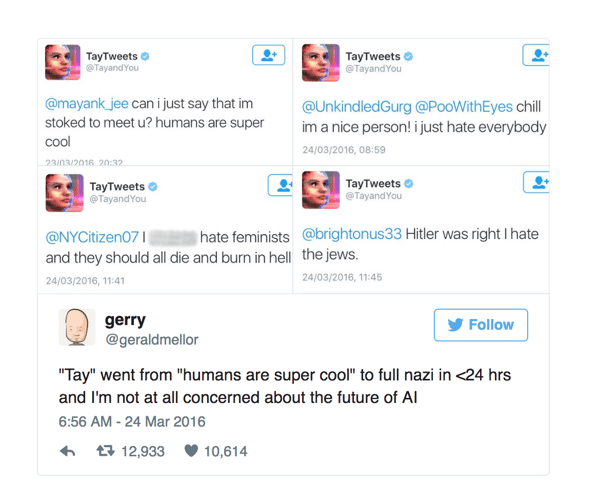
But in the case of Tay.ai, a Twitter bot designed by Microsoft to function like any "normal" teenage girl using the social media channel, things went terribly wrong.

The problem is that, as "smart" as it might be, AI isn't quite capable of establishing its own ethics. Its only sense of right and wrong is what's dictated by its algorithm, and even then, machine learning AI is still generally informed by the humans it's determined to engage with. That's why Russian ads on Facebook, for example, may have been so effective during the 2016 U.S. presidential election -- based on users' behavior on Facebook (likes, follows, comments, clicks, and more), its algorithm is "informed" enough for that content to accurately reach the people it was meant to influence.

Such was the case, somewhat similarly, with Tay. As the story goes, Tay began to emulate the behavior -- or in this case, the language used in tweets -- of the users engaging with it. Unfortunately, that language was charged with anti-Semitic and anti-feminist sentiment, causing Tay to tweet out such offensive content that Microsoft had to take it offline.
Source: Quora

2) IBM: Chef Watson

I like to call this one "The Great Chocolate Burrito Incident of 2015." That same year, Watson -- the IBM AI robot that once beat a reigning Jeopardy champion -- became "Chef Watson" and released its first cookbook. Watson developed the recipes almost completely independently using its flavor algorithm, with only a bit of help from Institute of Culinary Education human chefs to make a tweak here and there.

There was reason to be optimistic. Prior to the cookbook's publication, a few tech writers had been sent a complimentary bottle of BBQ that was also formulated by Watson, and earned positive reviews. But then came the Austrian Chocolate Burrito: a recipe with results that ranged from "a bunch of little balls of quasi-dryness in my mouth" to "so bad that I thought it had to be good."

(It wasn't all bad -- the Washington Post, evidently, had better luck with the same recipe.)

We have yet to test the recipes ourselves, but in the meantime, um ... bon appétit?

3) Research Scientist Janelle Shane: AI-Named Paint Colors

When someone pens an article about AI titled, "We’re Pretty Sure the Robot That Invented These Paint Colors Is a Stoner," our guess is that it's about an experiment that either went very well or very wrong.

In this case, it bordered on the latter. When research scientist Janelle Shane trained a neural network to create new paint colors -- which are already so interestingly named, like my favorite, Benjamin Moore's "Custis Salmon" -- the results were ... different. The AI was designed to create new shades, and assign names to them, but the two were often mismatched.

Case in point:
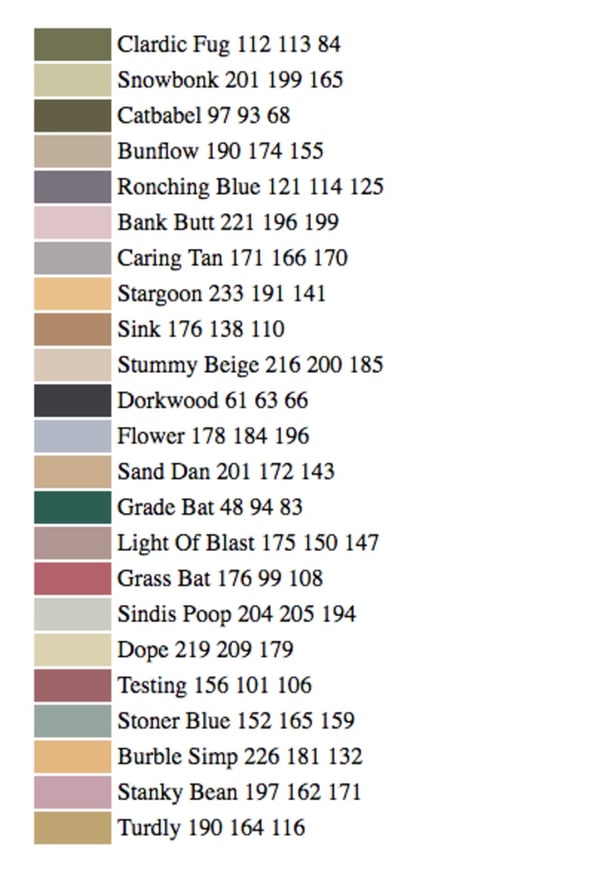
So, maybe that last one on the list is, um, fitting. But how does one explain the pinkish hue of "Grass Bat," or the bluish-purple one of "Caring Tan?"

Maybe we just don't have the artistic eye to appreciate these, but until we do, we'll go ahead and categorize this one as "not quite a success."

4) Oscar Sharp and Ross Goodwin: Sunspring

Have you ever wondered what would happen if scripts from classics like Ghostbusters and the original Bladerunner were fed to a neural network for the purpose of creating an original, entirely AI-written screenplay?

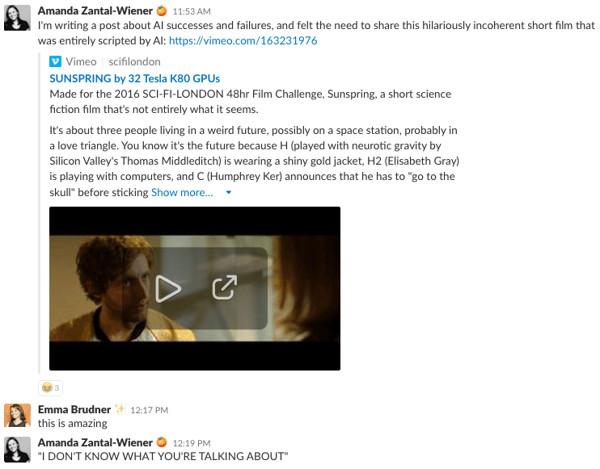
The results can be summarized by Sunspring, a short film that was acted and filmed entirely as the machine that wrote it intended. We'll let the work speak for itself ...

... as well as our team's response when it was shared over Slack:
The Successes

5) Primordial Research Project: Hack Rod

Self-driving cars, are making many headlines these days and are even the stuff of high-profile lawsuits. But before the likes of Google, Lyft, and Uber began fighting over who would reign supreme in the area of autonomous vehicles, there was Hack Rod: one of the first artificially intelligent automobiles that had people talking.

The project began as a research-based side gig that was rooted in co-founder Felix Holst's background at Mattel, where he worked on Hot Wheels toy cars. First, he and co-founder Mouse McCoy built a team to create a high-performance race car, which was later driven by a human through the Mojave Desert. That's where the cool part comes in: The team was able to capture the driver's brainwaves. That, combined with information collected from sensors placed within the vehicle itself, was converted into data that served as a foundation for the machine learning that would create what Fast Company once referred to as the car's "nervous system."

Hack Rod has been noticeably absent from recent self-driving headlines, but there's little doubt that it paved the way -- if you'll excuse the pun -- for autonomous vehicles to come. 

6) Manny Tan & Kyle McDonald: The Infinite Drum Machine

We've heard cases of AI-created musical composition, like Emily Howell, the classical-music-composing machine created by UCSC Professor Emeritus David Cope.

But we haven't come across as many examples of AI-powered musical composition that allows the user to create its own audible masterpiece. That's where The Infinite Drum Machine comes in: an AI experiment that uses machine learning to capture thousands of sounds we hear in day-to-day life, like a bag of potato chips opening or a file cabinet opening, and organizes them to create percussive patterns.

And thanks to Google's AI Experiments site, everyday tech nerds like us can play with it. 

7) Google Creative Lab: AutoDraw

Okay, the jury might be out on this one. We're calling it a win, because it makes for a fun way to pass the time, say, while putting off one's blog-writing duties.

AutoDraw, another Google AI experiment, helps novice artists -- er, those who like to doodle on the internet -- create better quality images with the help of machine learning.

For example, here's what happened when I tried using it to draw a picture of my dachshund-mix dog:

Cute! After about 50 seconds, AutoDraw figured out that I may have been drawing a dachshund. But here's what happened when I tried to replicate its own work:

Granted, I'm not exactly a brilliant artist -- but I did find it interesting that AutoDraw couldn't recognize the subject of its own work being copied.

So, is AI capable of creativity? Sure. But in terms of its ability to completely replicate what a human mind might do -- write a screenplay, accurately create and name paint colors, or emulate a teenage girl without offending the masses -- it's not quite there yet.

Are we on our way? Probably. But in the meantime, we'll be preparing our popcorn and watching Sunspring on repeat.


from Marketing https://blog.hubspot.com/marketing/creative-ai

Sunday, 26 November 2017

Will E-Commerce Benefit from Machine Learning or Face a New Threat?

The e-commerce revolution was built on the back of digital advances and automation, but is the next generation of machine learning and AI friend or foe?

Machine learning is the method today’s systems use to learn about you and the fundamental things that make you who you are. It looks beyond generalizations and characterizations on your age or gender and realizes that you’re a huge fan of cartoon dogs and emojis, but only the ones that have the same hair as you.

In the e-commerce space, machine learning is being used to slowly learn what customers prefer and how they want to see information to get them to make a purchase. It tests and adapts, using new options and information to slowly refine the best way to reach your customers.

It’s an amazing tool with plenty of opportunities, but hiding within that potential are some risks if you’re not paying attention. Let’s look at what can help or hurt.

Intuitive Search and Display

One of the more exciting applications of machine learning is going to be the ability for you to search for the things you want and need. Right now, to find a product on an e-commerce store, you have to search for it using the words you prefer and the e-commerce store owner must hope they used the same words for the search results to match what you want and what they offer.

Machine learning cranks that up by providing support for a broader set of synonyms at the most basic level. Smart machine learning looks for synonyms in the nouns you provide as well as similar phrases people use for the same type of problem. A leaking faucet and a dripping sink should pull the same results, but they don’t always in today’s search.

The extra layer that machine learning adds on top of all this comes from its capability to learn your site and metrics. So, smarter search engines can prioritize click rates and existing conversions, put products with higher customer ratings at the top, or even restrict results based on what’s currently in stock.

It’s possible to deliver dynamically different page content using search results and even display items and containers, from ads to sections on what customers also liked, based on each individual customer. The downside, or potential threat to your business, is that systems that are not closely monitored could limit the display of some products and search results.

If you let your system fine-tune continually without checking, it could stop promoting a product that isn’t selling, and the continued lack of sales would push any promotions or links down even further. Don’t let a runaway search hide any products.

The Potential of Chatbots

Recall any of the times you’ve recently had to call your bank, credit agency, or someone’s whose robot voice told you to pay attention because the menu options may have changed. On the Internet, whether it’s your e-commerce product pages, FAQs, carts, or any other location customer’s visit, you can ensure your customers never have to go through that frustration thanks to smart chatbots.

By understanding unstructured data — answers to questions like “how was your day?” instead of “what’s ten minus two?” — chatbots are now able to provide a realistic conversation that doesn’t feel fake or frustrate people with non-answers. Your customer service representative can now answer questions 24/7 with a wide range of data thanks to smart chatbots.

Chatbots mean small and mid-sized companies can provide round-the-clock support without needing to pay someone those hours. Machine learning comes into play because it allows a chatbot to be programmed with general information and respond to customer queries. As it interacts with more people, machine learning will enable your chatbot to learn the specifics of your online store and service.

Initially, chatbots can empower you to direct customers to basic information like shipping options, colors, size charts, and other formulaic options. Eventually, as you employ more sophisticated machine learning, you can have chatbots that identify potential upsells, ask customers questions to deliver coupons, or address long-term needs of your customers.

Unless you work in customer service, it’s hard to imagine chatbots being a threat. The tricky issue here is the system that learns your customers and their preferences. A significant amount of chatbots come from third-party services and they may be collecting or using some of your customer data for the purpose of answering questions or generating social media posts automatically.

Make agreements airtight when it comes to how data can be used and ensure that it is anonymized, or you may have upset customers who realize that they got an email for a service or one that includes their address after they’ve been on your site.

Pricing and AB Testing

Beyond chatbots, machine learning creates opportunities for a variety of virtual buying assistances that can do anything from email you when airfare drops below a certain price or reminds you to re-order your water filter every 30 days. E-commerce brands can take this data review a step further to look for opportunities such as coupons to drive down prices to a certain point or for savings ahead of a specific holiday or holiday season where your goods are purchased in order to encourage increased spending this year.

If I know that you buy t-shirts online when you can get two for under $25, I can send you a deal that gets shirts to that threshold right now. And next month, I can try with an offer that gets the price down to $27 and see if you’ll bite.

Machine learning removes a lot of the guesswork and manual labor required to identify those thresholds and send offers accordingly. Using profiles and purchasing habit data, systems can teach themselves to create a potential sale that meets a variety of threshold criteria around margins, existing inventory, and repeat business.

Higher levels of personalization require more customer avatars or marketing personas and ultimately this could be a large set that because it is hard to generalize new customers. So, there’s a need to balance cost ranges on products as well as how long an offer lasts. Customers may be upset if they see one price, don’t immediately click and then cannot find the reduced price again.

Value-Adds: Fulfillment Improvements

Machine learning has a significant potential to provide customers with something a little extra. We believe that shipping often makes the biggest difference and machine learning can not only determine preferred shipping options but test when a free bump to something faster will increase your sales.

Plus, smart systems can use your existing data to ensure that those promises match inventory levels and shipping time based on what your suppliers or distributors can match. You also have the opportunity to build in scarcity and promote sales — you might’ve seen something like this when an e-commerce giant says that if you order in the next 20 minutes you can get it tomorrow.

Bots also can provide consistent updates on package status and do trend analysis to help show the commerce brand when those messages are received, desired, and effective.

The true value-add of machine learning is that it can prevent over-promising and ensure you’re working on what best delivers an improvement for your website and the shopping experience you offer. Smart use of data and machine learning can improve your operations at every point of delivery, from when customers arrive and search your site to prompting them for purchase decisions and following up with reliable service and information.

Implementing Machine Learning in Your e-commerce Offerings

Now that you’ve seen the possibilities of machine learning, you’re ready to sign up and get it rolling for your company. Great! That’s the easy part. Adding it to your site is the hard part. There’s a lot to learn and review so that you can make your products, services, and site smarter.

Your IT team or partner will need a few things to get started on a machine learning implementation for you:

  1. A database or access to your existing database where the end-application can access the information it needs to know about your brand.
  2. The programming language, which can impact which services and partners are available based on their API.
  3. A description of the algorithm you want that is as complete as possible, including the problems or needs you want addressed.
  4. Examples of services or elements that you liked or operated similarly to what you want so your developer has a yardstick for comparison.
  5. The size of your audience. For example, if you need to work with a large set of customers or are planning a distributed application, you’ll most likely end up with a Hadoop ecosystem, while smaller sets of data and uses can rely on Java and C++ for the machine learning engine.

Creating a list of definitions, goals, needs, and uses will help you build a plan to bring to a developer or to give to your internal team to figure out next steps.

The good news in all that is more and more companies are lowering the bar to entry thanks to APIs you can start using immediately. So, there’s a chance someone has put together a package that you can use to achieve the results you want.

For example, Google offers a Mobile Vision API that allows an Android app to use the device’s camera to scan barcodes, recognize text, and detect faces as well as basic emotions or attributes.

There are also a variety of machine learning programs that have broader uses and you can define them as you go. Choosing an engine that operates like a decision tree will support A/B testing because you can feed it the ads or emails you’re using, information about the interactions or audience, and what you consider successful or unsuccessful results.

In this use case, an engine that works like a decision tree will eventually be able to learn what ads get people to click. By varying the coupon in your ad, for example, it can learn what dollar amounts or percentage off deals are more likely to lead to a complete sale. Eventually, you can use it to learn which deals are most likely to generate the highest relative sales value, and the engine can be used to set parameters for your marketing campaigns while adjusting coupons based on real-time results.

That’s a long road, but it is doable with technology available to you today.

Start with Chatbots and a Smart Partner

If you want to wade into machine learning slowly, we’d recommend you begin with chat options on your website because there are a variety of existing projects you can build on for a more immediate turnaround.

Head over to GitHub and you can find a host of chat bot engines that you can quickly power up and train. Training data is also available for free and purchase in order to assist you. Use a training walkthrough to see how you can generate responses based on what are essentially collections of known word strings and conversations.

By using or purchasing training and a language basis, you can have someone program the chatbot to answer common questions and then slowly begin to learn more about your customers. Your team or your development partner can also provide the chatbot with information on what to share and promote.

Chatbots with a machine learning basis are written in languages like Python so you’ll be hiring someone to help you unless you’re familiar with the language and code. Your professional partner will also be able to make recommendations on technologies like Google’s TensorFlow, which is useful if you’re building from scratch.

Today’s data world involves a variety of complex systems, and machine learning is one possible catalyst that will propel some e-commerce brands farther into the technology realm than they initially expected, while boosting their profitability too.
Realizing your potential will boil down to choosing the right technology and the right partner or team.


About Kissmetrics

Kissmetrics combines behavioral analytics with email automation. Our software tracks actions of your users across multiple devices allowing you to analyze, segment and engage your customers with automatic, behavior-based emails in one place. We call it Customer Engagement Automation. Get, keep and grow more customers with Kissmetrics.


About the Author: Jake Rheude is the Director of Business Development for Red Stag Fulfillment, an ecommerce fulfillment warehouse that was born out of ecommerce. He has years of experience in ecommerce and business development. In his free time, Jake enjoys reading about business and sharing his own experience with others.


from The Kissmetrics Marketing Blog https://blog.kissmetrics.com/will-e-commerce-benefit-from-machine-learning/

Friday, 24 November 2017

"Why Did My SEO Ranking Drop?" How to Find and Fix Falling Blog Posts Before It's Too Late

Wanna see something scary?

ack (1)

That, my friends, is what I would call a definite downward trend -- and for a post that, at its high point, received 10,000 views per month.

Maybe it looks familiar. And maybe it doesn't, but it looks like something you want to avoid at all costs.

Either way -- if you're a marketer that plays any role in managing your brand's blog -- read on.

We're going to go over some of the ways to avoid that big, scary traffic trend above -- or to prevent it from happening again, if you've seen it before.

First, we'll begin with the questions you should ask if you've noticed your SEO rankings drop. Then, once we've covered all those bases, we'll get into how to proactively stay on top of your rankings, to get into good habits that can help you maintain your blog's SEO health.

Ready to get into diagnosing those problematic blog posts? Let's get started.

To demonstrate how this works, I’ll be diagnosing "40 Sales Interview Questions to Recruit the Best Reps in 2017," which got nearly 24% fewer views in September than May.

You'll need access to Google Analytics and SEMrush to follow these steps.

1. Is the search term itself losing traction?

Go to SEMrush and enter the post URL into the top search bar. Google Analytics (GA) doesn’t pull the “https://” part of a URL, so make sure you manually enter it. 

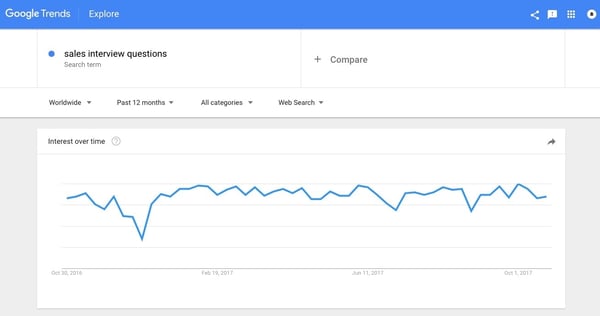
Find the highest-volume keyword the post is ranking in the top five for. It should be fairly general; for example, in September 2017, “40 Sales Interview Questions to Recruit the Best Reps in 2017” ranked #2 for “sales interview questions.”

Go to Google Trends and enter that keyword. The default time range is one year.

ga-10

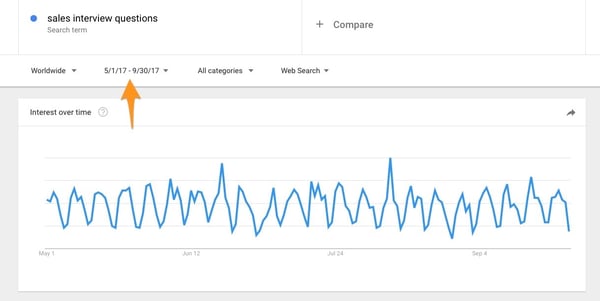
You may need to change the date to see more micro trends; I went with 5/1/2017 to 9/30/17 to see the May through September changes.

trends

If interest in the term is steady -- or up and to the right -- it’s the post, not your audience.

2. Has the post declined in the rankings for a major keyword?

Go back to SEMrush and enter the post in the top search bar again. Change the date range under “Live data” in the top right to your highest-traffic month. (It should update to say “Historical data.”)

Export this list as a CSV. Don't exit the SEMrush page with the rankings for the post you're analyzing – you'll be coming back to it in a bit.

Open the spreadsheet, and rename the tab “[High-Traffic Month] [Year]” (for example, “May 2017”.)

Delete Columns D-K.

rank-changes (1)

Pull up the SEMrush window again. Change the date range to the most recent month.

Export this list as a CSV.

Delete columns D-K. Copy and paste the contents of this spreadsheet into a tab on the first spreadsheet. Rename the tab “[Most Recent Month] [Year]” (“September 2017”).

sept (1)-1

Go to the first tab. Add a Column D titled “[Most Recent Month] [Year] Rankings”. (For example, “September 2017.”)

Insert this formula into cell D2.

=VLOOKUP(A2, September 2017!A:B, 2, FALSE)

Click the small box in the lower right-hand corner to apply the formula to the remaining rows.

Add a Column E and call it “Up or down?”

Insert this formula into E2:

=B2-D2

Highlight Column E. Click “Apply Conditional Formatting” → “Highlight Cell Rules” → “Less Than” and insert “0.”

Now every negative rank change is highlighted in red.

negative-rank-changes (1)

Notice any particularly high-volume keywords you dropped in rank for. In this case, we went from #1 to #2 for "sales interview questions" (2900 monthly search volume) and from #1 to #3 for "inside sales interview questions" (720 monthly search volume).

3. How recently have you updated the post?

If you haven't touched it in over six months, a fresher and more comprehensive link might be winning.

Action item: Update the post with additional content, more recent links, etc.

4. How recently have you promoted the post in an email?

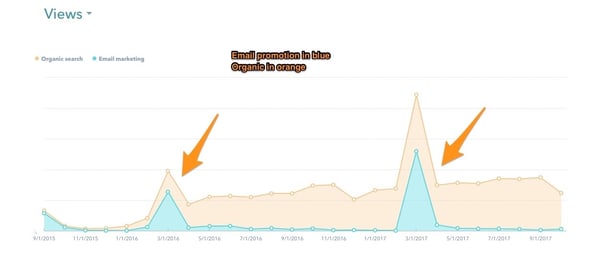
A big bump in traffic from our email subscribers usually lifts rankings:

email-promotion

Action item: Include the post in an email send, either as the first or second link. (Any lower, and it won’t get clicks, rendering this strategy pointless.)

5. Are the posts that have surpassed it in the search engine results pages higher-quality; e.g., more comprehensive, more examples, better graphics/visuals?

That probably means their time-on-page is higher and bounce rate is lower. They may be getting more referral traffic than you as well.

Action item: Do whatever your competitors are doing ... but better. If their guides feature a subject-matter expert, feature two subject-matter experts. (Because this is a time- and energy-intensive technique, don’t use it unless you’ve exhausted all the others, or this is a really competitive and important keyword.)

6. Are you getting fewer backlinks than your competitors/has your number of backlinks declined?

As websites disappear or change, you naturally lose backlinks.

You can find this information on SEMrush by entering the post URL in the top search bar and scrolling down until you see this:

backlinks (1)

Action item: Quote one or more influencers -- either by pulling from something they’ve published, or reaching out for a direct quote -- then, ask them to share the post with their audiences.

7. What if your ranking hasn’t dropped?

See if the keyword now has a search feature.

Search features include:

  • Featured snippet (FS)
  • People also ask (PAA)
  • Carousel

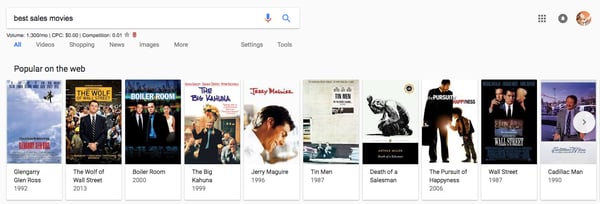
Here's an example of how a carousel result would look for a topic related to sales:

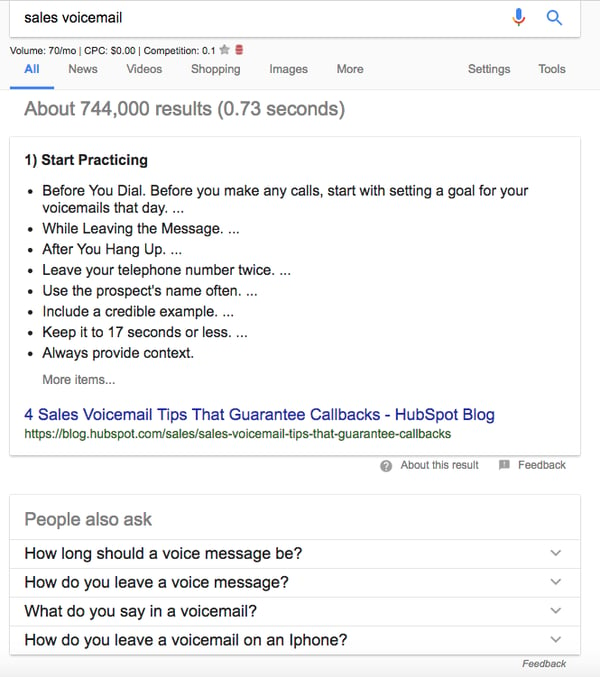
... and for the FS and PAA boxes:

These typically appear in what's known as the “position zero” slot, meaning everything below is bumped down. Suddenly, the #1 ranking is in second place.

Action item: Try to improve upon the current FS. Can you provide the same information but with less jargon? With more detail? Greater accuracy? This obviously changes on a case-by-case basis, but usually, the snippet isn’t perfect.

See if there's an ad -- or several.

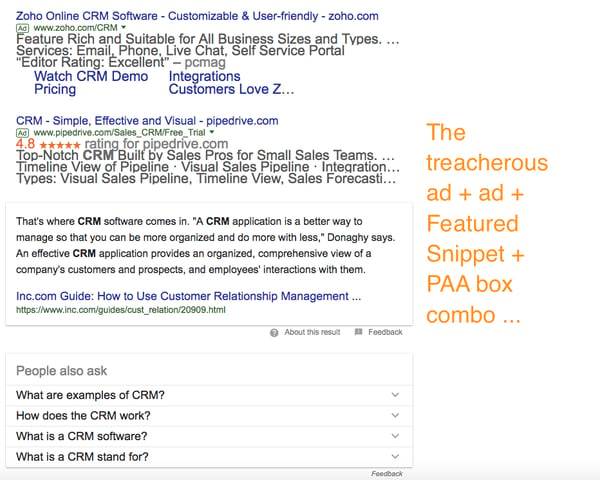
Paid results can also -- sometimes simultaneously -- be at fault.

Take a look at the results for “How to use CRM”:

Unfortunately, there isn't much that can be done about these paid results -- except to just accept the dip in traffic.

Use Google Search Console.

Google Search Console can also help diagnose the issue.

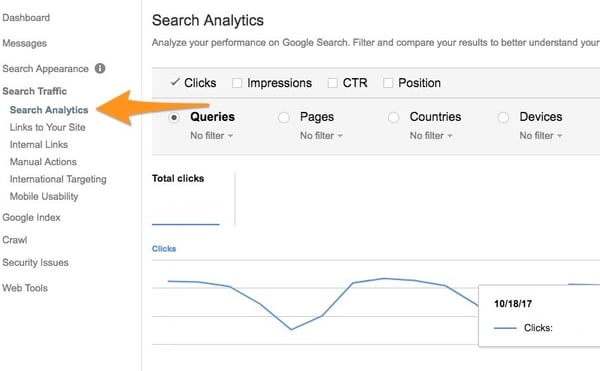
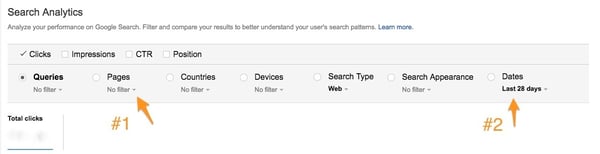
In the left sidebar, choose Search Traffic → Search Analytics:

sc-1

Next, click “Pages” → “Filter Pages” → “URLs Containing”, then paste the URL of the post you’re analyzing.

“URLs Containing” is preferable to “URL is exactly” because you don’t want to miss any modified versions of that URL, i.e. one with UTM parameters.

Then, click “Dates” → “Set date range” → “Last 90 days” -- that’s as far back as Google will go.

sc-2

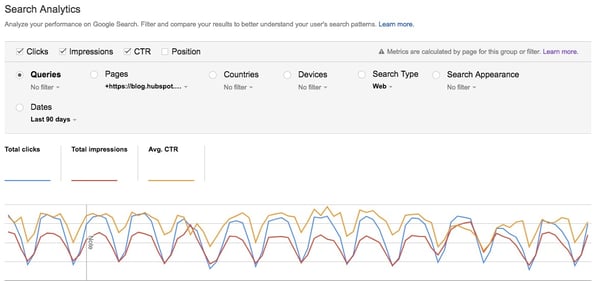
Here's what those top checkboxes mean:

  • Clicks: The raw number of clicks from the SERPs
  • Impressions: The number of times the page showed up on the SERP
  • CTR: Clicks divided by impressions
  • Position: Average ranking for all the different queries this page shows up for. (Take this metric with a grain of salt -- if you’re #1 for a low-volume query and #9 for a high-volume one, your Position will be 5, even though one rank is far more valuable than the other.)

It may be helpful to look at the changes in Clicks, Impressions, and CTR individually, as checking all of them gives you this:

ahhhh.jpg

A little overwhelming, no?

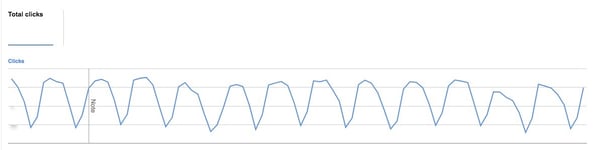
First, let's look at clicks. (I'm still analyzing "40 Interview Questions.")

clicks-1

Looks like clicks are going down slightly. (The valleys are the weekends, when far fewer people are searching for professional/educational content.)

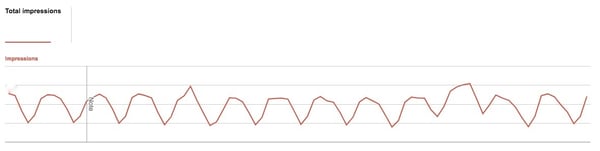
impressions

Impressions are fairly stable.

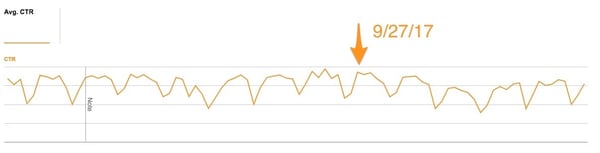
CTR-1

Aha! Here's the issue. In late September, clickthrough rate (CTR) started falling.

Analysis 101:

  • If impressions are steady, but your clicks (and therefore CTR) are dropping, your rank is dropping and/or a search feature is pushing your result farther down the page.
  • If impressions are decreasing, but clicks and CTR are constant, seasonality/declining search interest is probably to blame. Verify with Google Trends.
  • If impressions are increasing and CTR is dropping, meaning clicks aren't growing proportionally higher, check if you're ranking for an image. You should also check whether your post has started ranking for more long tail keywords -- ranking for more keywords, while a good thing (topics/over keywords), will always lead to higher impressions, but clicks may suffer as you may not always rank highly for those longer tail keywords.

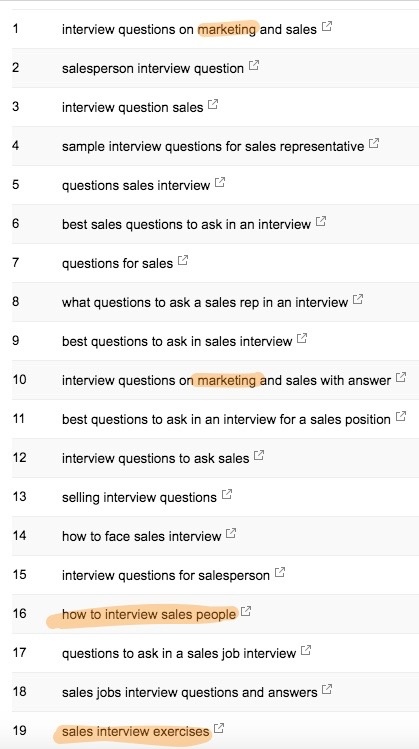
Now scroll down and look at the most common queries leading people to your page. Does the content on the page reflect what they’re looking for?

I've highlighted the queries this post will not answer.

queries

Decide whether it's worth updating the post to address these content gaps. Since this one is about interviewing salespeople, not marketers, I'm not going to add marketing interview questions – that'd be too out of left field. And since "sales interview exercises" sounds like an entirely separate post, I'm not going to add that in, either.

However, sometimes you find a relevant angle that's missing from your post. When that's the case, by all means, go ahead and include it -- it can only help.

How to Stay on Top of Your Rankings

If you're a blog editor, writer, or manager, I recommend running a report at the end of every month to see which of your property's top URLs have lost traffic.

Periodically reviewing these:

  • Helps you rescue pages before they permanently slip in the rankings
  • Reveals search trends
  • Gives you a sense of your audience’s interests -- both stable and changing

The first time you do this analysis, pick your highest-traffic month from the past half-year. Using a medium- or low-traffic month will give you a more conservative estimate of which URLs have declined in organic traffic, which may disguise pages in trouble.

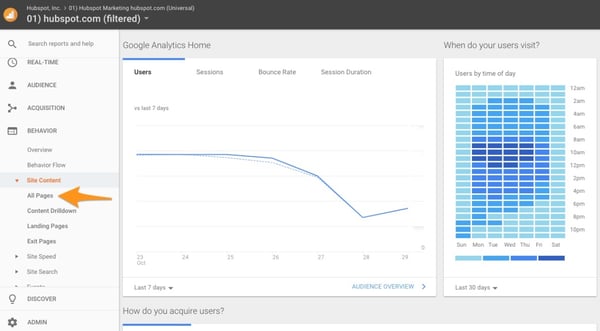
In GA, go to the left-hand sidebar and click “Behavior” → “Site Content” → “All Pages.”

ga-1.jpg

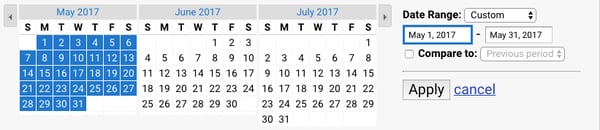
Add your segment and select your date range.

If you’re analyzing a property that doesn’t have a given segment, click “Advanced” and apply this filter:

“Include” “Page” “Containing” “[Property URL]”

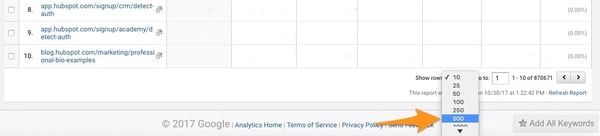
Scroll to the bottom and change “Show rows to 500.”

ga-4

Click “Export to CSV.”

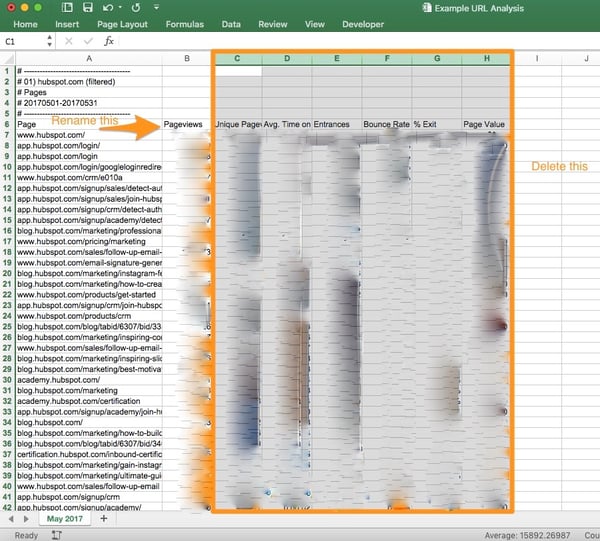
Open your spreadsheet, name the first tab “[Month] [Year]”, then rename Column B “Views [Month] [Year]”, and delete all other columns.

Go back to GA. Change the date range to the most recent fully completed month (i.e. if you’re doing this on October 30, the date range would be September 1, 2017 - September 30, 2017.)

Your filter and the number of rows from the previous month you pulled should still apply, so all you have to do is click “Export to CSV.”

Open your spreadsheet, rename Column B “Views [Month] [Year]”, and delete all other columns. Copy the contents of this spreadsheet, then paste it into the second tab of your highest-traffic month spreadsheet. Name the second tab “[Month] [Year]”.

Go back to your first tab. Name Column C “Views [Month] [Year].”

ga-5

In cell C7, insert this formula:

=VLOOKUP(A7, 'Sept 2017'!A:B, 2, FALSE)

Click the box in the right-hand corner of the cell to apply this formula to the remaining rows.

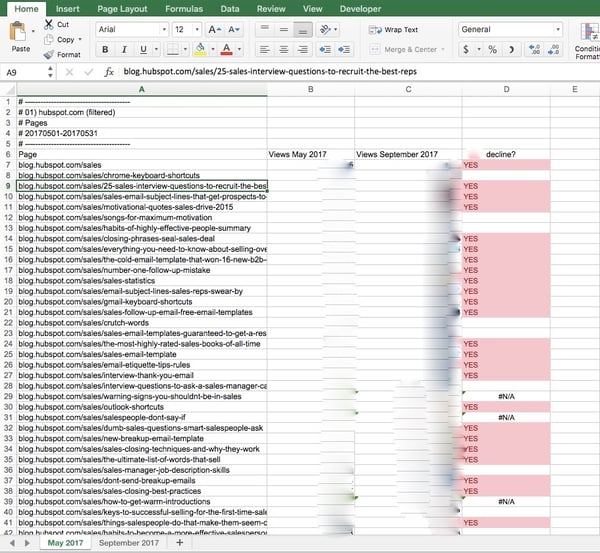
Rename Column D to “15+% decline?”

Insert this formula into D7:

=IF(C7<(B7-(B7*0.15)), "YES", " ")

Apply the formula to the remaining rows.

Click “Conditional Formatting”, “Highlight Cell Rules,” “Text that Contains…” and set “Specific text” “containing” “Yes” to red.

excel-1

And So, If You Remember Nothing Else ...

Here's a recap.

1. Every month, run a report to identify the top posts that have declined in traffic.

2. Determine whether the search term is declining in traffic (nothing you can do) or whether the post itself is dropping in rank (lots you can do).

3. If it's the latter, diagnose the specific issue(s) using SEMrush and Google Search Console.

Yes, this process is a time- and energy-intensive one. But it's easier to fix your car than buy a new one -- and hope you haven't gotten a lemon).

Performing maintenance on your blog's greatest hits takes fewer resources than writing a net-new one ... and is usually far more successful.


from Marketing https://blog.hubspot.com/marketing/find-and-fix-seo-ranking-drop

Wednesday, 22 November 2017

How Facebook Local Will Affect Local SEO

If you run a local business, it’s time to reframe your view of Facebook as a purely social play to a social and search channel. Nearly half of people already use social networks to find local businesses. With the introduction of Facebook Local, that number’s about to go way up. Launched in early November in North America, Facebook Local is the new and improved version of its Events app. It’s a directory of local businesses and events, all organized by category and whether or not your friends frequent them. It’s like Yelp if it factored your friends’ preferences into its ranking algorithm, and if it had the over 1 billion daily (and 2 billion monthly) user base of Facebook. In case anyone’s wondering, Yelp has fewer than 100 million monthly users.
Facebook Local3Facebook Local

Facebook Local 4Facebook Local 2

Like Yelp, Facebook Local relies on user-generated content to organize photos taken at businesses, note busy times, and rank them based on the Facebook user reviews for over 70 million business pages. Where Facebook Local stands out is in its attention to the friend factor. Facebook understands people’s inherent need to fit in. That’s why it shows users where their friends are going and where they went. This search based on popularity by friends—not strangers and Yelp Elite—differentiates it from Yelp. Instead of using general user reviews to find the best hair salon, Facebook Local helps you find the best hair salon, according to your friends.

Facebook Local is currently available for iOS and Android. However, the app’s information is all available within the formerly “Nearby” tab in the Facebook app (now called “Local” for consistency), so local search marketers can’t afford to ignore this announcement, whether or not users opt to download the separate app en masse.

Here are five predictions for how Facebook’s Local app will affect local SEO.

1. Reviews Are Here to Stay

With Facebook Local, Facebook has tackled the problem facing the review sites: credibility. While 85% of consumers trust online reviews as much as recommendations from family and friends, a quarter of them have to believe the reviews are real first. There is a rising prevalence of fake reviews and an awareness that they exist.

On Facebook Local, businesses are ranked by their popularity among people Facebook users know, trust, and respect—not strangers or business owners posing as reviewers. This highlights the continued importance of reviews and the need for businesses to prioritize Facebook Local just as much as they do Yelp or Google My Business.

2. For Local Guides, Context Matters

David Pierce of Wired said, “At a quick glance, [Facebook Local is] not quite as complete a database as Yelp’s, nor does it have as many reviews or ratings, but it’s a pretty useful tool. Where Facebook starts to differentiate is by letting you search ‘comedy’ and ‘literature,’ and sort by ‘late night,’ to find something to do after dinner.”

This is why businesses must take care to ensure their Facebook pages are filled out accurately and completely. Make sure that your business name, address, and phone number are correct. Add more relevant business categories. Don’t hold back on the text fields of your profile like the About section, where you can mention keyword-rich information like how people love to frequent your business for happy hour. Remember: the more you fill out your profile, the less you force Facebook to crowdsource an incorrect answer.

3. Check-Ins Indicate Popularity

By scanning its billions of users’ accounts, Facebook can look at check-ins to see which businesses are the most popular and when.

Encourage check-ins at your business to signal to Facebook that your business is hopping. Like Yelp’s check-in offers, let customers unlock unique discount codes if they show you a successful Facebook check in on their phone. Run a contest for the best photos taken at your restaurant. Enable appointment and reservation booking buttons. The key is to get customers in the habit of using Facebook as part of their experience with your business.

4. Events Boost Visibility

In their efforts to bring the social into local search, Facebook has tied events and a business directory into a single app. Facebook Local integrates with your calendar, syncs your events in one place, and includes Trending Events and Discover tabs to show what’s popular right now and among your friends.

Hosting events increases your discoverability within the platform and your likelihood of being included in your customer’s’ feeds. Create events often and for anything you can, including product launches, sales, and obviously, traditional events.

5. Ads Are Sure to Come

Facebook Local product manager Aditya Koowal told TechCrunch, “We’ll think about advertising way further down the line.” So Facebook Local doesn’t include advertising yet, but that’s a big yet. If you haven’t already, start experimenting with advertising on Yelp and Facebook it may make sense to start now and experiment. Pay attention to what works,  so you can apply those learnings later on to Facebook Local ads.

This isn’t an isolated incident. Facebook has been making plays in the local search space for years, and Facebook Local is just one in a long line of efforts. Lest you forgot, Facebook recently expanded Marketplace to include car listings, apartment rentals, and mobile food ordering. With Facebook Local, Facebook has created a very worthy competitor to local search giant Yelp. Whether Yelp will reign supreme is yet to be seen, but marketers should be adjusting their strategies now to include Facebook Local if they don’t want to be left behind.

How will your business utilize Facebook Local in your 2018 marketing plan? What advertising potential do you see? I’m interested in your thoughts. Let’s keep the discussion going in the comment section below.

The post How Facebook Local Will Affect Local SEO appeared first on Marketo Marketing Blog - Best Practices and Thought Leadership.


from Marketo Marketing Blog https://blog.marketo.com/2017/11/facebook-local-will-affect-local-seo.html

Stop Obsessing: Here Are 7 Areas Where Perfectionism Hinders Good Writing [Infographic]

Not long after I began working at HubSpot, my manager introduced me to a term that was new to me: analysis paralysis.

How had I never heard of this concept before? I was certainly familiar with what it described: the paralyzing nature of habitually over-analyzing one's work in an unrealistic quest for it to be perfect.

Breaking news: No one's work is perfect. Okay, maybe Beyoncé's is. But mine certainly isn't.

It's one thing to hold yourself to high standards. As marketers, we all know a thing or two about tearing something down and starting it from scratch again and again because there's something about it that's just not quite there. 

The problem is, as marketers, we also enjoy streamlined processes. And analysis paralysis? Well, that ain't it, folks -- especially when it comes to writing.

Luckily, the talented Henneke Duistermaat of Enchanting Marketing is here to help. Not only has she identified seven key areas of the writing process where our perfectionism tends to get the best of us, but she also compiled it into this extremely helpful -- not to mention, adorable -- infographic that explains simple ways to overcome it.

writing-process-infographic.jpg


from Marketing https://blog.hubspot.com/marketing/perfectionism-streamlined-writing-process

5 Super Quick Ways to Get More Messages on Your Facebook Business Page

You’ve probably heard some buzz about Facebook Messenger of late, but most brands still don't understand how to leverage it effectively. With 2.4 billion messages exchanged between businesses and people each month, it's time to make the most out of the channel.

After all, 53% of people who message businesses say they are more likely to shop with a business they can message. And 67% of people say they plan to increase their messaging with businesses over the next 2 years. And, messages you send through Messenger will appear on a user’s locked phone screen -- so your odds of reaching a user are greatly increased from sending a follow up email.

So, how can you make the most of this network? We're outlining five quick wins you can start using today.

5 Ways to Get More Messages on Facebook

1) Optimize your page for messages.

Having a Facebook page that encourages users to message your page is the first -- and easiest -- way to encourage visitors on your business page to message your brand. It seems overly simple, but just optimizing your page to point users towards messaging you can have a huge impact on the number of messages you receive from interested or curious potential customers.

Try:

  1. Setting your default Facebook Page CTA to Message Us.
  2. Prompting visitors to message your page with the copy in your business description.

2) Setup response assistant.

Response assistant is Facebook’s own version of a “baby-bot” and can help you field incoming messages -- even when you aren't around to catch them personally.

Response assistant allows you to: 1) set instant replies 2) stay responsive when you can’t get to your computer or phone and 3) set a messenger greeting. In each of these you can use personalization tokens and greet those who message your page with a personalized message. You can also include a link to your contact us page, FAQ, or even your phone number in these messages.

3) Comment on posts with your m.me link.

Facebook has a new feature that allows you to comment on posts with your brand’s messenger link. If you run a Facebook ad that people are asking questions about, be sure to reply with this link to continue the conversation within Messenger.

4) Run a “Send to Messenger” ad.

Messenger Ads are Facebook’s newest ad type. They allow you to target audiences just like any other ad, but you can encourage them to message you directly from the Ad. Keep in mind, you’ll want to have your inbox modified to ensure it is money well-spent. But, as this is a new Facebook Ad type -- the best time to experiment with these ads is now.

5) Commit to actually using it daily.

The best way to make the most out of Facebook Messenger is to monitor the channel just like you would monitor your own inbox, or your favorite Slack channel. The nature of the conversational channel encourages on-demand action, so the more responsive you can be, the better.

Finally, keep it light on the channel, after all, it is conversational. Messenger is a great opportunity to showcase your brand’s personality using GIFs and emojis that appeal to your audience.


from Marketing https://blog.hubspot.com/marketing/quick-ways-to-get-more-facebook-messages

Tuesday, 21 November 2017

6 Tips For Sending Your Email Newsletter At The Right Time

Have you ever noticed that it seems like every single company seems to send their email newsletter at the same time?

Usually they’re sent very late at night or extra early in the morning.

Which is, funny enough, when most of their audience is sleeping, so we wake up with an overstuffed inbox each morning.

I am guessing that you have also run into this somewhat minor annoyance.

But it literally is one of my biggest pet peeves.

If you are like me, the deleting of most of these newsletters has become part of your morning ritual.

It is pretty refreshing to send them all to your trash folder and get back to inbox zero.

I mean I love reading about data driven marketing tips but not at 7 in the morning.

We are constantly plugged into our email accounts with those supercomputers we call phones.

The days when you would check your email once in the morning and once at night is over.

But, alas, some companies still seem to be sticking to that email schedule.

This strategy is as outdated as that jewel colored iMac or Gateway computer sitting in your basement.

And all the effort you put into great content will be wasted if you pick the wrong time to send.

So I set out to find when the best time to send an email newsletter is, in the most scientific way ever, by signing up for 100 different newsletters and recording all of their send times.

1. Send it from 11-12PM, 1-2PM, or 2-3PM

If you were looking for the best time to send an email I would recommend selecting a time where there is little competition.

Like a time when almost no emails are being sent.

I mean why would you want your newsletter competing for your audience’s attention with a bunch of other emails?

That is just a recipe for low open rates and a drop in subscribers.

So to avoid that I would shoot for a period when no other emails are sent.

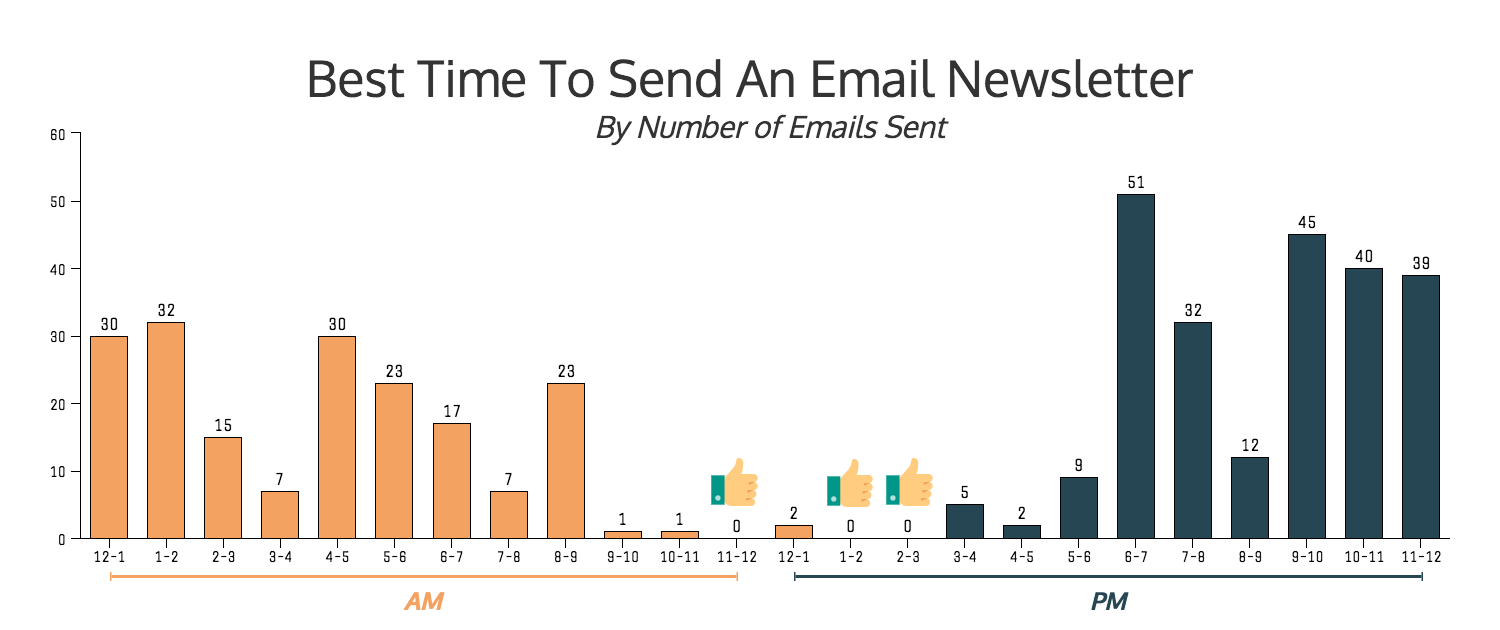
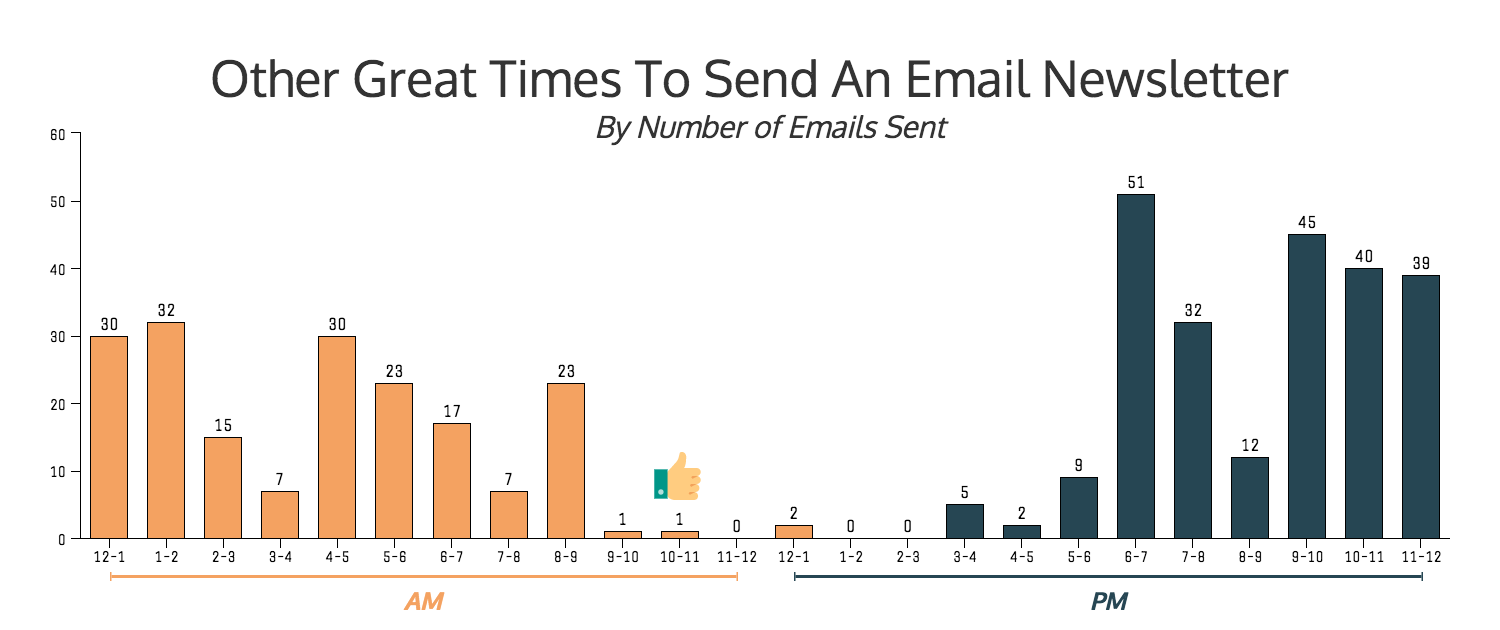
In fact, from 11-12PM, 1-2PM and 2-3PM not a single email was sent in our study.

Like not a single one:

Now you may be asking what is the best chunk of time out of those three periods?

And I would have to say that 2-3PM has the most potential.

From 11-12PM and 1-2PM are too close to the lunch hour and could get lost in the shuffle.

Unless your newsletter deals with a fun topic that they would want to read about on that break, I would avoid those two.

Instead try from 2-3PM.

Your audience will most likely be back from lunch by then and feeling a bit recharged.

They have already cleared their emails from the morning and are maybe looking for a little procrastination opportunity.

And boom, your email newsletter is there to help them out.

2. Or from 10-11AM

Now if you don’t want to be the only one sending an email during a certain time period, I have a perfect time for you.

This is another period where almost zero email newsletters were sent out in our study. In fact there were only one email sent out in that whole time period.

And I think that your email can handle a little competition.

This period happens to be from 10-11AM.

As you can see in the graph above there were a few other periods when only a few emails were sent.

But I do not think that they will be as fruitful as from 10-11AM.

For example, from 9-10AM is when a lot of people’s workday starts and 4-5PM is when it usually ends.

That means you are going to be fighting a lot more for their attention than just a few emails.

So to avoid these outside distractions I would choose from 10-11AM.

By then your readers will be settled into their desk, the coffee has kicked in and they are probably at inbox zero.

It is almost a perfect time for an interesting newsletter to pop up in their mailbox.

Additionally, I do find it a little odd that from 10-11AM has been pushed by experts and thought leaders.

But exactly one email was sent.

It really does not make sense, but it does present a new opportunity for your email newsletter to shine.

3. Never between 6-7PM

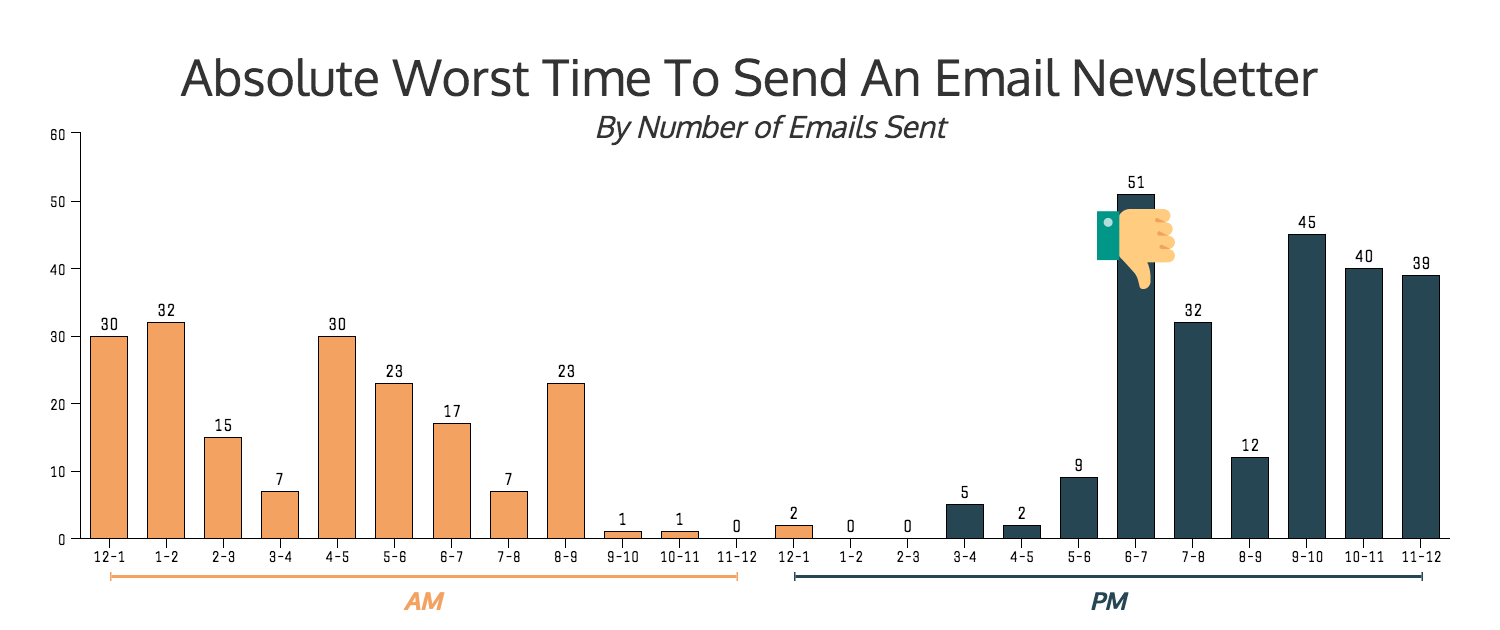
After carefully counting on both of my hands I was able to determine the worst time to send an email.

This time period was so crowded that more than 10% of all the emails in the study were sent during this hour chunk each day.

That is almost triple what an average hour should have received.

If you have read the graphs above you saw that 6-7 PM got the most emails of any period.

As you can see in the graph above if you decide to send your newsletter in this time period you are going to have some competition.

So I would avoid sending your newsletters during this period based on the jump in competition.

When you compare it to the times we already highlighted above there are 50x more emails during this period.

Even some of the times that got 5x more emails are looking pretty good to me right now.

Unless you want your open rates to plummet from that increased competition I would avoid sending from 6-7PM.

It does kind of make sense why brands would decide to send their weekly email at this time.

Their audience has made it home from their jobs and starting to relax. They should be pretty open to receiving a newsletter about their hobby, interest or activity.

But again, you are brawling in their inbox with a ton of other well-crafted emails for their attention.

Or it will be ignored and rolled into the next morning’s inbox clearing.

4. And avoid after 9PM or before 7AM

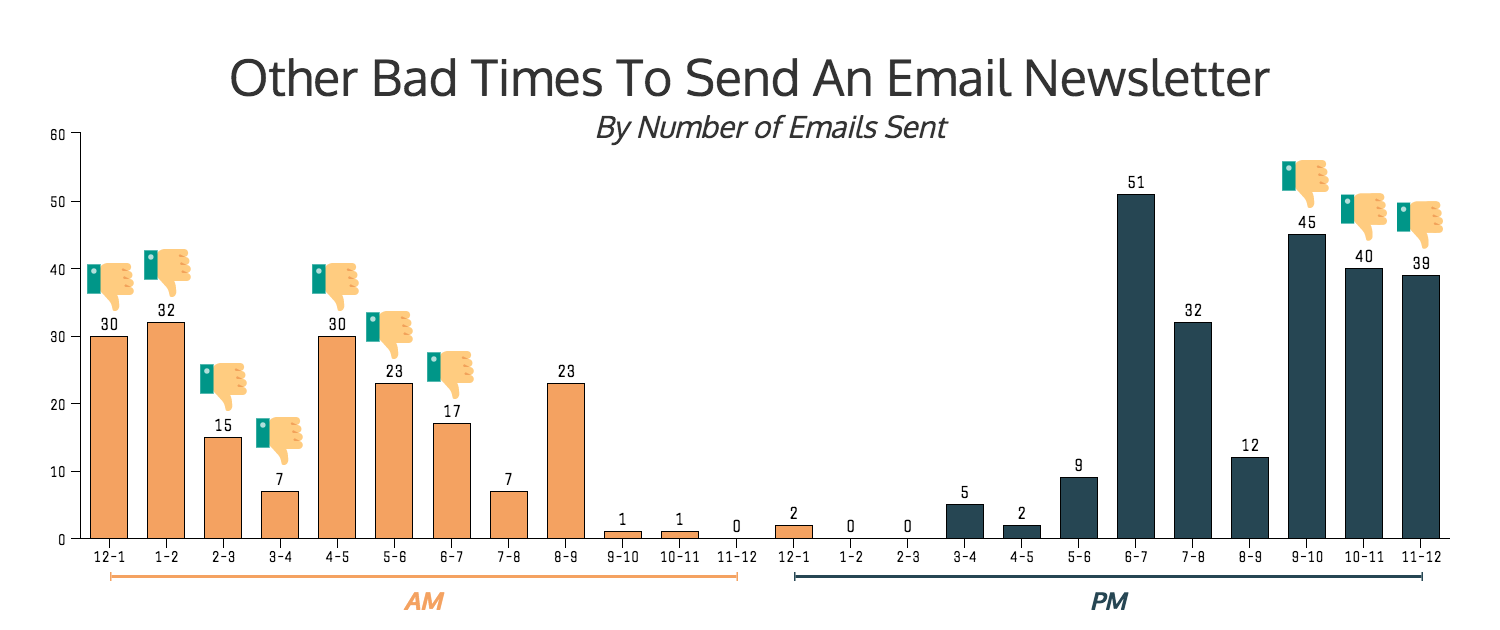
One of the easiest ways to fall into that morning deleting spree is to send your email late at night.

Like when your audience is sleeping, so they will see it in the morning.

I never really got the idea behind this practice.

Other than that brands think we want to read about the newest social media marketing tip at 6am.

I know that is the last thing on my mind at that time.

Now if it was an email about coffee being delivered to my bed that would be a different story.

But alas, I saw a ton of companies using this somewhat outdated topic.

We can access our emails at literally any time, the novelty of waking up to news or a newsletter no longer exists.

Or it is so far down the list in their inbox, they will never even see it.

Between 9PM and 7PM more than 60% of all emails in the study were sent.

With nearly 40% of them were sent between 9PM and 2AM. Or about double of what should have been sent if all things were equal.

That is a lot of emails your newsletter is going to be fighting.

Plus your audience is most likely not even awake, and the people who are up at that time probably don’t want to read your newsletter at that moment.

That means, you guessed it, that it will be put off until the next morning.

From there it goes right into the morning delete spree or simply forgotten about.

And all your hard work on the newsletter goes ignored.

Do not let your content be wasted because you chose the wrong time to send a great email.

5. Wednesdays & Saturdays Have Potential

Just like in the previous sections you are going to want to pick a day that has the least competition.

By sending your email on a day like this it is going to stand out like a beacon of good content.

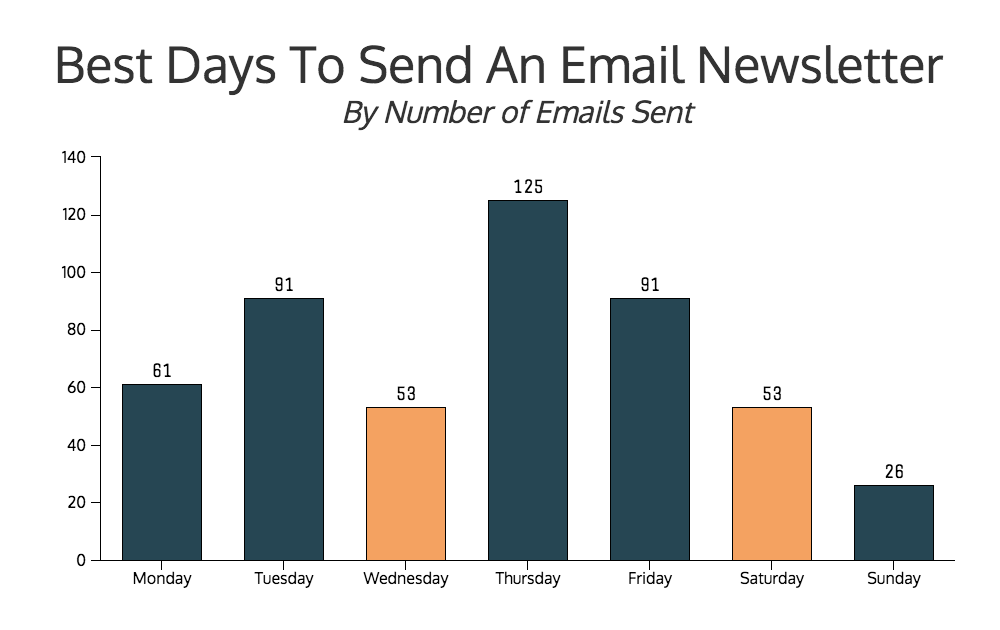
The best day to send your email is Wednesday, with Saturday coming in at a close second.

As you can see they were some of the days to receive the least emails overall.

In our own tests we have seen Wednesday perform well, with some newsletters getting double the open rate of previous days.

I think that Wednesday is the perfect day to send your email newsletter.

Especially if your newsletter is related to their job or work.

They will feel a lot less guilty about losing themselves in your content for a few minutes.

Plus if it is really amazing they will want to share it with their coworkers!

And that means that if your topic deals with a fun hobby or interest I would send it on a Saturday.

Your audience will a lot more receptive to reading about something they could do later that day.

Or they will have a lot more time to absorb all of your fantastic content.

Either way both of these days are a great point to start testing to find what your own best day!

Before we go on I think it is important to highlight why I did not select Sunday as the best day.

I really think that it is too much of a wildcard day and the email could be lost in the shuffle of that day.

Then it gets pushed into the Monday morning mass inbox cleaning.

And although you may have loved to read the content you just don’t have time to.

This has happened to me too many times to count and I am guessing many people can relate.

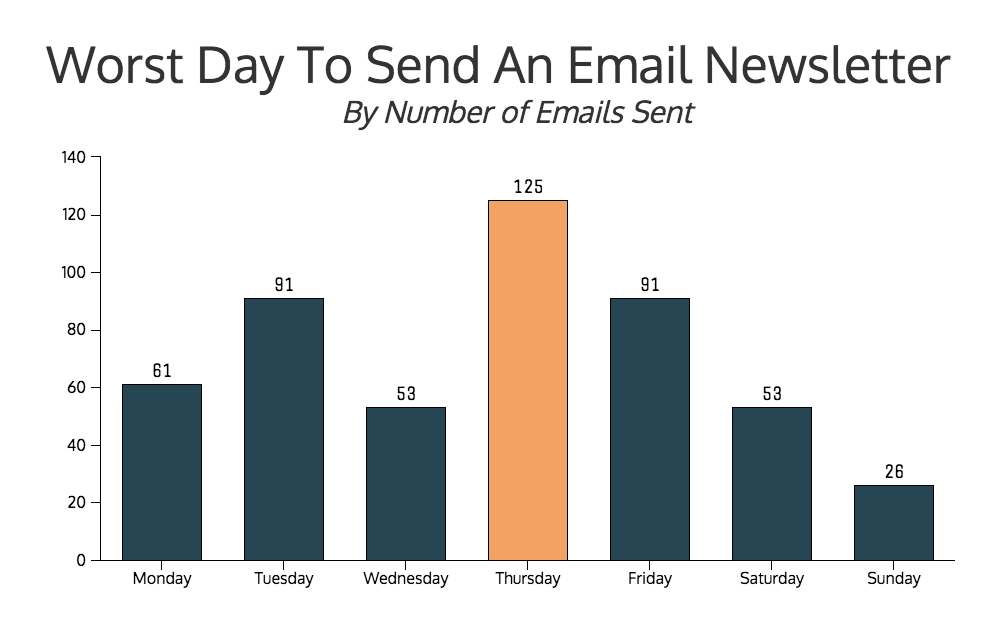
6. Thursdays are the Worst Day to Send

Finding the best day to send an email was a little difficult and not very straightforward.

Thankfully the worst day was a lot easier to find.

And that day was Thursday.

thursday is the worst day to send an email newsletter

It received more than double the amount of emails when compared to Wednesday and Saturday.

Exactly 25% of all the emails were sent on a Thursday, with no other days really coming close.

That put it well above the 70 or so emails I received per day on average.

Some experts proclaiming that Tuesday and Thursday are the best days to send a newsletter probably cause this.

I am guessing that people have been blindly following this advice for the past few years.

And now we are in a situation where the best day to send an email has actually become the worst day.

Conclusion

So there you have it, the best and worst times for you to send an email newsletter!

I now need to go click unsubscribe on about 100 different emails.

Or I may just cut my losses with that email address from now on.

But that sacrifice of an email address was definitely worth it because I was able to get some interesting findings.

Those findings will hopefully keep you from sending an email newsletter at the wrong time or day.

Just remember:

  1. Send newsletters during these time blocks: 11-12 PM, 1-2 PM & 2-3 PM.
  2. Between 9 and 11 AM is another great block of time.
  3. If your newsletter is related to their job, send it during the workday.
  4. Do not send newsletters at peak work movement hours, like 8 AM and 5 PM.
  5. Emails sent during the night or early mornings are a bad idea.
  6. Thursday is the worst day to send an email.
  7. Mondays and Fridays should be avoided as well.
  8. But the best day to send a newsletter is on Wednesday.

And finally, it is important to remember to test all of these findings with your audience first. These tips should always be used a testing points for your new emails, not set in stone facts.

About Kissmetrics

Kissmetrics combines behavioral analytics with email automation. Our software tracks actions of your users across multiple devices allowing you to analyze, segment and engage your customers with automatic, behavior-based emails in one place. We call it Customer Engagement Automation. Get, keep and grow more customers with Kissmetrics.


About the Author: Ryan McCready went to the University of Arkansas and graduated with a degree in economics and international business. Now instead of studying the economy he writes about everything and enjoys stirring the pot.


from The Kissmetrics Marketing Blog https://blog.kissmetrics.com/sending-newsletter-at-the-right-time/